
Cross-Border Transfer Risk Review Checklist
I don’t approve a cross-border transfer until I can trace where the data goes, who can access it, and what protections apply. U.S. hosting alone doesn’t settle the question: overseas support, device copies, and backups also need review.
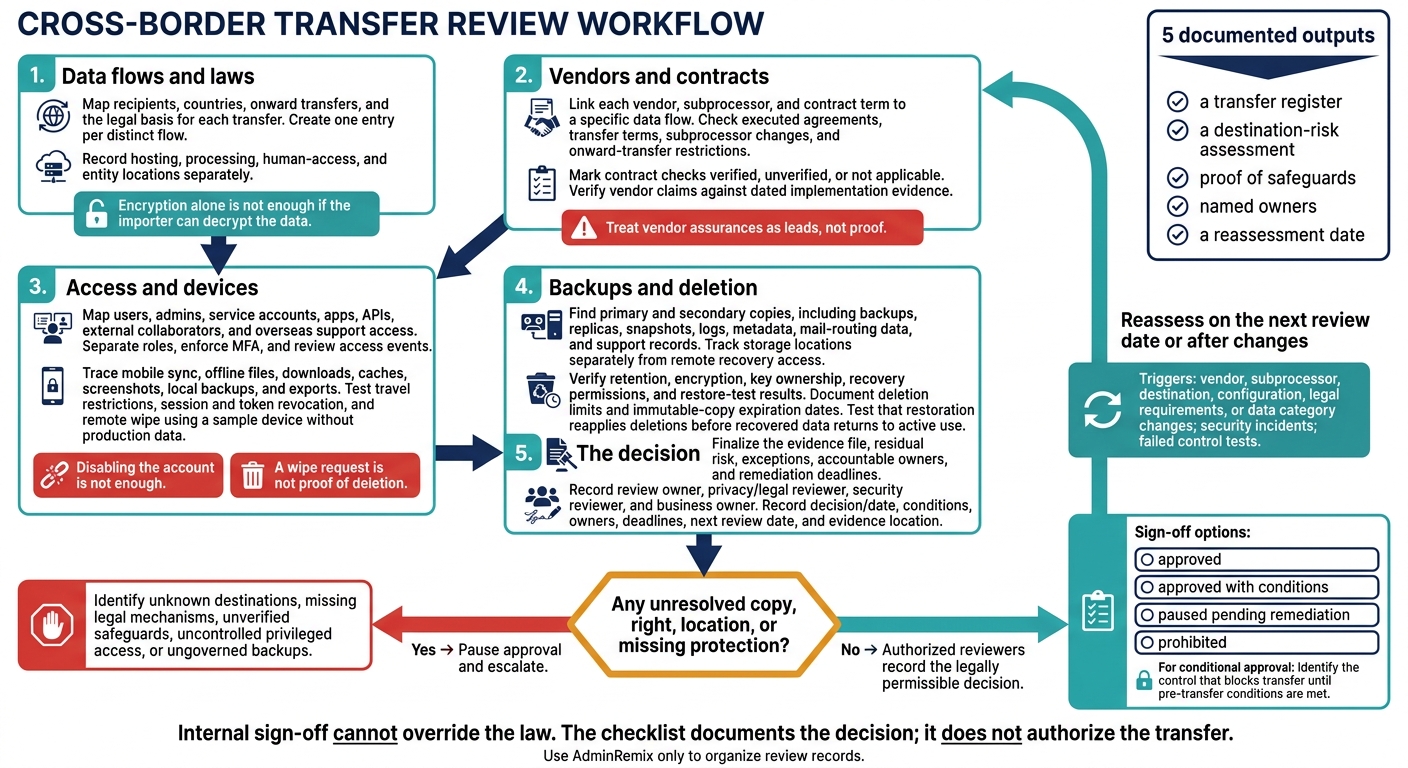
I require 5 documented outputs: a transfer register, a destination-risk assessment, proof of safeguards, named owners, and a reassessment date. My review covers:
- Data flows and laws: Map recipients, countries, onward transfers, and the legal basis for each transfer.
- Vendors and contracts: Check signed terms, subprocessor changes, and records that show controls are in place.
- Access and devices: Review users, admins, apps, mobile sync, downloads, and overseas access.
- Backups and deletion: Confirm copy locations, retention, recovery access, and deletion limits.
- The decision: Record gaps, owners, deadlines, and whether to approve, pause, or prohibit. Use AdminRemix only to organize review records.
My rule is simple: <u>unresolved locations or missing protections mean approval stays paused</u>. Internal sign-off cannot override the law.
Cross-Border Transfer Risk Review: 5 Review Stages
International Data Transfers Checklist
sbb-itb-c68f633
Map Transfers and Review Destination Risks
Once the review rules are set, log each transfer path and assess its destination.
Build the Data Transfer Register
Create one entry per distinct flow. Include Google Workspace, cloud services, integrations, APIs, exports, mobile sync, remote support, logs, and recovery. Identify the exporter, importer, vendor, subprocessor, and onward recipients. Record hosting, processing, human-access, and entity locations separately. A vendor’s headquarters does not tell you where processing happens.
For each flow, record the data subjects, data categories, sensitivity, volume, frequency, purpose, retention, access level, and key control. Check whether you can exclude API fields or replace them with masked, pseudonymized, aggregated, or test data.
Use these columns for a compact register view. Keep detailed fields in supporting records.
| Data flow | Destination | Recipient | Purpose | Data category | Transfer mechanism | Access type | Evidence | Owner | Review date |
|---|
After logging each flow, assess its legal route and destination risk.
Check Transfer Laws and Destination Safeguards
Have qualified privacy counsel confirm the governing transfer rule and mechanism: adequacy, SCCs, BCRs, another approved safeguard, or a narrow derogation. Check onward transfers separately.
Assess the destination for the specific flow - not just its country label. Review privacy protections, surveillance powers, government-access practices, independent oversight, and judicial redress. Check whether the importer can notify you, limit disclosure, or challenge requests. Weigh these factors against the data’s sensitivity, processing purpose, recipient, and technical architecture.
Document the safeguards and remaining risk for each flow. Explain how key control, pseudonymization, restricted access, or shorter retention addresses each threat. Encryption alone is not enough if the importer can decrypt the data. Record residual risk, approval authority, and the next reassessment date.
Set suspension triggers for unapproved destinations, undocumented onward transfers, loss of key control, or material legal changes. Route legal conclusions to qualified reviewers.
Review Vendors, Subprocessors, and Contracts
Use the transfer register to link each vendor, subprocessor, and contract term to a specific data flow.
Check Contract Scope and Change Notices
Check each item against the executed agreement and dated evidence as part of your IT asset management process. Mark it verified, unverified, or not applicable. Set supplier requirements based on how critical the service is and its impact.
- Entities and roles: Confirm the contracting entity; controller/processor or equivalent roles; and processor and subprocessor names, contact details, functions, locations, and onward-transfer destinations. Check that the agreement and subprocessor list match the approved register and application records. Controllers should keep processor and subprocessor identities readily available.
- Processing scope: Verify documented instructions, purposes, data categories, affected individuals, and duration. Cover production data and all copies, including metadata, logs, support tickets, diagnostics, replicas, backups, disaster recovery, caches, telemetry, and development or test environments.
- Transfer terms: Check the processing agreement, transfer mechanism, completed annexes, and onward-transfer restrictions.
- Security, incident, audit, and exit duties: Require confidentiality, encryption, key management, access controls, logging, breach notice, investigation support, regulatory assistance, audit evidence, remediation, termination support, and deletion deadlines.
- Change notices: Check advance-notice periods, objection procedures, and transition or termination rights for new subprocessors, countries, hosting regions, and support locations. Confirm that these duties apply to sub-tier providers and require documented approval before an unapproved destination is activated.
Request subprocessor contracts only when needed to prove compliance and onward-transfer safeguards.
Once contract terms are confirmed, test vendor claims against control records for the same data flow and review period.
Verify Vendor Claims Against Control Records
Treat vendor assurances as leads, not proof. Request records for the purchased service and review period. Check assurance-report scope, dates, and exceptions. Use questionnaires and policy statements to guide your review until implementation evidence supports their claims.
Compare vendor claims with implementation evidence using the table below.
| Risk area | Evidence to request | Acceptable evidence | Warning signs | Remediation action |
|---|---|---|---|---|
| Hosting | Architecture, region list, subprocessor register | Current country-level records covering storage, support, and recovery | “Global infrastructure”; purchased service excluded from the report | Obtain complete locations; restrict processing to approved regions |
| Identity controls | User/admin export, MFA records, access review | Named accounts, justified roles, MFA coverage, signed review | Shared accounts; dormant admins; unexplained privileges | Remove excess access; require MFA and quarterly reviews |
| Encryption | Protocol specifications and storage settings | Configuration records identifying covered data states and exceptions | “Encrypted” without scope or settings | Enforce required encryption; approve exceptions explicitly |
| Key management | Custody model, key policies, rotation records | Records showing key access and separation of duties | Unclear custody or decryption privileges | Clarify key ownership; segregate access where appropriate |
| Logging | Log inventory, sample events, retention settings | Protected records showing user, time, action, and affected object | Missing admin events; no monitoring owner | Enable missing logs; set retention and review ownership |
| Incident response | Response plan, notice procedure, exercise results | Tested escalation path tied to contractual timing and assistance duties | Notice only after final confirmation; no defined clock | Tighten notification terms; verify procedures through an exercise |
| Backups and recovery | Location list, retention policy, restore results | Documented recovery objectives, successful restore test, purge process | Undisclosed countries; untested recovery; excluded replicas | Approve locations; test restoration; document deletion duties |
| Support access | Role matrix, approval workflow, session logs | Approved countries, named role, active ticket, minimum data, expiring access | Global standing access; shared accounts; unlogged sessions | Require geographic limits, MFA, customer approval, and automatic expiration |
Create one finding per unresolved gap. Record the vendor or subprocessor, affected data and country, unmet requirement, evidence reviewed, risk rating, owner, deadline, interim safeguard, approval status, and reassessment date.
Review Access, Admin Roles, and Device Copies
After reviewing the contract, check who can access the data and where copies remain across accounts and devices.
Audit User, Application, and Admin Access
Map every access path. Build a dated inventory of users, groups, service accounts, delegated admins, apps, OAuth clients, APIs, shared drives, and external collaborators. Include dormant, support, and break-glass accounts, along with vendors that have direct Workspace access.
For each entry, record its purpose, data scope, origin and destination country, authentication method, last-used date, owner, and approval status. Check impersonation and domain-wide delegation separately. Google recommends narrow OAuth scopes for delegated access. Review external sharing and download permissions to see where people can open or copy data outside approved regions.
Separate roles and enforce MFA. Keep ordinary user, help desk, security, delegated administrator, and super-admin roles separate. Use separate administrator accounts and phishing-resistant MFA. Before relying on geographic or device restrictions, record the Google Workspace edition and enabled settings.
Review audit events and account changes. Check role changes, unexpected countries, OAuth activity, and downloads for access outside approved regions. Compare recent onboarding, role changes, and departures against their tickets. Remove permissions, active sessions, tokens, recovery methods, and device access when access should end. Disabling the account is not enough.
Next, trace where copies land on mobile devices and devices used offline.
Check Mobile Sync and Device Security
Locate endpoint copies. Inventory mobile sync, offline files, downloads, caches, screenshots, local backups, and exports created outside standard download paths. Record ownership, management status, OS, encryption, screen lock, patch level, region, and last compliance check. Use these records to identify copies kept outside approved regions, and verify mobile-management settings against device reports.
For personal devices, document limits on inspection, selective removal, and control over personal backups. Blocking downloads does not stop screenshots or photos of screens.
Test travel and device-loss controls. Check whether travelers, support staff, or administrators can view cached files or offline documents outside approved regions. Cloud region settings alone do not prove location control. Validate geographic restrictions using logs and controlled access attempts.
Test remote wipe on a sample device without production data. Verify lost-device reporting, along with session and token revocation. Keep erasure or disposal evidence for retired devices. A wipe request is not proof of deletion.
Manage Review Records With AdminRemix
Use AdminRemix only to organize evidence. Export only the fields needed, restrict sharing, and use named accounts with MFA. Set retention and deletion dates, and document any new vendor, subprocessors, destination country, or copied data.
Conclusion: Verify Copies and Approve the Decision
After the access review, check remaining copies, close the evidence file, and record a clear decision: approve, pause, or prohibit.
Check Backup Locations, Retention, and Deletion
- [ ] Find all primary and secondary copies, including backups, replicas, snapshots, logs, metadata, mail-routing data, and support records. Record each provider, country, data category, purpose, retention period, encryption status, and owner. Track storage locations separately from remote recovery access.
- [ ] Check retention settings against policy. Verify encryption, key ownership, recovery permissions, and restore-test results. Record recovery time and recovery point objectives.
- [ ] Verify deletion across replicas, caches, indexes, and backups. Document limits on deleting immutable copies and their expiration dates. Test that restoration reapplies deletions before recovered data returns to active use.
Complete Review Records and Set Reassessment Dates
Finalize transfer dates, recipients, purposes, data categories, legal mechanisms, destination assessments, verified vendor safeguards, access restrictions, and approvals. Link versioned contracts, configuration records, and test results. Include exceptions, compensating controls, residual risk, accountable owners, and remediation deadlines.
Set evidence-retention rules and a risk-based next review date. Use U.S. date formatting and include time zones in sign-off timestamps.
Reassess after any change to a vendor, subprocessor, destination, configuration, legal requirements, or data category. Also reassess after security incidents or failed control tests.
Pause approval if any copy, right, or location remains unresolved. Close the gap before approving.
Record the Final Transfer Decision
Stop and escalate unknown destinations, missing legal mechanisms, unverified safeguards, uncontrolled privileged access, or ungoverned backups. Before proceeding, resolve these gaps or obtain a documented, legally permissible decision from authorized reviewers. Internal risk acceptance cannot override legal rules.
Final sign-off
Review owner: ___ · Privacy/legal reviewer: ___
Security reviewer: ___ · Business owner: ___
Decision/date: ___ - approved / approved with conditions / paused pending remediation / prohibited
Exception approval: ___ · Conditions, owners, and deadlines: ___
Next review date: ___ · Evidence location: ___
For conditional approval, identify the control that blocks transfer until pre-transfer conditions are met. The checklist documents the decision; it does not authorize the transfer.
FAQs
Does employee travel count as a cross-border transfer?
Yes. When employees travel, accessing organizational data from unmanaged or off-campus devices creates security risks that IT teams need to monitor. Teams must check device metadata and IP history for unfamiliar locations or unusual access patterns.
AdminRemix tools such as AssetRemix and User Getter give IT visibility into device and user records, helping teams track asset access outside the office.
What if my vendor won’t disclose data locations?
Treat refusal as a serious risk. Knowing where your data is stored matters for compliance and business continuity. Review your contract’s confidentiality and compliance clauses, then request formal documentation or an attestation letter from the vendor. If they still can’t or won’t clarify, pause further integration until the risk is resolved.
Keep your service and vendor inventory up to date with tools like AssetRemix so your documentation stays ready for audits.
How should I prioritize transfer-risk remediation?
Rank issues by business impact and likelihood, tackling Critical issues first, followed by High and Medium. Start with MFA for administrators, reducing super-admin accounts, and access from unmanaged devices. Then address broad external sharing and high-risk OAuth scopes that haven’t been reviewed.
Track all findings in one place, with an owner, a target fix date, and clear closure criteria for each. Aim to fix Critical issues within 7 days and schedule Medium items over a quarter. Test each fix against security rules before marking the issue resolved.