
Secure IT Disposal: Employee Training Guide
Secure IT disposal is about safely retiring hardware while ensuring all sensitive data is completely erased to prevent breaches. Many breaches occur due to human error or incomplete processes, not advanced hacking. Proper training ensures employees follow secure disposal procedures, reducing risks and meeting compliance standards like NIST SP 800-88, HIPAA, and SOX.
Key Points:
- What is Secure IT Disposal? Safely retiring laptops, servers, and other devices while erasing data beyond recovery. Techniques include Clear (basic overwrite), Purge (advanced wipe), and Destroy (physical destruction).
- Why Training Matters: Mistakes like skipping steps or poor documentation lead to breaches. Training ensures employees follow correct procedures like chain-of-custody and certified destruction.
- Role-Specific Training: Tailor objectives for roles (e.g., end-users submit requests, IT sanitizes devices, managers verify vendor certifications).
- Tools for Management: IT Asset Management (ITAM) platforms, like AssetRemix, simplify tracking, automate workflows, and ensure compliance documentation.
Steps to Secure Disposal:
- Identify and back up data.
- Submit a disposal request.
- IT sanitizes data using NIST-compliant methods.
- Maintain documentation, including Certificates of Destruction.
- Use certified ITAD vendors with secure processes.
Regular training, clear policies, and ITAM tools protect data, meet regulations, and streamline workflows.
105. CompTIA Security+ SY0-701: Secure Asset Disposal & Decommissioning Best Practices
sbb-itb-c68f633
Planning the Training Program
A generic training approach won't cut it when it comes to IT asset disposal. To be effective, training needs to be tailored to the specific responsibilities of each role.
Setting Learning Objectives by Role
The best training programs focus on role-specific objectives rather than offering a one-size-fits-all session. Here's how these objectives typically align with different roles:
| Role | Primary Objective |
|---|---|
| End Users | Learn how to properly submit a disposal request and understand that data risks persist even when a device is powered off. |
| IT Technicians | Perform NIST 800-88 compliant sanitization methods - Clear, Purge, or Destroy - based on the type of device and its data sensitivity. |
| Logistics & Facilities | Ensure a secure chain of custody with serial-level logging and signed transfer documentation. |
| Managers & Compliance Staff | Evaluate ITAD vendors for credentials like R2v3, e-Stewards, or ISO certifications, and secure Certificates of Data Destruction for all disposed assets. |
"Data security doesn't end when a device is powered off." - 1PC
This structured approach is especially crucial for end-user training, where misconceptions - like thinking a device is "safe" once handed in - can lead to security gaps. With these objectives in place, the next step is to clearly define who is responsible for each part of the process.
Defining Roles and Responsibilities
Assigning clear responsibilities ensures no critical steps are missed. A well-documented disposal policy should outline who is accountable for tasks like initiating disposal requests, sanitizing devices, updating inventories, and auditing vendors. As KirkpatrickPrice explains:
"While your employees may be knowledgeable about data disposal best practices, without policies that mirror your business requirements, holding them accountable is difficult." - KirkpatrickPrice
The policy should also specify the consequences of non-compliance - not to punish, but to underscore the importance of following secure disposal procedures. For organizations without the capacity for high-security destruction in-house, assigning a manager to oversee certified third-party vendors can be a practical solution. This manager should ensure the vendor provides a Certificate of Destruction that includes details like serial numbers, destruction methods, and technician IDs.
By tying these roles to a robust IT asset management system, every step of the disposal process becomes traceable and verifiable.
Connecting Training to IT Asset Management
The success of a training program depends on the quality of the underlying data. An incomplete or outdated asset inventory can lead to gaps in the disposal process.
Tools like AdminRemix's AssetRemix give IT managers the visibility they need to align training with actual workflows. For example, flagged assets can trigger automated disposal workflows, ensuring the training translates into real-world action. Additionally, accurate asset data simplifies compliance audits by providing clear documentation of every step in the disposal process.
Building the Training Curriculum
Once roles are clearly defined, the next step is crafting a curriculum that’s both actionable and easy to follow. A well-structured curriculum translates policy into practical steps, ensuring everyone knows what to do and how to do it.
Core Topics to Cover
The curriculum should begin with data classification - a critical step in understanding that not all devices pose the same risks. For example, a shared office printer and a CFO's laptop require vastly different handling. Device classification determines the appropriate sanitization method, ensuring proper disposal.
To make this process clear, the table below outlines the three NIST 800-88 sanitization methods. It serves as a quick reference for matching the correct technique to specific disposal scenarios:
| NIST 800-88 Method | Technique | When to Use |
|---|---|---|
| Clear | Software-based overwriting | For internal transfers of devices with low to moderate security risks |
| Purge | Advanced logical or physical techniques | For devices leaving organizational control |
| Destroy | Shredding, crushing, or degaussing | For high-security devices or those in regulated industries like healthcare or finance |
One key point to emphasize: any device leaving the organization must meet at least Purge-level sanitization standards. Research shows that improper sanitization or poor tracking is behind most data breaches involving end-of-life hardware. The curriculum should also highlight relevant compliance frameworks, helping employees understand both the legal and technical consequences of missteps.
By addressing these core topics, the curriculum ensures that everyone, from end users to IT technicians, applies secure disposal practices consistently.
Policies, Procedures, and Checklists
Every training module should align directly with your ITAD policy. This policy should already outline approved vendors, destruction methods, and chain-of-custody protocols. By mirroring real-world procedures, the training equips employees with practical knowledge they can immediately apply.
Role-specific checklists are an excellent way to reinforce these procedures. For instance, an IT technician’s checklist might include:
- Logging serial numbers
- Confirming the sanitization method based on device classification
- Verifying that the Certificate of Data Destruction includes critical details like the destruction method, timestamp, and technician ID
For employees working with third-party ITAD vendors, the checklist should remind them to confirm that destruction is performed in-house by vetted vendors. These details support the chain-of-custody and documentation protocols established earlier.
With a curriculum rooted in policy and supported by clear checklists, the focus shifts to delivering this content in a way that resonates with each audience.
Training Formats and Delivery Options
The method of delivery matters just as much as the content itself. Different roles require different approaches to absorb information effectively.
For general employees, short micro-learning videos - no longer than 3–4 minutes - paired with a quick quiz are ideal. Professor Daniel J. Solove, founder of TeachPrivacy, underscores this point:
"The content must be short and to the point – and it must be engaging. Engaging content must be substantive."
For IT technicians and help desk staff, hands-on labs are far more effective than passive learning methods. Practicing NIST 800-88 sanitization techniques on decommissioned test devices builds the kind of muscle memory that presentations or videos simply cannot replicate.
Onboarding sessions introduce new hires to disposal policies right from day one, while role-specific refresher modules help experienced staff stay up-to-date as regulations and procedures evolve. By tailoring the format to the audience, the training becomes not just informative but impactful.
Teaching Secure IT Disposal Workflows
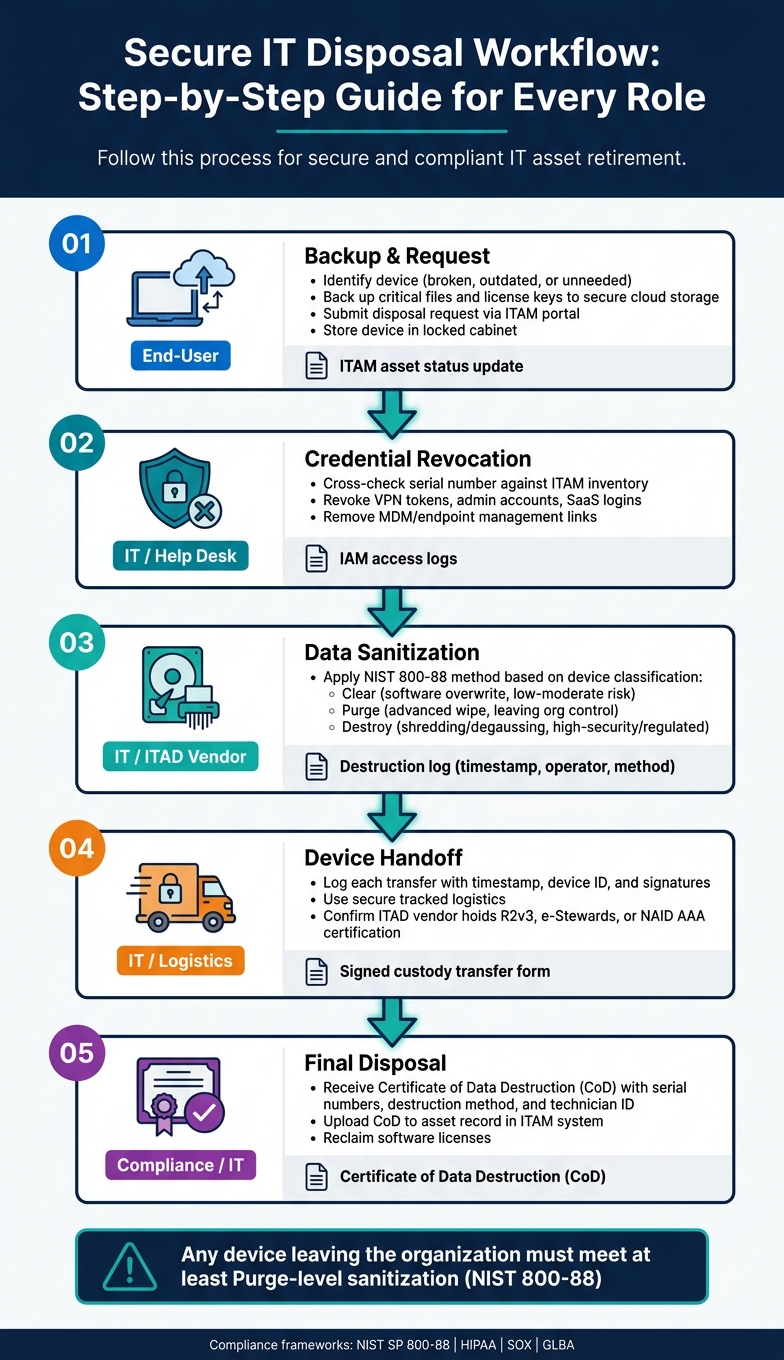
Secure IT Disposal Workflow: Step-by-Step Guide for Every Role
With the curriculum in place, it’s time to ensure each role follows precise, step-by-step workflows. These workflows should be tailored to specific roles, leaving no room for confusion.
End-User Workflow Training
While most employees won’t be tasked with sanitizing hard drives, they still play a crucial role in the initial steps of the disposal process. It starts with identifying the device - determining if it’s broken, outdated, or simply no longer needed. Once identified, employees must back up critical files and license keys to secure cloud storage.
After backing up data, employees submit a disposal request through the organization’s ITAM portal to officially begin the decommissioning process. Until IT or a certified vendor collects the device, it should be stored in a locked cabinet or a designated secure area. This ensures compliance with regulations and prevents unauthorized access. Devices should never be left on desks or abandoned in storage closets. For remote employees, IT can simplify the process by pre-installing remote wiping tools on company-owned devices, allowing data to be erased before shipping.
IT and Help Desk Workflow Training
Once a device is flagged for disposal, IT takes over. The first step is asset verification - cross-checking the device’s serial number against the ITAM inventory. IT also revokes all associated credentials, such as VPN tokens, administrator accounts, SaaS logins, and any links to MDM or endpoint management systems.
The next step is data sanitization, which should align with NIST 800-88 guidelines. The specific purge-level commands will depend on the type of drive. Tools like Blancco Drive Eraser can streamline this process by automating data erasure and generating compliance-ready reports. After sanitization, IT updates the device’s status in the ITAM system and requests a Certificate of Destruction (CoD) with detailed device information. This is also the time to reclaim any software licenses tied to the device. AdminRemix can assist IT teams by tracking asset lifecycle statuses and centralizing disposal documentation. These steps ensure that training translates effectively into daily operations.
Maintaining Chain-of-Custody
Proper documentation of every device handoff is essential for compliance and smooth auditing. Each transfer - from the end-user to IT and from IT to an ITAD vendor - should be logged with a timestamp, device ID, and signatures.
When working with third-party ITAD vendors, it’s important to confirm they hold certifications like R2v3, e-Stewards, or NAID AAA. Also, ensure that data destruction is handled in-house rather than outsourced to unverified parties. Devices should be transported using secure, tracked logistics, and serial-level reporting should be obtained upon receipt by the vendor. The final CoD - detailing the destruction method, serial numbers, and technician ID - closes the process and provides the necessary compliance documentation.
| Phase | Responsible Role | Documentation Required |
|---|---|---|
| Backup & Request | End-User | ITAM asset status update |
| Credential Revocation | IT / Help Desk | IAM access logs |
| Data Sanitization | IT / ITAD Vendor | Destruction log (timestamp, operator, method) |
| Device Handoff | IT / Logistics | Signed custody transfer form |
| Final Disposal | Compliance / IT | Certificate of Data Destruction (CoD) |
Keeping the Training Program Current
Scheduling Refresher Training
Once secure workflows are in place, regular training is essential to maintain compliance. It’s a good idea to review disposal policies and training materials annually. Make updates immediately when there are changes to regulations, vendors, or IT infrastructure.
Refresher sessions play a key role in reinforcing critical distinctions - like the difference between simply deleting files and fully destroying media.
"To enforce secure data destruction and disposal, you need effective policies that cultivate a culture of compliance." - Tori Thurmond, KirkpatrickPrice
Tailoring training to specific roles is also crucial. Employees directly involved in overseeing destruction processes should receive more advanced training compared to general staff. Clearly defining these oversight roles in your policies ensures the right people get the appropriate training.
Auditing and Improving the Program
Internal audits are a proactive way to identify gaps before external audits expose them. During these audits, focus on practical questions: Do employees know where to leave retired equipment? Can they identify which data must be removed before handing it off? Are Certificates of Destruction detailed enough to include serial numbers? These checks help confirm whether training is being effectively applied.
"An electronic waste audit can help uncover issues in your company's plans, procedures, and employee practices." - eSmart Recycling
Additionally, ensure written protocols align with current standards like NIST 800-88. Confirm that ITAD partners hold active certifications, such as R2v3 and NAID AAA, which require annual audits to remain valid.
Regular reviews and updates keep IT disposal workflows strong and compliant with changing standards. Incorporating automation tools can further streamline these manual processes.
Using IT Tools to Automate Disposal Workflows
Managing end-of-life devices manually can lead to missed steps - like reclaiming licenses, revoking credentials, notifying vendors, or documenting processes. Modern IT Asset Management (ITAM) tools simplify this by automating key actions as soon as a device is flagged for disposal.
For example, ITAM solutions like AssetRemix centralize lifecycle data, making compliance easier to manage. AssetRemix from AdminRemix tracks asset status changes, maintains chain-of-custody records, and keeps teams audit-ready by consolidating disposal documentation.
"Real IT asset lifecycle management means you're on top of every asset from procurement all the way through to asset disposal." - Michael Becker, IT Specialist
Standardizing tags like Pending Disposal or Decommissioned can automatically trigger downstream workflows. Requiring data destruction certificates to be uploaded directly to asset records adds an extra layer of accountability, ensuring your audit trail remains intact and self-sustaining.
Conclusion
Secure IT disposal plays a crucial role in safeguarding data, meeting regulatory requirements, and ensuring responsible e-waste management. The risks are undeniable: many hardware-related data breaches occur due to poor sanitization or lack of proper tracking during the end-of-life phase.
"Secure IT asset disposal isn't just a best practice - it's a necessity." - Usama Muneer, CBT Nuggets
To minimize these risks, organizations need a well-prepared workforce. This includes clear policies, training tailored to specific roles, and dependable IT asset management tools. When employees are properly trained in secure disposal practices, the organization is better equipped to handle internal audits and meet regulatory standards like HIPAA, SOX, or GLBA.
Detailed documentation - down to the serial number - isn't just helpful; it's essential. It's the difference between passing an audit and falling short. These practices collectively build a strong defense against data breaches and compliance issues.
FAQs
How do I choose Clear vs Purge vs Destroy?
When it comes to handling sensitive data, there are three main approaches to consider:
- Clear: This method makes data inaccessible through standard methods, such as overwriting it. However, the data can still potentially be recovered using specialized tools. It's a practical option if you plan to reuse the media but are willing to accept some level of risk.
- Purge: Purging goes a step further by removing data to a point where recovery is nearly impossible, even with advanced techniques. This approach is best suited for situations requiring heightened security.
- Destroy: Destroying involves physically breaking down the storage media, such as shredding or pulverizing it, to ensure the data is completely irrecoverable. This is the most secure method but renders the media unusable.
The choice between these methods depends on factors like your security requirements, whether you plan to reuse the media, and any compliance standards you need to meet.
What must be on a Certificate of Destruction?
A Certificate of Destruction serves as proof that items were securely and properly disposed of. It should include key details such as:
- Description of the items: Specify what was destroyed (e.g., documents, hard drives, etc.).
- Date and method of destruction: Record when and how the items were destroyed (e.g., shredding, incineration).
- Location of destruction: Note where the disposal took place.
- Certification signature: Include a signed statement verifying the process.
These elements ensure the disposal process is documented thoroughly, promoting accountability and compliance.
How do we prove chain-of-custody in an audit?
To ensure you can prove chain-of-custody during an audit, it’s crucial to keep detailed records for every stage of a device’s lifecycle. This means tracking assets at the serial level, maintaining signed custody transfer documents, and creating thorough reports. Having a well-documented ITAD policy that clearly defines roles, responsibilities, and approved vendors is another key step to ensure accountability.
Additionally, regular monitoring and detailed post-disposal reporting enhance traceability. These practices create a clear, auditable trail, showing compliance and safeguarding data security throughout the entire decommissioning process.