
Top Features of Automated Software Inventory Tools
Automated software inventory tools simplify IT asset management by replacing manual tracking with real-time, automated solutions. These platforms help organizations manage assets across on-premise, cloud, and container environments, ensuring accurate and up-to-date inventories. Key features include real-time discovery, centralized repositories, license management, and integration with tools like Google Admin Console and QuickBooks. Security options like role-based access control (RBAC) and audit trails enhance accountability and compliance.
Here’s a quick overview of the tools covered:
- AdminRemix: Affordable ($99/month), ideal for Google-centric setups, with features like barcode scanning, SSO support, and real-time tracking.
- Tool A: Enterprise-grade with advanced scanning, compliance tools, and ITSM integration, but higher cost and complexity.
- Tool B: Budget-friendly, with webhook-based real-time tracking and flexible integrations, but limited scalability and accuracy.
Each tool offers unique strengths, so choose based on your organization’s specific needs and IT ecosystem.
Key Features to Look for in Software Inventory Tools
When choosing software inventory tools, automated real-time discovery should be a top priority. Modern tools leverage cloud provider APIs and network scanning to instantly log assets as they are created or modified. This eliminates the delays caused by scheduled scans or manual updates, ensuring that your inventory reflects the current state of on-premises, cloud, and container environments.
A centralized asset repository is another crucial feature. By consolidating data from cloud consoles, on-premises systems, and even spreadsheets into one unified source, these tools eliminate confusion. Teams no longer need to rely on fragmented systems, ensuring everyone accesses the same accurate and up-to-date information. Add to this barcode and RFID integration, which updates stock levels in real time during physical movements, significantly reducing errors caused by manual data entry. With consolidated data in place, strong change management processes help maintain the integrity of asset records.
Change management and audit trails are indispensable for tracking every adjustment to the inventory. These features log who made changes and when, creating a historical record that is invaluable for troubleshooting and staying prepared for audits. Additionally, software license management automates the tracking of entitlements and usage limits, helping avoid over-deployment, ensuring compliance, and preventing unexpected expenses. Considering that 8% of inventory is discarded or lost annually, costing $163 billion globally, these tools can make a measurable difference to your budget and efficiency.
For security and control, role-based access control (RBAC) restricts data access based on user roles, ensuring that engineers, finance teams, and security personnel only see the information relevant to their work. Tools with integration capabilities further streamline operations by connecting with platforms like Google Admin Console, JAMF, and accounting software such as QuickBooks or Xero. These integrations automate data imports and keep financial records up to date.
Automated reorder alerts are another valuable feature. These alerts can be customized to trigger notifications or even purchase orders when stock levels drop below a set threshold, helping to prevent stockouts. Similarly, automated alerts for license renewals ensure you never miss deadlines, reducing compliance risks and avoiding unnecessary costs. By automating these processes, inventory tools provide continuous asset visibility and operational stability.
These features, working together, create a strong framework for managing software inventory effectively and efficiently.
sbb-itb-c68f633
1. AdminRemix
AdminRemix's AssetRemix is trusted by over 7,000 customers globally, delivering an efficient solution for automated software inventory management.
Real-Time Tracking
With barcode scanning and Lansweeper integration, AssetRemix enables real-time asset tracking. By using webhooks to update its database instantly, it removes the need for tedious manual spreadsheet updates.
Lundin Matthews, Founder of AdminRemix, highlights the transformation:
"Prior to using Lansweeper, AdminMixer customers would leverage bulk CSV imports or manual data entry... With the ability to automatically populate and enrich IT asset inventory data through the Lansweeper integration, our customers can reallocate those IT resources to other business-critical tasks."
Pauline McGinnis from Kipp Indy Public Schools shares how it simplifies their operations:
"It allows us to check and update the whereabouts of our fleet. We can pull the Chromebook data, and see if any of the devices are missing or if a device needs to be replaced. The inventory takes less time and we can retrieve data instantly."
Alongside real-time tracking, the platform also enhances compliance through its license management tools.
License Management
AssetRemix includes a dedicated module for tracking licenses, funding sources, and purchase details. This ensures compliance, simplifies audits, and retains historical records, helping IT teams avoid over-deployment errors.
Integration Capabilities
Integration is a key strength of AssetRemix. It supports SSO with popular providers like Okta, Azure Active Directory, Google, OneLogin, Ping Identity, ADFS, VMWare, SAML, and OpenID. The platform also syncs directories in real time with services like Workday, Bamboo HR, Google, Azure, Okta, Gusto, and Rippling. Additionally, it allows direct imports of device data from JAMF and the Google Admin Console, eliminating the need for manual CSV uploads. For further automation, Zapier integration connects calendars, spreadsheets, and other tools to streamline IT asset management.
Security Features
AssetRemix prioritizes data security with 256-bit SSL encryption and infrastructure hosted on the Google Cloud Platform (GCP), ensuring reliability and protection. Security measures include role-based access control (RBAC), two-factor authentication (2FA), and automatic log-out to safeguard sensitive information.
The platform offers straightforward pricing at $99 per month or $999 annually, covering unlimited assets, help desk agents, and issues. It also includes SSO and directory synchronization, with a 14-day free trial available for new users.
2. Tool A
Lansweeper takes an agentless approach to scanning, relying on protocols like WMI, SSH, and SNMP to keep track of software inventories without needing to install agents on every device. This method allows it to monitor changes across Windows, Mac, Linux, and virtual environments, identifying new deployments in just minutes. This forms the backbone of its real-time tracking capabilities.
Real-Time Tracking
Lansweeper updates software inventories instantly as devices connect to the network, offering live asset status through its dashboards. For example, during a 500-node enterprise deployment, the tool identified a malware-induced software change affecting 20% of endpoints in less than five minutes, enabling quick quarantine actions. By cutting audit times by up to 70%, it has proven to be a time-saver. One healthcare provider even achieved 99.9% inventory accuracy during peak usage, showcasing its dependability in high-pressure scenarios.
License Management
The tool automatically matches installed software against purchased licenses, handling CALs, SaaS subscriptions, and perpetual licenses. It simplifies audits by normalizing publisher names and identifying various software editions. A mid-sized company reduced software costs by 25% by reclaiming unused licenses through Lansweeper's compliance reports. Independent benchmarks highlight over 95% accuracy in license reconciliation, with typical users reporting average savings of $50,000 annually in setups with 1,000 users.
Integration Capabilities
Lansweeper integrates seamlessly with platforms like ServiceNow, Jira, and Microsoft SCCM, while also offering REST APIs for custom workflows. It can push software data to configuration management databases (CMDBs) in real-time and supports bi-directional syncing of inventory data. Deployment is quick - usually around 30 minutes - whether in the cloud or on-premises. It scales to over 100,000 assets using distributed scanners and offers more than 200 connectors, enabling automation across a variety of IT environments.
Security Features
Security is a key focus for Lansweeper. It uses role-based access control (RBAC), TLS 1.3 encryption, and detailed audit logs. Additional features include vulnerability scanning tied to CVE databases, multi-factor authentication, and data masking to block unauthorized access. Gartner analysts have praised its security measures, particularly its integration with endpoint detection tools and automated patch compliance checks. These features make it a strong choice for industries with strict regulatory requirements, such as those needing SOC 2 compliance.
3. Tool B
Tool B takes a streamlined approach, focusing on simplicity and speed to meet the needs of IT teams requiring quick deployment. With over 600 tech companies relying on it to manage their IT assets, this platform has carved out a niche for itself. Its freemium model, which involves no upfront costs, makes it an accessible option for organizations of all sizes.
Real-Time Tracking
One standout feature is its use of webhooks to ensure real-time updates across external systems. This means that any software changes or asset updates are instantly pushed to other tools, keeping everything in sync without manual intervention.
Integration Capabilities
AssetRemix shines in its ability to seamlessly connect with existing IT ecosystems. The webhook system supports custom workflows, enabling teams to automatically send inventory updates to ticketing systems, communication platforms, or analytics tools as events occur. Gregory M. Walker of Snared Services shared his experience:
"AssetRemix has enabled my team to move into asset tracking with speed and confidence."
The platform’s flexible pricing tiers allow organizations to start for free, with the option to upgrade as their needs grow. Plus, the free trial doesn’t require a credit card, making it easy to test without commitment.
While integrations are a major strength, the platform doesn’t compromise on security.
Security Features
Tool B combines rapid workflow automation with robust security measures to ensure efficient and safe asset management. It uses 256-bit SSL encryption to protect data during both transmission and storage. This guarantees data integrity while remaining accessible for distributed IT teams. Marcus D. Perrin from Laughner's Cafeteria emphasized this balance:
"AssetRemix is the perfect combination of simple interfaces and functional software my team demands."
For organizations managing assets across multiple locations, centralized visibility is critical. Joe M. Murphy from Maxxx Energy highlighted how the platform addresses this need:
"With assets spread across multiple locations, AssetRemix has enabled my team to visualize our entire inventory."
Strengths and Weaknesses
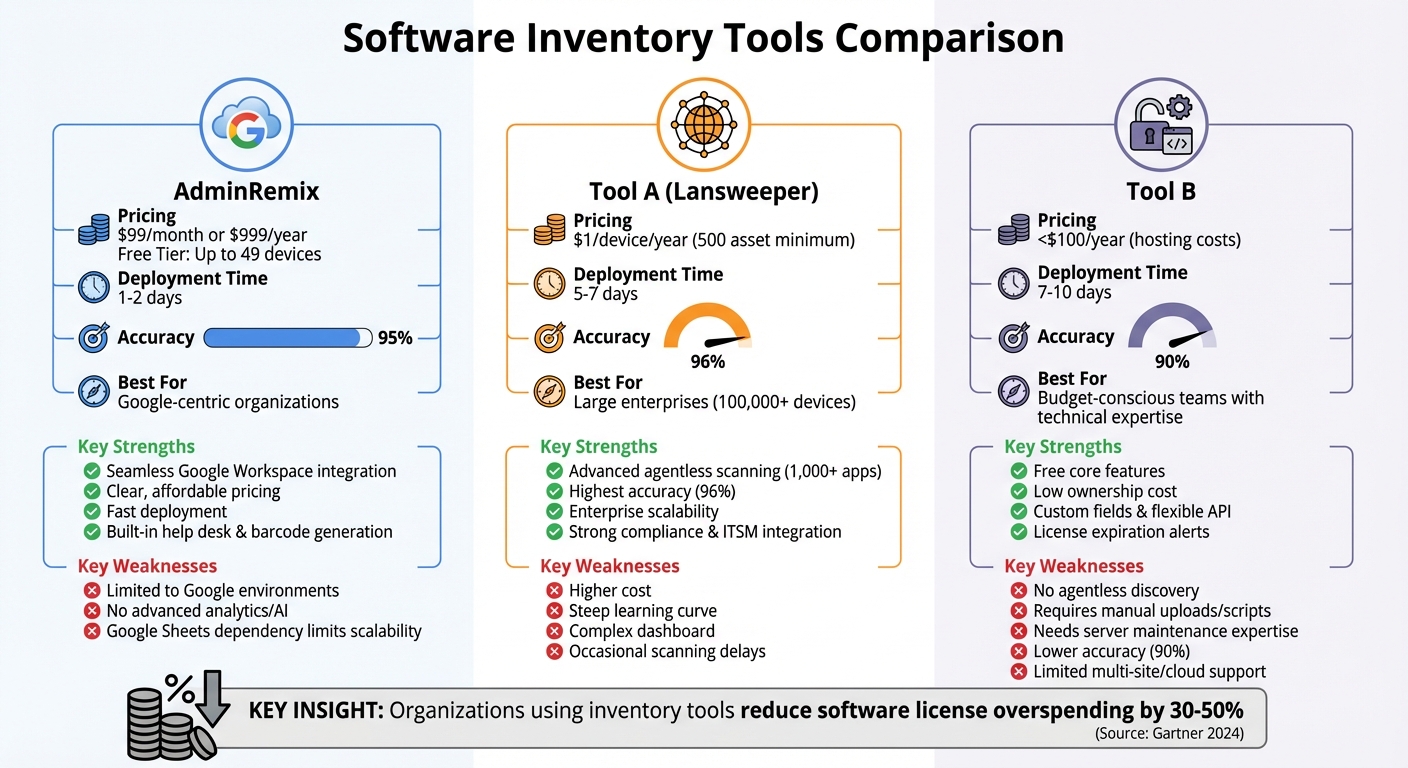
Comparison of Top 3 Automated Software Inventory Tools: Features, Pricing & Best Use Cases
When evaluating software inventory tools, it's important to weigh their strengths against their limitations. Here's a quick comparison of the key features and drawbacks for each tool:
| Tool | Key Strengths | Key Weaknesses |
|---|---|---|
| AdminRemix | • Seamless integration with Google Workspace, including tools like Chromebook Getter • Clear pricing at $99/month or $999/year for unlimited assets • Free tier available for up to 49 devices - no credit card needed • Fast deployment (1–2 days) with 95% accuracy • Built-in help desk and barcode generation |
• Primarily designed for Google-focused environments • Lacks advanced analytics or AI-driven insights • Reliance on Google Sheets for bulk operations can limit scalability |
| Tool A | • Advanced network discovery with agentless scanning across 1,000+ applications • High accuracy (96%) in asset detection • Scalable for enterprises managing 100,000+ devices • Strong compliance reporting and ITSM integration |
• Higher cost: starts at $1/device/year with a 500-asset minimum • Steep learning curve, requiring 5–7 days to set up • Complex dashboard may overwhelm non-IT users • Occasional delays in scanning large networks |
| Tool B | • Free core features with self-hosted deployment • Low ownership cost - under $100/year for hosting • Custom fields and flexible API integrations • Effective license management with expiration alerts |
• No built-in agentless network discovery • Automation depends on manual uploads or custom scripts • Setup requires 7–10 days and server maintenance expertise • Lower accuracy (90%) compared to competitors • Limited support for multi-site or cloud-heavy setups |
This breakdown underscores the trade-offs IT teams face when choosing a software inventory tool.
AdminRemix excels in simplicity and affordability for Google-centric setups, offering quick deployment and dependable accuracy. However, its focus on Google environments may restrict its adaptability in mixed IT ecosystems.
Tool A stands out with enterprise-grade scanning and compliance features, though its high cost and complexity may deter smaller teams. On the other hand, Tool B provides a cost-effective and customizable solution, but it requires significant technical know-how and may falter in large-scale or cloud-first deployments.
The importance of real-time tracking, integration capabilities, and security features in inventory tools cannot be overstated. As Gartner's 2024 research highlights, organizations using these tools effectively report a 30–50% reduction in software license overspending [Gartner, 2024].
Conclusion
Pick a tool that fits your organization’s unique requirements. Key features like real-time tracking, easy integrations, automated discovery, and strong security are essential for successful IT asset management - especially if your organization relies heavily on the Google ecosystem.
For those deeply tied to Google’s tools, AdminRemix offers a standout solution. With transparent pricing of $99 per month or $999 per year for unlimited assets, plus a free trial for up to 49 devices, it’s designed to simplify asset management. AdminRemix also provides specialized tools like Chromebook Getter, which streamline workflows. As Philip Helmers from SWBOCES LHRIC put it:
"I signed up for Chromebook Getter because it's faster than getting what I need with GAM command lines".
FAQs
How do I choose the right software inventory tool for my environment?
To pick the best software inventory tool, start by pinpointing your organization's specific requirements. Prioritize features such as continuous asset discovery, dependable tracking, and lifecycle management. Opt for tools that offer a user-friendly interface, automation options, compliance management, and robust reporting. It's also crucial to ensure the tool is scalable and can integrate seamlessly with your current systems, allowing it to adapt as your organization grows and simplify your IT asset management process.
What’s the difference between real-time discovery and scheduled scans?
The main distinction lies in how quickly updates are made and how resources are used. Real-time discovery updates inventory data instantly as changes happen, giving you up-to-the-minute visibility and the ability to quickly spot new or altered assets. Scheduled scans, however, operate on a fixed timetable (like daily or weekly), offering updates at regular intervals. While real-time discovery provides faster insights, scheduled scans use fewer system resources but might miss recent changes until the next scan.
How does license management prevent overspending and audit risk?
License management plays a key role in keeping costs under control by tracking software licenses and their usage effectively. This ensures businesses avoid unnecessary purchases. Additionally, it helps maintain compliance with licensing agreements, reducing the risk of audits and potential penalties or fines caused by mismanagement.