
IT Asset Discovery: Best Practices for Automation
Managing IT assets manually? It’s costing you time and money. Automated IT asset discovery is the solution to track devices, software, and cloud resources accurately and efficiently. Here’s what you need to know:
- Why it matters: Manual tracking is error-prone, with up to 60% inaccuracies in just three months. Automation ensures real-time visibility, reduces security risks, and prevents overspending on IT.
- Key steps:
- Review your current setup: Identify hidden assets and standardize data.
- Deploy discovery tools: Use agent-based, agentless, or hybrid methods for comprehensive asset tracking.
- Integrate data: Sync discovery outputs with IT systems like CMDB for centralized management.
- Monitor and refine: Regular audits and performance metrics ensure your process stays effective.
- Results: Companies like Mirgor saved 2,500 labor hours and millions in costs by automating IT asset discovery.
Switching to automation simplifies IT management, enhances security, and ensures compliance. Start small, focus on critical assets, and expand over time.
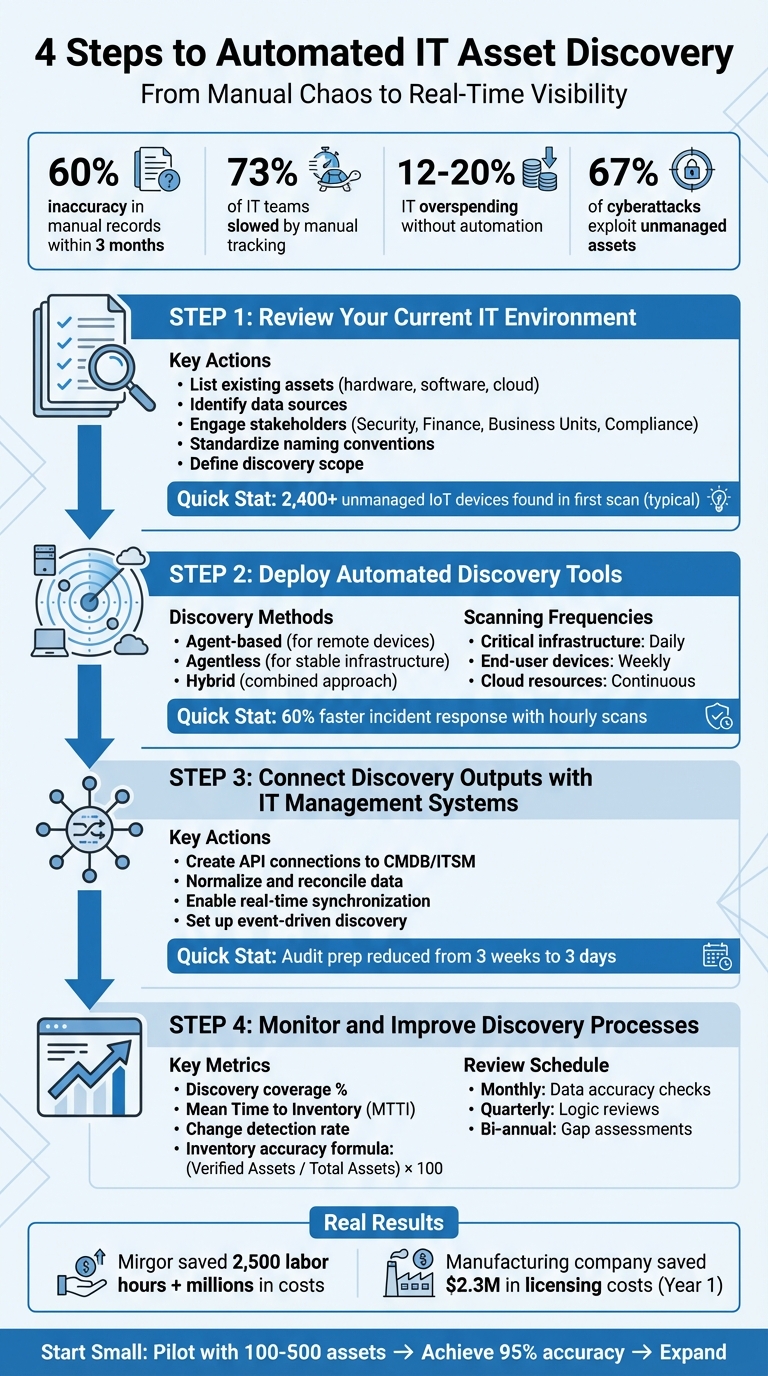
4-Step IT Asset Discovery Automation Implementation Process
Unify Your IT Asset Inventory in 24 hours! Leverage Automated Discovery
sbb-itb-c68f633
Step 1: Review Your Current IT Environment
Before diving into automation, start by gathering all your asset data - procurement records, ticketing systems, finance documents, spreadsheets, and anything else you use to track IT resources. This step helps you create a baseline that includes both documented assets and any hidden ones lurking in your environment.
Here’s a shocking stat: manual asset records are usually 40-60% inaccurate within just three months of being created. That’s not all - over 73% of IT teams say manual tracking slows down operations significantly, and companies without automation end up overspending on IT by 12-20% annually due to duplicate purchases and unused licenses. One company even found over 2,400 unmanaged IoT devices during their first automated scan - devices that had been quietly posing security risks the whole time.
List Existing Assets and Data Sources
Start by documenting everything you currently track, even if the records are incomplete. This includes:
- Hardware: Data center equipment, laptops, mobile phones, network devices, peripherals, IoT devices.
- Software: Operating systems, middleware, applications, licenses, SaaS subscriptions.
- Cloud Resources: Virtual machines, containers, storage buckets, code repositories, cloud-native services.
Bring in stakeholders to help reconcile records and uncover undocumented assets. For example:
- Security teams can pinpoint vulnerable assets and permissions.
- Finance and procurement teams provide purchase orders and contracts to match discovered assets with what you actually own.
- Business unit leaders can reveal Shadow IT - those tools and devices departments use that never made it into official records.
- Compliance and legal teams ensure you’re tracking assets required by regulations like HIPAA, SOX, or GDPR.
To avoid duplication and errors, establish standardized naming conventions (e.g., “Location-Type-ID”). This ensures your discovery tools start with clean, reliable data instead of a messy baseline full of errors.
Once your asset baseline is set, you can define the scope for targeted discovery.
Define the Scope of Asset Discovery
Next, decide which environments to scan first. Separate development, staging, and production environments and set appropriate scan frequencies for each. For instance, one financial services company cut its security incident response time by 60% by running hourly automated scans on critical network segments.
Focus on high-risk and business-critical areas first to maintain real-time visibility. Segment your assets by geography, business unit, and facility type - like data centers, colocation sites, or third-party suppliers. Why is this important? About 67% of successful cyberattacks exploit unmanaged or unknown assets. Identifying these blind spots now can save you from major headaches down the road.
Use a "What, Where, and How" framework to map out your assets:
- What: The types of assets you’re managing.
- Where: The environments, facilities, and functions where they’re located.
- How: Your management policies and compliance requirements.
This structured approach ensures no assets slip through the cracks, setting you up for success when deploying automated discovery tools.
Step 2: Deploy Automated Discovery Tools
Once you've established your baseline and defined the scope, it's time to roll out tools that will locate and track your assets. The discovery approach you choose should align with your environment. For example, remote workers require different coverage compared to on-premises data center equipment, and cloud resources demand an entirely different strategy than physical hardware.
Choose the Right Discovery Methods
Using the asset baseline you've built, modern discovery methods can uncover both documented and hidden assets. These tools typically fall into three categories: agent-based, agentless, or a hybrid of the two.
- Agent-based discovery involves installing software on each device to gather detailed telemetry, such as software usage, configurations, and hardware specifications. This method is especially useful for continuously monitoring remote devices.
- Agentless discovery uses network protocols like SNMP, SSH, and WMI to scan devices without requiring software installation. It works well for stable infrastructure like servers, switches, and printers that remain consistently connected to the network.
- Hybrid approaches combine both methods, deploying agents on sensitive endpoints while relying on agentless scanning for more stable infrastructure. This can maximize coverage and efficiency.
"For discovery to be truly continuous, organizations typically need frequent update mechanisms - asset data should refresh based on events or short reporting cycles rather than long scanning intervals." - Ignacio Graglia, InvGate
Additionally, ensure your tools integrate with cloud provider APIs to track virtual resources in real-time. A good discovery tool should also automatically normalize data, standardizing manufacturer names and resolving duplicates to keep your records clean and accurate.
Once your tools are in place, the next step is to determine how often each asset type should be scanned to maintain up-to-date information.
Define Scanning Frequencies and Schedules
After selecting the appropriate discovery method, align your scanning schedules with the importance of each asset. The frequency of scans should depend on how critical the asset is:
- Critical infrastructure like servers, network equipment, and security appliances should be scanned daily to ensure high availability and security.
- End-user devices, such as desktops and laptops, generally require weekly scans, as they experience fewer changes.
- Cloud resources benefit from continuous monitoring through API integrations, catching changes as they occur.
"Scan frequency depends on asset criticality and change rates. Critical infrastructure should be scanned daily or continuously, user endpoints weekly, and software inventory monitored closely for compliance." - Lansweeper
Real-world examples highlight the impact of optimized discovery practices. A financial services firm reduced its security incident response time by 60% by implementing hourly scans for critical network segments. Similarly, a manufacturing company transitioned from manual spreadsheets to automated discovery, saving $2.3 million in software licensing costs within the first year by identifying unused licenses.
Today's discovery tools are built to minimize network impact, allowing comprehensive scans to run during business hours without disrupting operations. For software inventory, daily monitoring is recommended to ensure license compliance and proactively address security vulnerabilities before they escalate.
Step 3: Connect Discovery Outputs with IT Management Systems
Once you've set up your discovery tools and established a reliable data baseline, the next step is to integrate this data with your IT management systems. By creating direct API connections between your discovery tools and platforms like your Configuration Management Database (CMDB) or IT Service Management (ITSM) system, you ensure your asset data is centralized and up-to-date. Without proper integration, you risk dealing with fragmented data and outdated records.
Modern solutions like AssetRemix simplify this process by enabling automated data feeds. These feeds continuously update your inventory as changes occur, reducing the need for manual updates and ensuring your records stay accurate.
Normalize and Reconcile Data
Raw data from discovery tools often comes with inconsistencies. For example, naming variations can lead to duplicate records. To avoid this, normalize the data by standardizing naming conventions across all assets.
But normalization alone isn’t enough. You also need reconciliation logic to handle conflicting information from different tools. Take this scenario: one tool identifies a server as running Linux, while another reports it as running Windows. Your system must have predefined rules to determine which tool's data takes precedence. For instance, you might decide that SCCM is the trusted source for hardware details, while ServiceNow is the authority for application ownership.
"Without discovery, your CMDB is incomplete, and without reconciliation, it becomes unreliable."
- Saurabh Kumar, CEO, Rezolve.ai
Focus first on high-priority assets like servers and core applications before expanding to include less critical devices. Set up field mapping to automate updates for technical data - like IP addresses and hardware specs - while safeguarding manually verified fields such as asset owner or physical location. This balance ensures accuracy without compromising human-validated information.
Enable Real-Time Synchronization
In fast-changing IT environments, especially those leveraging cloud infrastructure, relying on weekly or monthly scans leaves your inventory outdated. Real-time synchronization is a must for tracking assets in environments where resources can appear or disappear within minutes.
To achieve this, use event-driven discovery mechanisms. APIs, webhooks, and logs from cloud providers like AWS CloudTrail or Azure EventBridge can capture changes as they happen. For instance, you can set up alerts for unknown assets or automatically update your CMDB when a new EC2 instance is launched. One fintech company dramatically reduced its audit preparation time - from three weeks to just three days - by maintaining a continuously updated CMDB.
"Waiting a week to update your CMDB is like reading last month's news - it's outdated before you even look at it."
- Jennifer, Dev.to
For critical assets like production servers, aim for continuous or daily synchronization. Less critical devices, like printers, can be updated on a monthly basis. The ultimate goal is to ensure your IT management system reflects the real-time state of your environment, not a snapshot from a past scan.
Step 4: Monitor and Improve Discovery Processes
Even with automation, discovery processes need regular oversight to stay effective. Without this, you could end up with gaps, duplicate records, or outdated information - problems that can weaken your entire inventory system.
Schedule Regular Reviews and Audits
Set up a monthly routine to check your data for accuracy. Look for warning signs such as sudden changes in asset counts, duplicate entries, or missing information. These could point to issues with your discovery rules or gaps in network coverage.
Every quarter, take a closer look at your scanning and normalization logic. As your IT environment changes, your discovery rules should adapt too. For example, if you’ve made significant updates to your infrastructure, you might need to tweak scanning schedules or add new data sources to ensure you’re capturing everything.
Additionally, conduct a thorough gap assessment twice a year to pinpoint any blind spots in your system.
"Discovery should be established as a continuous operational process rather than a periodic task."
- Ignacio Graglia, InvGate
Once your review schedule is in place, use performance metrics to measure how well your system is working.
Measure Discovery Performance
Regular reviews are just the start. To ensure your discovery process keeps up with your IT needs, track specific performance metrics. Key indicators like discovery coverage, Mean Time to Inventory (MTTI), and change detection rate can help you measure how effectively and quickly your system identifies new assets.
- Discovery coverage: This shows the percentage of IT assets your system has accurately identified. Missing a large portion of assets means you’re likely operating with significant blind spots.
- Mean Time to Inventory (MTTI): This measures the time it takes for a new asset to appear in your inventory after being introduced. A shorter MTTI means faster visibility into changes.
- Change detection rate: This indicates how often hardware or software modifications are automatically identified before requiring manual updates.
To check how reliable your records are, calculate inventory accuracy using this formula:
(Number of Verified Assets / Total Recorded Assets) × 100.
You can also track the reconciliation match rate, which shows how well your system consolidates data from different sources without creating duplicates. Together, these metrics give you a clear picture of how dependable your discovery process is.
Conclusion
Automated IT asset discovery provides real-time, precise visibility into your IT environment. As we've seen, relying on manual methods often leads to costly errors and security vulnerabilities. By implementing the steps from this checklist, you can eliminate these gaps and reclaim the hours wasted on manual tracking.
The shift to automation emphasizes the importance of continuous monitoring. As Cloudaware aptly states:
"ITAM isn't a quarterly spreadsheet exercise anymore but a living system: discovery, ownership, controls, and proof".
Consider the 2026 case study of Mirgor, which reported saving 2,500 hours of manual labor. These time savings translate into faster incident response, improved security, and better compliance - clear examples of the benefits of automated asset discovery.
AdminRemix simplifies this process with AssetRemix, a tool designed to integrate with discovery systems. It provides real-time device visibility, lifecycle mapping, and help desk support, all for $99 per month with unlimited assets and agents. This makes it accessible for IT teams of any size, eliminating the burden of manual inventory tracking.
Start small - pilot with 100–500 assets, aim for 95% discovery accuracy, and then expand. Investing in automation not only reduces security risks and operational costs but also gives you the confidence of knowing exactly what's on your network.
FAQs
Which assets should we discover first?
To kick things off, focus on your core IT assets - things like laptops, desktops, and software applications. These are the backbone of most IT environments and are often the easiest to identify and track. Starting here gives you a strong base for your asset discovery efforts, making it easier to branch out to less obvious or more complex asset types later on.
Should we use agent-based, agentless, or hybrid discovery?
The choice really comes down to what your organization needs. Agent-based discovery relies on software installed directly on devices, making it perfect for gathering detailed data, especially for assets that are remote or occasionally offline. On the other hand, agentless discovery works by scanning networks without requiring software on individual devices. This makes it a faster option for larger environments where quick deployment is key. A hybrid approach blends the two, offering the best of both worlds: in-depth monitoring alongside wide network coverage. This ensures accurate and efficient inventory management, whether your devices are remote or on-premises.
How do we keep the CMDB accurate in real time?
To keep your CMDB accurate and up-to-date, rely on continuous automated asset discovery. This approach automatically identifies new, modified, or removed assets across your network, cloud, and on-premises environments. By scheduling regular scans and integrating these updates directly into your CMDB, you minimize manual work, reduce errors, and maintain a clear, real-time view of your IT infrastructure.