
OEM Take-Back Programs: What IT Managers Need to Know
If you treat OEM take-back like “just recycling,” you can end up with audit gaps, data risk, and extra cost. For me, the core takeaway is simple: I need to check state e-waste rules, use NIST SP 800-88 Rev. 2 for data wiping, keep serialized records, and confirm whether the program gives me a fair return or just a clean exit path.
Here’s the short version:
- Compliance comes first: As of 2026, 25 states plus Washington, D.C. have mandatory e-waste laws.
- Data wiping must be documented: I need a Certificate of Data Destruction with serial numbers, not a batch-only record.
- “Free” take-back often still costs money: Pickup fees can run $150–$400, and destruction can add $8–$45 per device.
- Timing affects resale: Many business laptops retired in years 3–4 still hold 15%–30% of original price.
- Not every OEM program fits mixed fleets: Some only accept their own brand, which can leave gaps.
If I’m planning a hardware refresh, as part of my IT asset management strategy, I should think through rules, sanitization, chain of custody, records, fees, and resale value before pickup day.
| Area | What I need to check |
|---|---|
| Compliance | Federal and state disposal rules, plus HIPAA, PCI DSS, SOX, or GLBA if they apply |
| Data security | NIST SP 800-88 Rev. 2 method: Clear, Purge, or Destroy |
| Documentation | Pickup manifests, transport logs, CoDD, recycling records, serialized reports |
| Cost | Pickup charges, destruction fees, internal labor, failed pickup fees |
| Value recovery | Trade-in credit, buyback terms, device age, condition, resale window |
| Program fit | Accepted device types, age limits, mixed-brand support, reporting quality |
So when I look at an OEM take-back program, I’m not just asking, “Will they pick this up?” I’m asking, “Will this process hold up in an audit, protect data, and make financial sense?”
Compliance, data security, and policy requirements
Before you schedule pickup, set the rules for compliance, sanitization, and documentation for every device. This part isn't one-size-fits-all. The right process depends on the state, your industry, and how sensitive the data is.
U.S. e-waste rules and state program requirements
At the federal level, RCRA covers hazardous parts in retired IT hardware, including CRT monitors and certain batteries. If you miss the mark here, the fines can add up fast on a per-day basis.
State rules add another layer. As of 2026, 25 states plus Washington, D.C. have mandatory e-waste laws, so you need to map the rules by state and by device type before pickup.
Once you know the disposal rules, the next job is simple in principle but serious in practice: prove the data can't be used.
Data sanitization and chain of custody
The federal standard for media sanitization is NIST Special Publication 800-88 Revision 2, finalized in September 2025. It sets out three sanitization levels:
| Method | Data Recovery Risk | Typical Use Case |
|---|---|---|
| Clear | Low (software-based overwrite) | Non-sensitive or low-sensitivity internal data |
| Purge | Near zero (cryptographic erasure or degaussing) | Confidential data, PHI, or financial records |
| Destroy | Zero (physical shredding or incineration) | Classified data, trade secrets, or damaged media |
For SSDs, use cryptographic erasure or physical destruction. If your policy still points to DoD 5220.22-M, update it.
Chain of custody has to begin the moment a device leaves your hands and continue through final disposition. In plain English, that means:
- Signed pickup manifests
- Transport logs
- Verified handoffs
A simple confirmation email from the OEM isn't enough. If PHI is in the mix, healthcare groups need a Business Associate Agreement (BAA) under HIPAA, plus documented chain of custody. Financial institutions need a service provider agreement under PCI DSS.
Records to keep for audits and internal controls
Take-back records are what back up your compliance story during an audit. The most important document is the Certificate of Data Destruction (CoDD). It should include each device's serial number, the sanitization method used, the standard applied, and the technician's name.
Don't accept batch certificates. Each certificate needs to show individual serial numbers if you want it to hold up in an audit.
You'll also want Certificates of Recycling and signed pickup manifests. Here's how long to keep the records under each rule set:
| Regulation | Documentation Required | Retention Period |
|---|---|---|
| HIPAA | BAA, Chain of Custody, CoDD | 6 years |
| SOX | Audit trails, serialized inventory | 7 years |
| GLBA | Audit trails, vendor certifications | 5 years |
| PCI DSS | Service provider agreement, event logs | 1 year (logs) / 7 years (CoDD) |
A good default is a 7-year retention policy unless a stricter rule applies.
Education and defense groups also need extra records for FERPA, CMMC, and NISPOM obligations.
Once compliance is defined, the next question is whether OEM take-back is worth the cost.
sbb-itb-c68f633
Costs, value recovery, and program tradeoffs
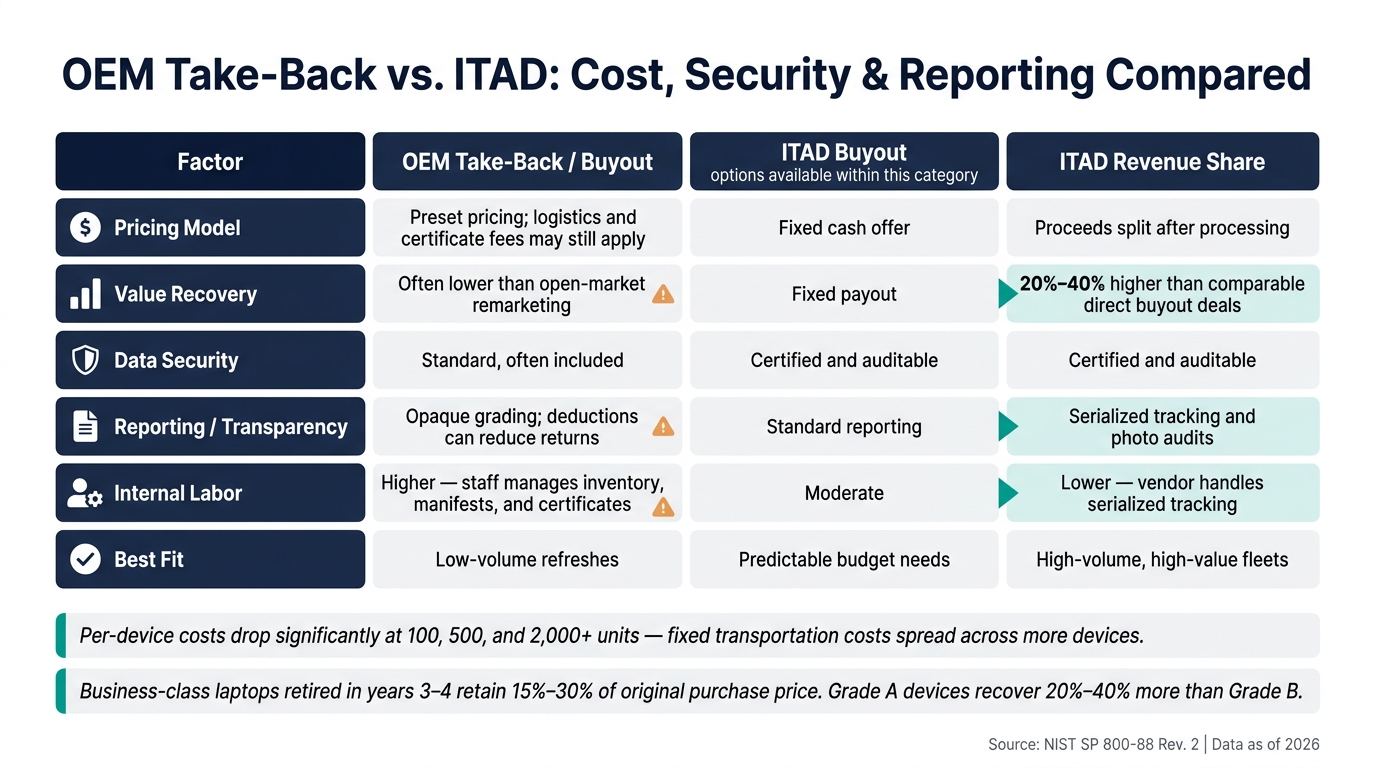
OEM Take-Back vs. ITAD: Cost, Security & Reporting Compared
Once compliance is locked in, the next step is simple: look at the actual cost. That means vendor fees, internal labor, and what you can get back through resale.
Common cost models and hidden internal expenses
A no-charge take-back program can still cost money. Pickup transportation and fuel surcharges often land between $150–$400 per pickup. Certified destruction can add $8–$45 per device. Certificates and rush reporting may tack on another $25–$75.
There are internal costs too, and they add up fast. Your team still has to log inventory, track handoffs, and make sure equipment is ready to go. If counts don’t match or the gear isn’t prepared on time, failed pickup charges of $100–$250 can apply. And when drives contain regulated data under HIPAA or PCI DSS, extra handling can push costs up by 25%–50%.
OEM take-back programs often focus more on logistics control and margin protection than on getting the highest resale return.
When trade-in credits or remarketing value apply
Cost is only one side of the picture. The other side is recovery value.
Business-class laptops retired in years 3–4 usually keep 15%–30% of their original purchase price. Depending on condition and sales channel, outcomes can range from a $12 recycling cost to a $340 retail refurbished sale. That’s a big swing. Condition matters a lot too: Grade A devices can recover 20%–40% more than functionally identical Grade B units.
Some assets won’t return anything at all. Devices that need physical shredding under NIST SP 800-88 have no resale value, so they become a straight processing cost. Post-AUE Chromebooks can also carry negative recovery value.
A simple rule helps here: set a $25–$50 recovery floor per device. If a unit won’t clear that mark after logistics and processing costs, send it to recycling. Timing matters just as much. Miss the 3- to 4-year remarketing window, and a device that could have produced a credit may turn into a net cost.
Comparison table: Cost, security, and reporting factors
| Factor | OEM Take-Back / Buyout | ITAD Buyout | ITAD Revenue Share |
|---|---|---|---|
| Pricing model | Preset pricing; logistics and certificate fees may still apply | Fixed cash offer | Proceeds split after processing |
| Value recovery | Often lower than open-market remarketing | Fixed payout | Typically 20%–40% higher than comparable direct buyout deals |
| Data security | Standard, often included | Certified and auditable | Certified and auditable |
| Reporting / transparency | Opaque grading and deductions can reduce returns | Standard reporting | Serialized tracking and photo audits |
| Internal labor / documentation | Higher; staff manages inventory, manifests, and certificates | Moderate | Lower; vendor handles serialized tracking |
| Best fit | Low-volume refreshes | Predictable budget needs | High-volume, high-value fleets |
The best model comes down to three things: volume, data sensitivity, and how much internal work your team can take on.
Per-device costs drop a lot at 100, 500, and 2,000+ units because fixed transportation costs get spread across more devices. Below 100 devices, those fixed charges hit much harder. That’s why a no-charge OEM program can look good at first glance. Just make sure you know exactly what’s included before you commit.
Those tradeoffs set up the program-selection criteria in the next section.
How to evaluate and run an OEM take-back program
Criteria for selecting an OEM take-back program
After compliance and cost, the next step is simple: make sure the program fits your fleet, your workflow, and your reporting needs.
Start with device coverage. Does the program take your actual mix of equipment, or only that OEM's own brand? A lot of OEM programs won't accept third-party devices, and that can leave holes in a mixed fleet. You should also check freight minimums, pickup fees, and any free-pickup thresholds before you move ahead.
Ask for current environmental and data-destruction certifications from the OEM or its recycling partner. And don't treat reporting as optional. Serialized disposition reports and destruction certificates should be standard deliverables, not add-ons.
Device age limits matter too. Buyback usually applies to laptops and desktops under 5 years old, servers under 4 years, and mobile phones under 3 years old. Older or damaged devices usually shift into recycling instead of buyback.
Once you've narrowed the list, map out the internal handoff steps so the process doesn't fall apart once equipment starts moving.
Building a repeatable intake-to-retirement workflow
Use the same path for every retirement event. That's what keeps mistakes from creeping in.
Start by pulling eligible assets from inventory based on age and condition thresholds. Before anything leaves the building, verify ownership and lease status. Shipping leased equipment through an OEM take-back program can create legal problems. After ownership is confirmed, sort each device into one of three paths: redeployment candidate, buyback candidate, or recycling. Follow a value-first order: internal redeployment first, then remarketing or buyback, then recycling.
Next comes sanitization. Wipe devices under NIST SP 800-88 Rev. 2, then remove BIOS locks, MDM enrollment, Activation Lock, SIMs, SD cards, and asset tags before pickup.
Packaging matters more than people think. Use anti-static bags and foam inserts for screens. For bulk shipments, palletize the load with corner protectors and shrink-wrap to reduce transit damage. Only schedule pickup after sanitization is finished and documented.
Once the shipment is picked up, the chain of custody begins. Every handoff should be logged, from your facility to transport to final processing. After the vendor confirms disposition, match the serialized report against your original inventory list, attach the Certificate of Data Destruction, and close the asset record in your ITAM system.
Treat ITAD as risk management, not just recycling.
Using an ITAM system to track take-back status and documents
Repeatability starts with clean asset data and tight document control.
At a minimum, your ITAM platform should store:
- Each device's serial number
- Asset tag
- OEM take-back eligibility status
- Assigned disposition path
It also helps to tie retirement triggers to help desk activity. For example, linking an employee offboarding ticket to asset recovery helps devices get collected and processed fast instead of sitting in a drawer for weeks.
AssetRemix by AdminRemix brings asset records, ticket links, and disposition documents into one place. That makes it easier for auditors to match a serial number to its destruction record fast.
Conclusion: Next steps for IT managers
OEM take-back programs only work when you treat them like a repeatable process, not a one-off shipment. Once you've made the compliance and cost calls, the next part is simple in theory and strict in practice: execute the same way every time.
Before your next refresh, check the federal and state disposal rules that apply to your fleet. And if your data destruction policy still points to older standards, fix that now. NIST SP 800-88 Rev. 2 was finalized in September 2025.
Take-back also isn't free. Destruction, disposal, and internal labor can still add meaningful cost. And any recovery value depends on the age, condition, and timing of the assets.
After the rules are clear, connect the workflow to the records. Every retired device should have:
- A serialized chain-of-custody record
- A Certificate of Data Destruction
- A Certificate of Recycling
If those documents aren't tied to each asset record every single time, you've got an audit gap. Tools like AssetRemix by AdminRemix can help keep asset records, disposition status, and related documents in one place. Tie those records to each asset record before pickup.
FAQs
How do I choose between buyback and recycling?
Choose buyback for newer devices that still have resale value, usually over $50 per unit and in good condition.
In most cases, buyback makes the most sense for:
- Laptops and desktops under 5 years old
- Servers under 4 years old
- Phones under 3 years old
Choose recycling for damaged, locked, or obsolete hardware when processing costs are higher than the amount you can recover. It also fits cases where policy calls for on-site data shredding or disposal within 72 hours.
What records matter most in an audit?
The records that matter most are device-level, verifiable records tied to each specific asset, not broad summary reports.
That usually means keeping:
- A master inventory list with serial numbers and asset tags
- A serial-matched Certificate of Data Destruction or sanitization that includes the NIST 800-88 method, timestamp, and operator
- A documented chain-of-custody log for every handoff, from pickup through final disposition
Think of it this way: a generic report tells you what happened in bulk. Serialized documentation shows what happened to this exact device. That’s the paper trail people look for when they need proof, not just a high-level update.
When is an OEM take-back program the wrong fit?
An OEM take-back program can be the wrong fit if your main goal is getting the most money back or if you need more hands-on logistics help than most OEMs offer.
In many cases, OEMs rely on preset pricing, stricter grading rules, and firm requirements around packaging, accessories, and paperwork. That can make the process feel pretty rigid.
They may also offer less support for onsite pickups and de-installation, especially when you're dealing with large fleets spread across many devices and locations.