
Agent-Based vs. Agentless Discovery Tools
When it comes to IT discovery tools, the choice between agent-based and agentless methods is critical for managing and monitoring your network effectively. Each approach has strengths and limitations, and understanding these can help you pick the right fit - or even combine them for the best results.
Key Takeaways:
- Agent-Based Tools: Install software on each device for detailed insights. Ideal for remote/offline devices and high-security setups.
- Agentless Tools: Use centralized scans without installing software. Great for quick network mapping and devices like printers and switches.
Quick Comparison:
| Aspect | Agent-Based | Agentless |
|---|---|---|
| Setup | Requires software on devices | Centralized configuration |
| Data Detail | High (local processes, software usage) | Medium (network-level data) |
| Offline Devices | Supported (data syncs later) | Not supported |
| Maintenance | Higher (updates on devices) | Lower (centralized updates) |
| Use Cases | Laptops, remote workforces, secure environments | Network infrastructure, quick scans |
The best approach often combines the two: start with agentless scans for a broad overview, then deploy agents on critical devices for deeper monitoring.
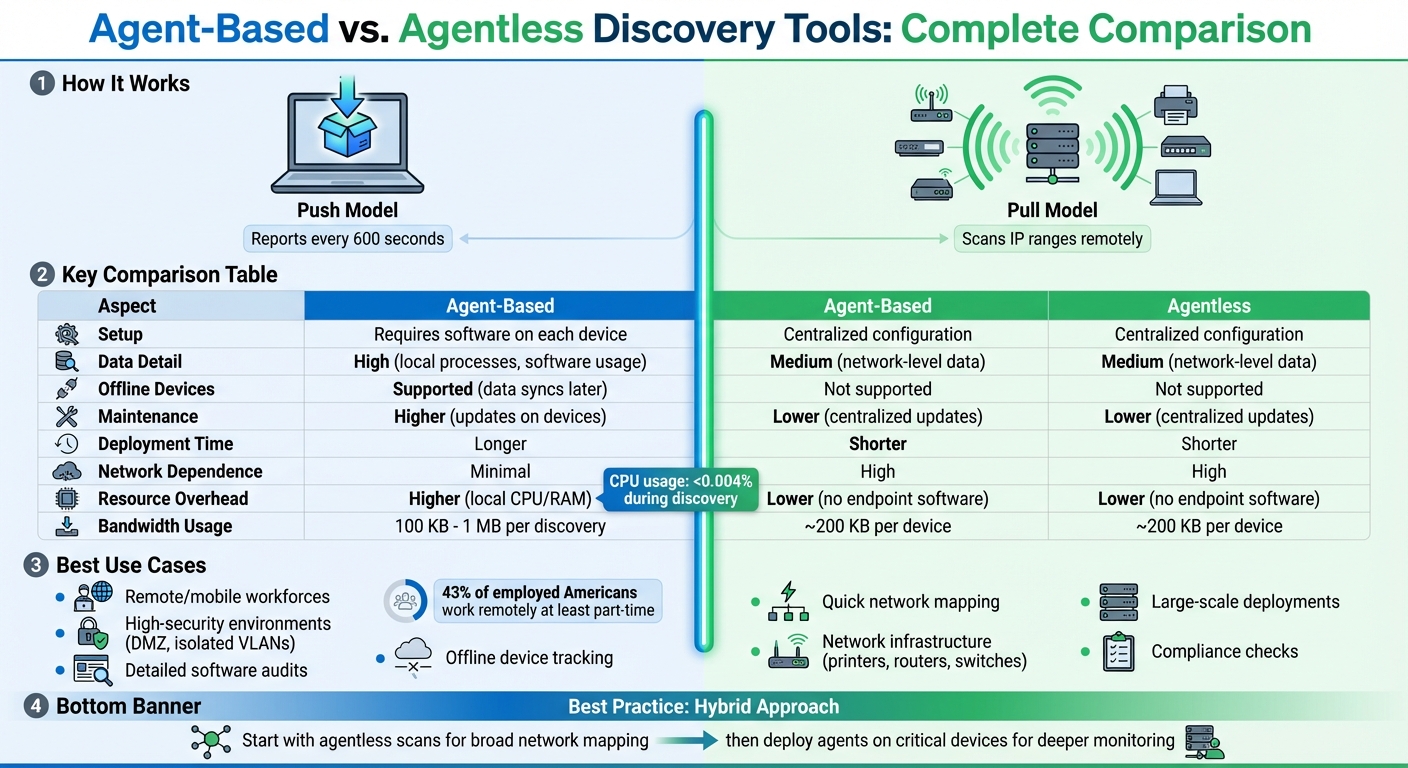
Agent-Based vs Agentless IT Discovery Tools Comparison
Agent-Based Discovery Tools Explained
How Agent-Based Discovery Works
Agent-based tools in automated asset discovery operate using a push model. This means an agent is installed on each device you want to monitor - whether it’s a laptop, server, or workstation. The agent runs locally on the device and communicates directly with a central management console.
These agents are typically set to report back every 600 seconds. Running with elevated permissions, they can access the Windows API and dig into local file systems. This allows them to uncover hidden executables and processes that network scans might overlook. Since the agent initiates outbound communication, there’s no need to open inbound ports on your firewall, as the traffic bypasses inbound firewall rules entirely.
A standout feature is offline data collection. Even if a laptop disconnects from the corporate network or remains offline for days, the agent continues to gather data locally. Once the device reconnects to the internet, it sends the stored data in batches to the central system. This ensures consistent monitoring, even for devices that aren’t always online.
Benefits of Agent-Based Discovery
Agent-based discovery provides highly detailed insights. Because the agent operates directly on the device, it collects in-depth information such as CPU and memory usage, installed software, and running processes - details that remote scans often miss.
Another advantage is its ability to work seamlessly through firewalls, NAT setups, and isolated VLANs without needing complicated network configurations. This makes it particularly useful in high-security environments, like DMZ zones or systems handling sensitive information.
For organizations with remote or mobile workforces, these tools excel at tracking assets outside the corporate network. Additionally, they are designed to use minimal bandwidth - typically between 100 KB and 1 MB per discovery - ensuring that remote connections remain stable and responsive.
Drawbacks of Agent-Based Discovery
Despite its strengths, agent-based discovery isn’t without challenges. Deploying the agent software across all devices can be a time-intensive process, especially in large-scale environments. This becomes even more complicated if an organization lacks a clear inventory of its devices, making it hard to determine where agents need to be installed.
Maintenance can also be labor-intensive, as updates must be applied to individual nodes, increasing administrative workload. While agents usually consume minimal CPU resources - often less than 0.004% during discovery - poorly optimized setups can occasionally lead to performance issues for end users.
Another factor to consider is vendor lock-in. Most agents are proprietary, meaning switching to a different discovery tool after widespread deployment can be a challenging and resource-heavy process. This makes choosing the right vendor a critical decision for long-term IT planning.
sbb-itb-c68f633
Agentless Discovery Tools Explained
How Agentless Discovery Works
Agentless discovery relies on a pull-based approach. Instead of deploying software on every device, a centralized engine or probe scans specific IP ranges or domains within your network. It uses protocols like SNMP, WMI/WinRM, and SSH to remotely gather data from devices and might also incorporate tools like Netflow or packet capture to map interactions between assets. To retrieve this data, the system requires administrative credentials, such as service accounts or SSH keys, for remote authentication. Once set up on a central server or probe, it can scan the entire network without needing to update software on individual devices. This approach makes asset discovery faster and easier to manage.
Benefits of Agentless Discovery
Agentless discovery is ideal for quick, wide-reaching scans across a network. Its zero-touch deployment allows for immediate identification of assets, which is especially helpful for devices like printers, routers, and switches that can’t host agent software. Centralized management simplifies the process by requiring credentials and protocol configurations only once, reducing ongoing maintenance. This makes it a practical option for large-scale networks or older systems with limited capacity.
Drawbacks of Agentless Discovery
While agentless discovery has its strengths, it does come with limitations. It doesn’t provide the same depth of information as agent-based methods, lacking access to detailed data like the full Windows API or hidden executables. Its effectiveness also depends on network accessibility - devices must be online and reachable, with firewalls allowing protocols such as WMI, RPC, or SNMP. This can pose challenges in highly secure setups or for remote devices that rarely connect to the main network. Additionally, scanning can impact network performance. Even though no software is installed on endpoints, queries like WMI or RPC can cause temporary CPU spikes, and network bandwidth usage may reach roughly 200 KB per device during each scan. These factors can lead to reliability issues in networks with latency or packet loss.
Agent-Based vs. Agentless: Key Differences
Deployment and Resource Requirements
When choosing a discovery tool for IT asset management, it's essential to weigh the differences in deployment methods and resource needs. Agent-based tools work with a push-based approach, meaning software must be installed on every device. This creates a bit of a challenge - deploying agents effectively requires knowing which devices exist in the first place. On the other hand, agentless tools use a pull-based system that scans the network from a central server. This method typically only requires a one-time setup of IP ranges and credentials.
Post-deployment, the ongoing maintenance differs significantly. Agent-based systems demand regular patching at the device level, while agentless tools streamline this process with centralized updates. However, network dependency becomes a critical factor. Agentless tools need real-time connectivity to function, which means they might miss devices that are offline or isolated behind firewalls. In contrast, agents can store data locally and sync it later when a connection is restored.
| Aspect | Agent-Based (Push-Based) | Agentless (Pull-Based) |
|---|---|---|
| Deployment Time | Longer (requires installation on each device) | Shorter (one-time configuration) |
| Resource Overhead | Higher (uses local CPU/RAM) | Lower (no software on endpoints) |
| Network Dependence | Minimal (agents sync when online) | High (devices must be reachable) |
| Maintenance Effort | Higher (individual updates required) | Lower (centralized updates only) |
These differences in how each tool is deployed and maintained play a significant role in determining their suitability for specific environments.
Data Depth and Coverage
The way these tools gather and process data also varies widely. Agent-based systems have the advantage of direct access to local resources and APIs, allowing them to capture detailed information about software usage and local processes. In contrast, agentless tools rely on standard network protocols like WMI, SNMP, and SSH. While these methods can scan a wide variety of devices, they often lack the granularity that agents provide.
Agents also excel in continuous monitoring, enabling them to capture real-time updates - even for devices that are temporarily offline. Agentless tools, however, rely on scheduled scans, which can miss changes that occur between scans. As Device42 explains, “The agent, being local, is able to gather data and 'store' it, delivering hours, days, weeks, or even months of data in large chunks if and when a connection does become available”.
| Capability | Agent-Based | Agentless |
|---|---|---|
| Detail of Data | High (granular and precise) | Medium (less detailed) |
| Off-Network Assets | Yes (data syncs once reconnected) | No (requires online devices) |
| Breadth of Metrics | High | Medium |
| Real-Time Monitoring | Yes (continuous updates) | Limited (scheduled scans) |
Understanding these distinctions in data collection and coverage can help organizations pick the right tool for their needs. The choice often comes down to whether detailed insights and real-time tracking outweigh the simplicity and broader reach of agentless systems.
When to Use Each Discovery Tool
Best Use Cases for Agent-Based Discovery
Agent-based tools are perfect for scenarios where in-depth visibility is essential, especially for devices that often leave the corporate network. Think laptops and workstations - these benefit from agents that can collect data even when offline and sync it later when back online.
They’re also a great fit for high-security environments. In networks with strict firewall rules or isolated VLANs that block inbound scanning traffic, agents shine. They initiate outbound connections to the server, eliminating the need for open inbound ports.
If you need detailed audits, like tracking every installed or hidden application, agents are the way to go. They’re also ideal for tasks requiring administrative control over endpoints - like pushing software installations or enforcing policies remotely. With many agents operating on a default "call home" interval of 600 seconds (5 minutes), they provide updates almost in real-time.
On the other hand, when the focus is on broader network mapping, agentless discovery is a better option.
Best Use Cases for Agentless Discovery
Agentless tools are the go-to when you’re starting from scratch and need a complete inventory. They scan IP ranges to detect shadow IT and newly connected devices without requiring prior knowledge of the network. This makes them especially useful for large-scale deployments where installing software on thousands of endpoints isn’t practical.
For network infrastructure like printers, routers, and switches, agentless discovery is often the only feasible solution. Protocols like SNMP allow for quick and efficient mapping of these devices. Another advantage? These tools don’t strain target devices, as they rely on remote querying through standard protocols like WMI, SSH, and SNMP. They’re also great for compliance checks, ensuring no unauthorized devices sneak onto the network.
Using Both Methods Together
Each approach has its strengths, and combining them often yields the best results. Start with an agentless scan to map the network and identify all active endpoints. Then, deploy agents on critical devices like servers, laptops, and workstations - especially those that need detailed monitoring or frequently operate outside the office network. For devices like networking hardware and peripherals that can’t host agents, continue using agentless discovery.
As Rick Johnston puts it, "The best option can often be found by taking the best from all options and utilizing each in those cases that will be best served by them".
This hybrid approach balances broad network visibility with detailed insights where they’re most needed.
What Is Lansweeper Network Discovery? Agentless, Agent-Based, Active & Passive Scanning Explained
Conclusion
Choosing between agent-based and agentless discovery tools comes down to the specific needs of your IT environment. These two approaches aren't at odds - they actually complement each other. Agentless tools are great for quickly mapping networks and managing devices like printers and switches. On the other hand, agent-based tools provide detailed software usage data and work well for devices that are off-network or in high-security setups.
A hybrid approach often works best. Use agentless scans for broad network mapping, then deploy agents selectively for deeper insights. This way, you get comprehensive visibility without the hassle of guessing where agents are needed.
With 43% of employed Americans working remotely at least part-time, tracking off-network devices is more important than ever. Whether you're managing software licenses, enforcing security measures, or keeping an accurate inventory, the right mix of discovery tools can help keep your IT operations on track.
Make sure your chosen vendor allows for easy data export to keep your IT asset management data adaptable.
FAQs
Which discovery method is safer for locked-down networks?
Agentless discovery is often the safer choice for locked-down networks. This approach skips the need for installing software on devices, which helps minimize security risks and limits the attack surface. Instead, it relies on remote scanning protocols like SNMP, WMI, or SSH to gather information. On the other hand, agent-based discovery involves deploying software agents to devices, which, if not managed properly, could create vulnerabilities. For environments with strict security requirements, the non-intrusive nature of agentless methods makes them the preferred option.
How do I discover remote laptops that are rarely on VPN?
To identify remote laptops that seldom connect to a VPN, agentless discovery methods can be highly effective. These methods work by scanning devices remotely using network protocols such as SNMP, WMI, or SSH, eliminating the need to install software on each device. By detecting devices based on their network activity, agentless discovery allows for scanning across entire IP ranges or network segments. Even if laptops are offline or disconnected from the VPN, this approach ensures a broad and detailed understanding of your assets.
What’s the best way to run a hybrid agentless + agent setup?
To manage a hybrid setup that combines agentless and agent-based methods effectively, leverage the strengths of both approaches. Begin with agentless discovery to gain broad visibility across various devices, such as routers and printers, using protocols like SNMP or SSH. Next, deploy agents on critical assets or those that frequently move, such as Windows or Ubuntu machines, to enable deeper, real-time monitoring. This strategy provides extensive coverage, simplifies deployment, and improves monitoring across diverse IT systems.