
7 Security Communication Rules for IT Teams
When a security issue hits, communication gaps slow everything down. The article’s main point is simple: I need clear rules for where alerts go, who owns each message, how fast updates happen, and what gets logged.
Here’s the whole framework in one view:
- Use fixed channels and templates so alerts don’t get lost in random texts, chats, or calls.
- Tie notifications to severity with set response windows like 15 minutes for top-level incidents.
- Assign one owner per communication task with a RACI model.
- Set update rhythms such as every 30–60 minutes for critical incidents.
- Route high-risk messages through approval paths before they go out.
- Keep records in one searchable place for audits, reviews, and follow-up.
- Train IT, security, legal, HR, and leadership together so everyone follows the same process.
One stat stands out: 60% of organizations lack a clear cyber incident communication plan, and weak internal communication can add 33% more time to breach containment. That’s the cost of unclear messaging.
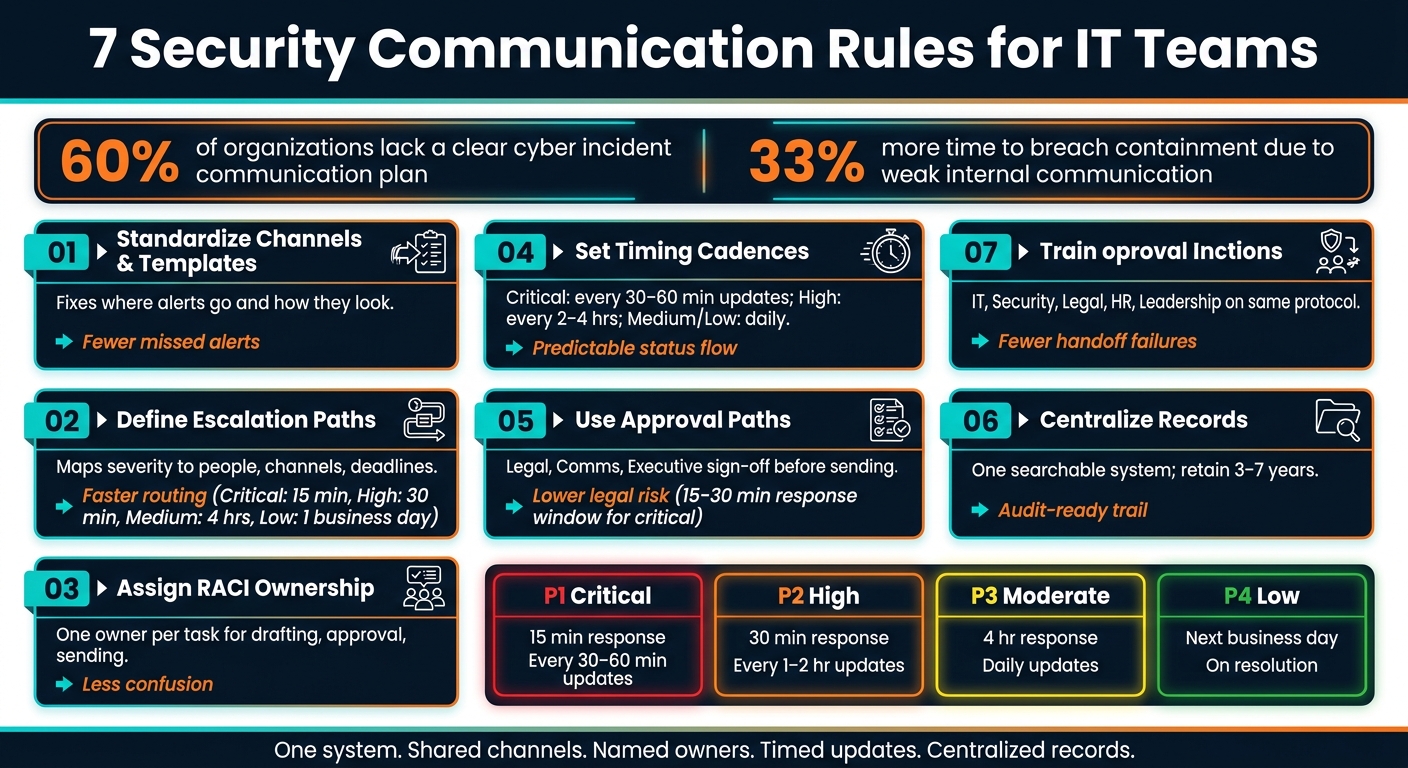
7 Security Communication Rules for IT Teams: Quick Reference Framework
Quick Comparison
| Rule | What it does | Main outcome |
|---|---|---|
| 1. Channels and templates | Standardizes where messages go and how they look | Fewer missed alerts and better records |
| 2. Escalation rules | Maps severity to people, channels, and deadlines | Faster routing to the right team |
| 3. RACI ownership | Assigns drafting, approval, and send roles | Less confusion during incidents |
| 4. Timing cadences | Sets update schedules for incidents and changes | More predictable status flow |
| 5. Approval paths | Controls sign-off for internal and external messages | Lower legal and messaging risk |
| 6. Central records | Stores messages, approvals, and decisions in one place | Better audit trail and review history |
| 7. Cross-team training | Teaches everyone the same protocol | Fewer handoff failures under pressure |
Bottom line: if I want incident response to move faster, I can’t leave communication to habit or memory. I need a written playbook, fixed timelines, named owners, and one record system that the whole team uses.
sbb-itb-c68f633
1. Standardize Security Alert Channels and Message Templates
When security messages bounce between personal texts, random chat threads, and unlogged calls, things get messy fast. You lose the paper trail. And during an incident, that can cost time. According to JumpCloud, 60% of organizations lack a clear communication plan during a cyber incident, and companies with weak internal communication see a 33% increase in breach containment time.
Scope of the Rule
This rule applies to every security message sent beyond the core technical team. That includes real-time incident alerts for IT and security staff, status updates for executives, action-needed notices for end users, and formal stakeholder or regulatory updates. It also makes one thing clear: some channels are official, and some are not.
Use these four official channels:
| Channel | Primary Audience | Use Case |
|---|---|---|
| Incident management / paging (e.g., PagerDuty) | On-call IT, security engineers | Critical and high-severity real-time alerts |
| Help desk / ticketing system (e.g., AssetRemix) | IT staff, asset owners | Vulnerability tasks, endpoint issues, security service requests |
| Dedicated chat channel (e.g., #security-alerts in Slack/Teams) | IT staff, relevant stakeholders | Incident updates, change notices, active threat warnings |
| Email distribution lists | Executives, end users, partners | Policy changes, scheduled maintenance, incident summaries |
For the most severe events, SMS or phone bridges can support those channels so on-call responders and leadership hear about the issue fast.
Critical and high-severity incidents, such as active ransomware, confirmed data exfiltration, or widespread phishing, should always go through standard channels and approved templates. Medium-severity issues that affect a defined group can move through ticketing systems or targeted email. Routine security work, like weekly patching, can use lighter automated notices, but those messages still need basic standards for clarity and record-keeping.
Personal texts and unlogged calls have a limited role. They're fine for quick coordination. But if a message changes user behavior, affects operations, or needs an audit trail, it must go through an official channel.
Who Owns Execution
Security owns the message itself: severity criteria, threat details, and template drafts. IT owns delivery: distribution groups, tool integrations, and channel upkeep. Legal, communications, and compliance review regulated notices, including breach notifications and company-wide policy updates.
Artifacts to Document
Use one template structure for every message. At a minimum, each one should include:
- A standard subject line, such as
[Security Alert] High – Email – Suspected Phishing Campaign - A severity label from the approved scale: Critical, High, Medium, or Low
- A timestamp in
MM/DD/YYYY HH:MM AM/PM (Time Zone)format - A plain-language impact summary
- Required user actions in numbered steps
- A contact name or ticket reference
Store these templates, along with the channel-audience matrix and distribution list definitions, in a central knowledge base or help desk system. Review them every quarter, and update them after any major incident or major organizational change.
Once channels and templates are locked in, severity should drive who gets notified first and how fast.
2. Define Escalation Paths and Severity-Based Notification Rules
Once your official channels are in place, escalation rules decide who hears about an incident first and how fast they need to respond. In plain English: after channels and templates are set, define who gets notified first, second, and third.
Scope of the Rule
This rule covers how security events move from initial detection to the right technical, management, and executive stakeholders based on clear severity levels, business impact, data sensitivity, and scope. It applies to incidents like compromised admin accounts, suspected breaches, security-driven outages, malware spikes, and active ransomware.
It does not apply to routine patching, planned maintenance, or other non-security IT work.
If customers, regulators, or third parties might be affected, use a separate external notification path.
A common place to start is a four-tier model with acknowledgment time targets:
| Severity | Example Trigger | Required Channel(s) | Acknowledge Within |
|---|---|---|---|
| Critical | Ransomware, confirmed data exfiltration, site-wide outage with suspected cyberattack | Phone/SMS + incident bridge + ticket | 15 minutes |
| High | Compromised admin account, lateral movement detected, major production disruption | Paging app or SMS + ticket | 30 minutes |
| Medium | Isolated malware on a single endpoint, repeated failed logins, limited-risk misconfiguration | Ticket + email + chat channel | 4 hours |
| Low | Blocked phishing email, security misconfiguration on a test system | Ticket only | 1 business day |
That matrix becomes the trigger for your notification chain.
For Critical events, the escalation flow is: Help desk or SOC → Security On-Call → IT On-Call → Security Manager/CISO → Legal, Communications, and executives.
Who Owns Execution
Security leadership owns the severity definitions and the escalation schema. IT Ops owns the tools that route alerts. Legal, Communications, and Compliance review regulated notices.
When It Applies
Use escalation as soon as an event meets the criteria. If new facts change the severity, reclassify it right away and log the timestamp, reason, and decision owner.
Artifacts to Document
Three artifacts make this rule usable when things get hectic.
- A severity matrix that defines each level by business impact, data sensitivity, scope, and recoverability, with clear examples from your own environment
- An escalation path diagram that shows the exact notification chain for each severity tier, including backup contacts for nights, weekends, and other off-hours coverage
- A notification rules table that maps each severity level to required channels, required stakeholders, and the core parts of the first message
AssetRemix can help link incidents to specific devices and their responsible owners, so your escalation paths point to actual asset-owner relationships instead of generic role titles.
Store these artifacts in one central place, keep them version-controlled, make sure teams can reach them 24/7, and test them during tabletop exercises.
3. Assign Clear Owner Roles Using a RACI Model
Once escalation paths are in place, give every message a clear owner. Escalation paths show where messages go. A RACI shows who handles them.
Scope of the Rule
This rule applies to recurring security communication tasks where fuzzy ownership leads to delays and errors. That includes alert intake, status updates, escalation calls, approvals, and post-incident records. A RACI assigns four roles: Responsible, Accountable, Consulted, and Informed.
From there, name the person who drafts, approves, and sends each message.
In a phishing incident, the analyst drafts the alert, the incident manager approves release, legal reviews user-data exposure, and the service desk is informed.
For each communication task, assign one and only one Accountable owner.
Who Owns Execution
Keep drafting and approval separate. That split matters. The incident manager coordinates message flow. The communications lead drafts and distributes messages. Legal, privacy, HR, and compliance review content that is visible outside the team or tied to regulation. The service desk and nearby IT teams stay informed. Don’t mix up “informed” with “approval.”
When It Applies
Set this ownership ahead of time for incident response, change management, phishing alerts, vulnerability notices, maintenance risk notices, and policy changes. Also spell out what happens if the main owner is unavailable:
- Who the backup is
- How the handoff is confirmed
- Which channel tells the team ownership has changed
Artifacts to Document
Use a RACI matrix plus a short playbook that maps each message type to its owner, backup approver, reviewers, and response time. Keep the matrix in your incident response plan. Update it with backup contacts, and review it after major incidents or whenever responsibilities shift. With that in place, teams can use the same setup for incidents, changes, and follow-up records.
4. Set Message Timing Cadences for Incidents and Changes
RACI tells you who owns the message. This rule covers when that message needs to go out.
Scope of the Rule
Timing cadences give security communications a set rhythm across two tracks: active incidents and planned changes with security impact. For incidents, that means the whole lifecycle: detection, triage, containment, recovery, and post-incident review. For changes, it runs from early awareness and prep through go-live and post-change monitoring.
Start with this cadence table:
| Severity | Update Frequency | Executive Brief | Post-Incident Summary |
|---|---|---|---|
| Critical | Every 30–60 min | Within 2–4 hours | Within 5 business days |
| High | Every 2–4 hours | Within 24 hours | After closeout |
| Medium/Low | Daily or at milestones | As needed | After closeout |
For change work, use the same discipline. Notify stakeholders 3–5 business days before the change, send a reminder 24 hours before, and confirm outcomes within 24–48 hours after the change window closes.
One rule works at every severity level: always include the next update time in every message, even if there’s nothing new to share. That simple line cuts down on inbound noise when an incident is active.
Who Owns Execution
The incident commander owns incident update timing. The communications lead drafts and sends updates. The change manager owns change notices and reminders.
When It Applies
Start the cadence as soon as an incident is declared at a severity level or a change is approved and scheduled. Stop it only when the incident or change is officially closed in the tracking system, with a final message sent to all relevant audiences to confirm closure.
For U.S. organizations that fall under state breach notification laws or sector-specific rules, build a legal review window directly into the Critical timeline before any external notice goes out.
Artifacts to Document
Keep a timing table in each incident response playbook that maps severity to audience, channel, update interval, and owner. For changes, attach a communication schedule to each change record in your ITSM tool. That schedule should include pre-notice dates, go-live messaging, and post-change summary deadlines.
Also log every message in the ticket with:
- timestamp
- sender
- recipients
- channel
Next, define who can approve each message before it is sent.
5. Use Structured Approval Paths for Security Messaging
Timing tells you when to send a message. Approval paths tell you who needs to sign off before it goes out. Once the message is ready, approval is the gate that decides if it can be sent.
Scope of the Rule
External communications always need formal approval. Internal messages can take a lighter path if you're using pre-approved templates.
Who Owns Execution
| Function | Responsibility |
|---|---|
| Security / Incident Commander | Drafts and routes the message |
| Legal / Privacy / General Counsel | Reviews compliance and liability risk |
| Communications / PR Lead | Edits tone and audience fit |
| Executive Sponsor (CISO or CEO) | Gives final sign-off for public-facing or executive-visible messages |
Define approvers by role, not name. That way, if the main approver is out, a backup in the same role can step in and keep things moving.
When It Applies
Use the full approval path for SEV-1/2 incidents, confirmed data exposure, or any message tied to regulated data like PII, PHI, or PCI.
For urgent cases, pre-built templates with pre-approved holding language can save time. The security lead only needs to fill in the changing details, then send the message through a shorter approval path. That matters when minutes count.
Legal and communications reviewers who are on call should have a set response window - 15 to 30 minutes for critical incidents. If they don't respond in time, the workflow should auto-escalate to a backup approver. Every approved message should also leave a clear audit trail.
Artifacts to Document
Keep the draft, final version, timestamped approver sign-offs, edits, channels, audience, and ticket link in one searchable system.
6. Keep Centralized, Searchable Communication Records
Once a security message gets approved, it needs to live in one searchable system of record. That gives teams a clear trail for audits, investigations, and post-incident review. It also saves responders from digging through inboxes, chat threads, and random notes just to piece together what happened.
Scope of the Rule
This rule applies to incident, change, advisory, and external security communications tied to risk decisions.
Use a central system of record for incident details, and keep security records for at least 3 years after follow-up closes. If a law or rule calls for more time, keep them longer. Sectors like healthcare and finance often have longer retention periods.
Who Owns Execution
| Role | Responsibility |
|---|---|
| SecOps / SOC | Attach incident communication records to central tickets and maintain tagging standards |
| IT Operations / Service Desk | Log change-related messages and approvals in the ITSM platform |
| CISO / Director of Information Security | Own the policy, retention requirements, and approved record systems |
| CIO / Head of IT | Integrate ITSM, collaboration tools, and asset management systems |
| Legal and Compliance | Advise on retention periods, eDiscovery, and regulatory expectations such as SOC 2, HIPAA, and PCI DSS |
| HR and Communications | Review employee-facing security messaging that may need long-term retention and approved wording |
When It Applies
After approval, store the final message, edits, and decision trail in one place.
If a message affects containment, escalation, or disclosure, record it. For P1–P3 incidents, that means full communication logs. For lower-severity events, a structured summary is enough, as long as it includes the decision, time, and owner. And if a quick hallway chat or Slack exchange leads to a decision, log the decision and why it was made.
Artifacts to Document
Tag each record with a standard set of metadata:
- incident ID
- severity level
- impacted systems
- involved teams
- communication channel
- key decisions made
Core artifacts include incident chat summaries or transcripts, escalation notices with timestamps in U.S. format, such as 09/13/2026 3:30 PM, and approval messages.
Tools like AssetRemix can connect communication records directly to specific assets and users. That way, a search for a device name or user ID can pull up related tickets, notices, and incident logs in one place.
Once records are centralized, the next rule is making sure every team follows the same communication protocol.
7. Train Cross-Functional Teams on Shared Security Communication Protocols
Once the records and templates are in place, the next job is simple in theory and hard in practice: get every team to use them the same way.
Centralized records and templates only work if people follow one shared protocol. If they don’t, handoffs get missed, messages clash, and small issues turn messy fast. Training is what turns a written process into day-to-day behavior.
Scope of the Rule
This rule applies to every team involved in security messages. That reaches far past IT and security.
It includes help desk, DevOps, HR, legal, communications, and leadership. Each group has a part in the communication chain, so the training needs to reinforce the same severity terms, alert channels, escalation paths, and message templates across the company.
Who Owns Execution
The CISO or head of security is accountable for the full training program. Legal, HR, and corporate communications should be consulted so the messaging lines up with regulatory and employee communication standards.
| Role | Responsibility |
|---|---|
| CISO / Head of Security | Accountable for program quality and alignment with incident response plans |
| Security Awareness Team | Designs curriculum, exercises, and training materials |
| IT Operations | Ensures tools and workflows match what is taught in training |
| Legal and Compliance | Advises on regulatory messaging requirements |
| HR / L&D | Integrates training into onboarding and recurring calendars |
| Corporate Communications | Aligns on external and executive-facing message protocols |
When It Applies
Training should run on three tracks:
- Onboarding: A protocol-focused session for new IT, security, and engineering staff
- Annual refreshers: All staff, with updated playbooks and lessons learned
- Event-driven drills: Twice-yearly or quarterly sessions for key roles such as SOC analysts, help desk leads, and DevOps engineers, plus sessions after any real incident or major change
Run simulations any time roles, systems, or channels change.
Tabletop exercises are where the rules stop being abstract. They put IT, security, HR, legal, and communications in the same room to rehearse who says what, to whom, and when. That matters, because calm planning on paper is one thing. Doing it under pressure is another.
Artifacts to Document
Treat training materials as controlled security records, not random slide decks that get lost after one meeting. Store them in the same system of record, using the same tags and naming rules.
- Role-specific playbooks for common scenarios like phishing response, identity compromise, and production outages with security impact
- Templates for internal alerts, executive summaries, and regulatory notifications
- RACI showing who drafts, approves, sends, and follows up for each scenario and severity level
- Training completion records with dates, roles covered, and assessment scores
- After-action notes from tabletop exercises and real incidents, including which communication steps failed and what changed afterward
Tag each artifact with its last update date and approving owner.
Reference Tables and Examples for the 7 Rules
Use the tables below as a fast-reference set during active incidents. Each one turns a rule into something you can use in the moment, not just read and forget.
Channel Comparison
| Channel | Speed | Reliability | Audit Trail | Best Use |
|---|---|---|---|---|
| Chat (Slack, Teams) | Near real-time | Generally high, but dependent on internet and SaaS availability | Strong if message history retention is enabled | Initial triage, real-time coordination, quick updates |
| Slower than chat | Very high | Strong; archivable and searchable | Executive summaries, formal notifications, post-incident reports | |
| Phone / SMS | Fast | High, assuming cellular service | Weak without logging tools | P1 escalations, on-call wake-ups, off-hours executive alerts |
| Video bridge (Zoom, Google Meet) | Medium; requires coordination | High if the service is not impacted by the incident | Moderate; meeting recordings and chat logs require deliberate setup and storage | Complex or prolonged incidents, cross-functional decision-making |
Label channels with the local time zone, such as ET or PT. Also make sure meeting recordings are stored in a format that your legal and compliance teams accept.
Severity Matrix: P1–P4
| Severity | Impact | Initial Response Window | Update Cadence |
|---|---|---|---|
| P1 – Critical | Business-critical outage or active breach | Within 15 minutes | Every 30–60 minutes until contained |
| P2 – High | Major degradation or localized compromise | Within 30 minutes | Every 1–2 hours |
| P3 – Moderate | Single compromised device or minor performance issue | Within 4 business hours | Once per business day or at major changes |
| P4 – Low | Policy violation or routine alert, no disruption | By next business day close | On resolution or weekly summary |
At any severity level, the first message should be an acknowledgment, not a root-cause explanation. That matters more than it sounds. A templated acknowledgment sent within 15 minutes can cut down inbound noise while the team is still trying to get its footing.
Sample RACI for Incident Communication
| Activity | Incident Lead | Comms Lead | System Owner | Security Lead | Executive Approver |
|---|---|---|---|---|---|
| Declare severity | R | C | C | A | I |
| Draft initial internal message | A | R | C | C | I |
| Approve external / customer-facing comms | C | R | I | C | A |
| Send stakeholder updates | R | A | C | C | I |
| Close incident and log records | R | C | C | A | I |
R = Responsible, A = Accountable, C = Consulted, I = Informed
Asset data in AdminRemix can speed owner lookup during P1 incidents. When time is tight, that lookup can save more time than people expect.
Timing Table by Scenario
| Scenario | First Acknowledgment | Update Cadence | Closure Summary |
|---|---|---|---|
| Phishing | Within 1 business hour | Every 2–4 hours while active; one advisory the same day | Within 2–3 business days, including reported emails, click-throughs, and key prevention steps |
| Service outage (P1) | Within 15 minutes | Every 30–60 minutes for IT/security; every 60–120 minutes for executives | Within 24 hours, including root cause, remediation, and prevention measures |
| Compromised account | Within 1 hour | At key steps, such as lock, reset, and access review | Within 2–3 business days, documenting what was accessed, remediation steps, and training reminders |
| Data exposure | Within 15–60 minutes | At least hourly during investigation; executives at major milestones | Within 3–7 business days, including impact assessment, regulatory steps, and long-term controls |
All timing windows should reference detection time, not report time. They should also account for U.S. state breach notification laws where applicable.
After channel, severity, ownership, and timing are set, record the outcome in one system. If records end up scattered across chat, email, and shared drives, reviews get messy fast.
Centralized Records Table
| What to Log | Where to Store | Retention | Owner |
|---|---|---|---|
| Incident timeline (detection, escalation, containment, recovery) | Incident management / ticketing system | 3–7 years | Security lead / incident commander |
| Stakeholder communications (emails, chat summaries, status updates) | Document repository linked to incident record | 3–7 years (longer for regulated industries) | Communications lead |
| Approvals (who approved what, and when) | Incident record or document repository | Match incident retention policy | Security lead |
| Asset details (device, owner, criticality, service history) | ITAM system such as AssetRemix | Per organizational asset-retention policy | IT operations |
| After-action notes and lessons learned | Shared security knowledge base | Per organizational retention policy | Security lead |
Keep each record tied back to the incident record. That one habit makes audits and post-incident reviews much easier.
Use these references to standardize playbooks before turning them into daily workflows. Next, turn these references into working procedures and assigned tasks.
How IT and Security Teams Can Put These Rules Into Practice
Start by turning the severity matrix, RACI, cadence table, and approval rules into one working playbook. Put it in Google Drive or your ITSM knowledge base so people know exactly where to find it when things get messy. Then take the seven rules and turn them into one Security Communication Playbook. For each rule, map out 2–5 repeatable actions, assign an owner, name the channel to use, and add short checklists for on-call staff. For each incident scenario, spell out the sender, channel, and deadline.
Once that playbook is in place, build four reusable message templates from it:
- Internal alert
- Incident update
- Executive briefing
- Post-incident summary
Each template should include the minimum fields needed for that message type. An internal alert should include the incident ID, timestamp, affected systems, severity, immediate actions, and any action the recipient needs to take. An incident update should cover current status, new impact, mitigation progress, blockers, and the next update time. Executive briefings should stay non-technical and focus on business impact, root cause, actions taken, and decisions needed. Post-incident summaries should record the timeline, root cause, containment steps, lessons learned, and improvement actions with owners and due dates.
The same workflow should also handle approvals and record links. Build tiered approvals into the ticket flow so the process isn't left to memory in the middle of an incident. Analysts can send low- and medium-severity messages from pre-approved templates. High- and critical-severity messages should be reviewed by the incident commander, comms lead, security lead, and IT ops manager. Any external or executive notice needs legal or leadership sign-off.
At that point, the incident ticket becomes the source of truth. Every message, chat thread, document, and asset record should link back to it. Use Gmail for alerts, Chat for coordination, Docs and Drive for live logs and records, Calendar for briefings, and Meet for war rooms. If your team needs to find system owners fast, AssetRemix and User Getter can help. Meet Enhancement Suite can make incident calls easier to manage when the pressure is on.
Don't stop at documentation. Run tabletop exercises at least twice a year using realistic scenarios, and make sure people use the actual tools and templates, not a watered-down version for training. Bring in IT, security, and cross-functional teams so the drill matches how incidents play out in practice. After each exercise, track alert time, template use, and record completeness. That gives you a clear read on what held up and what fell apart.
Conclusion
At 2:00 a.m., this only works if the process is already in place.
The seven rules work as one system, not as separate parts: shared channels, clear escalation, named owners, timed updates, approved messaging, and centralized records. Each part leans on the others. If one breaks, the whole thing gets shaky.
Documented playbooks, tests, and message records help keep the process repeatable, auditable, and usable when staff or tools change. It gets even stronger when messages connect to asset and user records. Linking alerts to asset and user records helps IT send the right message to the right owner. Tools like AssetRemix and User Getter can keep that context organized, so alerts and follow-ups stay targeted.
FAQs
How do I build a security communication playbook?
Build a security communication playbook with clear, repeatable processes and a shared document that spells out who does what.
That document should name the key roles, including:
- Incident Lead
- Communications Owner
- IT Operators
- Compliance Contact
Keep updates in one central hub so people aren’t hunting through email threads, chat messages, and scattered notes. Store runbooks and templates in one restricted location too. That way, the team knows exactly where to go when time is tight.
Then put the playbook to the test with tabletop exercises. After each incident or drill, review what happened and tighten the process, the same way a good pit crew shaves seconds by fixing small mistakes before race day.
What should go in a security alert template?
Include the core details your teams need to move fast and stay consistent:
- Event type and severity
- Affected users, devices, or organizational units
- The exact Admin console path
- Control owner, target fix date, and current status
These details help IT and security teams prioritize response, repeat remediation steps, and keep a clear audit trail.
How often should teams send incident updates?
Teams should send incident updates often enough to give everyone a clear, near-real-time view of what’s happening, without flooding people with pings. Keep each update centered on high-priority information, and use dedicated channels so all incident communication stays in one place.
Your incident response strategy should set a steady cadence for updates. That way, the team sees the issues that matter most and the progress being made, without getting buried in low-impact noise.