10 Key Parts of a Disaster Recovery Plan
If a system goes down, every hour can cost about $10,000. That’s why I see a disaster recovery plan as a short answer to one question: how do we get systems, apps, and data back fast enough for the business to keep going?
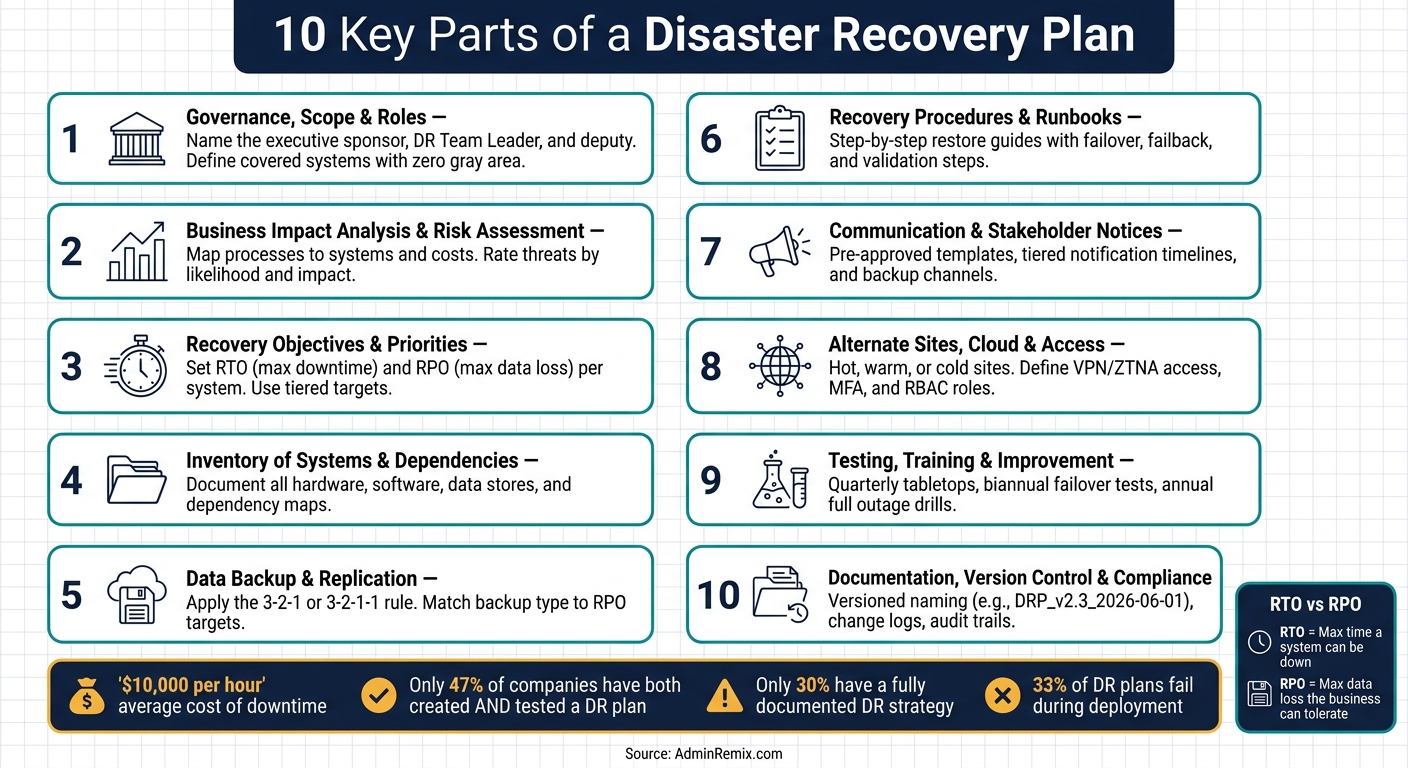
Here’s the full picture in plain English: a DR plan should name who’s in charge, rank what matters most, set downtime and data-loss limits, map system dependencies, define backups, document restore steps, line up communications, choose backup sites or cloud recovery, test the plan, and keep the documents current.
If I had to boil the article down to the 10 parts, they are:
- Governance, scope, and roles
- Business impact analysis and risk assessment
- Recovery objectives and recovery priorities
- Inventory of systems, assets, and dependencies
- Data backup and replication
- Recovery procedures and runbooks
- Communication and stakeholder notices
- Alternate sites, cloud services, and access
- Testing, training, and plan updates
- Documentation, version control, and compliance
A few points stand out right away:
- RTO = how long you can afford a system to be down
- RPO = how much data you can afford to lose
- Mission-critical systems may need recovery in minutes or hours
- Only 47% of companies had both made and tested a DR plan
- Many plans fail because records, runbooks, and ownership drift out of date
10 Key Parts of a Disaster Recovery Plan: Quick Reference Guide
How to write an IT Disaster Recovery Plan
Quick Comparison
| Part | What it answers | Why it matters |
|---|---|---|
| Governance | Who leads? What does the plan cover? | Stops confusion during an outage |
| BIA and risk | What hurts most? What can cause it? | Helps rank time, budget, and staff |
| RTO/RPO | How fast must recovery happen? How much data can be lost? | Sets recovery targets |
| Inventory | What do we have, and what depends on what? | Sets restore order |
| Backups | What data is protected, how often, and where? | Limits data loss |
| Runbooks | What exact steps does IT follow? | Cuts guesswork |
| Communication | Who gets updates, when, and through which channel? | Keeps teams, customers, and leaders aligned |
| Alternate recovery | Where do systems run if the main site fails? | Keeps services available |
| Testing | Does the plan work in practice? | Finds gaps before a real outage |
| Documentation | Is the plan current and audit-ready? | Keeps recovery work usable and traceable |
Bottom line: I’d treat a DR plan as a working system, not a file on a shelf. If ownership is clear, backups match business limits, and tests happen on a set schedule, recovery is far more likely to work when it counts.
1. Governance, Scope, and Roles
Start by naming three people: one executive sponsor, one DR Team Leader, and one deputy.
Their authority and budget responsibility should be written into a board- or executive-approved DRP charter. That matters because, during a recovery event, people need to know who can make the call and who can approve spending without delay.
The DR Team Leader runs plan execution. That includes declaring recovery, setting recovery priorities, and keeping senior leadership informed. If that person is unavailable, the deputy steps in. Put simply, this setup keeps recovery decisions in one place instead of letting them scatter across teams.
After ownership is set, define the plan’s scope with zero gray area. Spell out the covered systems, locations, cloud environments, and third-party services. Also list what’s out of scope. If something is left undefined, it can turn into confusion when systems are down and time is tight.
That scope then becomes the basis for risk ranking and recovery priorities.
A RACI matrix turns governance into day-to-day action for DR. It maps each recovery task, such as failover initiation, data restoration, and stakeholder notification, to a named accountable owner. It should also name backups and show clear escalation paths. Each task needs one accountable owner. On top of that, tie every asset to an owner, a location, and a recovery priority.
With governance in place, the next step is to assess business impact and risk.
2. Business Impact Analysis and Risk Assessment
With governance and scope in place, the next step is to measure business impact and exposure. A Business Impact Analysis (BIA) shows the business cost of downtime. A risk assessment shows what might cause that downtime. Put the two together, and you get a much clearer picture of where recovery time, budget, and staff should go.
Start with your core business processes, such as order fulfillment, payroll, customer support, and payment processing. Then use your current asset inventory to map each process to the systems, data, people, and vendors it depends on. This is where things often get messy. A process may look simple on paper, but behind it sits a web of apps, shared services, outside providers, and internal owners.
Talk with stakeholders about what each outage window would cost in terms of revenue, backlog, compliance, and customer trust. Look at impact from four angles:
- Financial: lost revenue, penalties
- Operational: backlogs, overtime
- Legal/compliance: HIPAA, PCI DSS, SOX exposure
- Reputational: churn, negative press
Tools like AdminRemix's AssetRemix can help centralize asset and ownership data, which makes dependency mapping more complete.
Once you have impact estimates, turn the BIA into recovery tiers based on how long each process can stay offline before the damage becomes unacceptable.
| Recovery Tier | Downtime Tolerance | Example Systems |
|---|---|---|
| Tier 0 – Mission Critical | Minutes | Core transaction processing, identity and access management, core network and directory services |
| Tier 1 – Highly Critical | Up to 4 hours | Customer support tools, order management, email, video conferencing |
| Tier 2 – Important | 24–72 hours | Internal reporting, back-office applications |
| Tier 3 – Non-Critical | Several days | Training platforms, archival systems |
For risk, build a threat list that matches your actual environment. U.S. organizations deal with region-specific natural hazards, including hurricanes on the Gulf and East coasts, earthquakes in California, tornadoes in the Midwest, wildfires in the West, and winter storms in northern states. On top of that, there are the usual threats: ransomware, hardware failure, cloud provider outages, and human error.
Rate each threat by likelihood and impact. Then record the controls you already have and the gaps that still need attention. Put the results into a risk register that ranks the highest-priority scenarios.
Use the BIA and risk register to set RTOs and RPOs with business and IT leadership. Those outputs feed the recovery objectives in the next section.
3. Recovery Objectives and Recovery Priorities
After the BIA, give each system an RTO and RPO based on business impact. RTO is the amount of time a system can be down. RPO is the amount of data loss the business can live with. Those two targets also shape the recovery order.
A simple example helps. An online sales system might need a 1-hour RTO and a 15-minute RPO. Systems that matter more to revenue, service, or safety usually need tighter targets.
One mistake shows up all the time: setting the same aggressive targets for every system. On paper, that sounds safe. In practice, it can burn money on low-priority systems while leaving the most critical ones short on protection. A tiered model works better. Set tighter targets for mission-critical systems and looser ones for lower-value systems, then rank systems by the order they need to come back.
There’s also a direct cost tradeoff here. Shorter RTOs and RPOs usually mean more spending on redundant infrastructure, replication, and staffing. Near-zero data loss may call for synchronous replication. A lower-budget plan may depend on nightly backups and accept several hours of data loss. The goal is simple: set the shortest targets the business can afford and actually maintain.
Recovery priority is not only about what comes back first. It’s also about what has to come back before something else can work. Restoring a customer portal before its identity service won’t restore access. That’s why you need to document system dependencies and build the recovery sequence around them. Next, document the systems and dependencies that support that recovery order.
4. Inventory of Systems, Assets, and Dependencies
Once recovery tiers are set, the next job is to document the systems, assets, and dependencies behind each tier. A DR plan needs a current inventory of everything it must restore. Without that, restore gaps show up fast, and delays follow.
Your inventory should cover hardware like servers, network gear, and endpoints; software like applications, licenses, and SaaS tools; data stores like databases, backup repositories, and cloud storage; plus user accounts and owners. For each asset, note the owner, location, recovery tier assigned earlier, and any upstream services and accounts it depends on.
Dependency mapping is where many teams don’t spend enough time. A list tells you what you have. A dependency map tells you what has to come back first. That matters because restore order should follow service logic, not system size. If your e-commerce checkout depends on a payment gateway and an identity provider, bringing back the web servers first won’t get the service online.
When inventories are incomplete, incidents turn into manual discovery work. That stretches downtime and puts more pressure on the team in the middle of a bad day. And plain spreadsheets tend to fall out of date fast. Tools like AdminRemix's AssetRemix can centralize asset records and keep the inventory aligned with real changes.
Use this inventory to set restore order, backup scope, and dependency checks in the next step. It also drives backup scope and replication design.
5. Data Backup and Replication Strategy
Once you have your asset inventory, you can see which systems need the most protection and how fast they need to recover. From there, match each backup method to the RPOs set in the last section.
Each backup type plays a different part in recovery. Full backups copy all selected data. They’re the fastest to restore from, but they use the most storage, so teams usually run them weekly or monthly. Incremental backups save only the changes made since the last backup of any kind. They’re efficient day to day, but restores take more work because you need the last full backup plus every incremental backup after it. Differential backups save all changes made since the last full backup. That makes restores faster than incrementals, while still using less storage than doing full backups every day. Image-based backups capture an entire system, including the OS, apps, and settings. That makes them a strong fit for fast recovery to new hardware or a virtual machine, especially for domain controllers and core application servers.
In most environments, the plan is pretty simple: weekly full backups, daily incrementals or differentials, and frequent snapshots for critical databases. Snapshots help with fast rollback inside a system, but they are not a replacement for backups. They don’t remove the need for offsite or separate copies. If your RPO is short, your backup or replication schedule needs to be more frequent.
Where you store backups matters just as much as how often you run them. The 3-2-1 rule is a strong starting point: keep three copies of your data, on two different media types, with one copy offsite. Because ransomware is now such a big problem, many teams add another layer and move to 3-2-1-1. That means one copy is immutable or air-gapped, so attackers can’t encrypt it or delete it.
There’s a tradeoff here. On-premises storage gives you the fastest restores, but if the whole site goes down, production and backup can go down with it. Cloud storage gives you geographic separation without the upfront hardware cost. A hybrid model often works best: keep recent backups locally for fast RTO, then replicate older backups to the cloud for resilience. It’s a practical middle ground for performance, cost, and RPO.
Retention policy also matters. You need enough restore points to recover from threats that sit quietly before anyone notices, like ransomware. Put simply, retention is not just an archive rule. It’s part of your recovery plan.
Use continuous replication only for workloads that can’t handle much data loss at all. For everything else, pick the simplest method that still meets your recovery targets.
| Backup Type | Best For | Restore Speed | Storage Cost |
|---|---|---|---|
| Full | Baseline recovery, weekly cadence | Fastest | Highest |
| Incremental | Daily/hourly efficiency | Slowest (chain required) | Lowest |
| Differential | Balance of speed and storage | Moderate | Moderate |
| Image-based | Critical servers, bare-metal recovery | Fast | High |
| Continuous replication | Near-zero RPO workloads | Near-instant failover | Highest |
6. Recovery Procedures and Runbooks
Once backup and replication are set, document the exact steps needed to restore service. A recovery runbook is a step-by-step guide for bringing systems and services back after a disruption. It is not the same as a playbook, which covers broader response choices, or an SOP, which covers routine tasks. The point is simple: runbooks help on-call engineers and support teams move fast without leaning on tribal knowledge.
A good runbook should spell out:
- Title
- Scope
- Prerequisites
- Roles
- Permissions
- Step-by-step actions
- Expected results
- Dependencies
- Validation checks
- Communication prompts
- Rollback steps
Failover and failback also need to be defined in plain terms. For failover, move services to the secondary environment, validate data, restore applications, and cut over traffic. For failback, return services to the primary environment only after validation. Every cutover step should trigger the right notification, so teams are not left guessing what changed or when.
Runbooks should not sit untouched after they are written. Review them after incidents, test failures, staffing changes, and migrations. Store them in a centralized, version-controlled repository, and include both a version number and a last-updated date. Then use test results and incident reviews to keep the runbook current.
sbb-itb-c68f633
7. Communication and Stakeholder Notification Plan
A recovery runbook tells IT how to bring systems back. A communication plan tells people what’s going on, who it affects, and what they need to do next. Once recovery begins, steady communication keeps everyone moving in the same direction.
Set four things in advance: who sends the notices, what triggers them, who gets them, and when each group should hear from you. Common trigger events include a data breach, a major outage that lasts 30+ minutes, or a site evacuation. The timeline should stay simple and clear:
- Leadership: 15–30 minutes
- Impacted employees: 1–2 hours
- Key customers: 1–3 hours
- Regulators: by the legal deadline
External notices may also mean website updates, support scripts, and regulated customer notices. After you lock in timing, spell out what each audience needs to hear.
Messages should stick to facts and avoid guesswork. Executives need a short impact summary that covers revenue exposure, compliance risk, and any decisions they must make. IT and operations teams need exact status updates and action items. Employees need plain direction on whether to report in, switch to manual processes, or pause certain transactions. HR and facilities handle employee safety instructions, while legal and communications review anything customer-facing or public-facing. Customers need to know if they are affected and what actions are in motion. Vendors and other critical third parties need details on shared systems, access needs, and expected support levels.
Use backup channels, not just your main ones. Pair tools like Microsoft Teams and corporate email with SMS alerts and direct phone calls. Keep an offline directory with personal mobile numbers and backup email addresses for critical staff. For outside audiences, use a public status page and coordinated social posts as the single source of truth. Also, pause scheduled marketing posts until the incident is resolved. That only works if the messages are written and approved ahead of time.
Use pre-approved templates for internal alerts, customer notices, and vendor updates. Legal and communications should review them before an incident happens. Each template should name the approval owner, the distribution list, and the next-update time. Tools like AdminRemix can help maintain current user and account mappings so teams can target notifications faster.
Clear communication cuts confusion while teams work to restore access through alternate sites and services.
8. Alternate Sites, Cloud Services, and Access Strategies
Once stakeholders know what's going on, the next question is simple: where does recovery happen? If the primary site goes down, work shifts to an alternate environment. That means the plan needs to spell out both the backup location and how fast teams can get systems running there.
The right site depends on each system's RTO and RPO. The three classic choices are hot, warm, and cold sites:
- Hot site: A fully operational secondary site. Failover usually takes minutes to hours. Best for mission-critical systems.
- Warm site: A partly prepared site. Recovery usually takes hours to days. Best for important systems.
- Cold site: A basic facility shell with power and connectivity. Recovery usually takes days or more. Best for non-critical workloads.
| Site Type | Readiness | Recovery Time | Best For |
|---|---|---|---|
| Hot site | Fully functional replica | Minutes to a few hours | Mission-critical services |
| Warm site | Pre-configured, some manual steps | Several hours to a couple of days | Important, non-urgent systems |
| Cold site | Basic facility shell | Days or longer | Non-critical workloads |
| Cloud DR | Backups, replicas, or scaled-down environments | Variable by model | Distributed teams and cloud-first organizations |
Cloud-based recovery can be a solid substitute for a physical secondary site. Two common cloud DR patterns often show up in recovery plans: pilot light and warm standby.
Pilot light means only the core services stay running at low capacity, then scale up during a disaster.
Warm standby means a scaled-down but fully functional copy of production runs all the time in another region and can take traffic during an outage.
A lot of organizations mix these approaches so they can line up RTO and RPO targets with budget.
Access matters just as much as location. Critical staff need the fastest route to the systems that matter most. Your plan should name approved access methods, such as VPN, zero-trust network access, or remote desktop gateways. It should also state minimum bandwidth for critical staff, MFA rules, and whether corporate-managed devices or BYOD endpoints are allowed during failover.
User provisioning plays a big part too. Manual account updates slow recovery and open the door to mistakes. It's better to centralize identity, assign pre-defined DR roles through RBAC, and automate access changes during failover. AdminRemix tools can help track user-to-asset access needs and update user and device metadata in bulk.
These site and access decisions need testing before any outage hits, which the next section covers.
9. Testing, Training, and Continuous Improvement
Once you’ve mapped out alternate sites and access paths, the next step is simple: test them. A DR plan that hasn’t been tested is mostly just paperwork. And that’s still a common problem. Only 47% of companies have both created a DR plan and actually tested it.
A solid way to handle testing is to use a tiered schedule based on system criticality. Not every system needs the same level of attention, and treating them all the same can waste time.
For mission-critical systems, the schedule should be more frequent and more hands-on:
- Quarterly tabletop exercises
- Biannual partial failover tests
- One annual full outage test during a low-traffic maintenance window
These tests should check the things that matter most in a crisis: backup restores, failover to alternate sites, and the access methods defined earlier.
Less critical systems usually don’t need that much testing. In most cases, annual functional or simulation tests are enough. If there’s a major infrastructure change, though - like a cloud migration or an ERP upgrade - it makes sense to run extra tests outside the normal cycle.
| Test Type | What It Validates | Recommended Frequency |
|---|---|---|
| Tabletop exercise | Roles, decisions, communication flow | Quarterly |
| Simulation/functional test | Backup restores, failover steps, runbook usability | Biannually for core systems |
| Parallel test | DR systems running alongside production | Annually or after major changes |
| Full outage test | End-to-end recovery from primary shutdown | Annually for mission-critical systems |
Training should move in step with the test schedule. Scenario-based drills build muscle memory in a way basic training never will. The team should rehearse the roles, communication paths, and recovery order already laid out in the plan. It also helps to rotate leadership during drills. If a different engineer runs the database failover, or a backup incident commander handles communications, the team is less likely to freeze when a key person is out. Varying the timing matters too. Some drills should happen outside normal business hours so the team isn’t only prepared for neat, 10:00 a.m. problems.
After every test, hold a post-test review within a few business days while the details are still fresh. That review should look for gaps in system design, runbooks, and communication. Each issue should turn into a tracked action item with:
- An owner
- A due date
- A pass/fail condition
Then comes the part many teams skip: the next test should check whether those fixes actually worked. If a change solved the problem on paper but falls apart during the next exercise, that’s worth knowing early. Document each fix so the plan stays current.
An accurate asset inventory also matters here. It helps confirm which systems belong in each test and keeps the scope from drifting. Tools such as AssetRemix can help keep that inventory current and define test scope.
10. Documentation, Version Control, and Compliance
Test results, incident fixes, and ownership updates should flow straight into the document record. If the DR plan falls out of date, risk goes up fast. A StorageCraft/Arcserve survey found that only 30% of organizations had a fully documented DR strategy, and 33% said their plan failed in deployment. That’s a tough number to ignore. Every runbook update, contact change, and infrastructure move should trigger an update to the live DRP.
Version control matters because confusion during an outage is the last thing any team needs. Each document should follow a clear naming pattern, such as DRP_v2.3_2026-06-01, so the current copy is obvious at a glance. Inside the plan, keep a Record of Changes table that logs the version number, affected sections, a short note on the edit, the editor’s name, and the approval date. NIST SP 800-34 recommends this kind of tracking and calls for a Record of Changes section, with older versions actively retrieved and replaced. For major revisions, require formal sign-off and include the approver in the change log.
Store the plan in a secure, redundant repository, and keep offline copies of critical runbooks, contact lists, and recovery credentials in a secure physical location. Access should follow least-privilege rules:
- DR coordinators can edit
- Operations staff can have read-only access
- Sensitive sections should stay limited to authorized personnel
All edits and access events should be logged so there’s a clear audit trail.
Review timing should live on the calendar, not in someone’s memory. At a minimum, review the full plan once a year and reissue it after approved changes tied to incidents, migrations, or staffing updates. Cloud migrations, vendor swaps, and staff turnover should each trigger an immediate revision. Hooking DRP updates into change management is one of the best ways to keep the plan matched to the live environment. That helps keep recovery steps, contact details, and approvals in sync with the current version.
For U.S. organizations, compliance alignment is a must. Healthcare, financial, and SEC/FINRA-regulated organizations each have specific documentation duties, including contingency plans, business impact analyses, system access records, and test evidence. A compliance crosswalk can help map each requirement to the matching DRP section, which makes reviews and audits much less messy.
Backup Strategy Snapshot
Use this quick reference once you've set your RTO and RPO.
Backup Type Comparison
| Backup Type | Recovery Speed | Storage Use | Best Fit | Budget Impact |
|---|---|---|---|---|
| Full | Fastest | Highest | Smaller datasets, simple environments, or periodic clean baselines | Highest overall - more storage, infrastructure, and bandwidth |
| Incremental | Slowest | Lowest | Large file shares, tight backup windows, and teams with limited storage | Lowest ongoing storage cost, but restore complexity can add admin time |
| Differential | Moderate | Middle ground | Teams that want faster restores without running full backups every day | Mid-range - more storage than incremental, less than repeated full backups |
Backup Storage Location Comparison
| Storage Location | Recovery Speed | Resilience | Access Considerations | Cost Considerations |
|---|---|---|---|---|
| On-Premises | Fastest for local restores | Lowest | Easy for local IT staff to access, but unavailable during a site-wide disaster | Higher upfront capital expense and ongoing maintenance |
| Off-Site | Slower | High | May require secure transport, a secondary facility, or special recovery procedures | Variable - depends on facility fees, transport, and media rotation |
| Cloud | Fast for smaller restores, but large restores can be limited by internet bandwidth | Strong | Requires reliable internet and clear restore authorization | Pay-as-you-go pricing, plus possible retrieval and network egress fees |
The tradeoff is pretty simple: faster recovery usually means more storage, more infrastructure, or both.
For example, restoring 500 GB over a 1 Gbps LAN can take about 1 to 2 hours, while the same restore over a 100 Mbps internet connection can take about 12 hours.
Pick the mix that matches your recovery targets and restore limits. Start with 3-2-1 or 3-2-1-1-0 as your baseline, then adjust based on RPO, bandwidth, and compliance.
Stakeholder Communication Matrix
This matrix turns your communication plan into a clear contact map by role. In a disaster, confusion spreads fast. You don't want people scrambling to figure out who should reach out, which channel to use, or when the next update is due.
A stakeholder communication matrix spells that out: who contacts whom, through which channel, and how often.
Include every group affected by the incident, plus:
- a primary channel
- a secondary channel
- a named owner role
- an update cadence
The table below makes those assignments usable during an incident.
Build in secondary channels and offline contact lists too. If your main collaboration tools go down, the matrix still needs to work.
| Stakeholder Group | Primary Channel | Secondary Channel | Owner Role | Update Frequency |
|---|---|---|---|---|
| All employees | Company email and Slack #incident-updates |
SMS alert system; emergency hotline recording | HR Lead (backup: Incident Commander) | Every 60 minutes while active; every 4 hours after stabilization |
| IT and security teams | On-call alerting tool; dedicated Slack/Teams incident room | SMS and direct mobile calls via on-call phone list | IT Incident Lead (backup: Senior Systems Engineer) | Every 30 minutes during triage; hourly after stabilization |
| Executive leadership | Executive email list; scheduled conference bridge | Direct mobile calls from Incident Commander | Incident Commander (backup: COO) | Every 30–60 minutes during high impact; twice daily after containment |
| Key enterprise customers | Incident status page; targeted customer email | Customer success manager calls; contact center IVR message | Communications Lead (backup: Head of Customer Success) | At incident start; every 90 minutes while impact persists; final closure update |
| Critical vendors and service providers | Support ticket and email to account manager | Vendor emergency support phone line | IT Vendor Manager (backup: IT Director) | At first contact; at major milestones; at resolution |
Tie each row to a job title, not a person. Keep names and phone numbers in a separate contact list. Then review the matrix every quarter during tabletop exercises.
Conclusion
A DRP is only as strong as the work behind it. These 10 parts need to function as one system. If one piece is missing, recovery gets weaker. When they work together, recovery stops being a nice idea on paper and becomes something your team can actually run.
The plan also needs to stay current. Tie updates to change management, procurement, onboarding, and offboarding so the document shifts along with the business.
DRP upkeep should be treated like normal IT work, not a once-a-year project. AdminRemix can help teams keep asset and account records up to date for DR testing and recovery.
Start small with one critical system. Test a restore, run a tabletop, assign an owner, and put quarterly reviews on the calendar. A usable DRP is current, tested, and connected to live operational data.
FAQs
How do I set realistic RTO and RPO targets?
Start by looking at what your organization actually needs: the users you support, the devices they use, and the apps they rely on every day. That gives you a clear picture of what your service desk is expected to handle.
From there, set service boundaries with clear priority levels: Critical, High, Medium, and Low. Each one should have response times your team can realistically meet.
That part matters more than it sounds. If your targets don’t line up with your team’s actual capacity, they’ll fall apart fast. Factor in working hours, staffing limits, and any coverage gaps before you lock anything in.
It also helps to start with the systems and assets that have the biggest effect on the business. Put your attention on business-critical areas first so you can support continuity where it counts most.
What should I include in a DR plan test?
Include incident simulations and drills so your team is ready for real-world situations. Run checks on backup integrity, make sure communication protocols work as expected, and review alert history to spot gaps before they turn into bigger problems.
Document every action you take to keep a permanent audit record. You can also use IT asset management data from AdminRemix to confirm an accurate, real-time inventory of the hardware and software that may need recovery.
How often should a disaster recovery plan be updated?
A disaster recovery plan needs regular updates as your IT setup changes. In most cases, a quarterly review or an update every six months works well for general IT management.
That matters for a simple reason: IT environments don’t sit still. New systems get added. Old ones get replaced. Infrastructure shifts over time. If the plan doesn’t change with them, the steps inside it can go stale fast.
Regular reviews help keep protocols accurate and useful, especially after system changes or infrastructure updates.