
Ultimate Guide to IT Support Communication Channels
IT support communication channels are the backbone of resolving technical issues efficiently. From email and phone to live chat and self-service portals, each channel serves specific needs. Here’s what you need to know:
- Email: Ideal for tracking issues and providing detailed responses.
- Live Chat: Fast, real-time support for quick fixes.
- Phone: Best for urgent or complex problems requiring immediate dialogue.
- Self-Service Portals: Empower users to solve common issues independently.
- In-App Messaging & Status Pages: Proactive updates to reduce unnecessary requests.
Modern IT support is shifting toward integrated omnichannel systems, allowing users to switch between channels without losing context. Tools like AssetRemix streamline operations by consolidating all communication into one platform, improving efficiency and reducing downtime. Metrics like response time, resolution time, and user satisfaction are key to measuring success.
The goal? Provide fast, reliable support through user-preferred channels while maintaining operational efficiency.
How Unified Communication Tools Improve Customer Experience in Modern Contact Centers
sbb-itb-c68f633
Main Communication Channels for IT Support
The choice of communication channel for IT support often hinges on the nature of the issue. Each option has its own strengths, making it suitable for specific scenarios.
Email works well for both asynchronous and semi-synchronous communication, automatically creating trackable tickets for easy follow-up, resolution, and IT asset management. It’s straightforward, requires no special setup, and provides a reliable record of the issue. Andy Cormier, Channel Chief at Syncro, highlights its importance:
"The best tech support intake method is always email".
Live chat and instant messaging offer real-time communication, enabling technicians to address issues quickly. One technician can handle multiple chats at once, which helps reduce wait times compared to phone support. These channels are particularly effective for resolving simple issues or answering quick questions without tying up significant resources.
Phone and voice support are invaluable for tackling complex or high-priority problems. The immediate back-and-forth dialogue helps clarify situations where users struggle to explain technical issues in writing. Additionally, hearing tone and inflection can aid in understanding intricate problems. However, despite the perception of speed, resolving urgent issues over the phone often takes about the same time as other methods.
Self-service portals and knowledge bases provide users with structured resources like FAQs, wikis, and articles. These tools allow users to solve common problems on their own, easing the burden on IT teams. Rob Schenk, Chief Experience Officer at Intelligent Technical Solutions, explains:
"I think most are starting to investigate these self-service options that would provide people with more coverage at all hours".
In-app messaging and status pages are proactive communication tools that keep users informed without requiring direct interaction with IT staff. Status pages notify users about system-wide issues like outages or maintenance, while in-app messages provide targeted updates within the software itself. These channels help reduce unnecessary ticket submissions by addressing concerns before users even report them.
How to Set Up Communication Channels
How to Choose the Right Channels
Picking the right communication channels starts with understanding how users work. For example, complex technical issues often require the clarity of a phone conversation, while simpler tasks like password resets can be handled through automated portals.
Budget considerations are another key factor. Onsite support tends to be the most expensive option due to travel and training costs. On the other hand, digital channels like email or live chat are more cost-efficient and allow technicians to handle multiple requests at once. The numbers show this trend: 42% of users prefer live chat when it’s available, and 72% lean toward self-service options - as long as they’re easy to navigate.
Privacy needs also play a big role. Sensitive topics like security breaches or performance reviews demand secure, private communication methods, not public group chats. Additionally, 80% of employees express a desire for more transparency in how decisions are made, which underscores the need for open and clear communication. Whatever channels you choose, it’s critical they integrate well with existing ITSM platforms to avoid creating data silos and fragmented workflows.
After selecting your channels, the next step is to integrate them with your help desk tools for seamless operation.
Integration with Help Desk Tools like AssetRemix
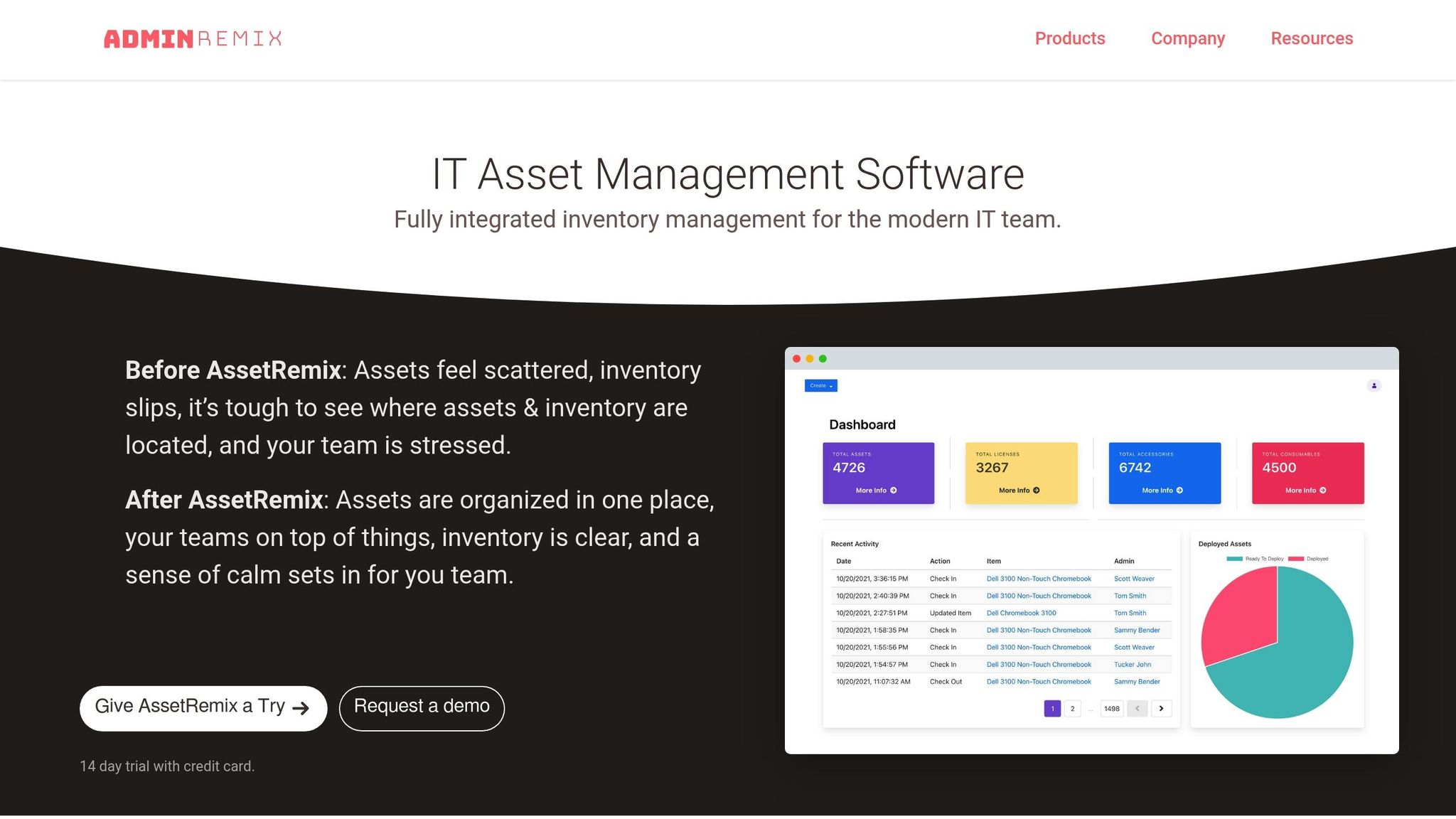
Consolidating all communication channels into a single help desk platform simplifies operations and eliminates the hassle of juggling disconnected systems. For instance, AssetRemix converts inbound emails into trackable tickets with custom fields, allowing IT teams to manage everything from one dashboard.
The platform automates ticket workflows from start to finish. It categorizes incoming queries, assigns them to agents based on predefined rules, and sends status updates to keep everyone informed. Companies that integrate tools like Slack with their help desk systems have reported a 19% drop in mean time to resolve (MTTR) incidents, while automation features can save IT teams up to 40 hours per week. This level of integration enhances efficiency and leverages the cost advantages mentioned earlier. Jim Beasley from Llano ISD sums it up well:
"The system is responsive and efficient, but above all, it is cost-effective".
AssetRemix offers a flat-rate pricing model at $99/month or $999/year, covering unlimited assets, agents, and issues, along with features like SSO and directory sync. This straightforward approach avoids the complexity of per-user or per-ticket pricing structures that many other platforms use. You can also connect your help desk to other systems like BambooHR or MDM tools, enabling automated triage based on employee data and keeping asset records updated in real time.
Training Your Team
After setting up and integrating your channels, proper training ensures your team can use them effectively. Tailored training for each channel is crucial: live chat requires quick, conversational replies, while email allows for more detailed and structured troubleshooting. Start by clearly defining roles: Admins manage global settings, Agents handle assigned tickets, and Supervisors oversee team performance.
Pilot the new workflows with a small group first to identify potential issues and gather feedback before rolling them out across the organization. This phased approach helps avoid widespread confusion and allows you to refine processes based on real-world feedback. When introducing integrated tools, explain their benefits - 47% of digital workers struggle to find the information they need to do their jobs, so showing how centralized channels address this problem can encourage adoption.
Standardized intake forms and templates across all channels can help your team capture critical details upfront, such as urgency, impact, and asset information. These standardized processes not only streamline workflows but also enhance the overall support experience. Finally, create test tickets to verify routing rules, check SLA timers, and ensure notifications reach the right team members.
Best Practices for Each Channel
Response Time Standards and Empathy in Communication
When it comes to response times, expectations differ greatly depending on the channel. For example, live chat users generally expect replies within a minute, while email inquiries are typically addressed within 2 to 4.7 hours. Phone support, on the other hand, demands immediate engagement, which makes sense given that 44.2% of employees still prefer calling IT for urgent issues like password resets. Leading support teams consistently achieve first response times of under 2 hours, far better than the industry average of about 4.7 hours.
Setting clear, priority-based response standards is key to ensuring your team addresses the most critical issues first. For instance, a system-wide outage might require a response within 15–30 minutes, while less urgent requests, like general inquiries, might have a 24-hour window. Hitting a 95% compliance rate with these SLA (Service Level Agreement) targets is vital. To keep metrics accurate, configure your help desk to pause SLA timers when tickets are marked as "waiting for customer".
| Priority Level | Impact/Urgency | Target Response Time |
|---|---|---|
| P1 (Critical) | System-wide outage / Security breach | 15–30 minutes |
| P2 (High) | Department-wide failure | 1 hour |
| P3 (Medium) | Single-user issue with workaround | 4 business hours |
| P4 (Low) | General inquiry / Minor request | 1 business day |
Speed is only part of the equation - tone matters just as much. Freshservice emphasizes:
"Delayed acknowledgment significantly reduces user confidence in IT support, even when eventual resolution quality is high".
Automating immediate acknowledgment emails that include an estimated resolution timeframe and links to relevant knowledge base articles can reassure users that their requests are being taken seriously.
Using Templates and Escalation Protocols
Templates are a time-saver, helping agents avoid repetitive typing while ensuring they include all necessary details for common issues. Whether it's password resets, software installations, or hardware troubleshooting, templates let your team work efficiently while keeping communication professional and reassuring.
Escalation protocols are another critical tool for preventing SLA violations. By setting up automatic notifications for managers or specialized teams when tickets approach their deadlines, you can intervene before issues escalate. Smart triage rules can also prioritize tickets based on keywords or requester roles, ensuring urgent matters get immediate attention.
Proactive updates, like sending a "still investigating" message using templates, can reduce follow-up inquiries and keep users informed during longer resolution times. These practices not only streamline operations but also create a more reliable and transparent support system.
Maintaining Consistency Across Channels and Using Automation
Standardized processes are essential for delivering consistent support across all channels. By centralizing requests into a single ITSM platform, you create a unified system where email, chat, portal, and phone interactions are all logged in one place. This prevents duplicate work and ensures no request slips through the cracks.
Using standardized intake forms across channels ensures that essential data is captured consistently. Applying the "just enough" principle - focusing on the 20% of data that resolves 80% of issues - keeps forms simple and avoids delays caused by overly complicated inputs. Syncro highlights this challenge well:
"If an end user knows they can call or message you directly and get work done faster than using a ticket, they will".
Automation is a game-changer for reducing repetitive tasks. A staggering 58% of IT teams spend over 5 hours weekly on manual tasks, with 90% reporting that this contributes to low morale and higher turnover. Tools like NLP (Natural Language Processing) can auto-categorize free-form emails and chats, while automated rules can close tickets left in "resolved" or "pending user" status for more than 72 hours, keeping the queue manageable. By leveraging advanced automation, organizations can save up to 40 hours of IT productivity each week.
Measuring and Improving Channel Performance
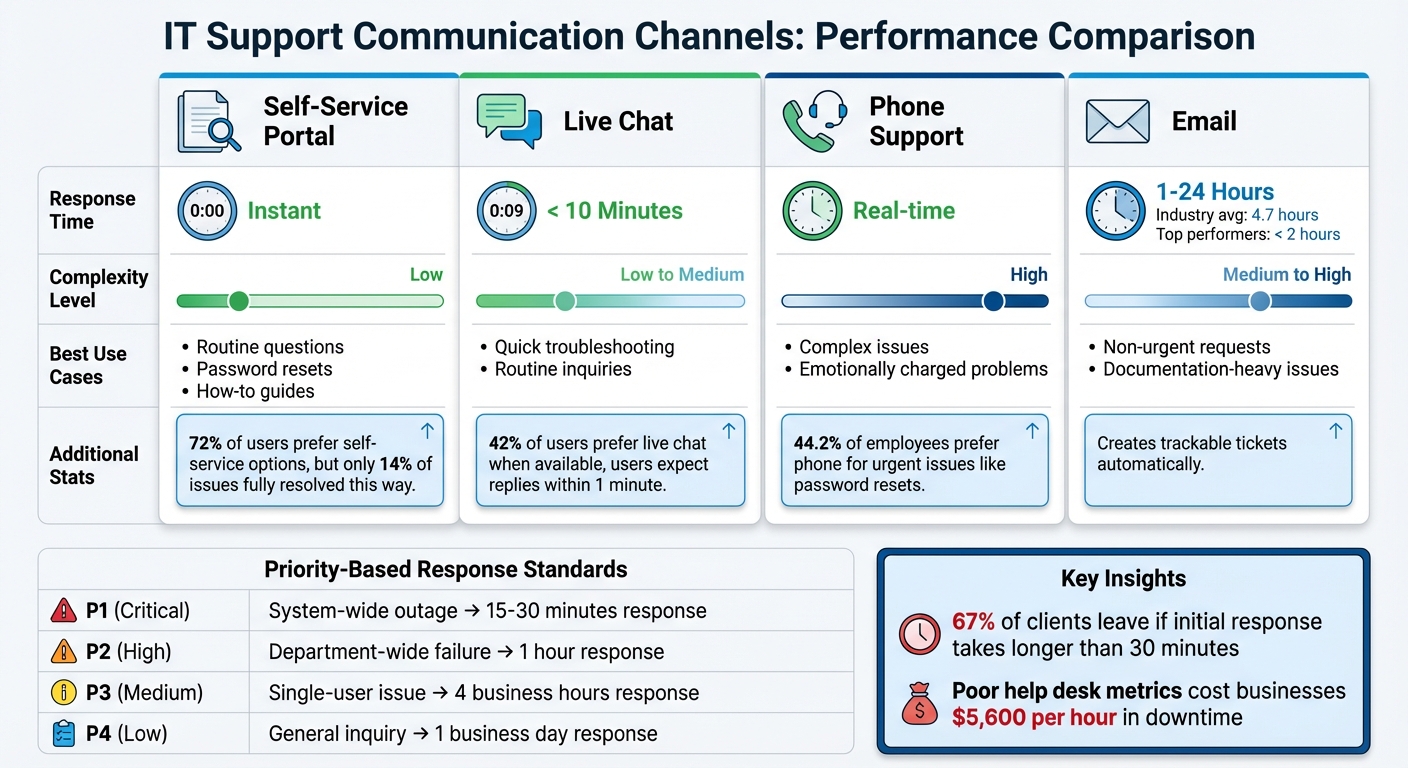
IT Support Communication Channels Comparison: Response Times and Best Use Cases
Key Metrics and User Feedback
Keeping track of your channel performance is crucial for delivering a smooth and integrated experience. Metrics like First Response Time (FRT), First Contact Resolution (FCR), and Time to Resolution (TTR) are critical indicators of how well your team is doing. For example, top-performing IT teams typically respond in under 15 minutes, while 67% of clients might leave if the initial response takes longer than 30 minutes.
To gauge user satisfaction, metrics like Customer Satisfaction Score (CSAT), Net Promoter Score (NPS), and Customer Effort Score (CES) come into play. Industry benchmarks suggest that CSAT scores between 65% and 80% reflect top-tier performance. On the flip side, poor help desk metrics can cost businesses an average of $5,600 per hour in downtime. Even a 1% improvement in FCR can save mid-sized operations $276,000 annually.
Breaking down ticket volume and resolution rates by channel reveals where staffing or training adjustments are needed. For instance, if 44.2% of employees rely on phone support for urgent issues like password resets, ensuring adequate phone coverage during peak hours becomes a priority.
User feedback collection should be simple and engaging. Trigger CSAT surveys right after ticket closure, use emoji ratings at the end of chat sessions, and add "Was this article helpful?" prompts to knowledge base articles. Shortening surveys to a single question can increase participation by 25%. As Lora Cruz from SurveySparrow explains:
"If your CSAT doesn't trigger any changes in process, training, or product, you're not closing the loop".
Automate processes to flag low scores, alert supervisors, and proactively follow up with dissatisfied users. This ensures feedback leads to actionable improvements.
Comparing Communication Channels
Each communication channel has its strengths, and understanding these helps you guide requests effectively while setting clear user expectations.
| Channel | Response Time | Complexity | Best Use Case |
|---|---|---|---|
| Self-Service | Instant | Low | Routine questions, password resets, how-to guides |
| Live Chat | < 10 Minutes | Low to Medium | Quick troubleshooting, routine inquiries |
| Phone | Real-time | High | Complex, emotionally charged issues |
| 1–24 Hours | Medium to High | Non-urgent requests, documentation-heavy issues |
AI tools are reshaping these benchmarks. For example, companies using AI report a Mean Time to Resolution (MTTR) of under 15 hours, compared to over 30 hours for those without AI. Nutanix implemented a Moveworks AI copilot for its 6,000+ employees, achieving a 90% satisfaction rate and resolving thousands of tickets with an average MTTR of just seven seconds. Similarly, Procore introduced "Bolt", an AI copilot in Slack, which now handles over 80% of employee IT requests, achieving a 98% satisfaction rate and eliminating manual password ticket handling.
How to Continuously Improve Your Channels
Sustained improvement starts with regular audits and smart automation. For example, calculate your Self-Service Score by dividing the number of help center users by total ticket requesters. This helps you measure the effectiveness of your portal. If users search but still submit tickets, it’s a sign your knowledge base needs updating. Monthly audits of support tickets can also reveal common terminology or gaps in your content, allowing you to refine articles accordingly.
Although 81% of customers try self-service before contacting support, only 14% of issues are fully resolved this way. Often, the problem lies in the content - 43% of self-service failures happen because users can't find relevant information. Using AI to scan and update your knowledge base can help bridge these gaps.
Resource allocation is another critical area. Review which platforms handle the most requests and adjust staffing or automation efforts accordingly. Instead of focusing solely on individual channels, prioritize backend optimization. As Moveworks emphasizes:
"The most impactful thing that IT support teams can do is shift their focus from improving individual channels to updating backend support systems".
Automating behind-the-scenes processes often has a greater impact on resolution times than tweaking individual channels. For instance, ensure that when users switch from chat to phone, their context and history follow them, so they don’t have to repeat information. Finally, set response and resolution targets based on issue priority, not the communication channel, to maintain consistent service levels across the board.
Conclusion
Choosing the right IT support channels is all about streamlining options to enhance efficiency and minimize frustration. The ITIL4 Practice Guide puts it best:
"It is important to ensure effective integration between the channels; the communications should be omnichannel, not multichannel".
The backbone of this approach lies in backend systems. While 44.2% of employees favor phone support, resolution times remain consistent across channels thanks to shared automation processes. Automating routine tasks, like password resets and account unlocks, frees up resources and allows users to select their preferred channels for other requests. Organizations that integrate effective communication tools report a 25% boost in employee productivity.
Strong backend integration needs to be matched with operational flexibility. Service Level Agreements (SLAs) should focus on issue priority rather than the submission channel, and teams should be trained to tailor their communication style based on the channel being used.
Since only 14% of issues are fully resolved through self-service, it's worth investing in a searchable knowledge base and regularly auditing support tickets to identify and address content gaps. Tools like AssetRemix can simplify this process by merging IT asset management with help desk support, giving your team a centralized hub for all interactions.
The overarching goal is clear: provide employees with the help they need, when they need it, through their preferred channels - all while maintaining full visibility and control over your support operations.
FAQs
How many support channels should we offer?
The right number of support channels varies depending on your business goals and what your customers prefer. Typically, having 3 to 5 options - like email, live chat, phone, SMS, and onsite support - provides well-rounded IT assistance. Prioritize channels that match your team's strengths while meeting customer expectations to maintain a smooth and efficient support experience.
How do we set SLAs by priority across all channels?
To establish SLAs by priority across all channels, start by creating SLA policies that include clear response and resolution targets for each ticket priority level - such as Urgent, High, Medium, and Low. Set specific trigger conditions for each priority to define when the SLA clock starts and stops. Assign realistic target times that align with the urgency of the issue. Once configured, save and implement these policies to maintain consistent SLA management across all channels. This approach ensures your team can meet service expectations efficiently and reliably.
What’s the best way to unify email, chat, phone, and portal into one ticket?
An omnichannel help desk system is the best solution for bringing together email, chat, phone, and portal interactions into one streamlined ticketing system. These platforms combine all communication channels into a single, unified interface. This setup allows for smooth ticket handling and ensures consistent responses, no matter how customers reach out. The result? Improved efficiency and a smoother support experience for both teams and customers.