
Ultimate Guide to IT Documentation Systems
IT documentation systems simplify your team's workflow by centralizing technical knowledge, reducing onboarding time, and ensuring critical information is always accessible. Here's what you need to know:
- What They Do: Serve as a single source for storing network diagrams, server setups, licenses, and step-by-step instructions.
- Why You Need Them: Prevent knowledge loss (70% of IT knowledge is lost when employees leave) and save time (new hires spend 200 hours finding missing info).
- Core Features: User-friendly organization, support for various content formats (quick references, runbooks, deep documentation), and integrations with tools like Google Workspace.
- Key Benefits: Cut onboarding time by up to 50% and resolve issues 70% faster.
- Choosing the Right System: Focus on budget, features like search and asset management, and integration with existing tools.
- Keeping Documentation Useful: Regular updates, clear ownership, and integration with IT asset management ensure accuracy and relevance.
An effective IT documentation system boosts productivity, reduces downtime, and preserves institutional knowledge.
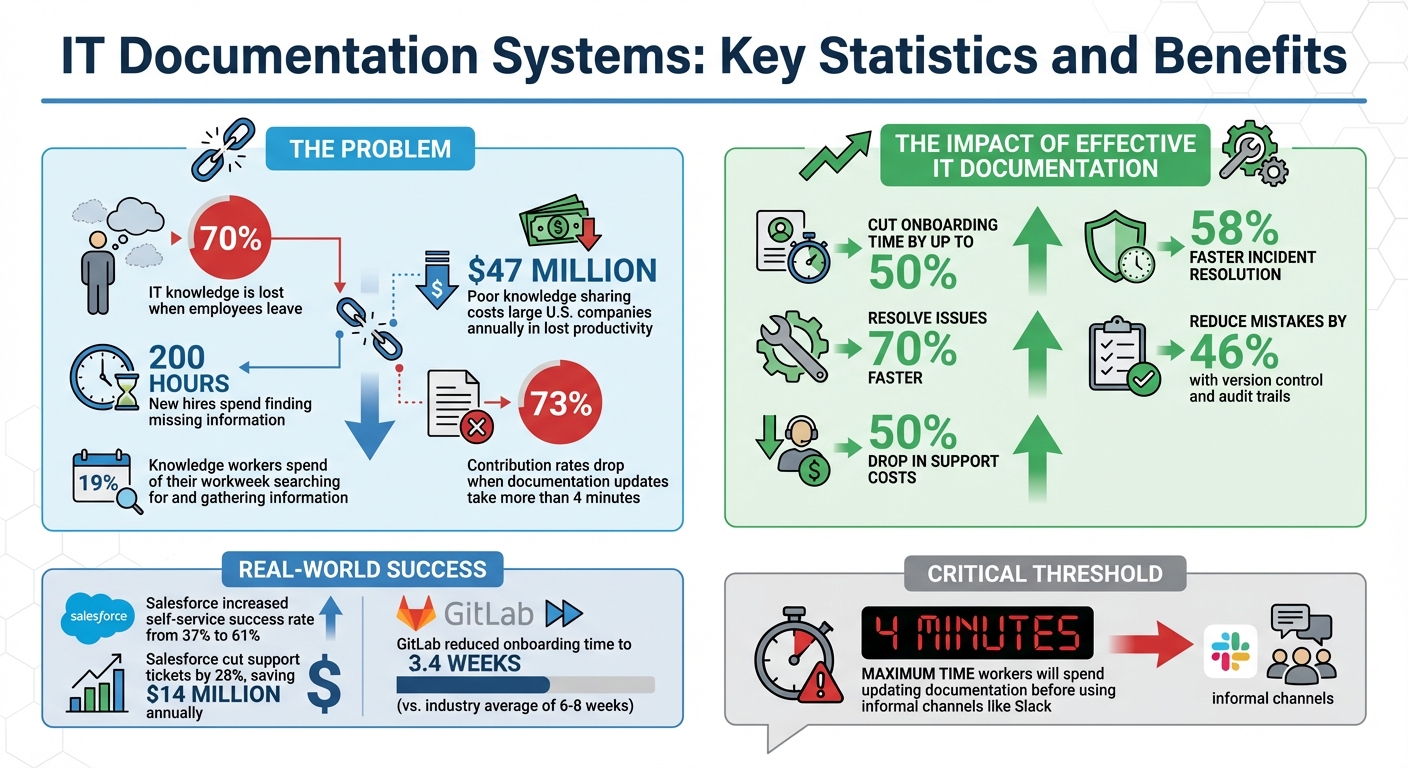
IT Documentation Systems: Key Statistics and Benefits
How to Create Effective IT Documentation
sbb-itb-c68f633
Core Features of IT Documentation Systems
The right features can make your documentation system a reliable go-to resource. Organizations with well-developed knowledge management systems report a 50% drop in support costs and resolve issues 70% faster compared to those without structured systems. These features help IT teams centralize knowledge and simplify their workflows.
User-Focused Organization
Your documentation should be structured the way people naturally search for information. The Inverted Pyramid Model works particularly well - start with broad, general information and narrow down to specific technical details. This mirrors how IT professionals approach problem-solving during incidents.
Keep navigation straightforward. Aim for 5–7 top-level categories and limit the depth to 3–4 levels. Overcomplicated hierarchies can confuse users. Advanced tools also offer dependency mapping, which highlights relationships between components like applications, databases, and servers. This feature is especially useful during outages, helping teams quickly identify and address cascading failures.
A strong search function is essential for efficiency. Modern systems support natural language queries, recognize synonyms, and even correct typos. When troubleshooting in the middle of the night, your team shouldn’t have to remember exact terminology from months ago.
This user-friendly organization lays the groundwork for supporting diverse content formats.
Multiple Content Format Support
Different users need different types of documentation. New administrators benefit from step-by-step guides with visuals, while daily users prefer quick tips and shortcuts. On the other hand, IT teams often require detailed technical references, such as API documentation or security specs.
A three-tiered content structure works best:
- Quick References: For instant answers, like VPN setup instructions or contact details.
- Runbooks: For precise, repeatable tasks, such as server restarts or onboarding steps.
- Deep Documentation: For in-depth information, like system architecture overviews.
Visual aids like screenshots, diagrams, and short videos make complex instructions easier to understand. For example, a network diagram can often explain a firewall configuration far better than lengthy paragraphs.
These content formats can be seamlessly integrated with external tools while maintaining strong security measures.
Integration and Security Options
Integrating your documentation system with other tools reduces the "contribution friction threshold" - the estimated 4 minutes workers are willing to spend updating documentation before resorting to informal communication like Slack. Modern platforms can connect with IT Asset Management (ITAM) tools, offering real-time updates on hardware inventories, software licenses, and system dependencies.
For teams using Google Workspace, tools like AdminRemix's Chromebook Getter and User Getter enable IT teams to manage device and user metadata directly in Google Sheets. These integrations ensure your documentation stays aligned with your actual infrastructure, minimizing manual updates.
Security is non-negotiable. Role-Based Access Control (RBAC) ensures sensitive data, like firewall rules, is only accessible to authorized personnel. Other critical features include 256-bit SSL encryption, Single Sign-On (SSO), and Two-Factor Authentication (2FA). Integrated password vaults further enhance security by keeping administrative credentials safely stored alongside related assets.
How to Choose an IT Documentation System
This guide expands on the idea of using centralized documentation systems to help your team maintain clarity and quick access to crucial information.
What to Look for When Selecting a System
Start by setting a clear budget. Decide whether a monthly subscription (around $99/month) or an annual plan (around $999/year) fits your needs. Knowing your spending limits early on can help you quickly narrow down your choices.
Work with your IT team to identify the features that matter most. Core functionalities to consider include asset lifecycle management, integrated help desk tools, and real-time Google Workspace directory sync. For example, asset lifecycle management helps track devices from purchase to disposal, while integrated help desk tools streamline email ticketing. Role-based access controls are also crucial for protecting sensitive information, and custom fields allow you to capture unique device details.
Ensure the system integrates well with your existing tools. Whether you're using Google Workspace, Chromebooks, JAMF for mobile device management, or Zapier for workflow automation, compatibility is key. AssetRemix, for instance, is trusted by over 350 IT teams for its seamless integration.
Think carefully about the deployment model. Cloud-based systems are easier to set up, have lower upfront costs, and include vendor-managed updates. They’re accessible from anywhere via a browser and can scale easily as your needs grow. On-premise systems, while more customizable, require significant time and resources for server setup and ongoing maintenance.
When testing a system, check how well it handles bulk operations like creating, editing, and checking out assets. AssetRemix offers a free trial for up to 49 devices, giving you a chance to evaluate how it performs in real-world scenarios before making a commitment.
With these criteria in mind, let’s look at how AdminRemix can simplify IT documentation.
How AdminRemix Supports IT Documentation
AdminRemix offers tools designed to make IT documentation and daily operations more efficient. Its AssetRemix platform centralizes IT asset management and integrates help desk features, keeping hardware inventories, software licenses, and support tickets in one place. This aligns perfectly with the goal of centralizing IT workflows and documentation.
For teams managing Google Workspace, Chromebook Getter and User Getter allow bulk management of device and user metadata directly through Google Sheets. These tools reduce the manual work needed to update documentation for large Chromebook fleets or user accounts, ensuring records stay aligned with your actual setup.
The Meet Enhancement Suite adds over 40 productivity features to Google Meet, such as auto-recording, muting all participants, and removing all participants. These features are especially helpful for remote IT teams during troubleshooting sessions or training calls.
"Overall AssetRemix has made my life a lot easier, it has turned our slothful device rollouts into a quick and seamless process."
- Arrington Douglas, Malakoff ISD
Once you understand the product's capabilities, compare pricing and features to determine its overall value.
Evaluating Pricing and Features
A side-by-side comparison of pricing models and features can help you assess long-term value beyond just the monthly cost.
| Evaluation Factor | Key Considerations | Why It Matters |
|---|---|---|
| Pricing Model | Per user vs. per device vs. flat rate | Per-device pricing (like AssetRemix) ties costs to the size of your IT estate. |
| Hidden Costs | Setup fees, user minimums, add-ons | Some platforms charge extra for help desk features or require a user minimum. |
| Scalability | Unlimited assets and flexible pricing | Allows for growth without unexpected costs or manual overhead. |
| Security | SSO, role-based controls, 256-bit SSL encryption | Protects sensitive data and ensures accountability. |
Factor in operational costs as well. Self-hosted systems may have lower fees but demand more internal maintenance. Cloud-based systems shift this responsibility to the vendor, freeing your team to focus on more strategic tasks.
Minimize friction in the documentation process. Studies show that knowledge workers spend about 19% of their workweek searching for and gathering information. If documentation updates take more than 4 minutes, contribution rates can drop by 73%. Look for systems with streamlined workflows, like real-time CSV imports, webhooks, or directory sync, to keep documentation up-to-date without adding unnecessary admin work.
"The system is responsive and efficient, but above all, it is cost-effective."
- Jim Beasley, Llano ISD
Lastly, prioritize systems with broad integration capabilities. Ensure the platform connects seamlessly with your help desk and asset management tools. AssetRemix, for example, integrates natively with Google Workspace and supports tools like Lansweeper for asset discovery. This reduces data silos and minimizes the need for manual updates.
How to Structure IT Documentation
This section explains how to design IT documentation that works seamlessly with a centralized system and provides immediate value to your team.
Organizing Content by User Workflows
Organize your documentation around user tasks rather than departmental divisions. For example, instead of creating folders like "Engineering Docs" or "Network Team Resources", group content based on tasks such as "Getting Started", "Troubleshooting", or "How-To Guides." This method aligns with user intent, making it easier and faster for them to find what they need.
The Divio Framework categorizes documentation into four types: Tutorials, How-to Guides, Reference, and Explanation. Each type serves a specific purpose, helping users quickly locate the right resource for their situation.
Salesforce provides an excellent example of the benefits of this approach. Between 2018 and 2020, the company consolidated its scattered documentation portals into a single platform at help.salesforce.com. Under the leadership of Sarah O'Keefe, Salesforce conducted card-sorting studies with 420 customers, shifting from a product-feature-based structure to one organized by user roles and business outcomes. This change increased their documentation self-service success rate from 37% to 61% and cut support ticket volumes for documentation-resolvable issues by 28%, saving an estimated $14 million annually.
When naming documents, use action-oriented titles or consistent prefixes like "Runbook: Restarting Auth Service" or "How to: Request VPN Access." This approach helps users quickly understand the document's purpose in search results, improving accessibility and relevance.
Finally, ensure your documentation has a clear page hierarchy so users can access critical information with just a few clicks.
Creating Clear Page Hierarchies
Keep your documentation structure simple and shallow, with no more than two to three levels. If users need to click more than three times to find a document, they’re likely to overlook it.
A straightforward hierarchy might include top-level categories like "Onboarding" or "Technical Docs", second-level topics such as "API Docs" or "Security Policies", and occasionally a third level for detailed content like specific API endpoints.
Use consistent headings (H1–H4) within documents to create a logical internal structure. This not only helps users skim through the content but also enables systems to generate "On this page" navigation menus automatically.
"If a document is 5 clicks away, it might as well be invisible." – Docuscry
Offer multiple navigation options to accommodate different user preferences. Some users prefer browsing through hierarchical folders, others rely on tags to filter content, and many jump straight to search.
Adding Visuals and Navigation Tools
Incorporate visual elements and intuitive navigation to improve usability beyond text-based organization.
Use system architecture diagrams and network topology charts to simplify complex IT infrastructure. Flowcharts are ideal for illustrating troubleshooting steps or decision-making workflows, while tables are perfect for presenting structured data like configuration parameters or port mappings.
Screenshots can be helpful in runbooks and troubleshooting guides but should be used sparingly. As user interfaces change, screenshots can quickly become outdated. Instead, rely on text descriptions that can be indexed by search engines, reserving screenshots for cases where visual confirmation is essential.
Internal links between related documents create a network of knowledge that helps users find relevant information without manually navigating folder structures. Always include a "Last Updated" timestamp and the document owner's name at the top of each page to ensure users trust the content's accuracy and relevance.
Keeping IT Documentation Current and Scalable
When documentation becomes outdated, it wastes time and hampers efficiency. Even the best-organized systems lose their value if the information they provide is inaccurate or stale.
Setting Up Regular Update Processes
One way to ensure documentation stays relevant is by embedding updates into your change processes. Take Stripe, for example - they require every API change to include a documentation update in the same pull request. This approach minimizes the risk of documentation drifting out of sync with actual changes.
Assigning ownership of specific sections can further improve accuracy. GitLab, for instance, reduced onboarding time for new employees to 3.4 weeks - far below the industry average of 6–8 weeks - by assigning clear roles for updating its handbook.
Adding freshness indicators, like "last reviewed" or "last updated" dates, makes it easy for users to gauge a page's reliability. These timestamps can also trigger automated alerts for periodic reviews. High-change documents, such as onboarding guides, might need monthly reviews, while others may only require quarterly or annual audits.
Simplifying the update process is another key factor. Systems that take longer than 4 minutes to update documentation see 73% lower contribution rates compared to faster ones. Features like an "edit this page" button allow for quick updates without complicated approval workflows.
Streamlined processes work best when paired with effective team collaboration.
Enabling Team Collaboration
Real-time collaboration tools with editing and commenting features help teams avoid duplicate efforts and share the workload. Version control and audit trails are also essential, making it easier to track changes and roll back errors - reducing mistakes by 46%.
Templates for common documents, such as runbooks, SOPs, and incident reports, can standardize content and make the process easier for contributors. Encouraging a "link-first" culture - where repeated questions are answered with links to existing documentation - reinforces the idea of documentation as the primary source of truth and reduces time spent searching for answers.
While collaboration and regular updates are crucial, connecting documentation with IT asset management ensures it aligns with current infrastructure.
Connecting Documentation with IT Asset Management
Integrating your documentation system with IT asset management (ITAM) tools creates a direct link between your infrastructure and the procedures needed to maintain it. AssetRemix, for instance, provides full visibility into the asset lifecycle - from purchase to disposal - ensuring documentation reflects the current state of hardware and software.
This connection also allows you to map dependencies between assets, such as identifying which applications rely on specific databases or servers. This kind of mapping is particularly helpful when troubleshooting in complex, expanding environments.
AssetRemix's Data Merge feature eliminates duplicate information across systems, keeping details like serial numbers, warranty dates, and user assignments synchronized between your ITAM platform and documentation. By integrating these tools, you can maintain a centralized knowledge base that scales with your IT environment, ensuring your team has access to accurate, up-to-date information.
Conclusion: Building Effective IT Documentation
Creating strong IT documentation comes down to picking the right platform, organizing content effectively, and ensuring it stays accurate.
When choosing a platform, look for one that integrates smoothly with your current IT tools and offers search features that go beyond basic keywords to understand user intent. Why? Knowledge workers spend about 19% of their workweek just searching for information. A good platform reduces that wasted time. Whether you opt for a simple static wiki or an advanced AI-driven solution depends on your team's ability to handle manual updates and, of course, your budget. Keep in mind that poor knowledge sharing costs large U.S. companies an estimated $47 million annually in lost productivity. This underscores the value of a system that fits both your technical needs and operational goals.
But a good platform is only part of the equation - how you organize your content is just as important. Use clear frameworks to separate different types of documentation, like tutorials, runbooks, and reference materials. Avoid overly complex hierarchies and stick to consistent naming conventions so your team can find what they need without frustration. Well-structured documentation can lead to 58% faster incident resolution. Once your content is properly organized, the next challenge is keeping it up-to-date in an ever-changing environment.
Maintaining accuracy is a constant effort. A streamlined structure and clear naming system make updates easier, but it’s also crucial to assign ownership for each document. Incorporate updates into your change management processes, and use tools like freshness indicators to flag outdated content. Tying your documentation to IT asset management ensures it reflects your current infrastructure.
Keeping your documentation fresh and relevant pays off in big ways - speeding up onboarding, cutting support costs, and safeguarding institutional knowledge. Businesses that prioritize documentation as a core operational practice, rather than an afterthought, are better positioned to grow efficiently and maintain stability when team members leave. By embracing these practices, your IT team can boost productivity and ensure long-term success.
FAQs
How do I migrate our existing docs into one system fast?
To move your documentation into a single system quickly, rely on tools built for bulk imports and automation. These tools make it easy to batch upload files, such as PDFs and Word documents, while keeping their structure intact - saving you from tedious manual adjustments. On top of that, using automation and APIs can help pull data directly from your existing tech stack, making the migration process smoother and minimizing any interruptions.
What should we document first for quick wins?
To get results fast, begin by documenting essential, frequently accessed information. Start with standard operating procedures (SOPs), incident response protocols, and important system configurations. Focus on tasks your team handles regularly, troubleshooting steps, and critical system details they rely on every day. Make it a habit to regularly review and update this documentation so it stays current and continues to be a reliable tool for boosting productivity and onboarding new team members.
How do we keep docs updated without adding extra work?
To keep your documentation current with minimal hassle, leverage automation and establish clear responsibilities along with defined update triggers. For instance, using tools like Google Sheets with automation can significantly cut down on manual tasks. Additionally, systems that monitor changes and notify the appropriate owners help ensure your content remains up-to-date. By combining a well-structured process with automated updates and clear accountability, you can avoid outdated documentation and make maintenance much smoother.