
Ultimate Guide to IT Asset Lifecycle Management
IT Asset Lifecycle Management (ITAM) is a structured approach to managing technology assets - from acquisition to disposal. It helps organizations reduce costs, ensure compliance, and maximize the value of their investments. With ITAM, you can track inventory, enforce security policies, manage software licenses, and monitor cloud subscriptions efficiently.
Key Takeaways:
- Cost Savings: Organizations with ITAM can save 10%–20% annually.
- Data Breach Costs: The average global cost of a breach was $4.88 million in 2024, with remote work contributing to 63% of incidents.
- Cloud-First Trend: 85% of businesses are expected to adopt cloud-first strategies by 2025.
ITAM Lifecycle Stages:
- Planning: Assess needs, set KPIs, and align with business goals.
- Procurement: Select vendors and log asset details.
- Deployment: Configure devices, train users, and integrate tools.
- Operation: Monitor performance and ensure compliance.
- Maintenance: Perform updates, resolve issues, and track warranties.
- Retirement: Securely dispose of assets and document the process.
Tools to Streamline ITAM:
- AssetRemix: Centralizes asset data for tracking and reporting.
- Chromebook Getter: Simplifies Chromebook management via bulk updates.
- User Getter: Automates Google Workspace user account management.
By focusing on measurable metrics like asset uptime, cost per asset, and utilization rates, ITAM empowers organizations to make informed decisions, avoid waste, and enhance productivity. Tools like AdminRemix simplify the process, shifting IT efforts from manual tasks to strategic management.
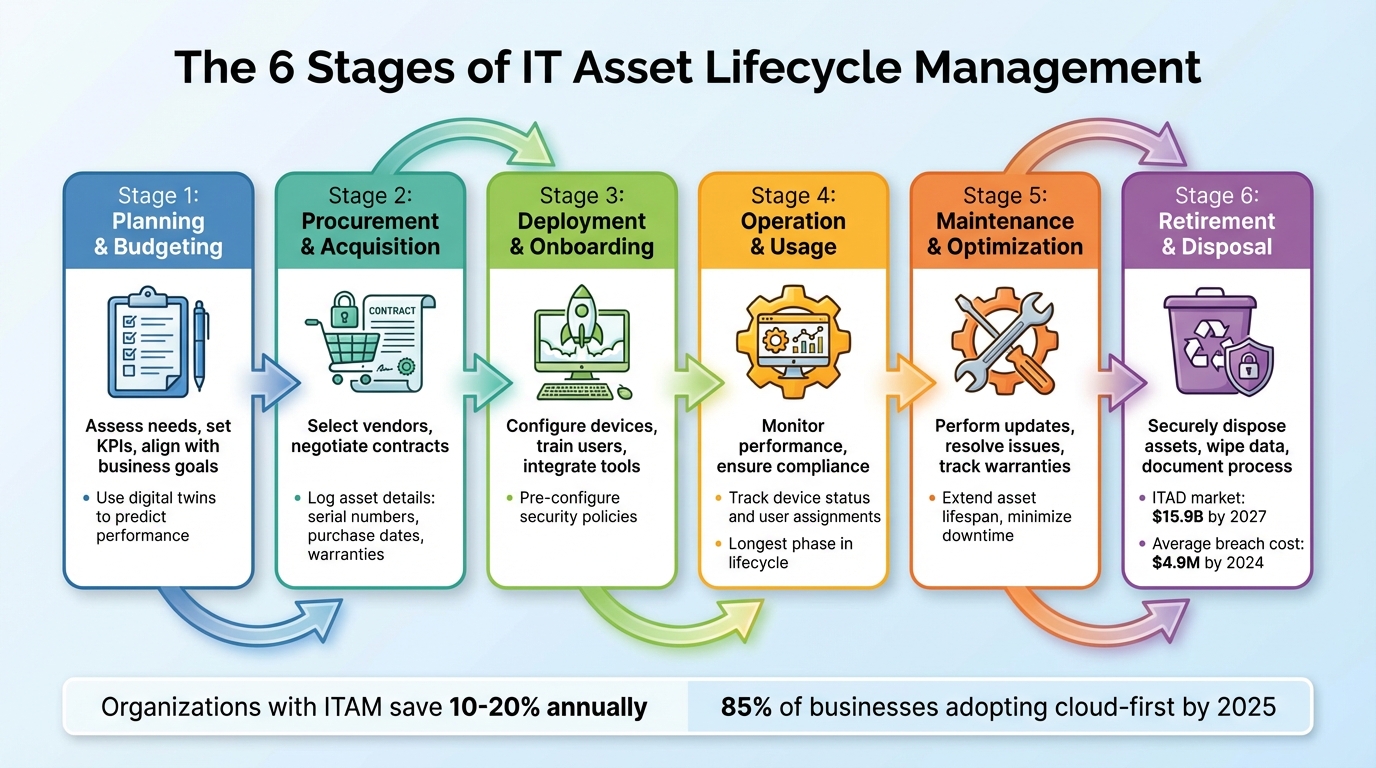
6 Stages of IT Asset Lifecycle Management Process
IT Asset Lifecycle Management (ITALM) Course
The 6 Stages of IT Asset Lifecycle Management
Managing IT assets effectively means guiding them through a structured lifecycle - from the initial planning phase to their final disposal. Each stage in this journey plays a role in maximizing value, cutting waste, and ensuring compliance. Let’s break down the six stages of IT asset lifecycle management, starting with the critical planning phase.
Planning and Budgeting
This is where it all begins. Before rushing into purchases, it's crucial to evaluate whether your organization actually needs new assets or if current resources are being underutilized. A thorough review of your inventory, growth forecasts, and alignment with business goals sets the foundation for smart decision-making. Engaging stakeholders from finance and IT early on ensures everyone is on the same page. Defining key performance indicators (KPIs) at this stage helps track success and identify areas for improvement later. Some organizations even use digital twins - virtual models of assets - to predict performance and functionality before committing to an investment.
Procurement and Acquisition
Once the planning is complete and budgets are approved, it’s time to source the assets. This involves evaluating vendors, negotiating contracts, and collecting essential details like serial numbers, purchase dates, warranties, and ownership records. Tools like AssetRemix can simplify this process by automatically logging asset data as soon as items are received. This creates a centralized record that tracks each asset throughout its lifecycle.
Deployment and Onboarding
Deploying new assets goes beyond just handing them out. Pre-configured tools, such as Google Workspace settings and security policies, can make the process smoother. With User Getter, IT teams can automate user account setups and ensure devices are ready to go right out of the box. Integrating IT asset management (ITAM) software with help desks, network tools, and device managers centralizes operations and streamlines onboarding. Don’t overlook user training - it’s critical for ensuring staff can use the new assets effectively while maintaining security and productivity.
Operation and Usage
This stage is where assets are actively used in daily operations, often for the longest period in their lifecycle. Regular performance monitoring ensures devices are meeting expectations and staying compliant with security policies. For Chromebook environments, tools like Chromebook Getter can track device status, last sync dates, and user assignments, eliminating the need for manual spreadsheets. Ongoing compliance checks during this phase help catch potential issues early, preventing them from escalating into costly security breaches or regulatory violations.
Maintenance and Optimization
Keeping assets in top shape requires regular inspections, timely updates, and quick resolution of any issues. This stage focuses on extending the lifespan of devices and avoiding unnecessary downtime. AssetRemix can assist by logging maintenance requests, tracking warranty statuses, and sending alerts when devices require attention. Proactive maintenance not only ensures smooth operations but also helps identify assets nearing the end of their lifecycle, allowing for better planning when replacements are needed.
Retirement and Disposal
As assets reach the end of their useful life, secure and compliant disposal becomes a priority. The IT asset disposition (ITAD) market is expected to grow to $15.9 billion by 2027, highlighting the importance of proper retirement practices. Mishandling this stage can lead to data breaches, with average costs projected to hit $4.9 million by 2024. A formal retirement policy is essential, detailing decommissioning steps, data wiping procedures, and assigned responsibilities. For sensitive data, NIST-approved methods or physical destruction (like shredding) are recommended. Certified ITAD providers can ensure compliance and provide certificates of data destruction. AssetRemix makes this process easier by generating final reports on retired assets, documenting when and how data was handled. Updating asset statuses to "Retired" and later to "Disposed" ensures accurate records and a clear audit trail.
How to Optimize IT Asset Lifecycle Management with AdminRemix
AdminRemix takes IT asset lifecycle management to the next level by offering tools designed specifically for today’s cloud-driven workplaces. These tools simplify IT operations by automating tasks like data entry and consolidating asset information, making it easier to make smart decisions at every stage. Let’s explore how AdminRemix’s key tools - AssetRemix, Chromebook Getter, and User Getter - play a role in optimizing lifecycle management.
Using AssetRemix for Lifecycle Tracking
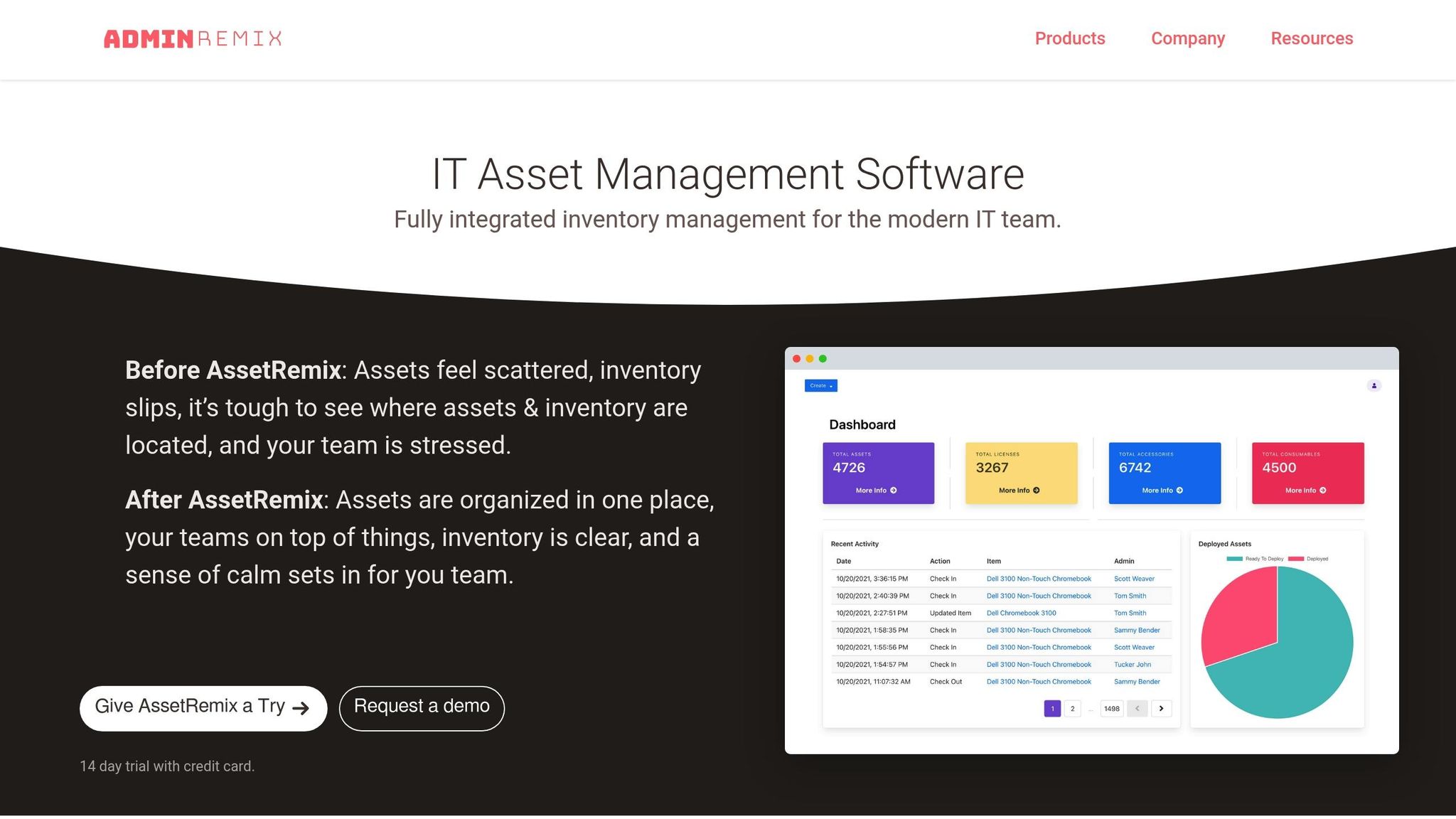
AssetRemix aligns with all stages of the IT asset lifecycle, offering a complete solution for tracking assets from procurement to retirement. It centralizes asset data, including purchase records and maintenance logs, in a single platform, giving teams full visibility over their IT inventory. By integrating with your help desk, AssetRemix provides instant access to critical details like warranty status, maintenance schedules, and asset assignments.
Features like bulk import/export make it easy to migrate data from your existing systems, while third-party integrations ensure a unified view of your assets. At $99/month or $999/year, the plan includes unlimited assets, help desk agents, and support issues, making it scalable for teams of any size.
Managing Chromebooks with Chromebook Getter
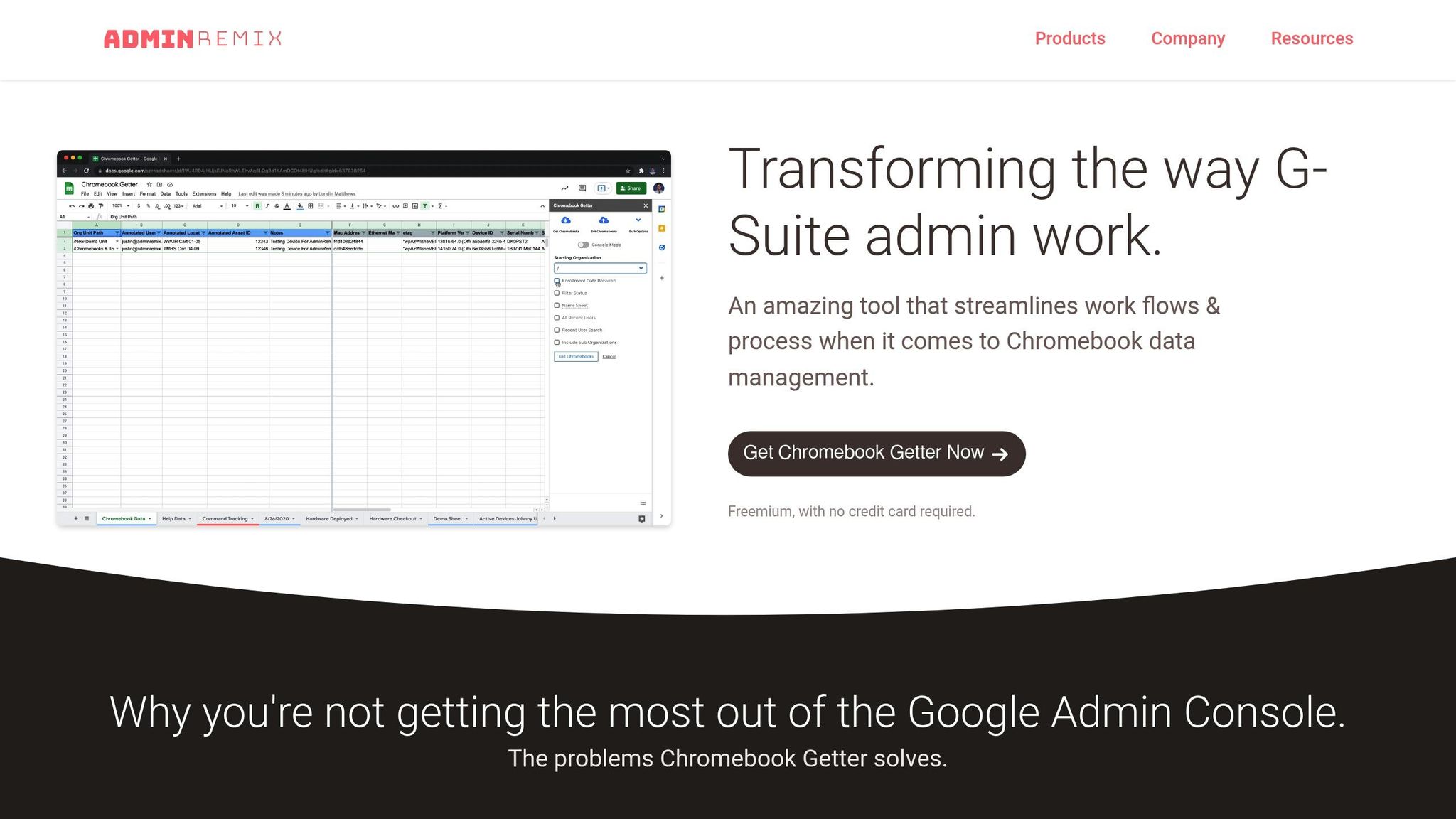
Chromebook Getter streamlines Chromebook fleet management by connecting Google Sheets directly to the Google Admin Console. Instead of updating device records one at a time, you can export your fleet’s metadata to a spreadsheet, make bulk updates - such as changing location notes or assigned users - and upload the changes in just minutes. This eliminates the need for manual barcode scanning to track inventory.
For $20.75/month or $249/year, the premium version adds extra features like Auto-Update Expiration (AUE) reports to help plan device refresh cycles. It also supports bulk actions such as deprovisioning devices, power washing to clear user data, and rebooting Chromebooks in kiosk mode.
"This is the best tool to help you manage Chromebooks all in one place." - Lorene Cowan, Technology Office Manager.
Chromebook Getter has quickly become a go-to replacement for the discontinued Chromebook Inventory app, with users praising its ability to download metadata across organizational units and its expanded functionality.
Managing User Data with User Getter
User Getter brings the same bulk management efficiency to Google Workspace user accounts. By exporting user metadata into Google Sheets, IT teams can streamline processes like onboarding and updating user information. This approach eliminates the need to repeatedly navigate the Admin Console, saving time while ensuring records remain accurate and up-to-date.
This tool complements device management by automating account setup and maintaining user data throughout operations. Together, User Getter and Chromebook Getter provide IT teams with a comprehensive solution for managing both devices and user accounts, making IT asset management more efficient and effective.
sbb-itb-c68f633
Tracking Performance Metrics and Improving Over Time
Managing IT assets effectively means keeping a close eye on key performance metrics. These metrics, or key performance indicators (KPIs), offer measurable insights into how well your organization handles and utilizes its IT assets. They can reveal critical details about return on investment, performance, and compliance, ensuring that decisions are informed rather than based on guesswork.
Some of the most useful KPIs to track include asset uptime, cost per asset (USD), and utilization rates. Monitoring these figures allows organizations to fine-tune costs, reduce risks, and make decisions backed by data.
Tools like AdminRemix come in handy here, offering real-time analytics on asset usage, performance, and costs. By centralizing asset information with solutions such as AssetRemix, Chromebook Getter, and User Getter, you can easily export metadata into Google Sheets for deeper analysis. This streamlined approach makes it simple to identify underutilized assets and reassign them for better efficiency.
Regularly reviewing this data is key to continuous improvement. For example, if you notice certain devices are underused, you can reallocate them to team members who need them more. Similarly, when older devices start costing more to maintain, the data can support decisions to replace them. With AdminRemix's automated tools keeping your asset database up to date, your team can shift focus from manual tasks to strategic planning.
It's a good idea to set baseline KPIs and review them monthly or quarterly. Over time, this process builds a clear understanding of which assets provide the most value and highlights areas where costs can be trimmed or productivity improved. This ongoing cycle of tracking and refining transforms IT asset management from a reactive chore into a strategic advantage for your organization.
Conclusion
Managing IT assets effectively goes far beyond just keeping tabs on equipment. It lays the groundwork for smarter decision-making that can boost both your bottom line and your team’s productivity. By adopting a structured approach, you gain full visibility and control over hardware, software, and cloud resources. This means you can spot unused software licenses or idle cloud instances before they start draining your budget unnecessarily. The payoff? Reduced costs, better resource allocation, and greater returns on your technology investments. It’s a win-win scenario that naturally highlights the value of automation in simplifying management.
AdminRemix takes the guesswork out of IT asset management with tools like AssetRemix, Chromebook Getter, and User Getter. By centralizing asset data, these tools free up your IT team to focus on high-impact, strategic projects rather than time-consuming manual tasks. Automation like this underscores the importance of keeping IT asset management flexible and forward-thinking.
It’s important to remember that IT asset management isn’t a “set it and forget it” task - it’s an ongoing process. As your assets and business goals evolve, so must your strategies. Regularly tracking performance metrics, scheduling proactive maintenance, and comparing results against benchmarks are key to staying ahead of potential issues rather than scrambling to fix them after the fact.
FAQs
What advantages does IT Asset Lifecycle Management bring to organizations?
Implementing IT Asset Lifecycle Management transforms the way organizations handle their technology resources. By carefully managing each phase of an asset's journey - from purchase to eventual retirement - it ensures assets are utilized efficiently, performance is optimized, and costs are kept under control.
Some standout advantages include proactive maintenance, which helps avoid unexpected downtime, and stronger security measures to safeguard sensitive information. It also ensures compliance with industry regulations, streamlining operations and enabling smarter, data-driven decisions. Ultimately, this approach helps businesses get the most value out of their IT investments, making it a must-have strategy for today’s cloud-driven workplaces.
How does IT asset management help lower the costs of data breaches?
IT asset management (ITAM) plays a key role in cutting down data breach costs by enabling real-time tracking and monitoring of IT assets. This capability allows organizations to pinpoint and address security vulnerabilities swiftly, reducing the chances of unauthorized access.
Keeping an accurate, up-to-date inventory and ensuring adherence to security standards are central to ITAM. These practices help prevent expensive incidents like data breaches or leaks and make it easier to respond effectively if a problem does occur. By taking these steps, businesses can greatly reduce both the financial strain and operational disruptions caused by security threats.
What are some effective tools to streamline IT asset management?
AdminRemix offers cloud-based tools that make managing IT assets much easier. Their platform includes features like asset discovery, lifecycle tracking, real-time inventory updates, and automated reporting.
With these tools, organizations can streamline their IT operations by reducing manual effort, improving visibility into their assets, and enhancing overall efficiency. Designed for today’s cloud-focused workplaces, AdminRemix works seamlessly with setups like Google Workspace and Chromebook environments, ensuring smooth asset management tailored to modern needs.