Ultimate Guide to Chromebook Recycling
If I had to sum it up in one line: recycle Chromebooks with a written process, not a last-minute pickup.
For me, the article comes down to five actions: track AUE early, build a clean device list, deprovision and wipe each Chromebook, use a certified recycler, and keep records for every handoff. That matters because Chromebooks may still hold local files, cookies, screenshots, and cached data. And once devices pass Auto Update Expiration (AUE), they stop getting ChromeOS security updates.
A few points stand out right away:
- Flag devices 12–18 months before AUE
- Do not let retired units sit untracked in storage
- Powerwash is often enough for cloud-first fleets, but higher-risk data may need NIST SP 800-88 Rev. 2 methods
- Use signed manifests, serial-number logs, and certificates of destruction or erasure
- Keep batteries separate and ship them through approved battery recycling channels
- Reuse, parts harvesting, and recycling should each have a clear path
One stat in the piece helps frame the issue: the U.S. EPA noted that only about 25% of electronics were collected for recycling in the years it studied. So this is not just about getting old laptops out the door. It is about data control, audit records, and keeping device retirement from turning into a storage-room problem.
What I like most is that the article does not treat recycling as a single event. It treats it as a repeatable lifecycle process: decide when a Chromebook leaves service, record its condition, remove it from Google Admin, wipe it, document the chain of custody, and then sort it into reuse, parts, or recycling.
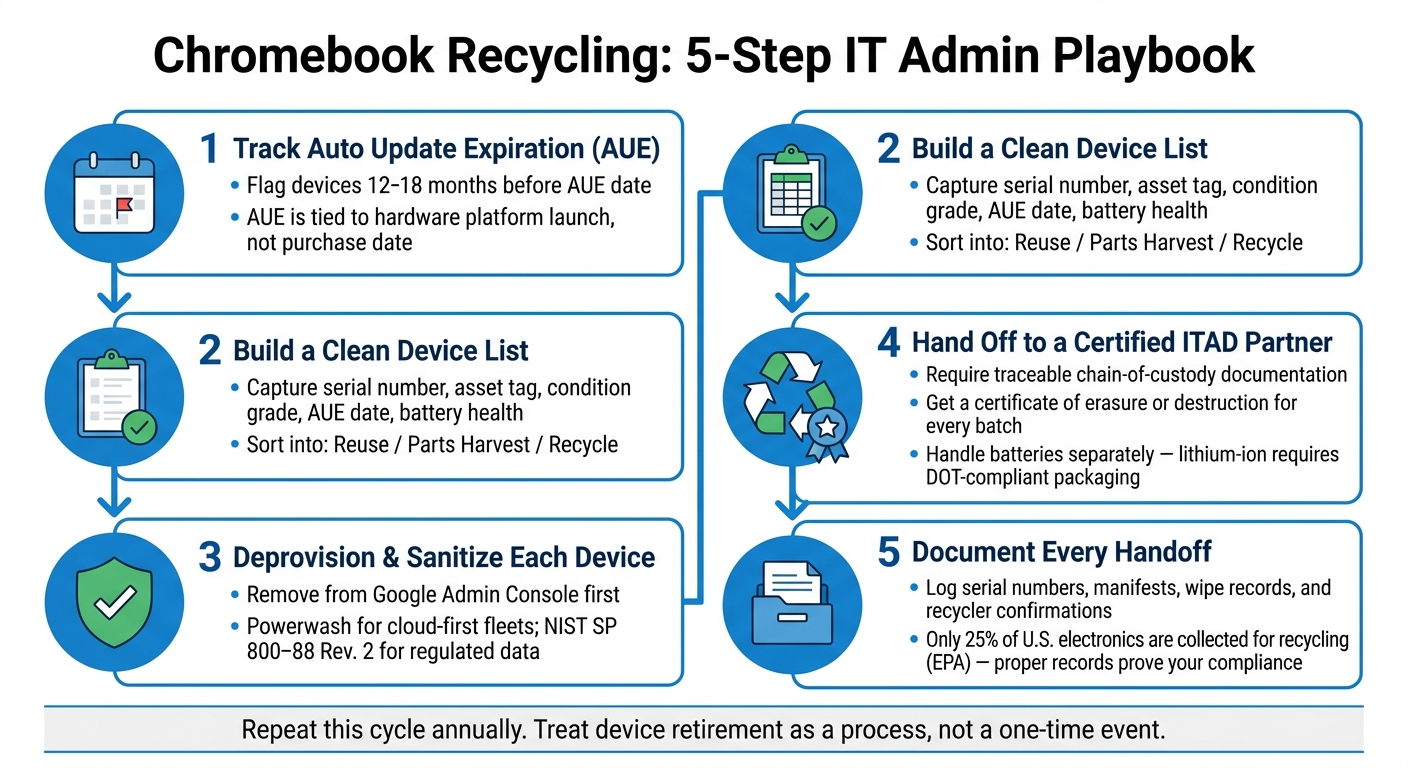
Chromebook Recycling Process: 5 Steps Every IT Admin Needs
♻️ How Schools Can Recycle Old Chromebooks to Fund New Technology | DES Technologies

Quick comparison
| Area | What I’d do |
|---|---|
| Timing | Review fleets 12–18 months before AUE |
| Device decision | Sort into reuse, parts harvest, or recycle |
| Data handling | Deprovision first, then reset or sanitize based on data risk |
| Documentation | Keep serials, manifests, wipe records, and recycler paperwork |
| Batteries | Handle separately from normal e-waste |
| Provider choice | Use a recycler or ITAD partner with traceable custody and reporting |
If you manage Chromebooks in a school, business, nonprofit, or clinic, this article gives the main playbook: retire devices on time, wipe them the right way, and prove what happened to every unit.
Plan Retirement Around AUE, Inventory, and Internal Policy
Use Auto Update Expiration (AUE) to Plan Retirement Timing
Auto Update Expiration (AUE) is the date when a Chromebook stops getting ChromeOS security patches and feature updates from Google. After that point, the device no longer gets protection against newly found vulnerabilities. If your organization handles sensitive data, that’s a serious risk.
Google now offers up to 10 years of automatic updates for Chromebook platforms released in 2021 or later. Older models had shorter support periods, often 6–8 years. Here’s the part that trips people up: AUE is tied to the hardware platform launch date, not the date you bought the device. So if you buy a model near the end of its sales life, you may get much less usable time than you expected.
A good rule is to flag devices 12–18 months before AUE so you have time to plan replacements, get approvals, and schedule recycling. In K–12, it makes sense to have AUE fall during summer break instead of testing season. In business settings, it helps to line up AUE groups with fiscal-year budgets and capital expenditure cycles.
Large 1:1 fleets can run into a nasty budget cliff when many devices hit AUE at the same time. A rolling refresh model can ease that pressure. For example, you might retire one grade’s devices each year and move older units into lower-demand roles. That spreads out costs and cuts down on last-minute budget scrambles.
Use AUE as the point that starts retirement planning, not the day the devices physically leave your building.
Build a Recycling Inventory with Asset and Condition Data
Before a device leaves your control, you need a full record of what it is and what shape it’s in. That record makes recycling decisions easier to track and defend later.
At a minimum, capture the following for every retiring Chromebook:
| Data Category | Specific Fields | Why It Matters |
|---|---|---|
| Identification | Serial number, asset tag, organizational unit (OU) | Chain of custody and deprovisioning verification |
| Lifecycle | AUE date, purchase/procurement date | Refresh timing and budget forecasting |
| Assignment | Assigned user, classroom, or department | Confirms device is truly retired and not still needed |
| Condition | Physical grade (A/B/C), battery health, repair history | Drives reuse vs. recycle decision |
| Accessories | Charger present (yes/no) | Affects reuse value and shipment weight |
| Financial | Purchase price, depreciated value | Supports budget forecasting and audit readiness |
Battery condition deserves special attention. It’s not just a maintenance detail; it’s a safety issue. If a battery is swollen or badly degraded, isolate it right away and handle it outside your normal inventory flow.
Once you have this data, you can sort devices into three simple groups:
- Devices ready for reuse or reassignment
- Units better suited for parts harvesting
- Hardware that should go straight to recycling
That split matters. It keeps usable devices from being scrapped too soon, and it helps stop damaged hardware from getting passed to staff, students, or donors.
Define Ownership, Storage, and Handoff Rules
A recycling inventory only works if ownership is clear. If no one owns the process, retired Chromebooks can sit around untracked, or worse, get donated before deprovisioning is done.
A basic ITAD policy should answer four things: who collects devices, where they’re stored, who can get into that storage area, and how handoff to a recycler is approved and recorded.
Here’s one way to divide the work. IT leadership can own technical readiness. Finance can handle budget planning. Facilities can manage storage logistics. Retired devices should be kept in a locked area, with access limited to approved staff and a sign-in log showing who entered.
For chain-of-custody records, every shipment to a recycler should include a signed asset manifest with serial numbers, quantities, and condition details. The recycler should send back a confirmation report and, when needed, a certificate of destruction that you can file with those records. Scattered spreadsheets and email attachments might work for a small batch, but they fall apart fast at scale.
Once ownership and storage rules are set, deprovisioning can start without holes in the record.
sbb-itb-c68f633
Deprovision Chromebooks and Protect Data Before Disposal
Next, take each Chromebook out of Google management and wipe local data before it leaves your hands.
Deprovision Devices in the Google Admin Console
Start with your inventory list so you can handle devices in batches before deprovisioning. In Google Admin Console, filter provisioned devices by OU, group them by disposition, and deprovision them using the same retirement reason across each batch.
That one detail matters more than it seems. If you use a single retirement reason across batches, it’s much easier to match device records with asset disposition reports later. That’s especially helpful for K–12 fleets and for organizations that tie retirements to fixed asset registers.
After deprovisioning, reset the device. If the data risk is higher, move to a stronger wipe method.
Reset Local Data and Know When Stronger Sanitization Is Required
Powerwash is ChromeOS’s built-in factory reset tool. For most K–12 and corporate fleets that keep data in the cloud, deprovisioning in the Admin Console plus a Powerwash is enough.
Before a device ships out, check for removable storage such as SD cards. Those should be wiped or physically removed.
If a device may hold PHI, payment card data, or other regulated data, use a NIST SP 800-88 Rev. 2-aligned method: Clear, Purge, or Destroy, based on the data type and risk level. Your data classification policy should determine which level fits each device group.
Ask your recycler or ITAD partner to record the exact method used for each device and provide a certificate of erasure or destruction. If something ever needs to be traced back later, that paperwork can save a lot of trouble.
Keep Audit-Ready Records for Every Retired Asset
Keep one complete record for each device from deprovisioning through final disposition.
| Record Category | What to Capture | Why It Matters |
|---|---|---|
| Deprovision log | Date, admin account, deprovision reason | Proves removal from management with timestamps |
| Asset disposition report | Serial number, asset tag, model, assigned OU, retirement date, disposition path | Links each device to its end-of-life outcome |
| Sanitization record | Method used (Powerwash, cryptographic erase, purge, destroy), NIST category | Demonstrates data protection for audits and incident response |
| Serial-to-sanitization mapping | Serial number tied to specific sanitization action and outcome | Critical for tracing any device after a data incident |
| Certificate of erasure/destruction | Formal document from recycler or ITAD provider | Supports chain-of-custody and compliance documentation |
| Battery handling notes | Whether the battery was removed or sent to a certified recycler | Supports environmental compliance and safety documentation |
For large fleets, bulk exports and ITAM tools can help you track serial numbers, deprovision dates, sanitization status, and recycler confirmations in one place.
Once those records are done, the devices are ready for certified handoff.
Choose a Recycler or Takeback Program That Meets US Requirements
With devices deprovisioned and records in place, the next move is picking a provider that can show what happened at each step, from intake to final disposition. You want a provider that documents intake, transport, reuse, recycling, and final disposition.
Check Certifications, Chain of Custody, and Reporting
Look for providers that support documented chain of custody and disposal reporting. That’s the line between a recycler that can prove disposition and one that just shows up for pickup.
Use Chromebook Getter to export AUE, OS version, activity history, and deprovisioning status before pickup.
Compare Recycler Types by Cost, Control, and Documentation
Pick based on reporting depth, custody control, and cost. Then line up the provider’s documentation process with your internal asset records before shipment.
| Service Type | Documentation & Reporting | Data Security Controls | Logistics & Scope |
|---|---|---|---|
| ITAD / Lifecycle Providers (e.g., Vivacity Tech) | Full intake-to-disposal handling and disposal reporting | Supports Chromebook repair, reuse, and recycling | Single point of contact for repair and recycling |
Prepare Bulk Shipments Without Losing Asset Visibility
Before devices leave your facility, use your reporting process to confirm which units are retired and which still need attention. Lock the manifest before the truck leaves.
Then reconcile the manifest against your inventory before pickup. Record tracking numbers, pallet counts, and any exceptions. Archive the pickup manifest and provider confirmation so each retirement batch is closed out before you move into program-level tracking.
Build a Repeatable Chromebook Recycling Program
Prioritize Reuse, Parts Harvesting, and Safe Battery Handling
Once deprovisioning is done and custody records are in place, sort each device into one of three paths: reuse, parts, or recycling. That simple split makes the whole process easier to run batch after batch.
Working devices that are past AUE can still do useful work in lower-demand jobs, like loaner carts or kiosks. If a device has been securely deprovisioned, it can also move into senior handoff or community donation programs.
For units that can't be fixed, parts harvesting is a smart way to get more life out of what you already own. Screens, keyboards, trackpads, and batteries can help keep other Chromebooks running instead of forcing your team to buy replacements right away. Store those parts in labeled bins, and track them in your asset system by part type and source device. That way, your repair team can see what's on hand before placing an order.
Batteries need a separate lane, and chargers should be set aside for reuse or recycling. Lithium-ion batteries fall under DOT hazardous materials rules, so packaging and shipping rules apply. Tape or bag the battery terminals, store batteries in labeled non-metal containers, keep them in a cool, dry area, and never toss them in with general e-waste. Send them through a battery collection program or a certified recycler, not curbside pickup or the regular trash.
Track Recycling Outcomes with Repeatable Asset Workflows
Once you've set the physical path, track what each cycle produces. Record how many devices were reused, harvested for parts, refurbished, or sent to certified recyclers in each round. Then calculate your landfill diversion rate - the share of retired assets kept out of landfills - and log the estimated recovered weight by material type. Those numbers help with sustainability reporting and give leadership a clear view of what the program is doing.
AssetRemix can keep lifecycle stage, condition, AUE status, deprovisioning events, recycler handoffs, and disposition outcomes in one place. When your team harvests parts, those components can be tied to repair tickets so inventory stays accurate across the full lifecycle.
Conclusion: Core Steps Every IT Admin Should Standardize
These steps work best when they're written into policy, not handled ad hoc. Monitor AUE dates at least 12–18 months ahead so retirements don't sneak up on your team. Keep inventory current with condition data so reuse-versus-recycle calls are easier at refresh time. Deprovision and wipe every device before it leaves your site, and use stronger sanitization when policy or regulations call for it.
Document every handoff, including serial numbers, manifests, and recycler certificates, so each batch is fully closed before the next one begins. Work only with certified ITAD and recycling partners that provide traceable chain of custody. Also, make reuse evaluation and battery management part of the yearly cycle from the start, not something your team scrambles to handle later. Put those steps in writing so the program can hold up through staffing shifts and budget changes.
FAQs
How do I find a Chromebook’s AUE date?
You can find a Chromebook’s Auto Update Expiration (AUE) date in the Google Admin console or with Chromebook Getter.
In the Google Admin console, go to Devices, select Chrome devices, and check the Auto-update expiration field.
If you use Chromebook Getter, look at the Support End Date column. That gives you a simple way to report on your fleet’s AUE status and plan device refreshes.
When is Powerwash not enough before disposal?
Powerwash on its own is not enough when you're getting rid of a device. It clears local files, but it does not take the place of formal decommissioning, data sanitization, or deprovisioning in management consoles.
For asset disposal, using only Powerwash may fall short of legal, security, and disposal compliance needs. You also need standardized data wiping and secure destruction methods.
What should I ask a recycler to prove chain of custody?
Ask for formal destruction records for every device, along with documents that show how data was wiped and how each item was physically destroyed.
Those audit records should be complete and written into the contract. That way, you can check that sensitive information was handled the right way before disposal. If you use AssetRemix, it can help maintain an audit trail across the full asset lifecycle.