
Ultimate Guide to Bulk IT Hardware Procurement
Bulk IT buying cuts costs only when I plan demand, limit device types, and track each asset from PO to retirement. If I skip process, I risk extra spend, device mismatch, and missing records. One stat stands out: 68% of businesses do not have a formal procurement process.
Here’s the short version:
- I start with business need, not vendor catalogs
- I use role-based device standards to reduce model sprawl
- I budget for total cost of ownership, not just the price tag
- I time orders around 3–5 year refresh cycles, hiring, and projects
- I compare vendors on lead time, warranty, shipping, imaging, and RMA terms
- I connect purchasing to ITAM, ticketing, MDM, and finance
- I track post-rollout numbers like device age, failure rate, utilization, and time to deploy
- I plan secure retirement with data wiping, destruction records, and recycling or trade-in
A few numbers shape the whole process:
- A $1,200 laptop can land near $1,700 over its lifecycle
- Added costs can run 30% to 70% beyond list price
- Custom server lead times can stretch to 6–12 weeks
- A healthy utilization target is over 90%
- A strong on-time delivery target is over 95%
If I had to sum up the article in one line, it would be this: buy in bulk only with clear standards, clean asset data, firm vendor terms, and a tracked rollout plan.
That’s the framework this guide walks through.
Setting up for Success with HAM: Using Purchase Orders to Capture Complete Asset Data in Procurement
sbb-itb-c68f633
Plan demand, standardize hardware, and build the budget
Quantity matters just as much as price. Buy too many devices, and budget gets stuck in inventory. Buy too few, and you're stuck paying for rush orders. The fix is pretty simple: use asset data to line up purchases with refresh cycles, onboarding, and growth plans. That usually starts with a role-based demand plan and a standard device catalog.
Run a needs assessment and build a device catalog
Start by matching devices to user groups. Office staff, field teams, and power users like analysts don't need the same hardware. Role-based specs help you avoid paying for more machine than someone needs, while also avoiding devices that can't keep up with the job.
Next, build a standard catalog with approved configs for each role. This cuts down on device sprawl and makes support a lot easier. It also helps block off-the-books purchases, which can create security issues.
Model total cost using U.S. procurement costs
The unit price is only the first number. Hardware and software purchases often come with 30% to 70% in added costs beyond list price once you factor in shipping, setup, and compliance.
For example, an enterprise laptop with a $1,200 purchase price can end up with a total lifecycle cost of about $1,700 after warranty and support, software licensing, deployment and maintenance, and end-of-life handling are added in.
If demand keeps shifting or budgets are tight, compare leasing versus buying across the full lifecycle. A lower upfront cost can look good on paper, but the long-term math is what matters.
Use ITAM data to time bulk purchases
Use ITAM refresh data to place bulk orders before replacement dates hit. That buffer gives teams time for budgeting, approvals, and delivery staging. Procurement timelines should line up with:
- employee onboarding and offboarding schedules
- refresh cycles, which usually run 3 to 5 years
- planned project launches
- geographic expansion plans
AssetRemix can centralize asset lifecycle data and help desk records for refresh planning.
With demand and timing in place, the next step is comparing vendors and negotiating contract terms.
Build a vendor strategy, compare quotes, and negotiate contracts
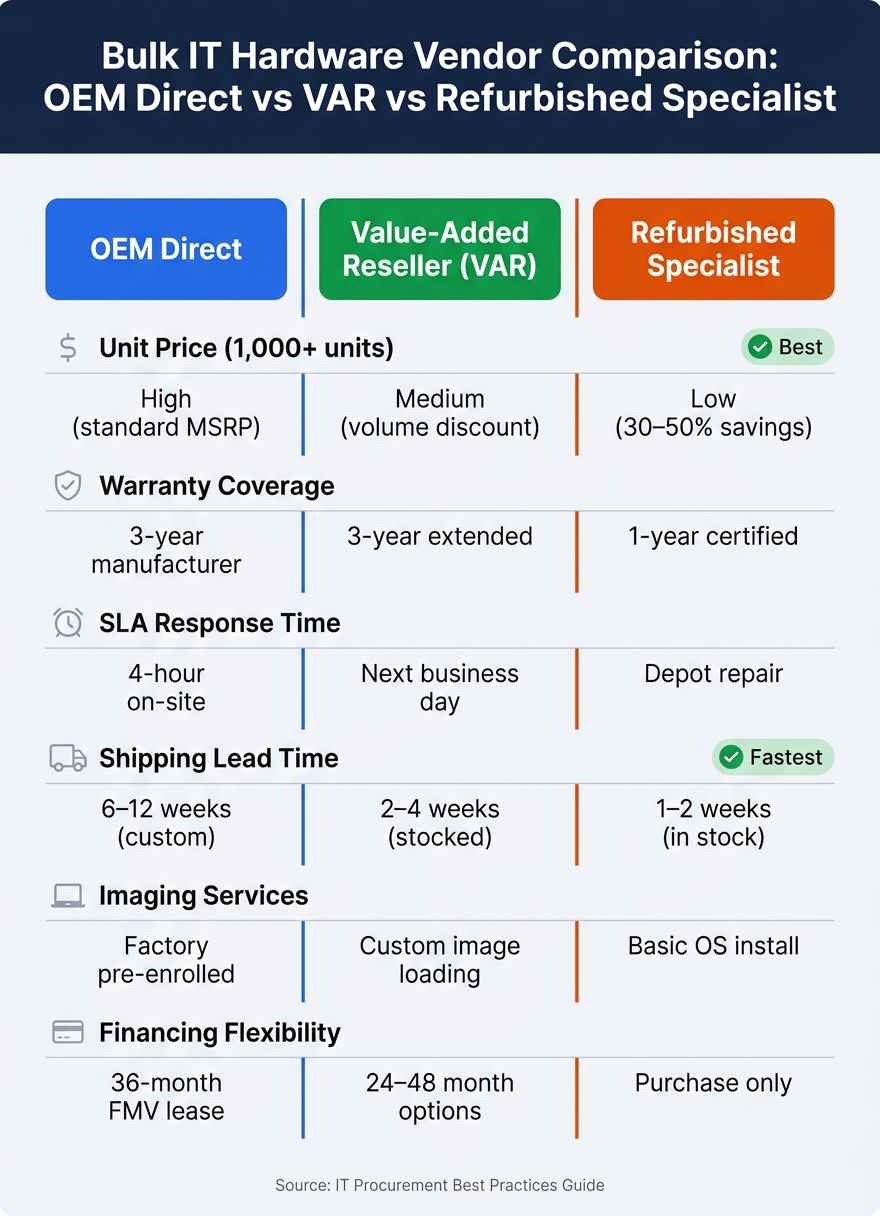
IT Hardware Vendor Types Compared: OEM vs VAR vs Refurbished
Once demand and budget are locked in, vendor choice can make or break the rollout schedule. Going with the lowest unit price is one of the most common bulk-buy mistakes. On paper, it looks smart. In practice, late deliveries, weak RMA support, and poor multi-site shipping can wipe out those savings fast.
The better move is to use a repeatable process for judging vendors.
Build a vendor evaluation framework for large orders
For large orders, price is only one piece of the puzzle. Lead time matters just as much. Commodity hardware may ship in days, while custom-configured servers can take 6–12 weeks. If you're lining up a deployment with onboarding dates or a project launch, that difference isn't small.
Look at vendors through an operations lens. Can they ship fast? Can they handle staggered deliveries? Can they support several offices at once? A vendor built for single-warehouse drops usually won't work well for a regional rollout.
It also helps to check what happens before the box even arrives. Some vendors can handle pre-imaging, asset tagging, or palletization. That can save your team a lot of dock-side work.
The table below shows how three common vendor types stack up for bulk orders:
| Evaluation Factor | OEM Direct | Value-Added Reseller (VAR) | Refurbished Specialist |
|---|---|---|---|
| Unit Price (1,000+ units) | High (standard MSRP) | Medium (volume discount) | Low (30–50% savings) |
| Warranty Coverage | 3-year manufacturer | 3-year extended | 1-year certified |
| SLA Response Time | 4-hour on-site | Next business day | Depot repair |
| Shipping Lead Time | 6–12 weeks (custom) | 2–4 weeks (stocked) | 1–2 weeks (in stock) |
| Imaging Services | Factory pre-enrolled | Custom image loading | Basic OS install |
| Financing Flexibility | 36-month FMV lease | 24–48 month options | Purchase only |
Refurbished hardware can make sense for standardized roles where top-end specs aren't needed. That 30–50% cost cut can open room in the budget for higher-priority infrastructure. Still, don't treat it like a free lunch. Make sure the vendor provides testing certification and data-wiping documentation that meets recognized standards.
Structure RFQs and negotiate terms that affect operations
Use an RFQ when your specs are already set. Use an RFP only when you want vendors to propose the solution.
A solid RFQ should spell out:
- Exact hardware configurations
- Imaging or enrollment needs, such as Zero-Touch enrollment for Chromebooks
- Accessory bundles
- Shipping windows
The terms that get skipped in contract review are often the ones that cause trouble during deployment. DOA replacement terms are a good example. Set the replacement window up front, and spell out who pays return shipping.
Do the same for bulk RMA handling. Put the workflow in writing: how defective units are flagged, how returns are processed, and how replacements are sent without slowing the rest of the rollout.
For pre-imaged or pre-enrolled devices, add clear security and data-handling terms to the contract. Verify that imaging adds no unauthorized software, devices arrive unaltered, and audit documentation is provided.
Collect vendor shipment data before devices arrive
One of the simplest ways to speed up receiving is to get serial number ranges and shipment dates from the vendor before the order ships. Then you can pre-stage ITAM records so devices are registered before arrival instead of being entered by hand at the dock.
That cuts receiving time and keeps deployment moving. It also sets up a cleaner handoff into receiving, enrollment, and rollout.
Execute purchasing, receiving, and deployment at scale
Once contracts are signed, the next job is execution. Each device needs to move from purchase order to end user through one connected workflow, with no dead ends and no guesswork.
Follow a clear bulk procurement workflow
The biggest problem here is a bad handoff. One team wraps up its part, and the next team is left asking, “What happens now?” A shared responsibility matrix within your IT asset management strategy helps stop that.
| Step | Primary Responsibility | Supporting Systems |
|---|---|---|
| Requirement Approval | IT Lead / Finance | Ticketing / ERP |
| PO Creation | Purchasing / Procurement | ITAM / ERP |
| Shipment Tracking | Procurement / Vendor | Vendor Portal |
| Receiving & Dock Coordination | Facilities / IT | ITAM / Logistics Log |
| Inspection & Asset Tagging | IT | ITAM (QR Codes) |
| Imaging & MDM Enrollment | IT | MDM / Imaging Tool |
| User Assignment & Handoff | IT / HR | ITAM / Ticketing |
Treat the PO as the control document for the whole flow: receiving, inspection, tagging, imaging, and invoice reconciliation. Pair the PO with shipment data and the delivery window so each device moves through receiving, tagging, imaging, and handoff without manual rework.
Standardize onboarding, enrollment, and rollout logistics
Use one receiving checklist for every shipment. Match box count to the manifest, inspect packaging, scan serials against the PO, and log exceptions right away.
At the asset-tagging stage, assign QR codes to every device so IT staff can update location, user assignment, or maintenance records with a mobile scan. After that, apply the standard image, MDM profile, security baseline, and naming convention before any device leaves staging.
Handle large Chromebook and Google Workspace deployments

Chromebook rollouts need one last cleanup step after enrollment: making sure device records match the right users before handoff.
After bulk Chromebook enrollment, reconcile device and user records in Google Sheets to fix assignments and clean up record data. AdminRemix's Chromebook Getter and User Getter support that bulk record cleanup for Chromebook and Google Workspace rollouts.
Manage lifecycle, track KPIs, and close the loop
Maintain lifecycle control from deployment to retirement
After rollout, the same records should stay in charge of support, refreshes, and retirement.
Deployment is not the finish line. Every device still needs warranty tracking, reassignment, refresh planning, or secure disposal. Keep each device tracked in ITAM after deployment so warranty status, reassignment, and retirement remain auditable. Set automated alerts for warranty expiration and refresh dates so your team can open claims or plan replacements before problems become urgent.
When a device comes back, inspect it, wipe it, and return it to reserve inventory. A utilization rate above 90% shows that existing inventory is being used well.
When devices reach end of life, secure disposal is non-negotiable. Certified data wiping, a certificate of destruction, and a recycling or trade-in program are the minimum standard.
Track the metrics that improve the next purchase cycle
These lifecycle records become the starting point for the next buying decision.
Use these eight metrics to review each cycle and make the next one better. Together, they cover the full path from request to retirement. Each metric has a clear definition, a practical target, and a named data source, so you know where the number comes from.
| Metric | Definition | Target Threshold | Data Source |
|---|---|---|---|
| Average Device Age | Mean age of all active devices in the fleet | < 3.5 years | ITAM |
| Utilization Rate | % of purchased assets currently assigned and in active use | > 90% | ITAM |
| Failure Rate | % of devices requiring repair or replacement within warranty | < 3% | Ticketing system |
| Procurement Cycle Time | Time from initial request to approved purchase order | < 5 business days | Procurement software |
| Time to Deploy | Time from device arrival to fully usable by the end user | < 48 hours | ITAM / Ticketing |
| Cost Variance | Difference between actual spend and planned procurement budget | < 5% | Finance / ERP |
| Compliance Exceptions | Devices found without required security or configuration standards | 0 | ITAM / MDM |
| On-Time Delivery Rate | % of orders delivered within the vendor's agreed timeframe | > 95% | Vendor data / ITAM |
Review these metrics after each cycle, not just after something goes wrong. A rising failure rate can point to a vendor quality problem. A low utilization rate often means over-purchasing. A long procurement cycle time usually points to a process bottleneck. Each number gives you a direct clue about what to fix in the next cycle.
Conclusion: Core practices that make bulk procurement repeatable
Bulk IT hardware procurement works best when each stage feeds the next. Forecast demand early using real utilization data instead of gut estimates. Standardize device choices to simplify support and get better volume pricing. Model the full lifecycle cost, because unit price is only the first number. Negotiate contracts with clear operating terms for lead times, delivery windows, and warranty coverage. Run deployment with clear ownership at every handoff so nothing slips through the cracks.
Then feed this cycle's ITAM data into the next procurement plan. AssetRemix keeps asset records, lifecycle visibility, and help desk history in one place to support the next bulk order.
FAQs
How do I forecast bulk hardware demand accurately?
Use a data-driven approach to track current usage and plan for future needs. Start with inventory and usage patterns, then estimate demand based on growth, upcoming projects, and scaling plans.
To tighten accuracy, use procurement analytics, AI, and automation to track spend, usage, inventory levels, vendor performance, and market trends. When you combine inventory review, capacity planning, and analytics, you can cut shortages and waste.
When should I lease instead of buy IT hardware?
Lease IT hardware when its useful life is short, it loses value fast, or you need the freedom to refresh on a regular cycle. Leasing can make upgrades simpler and helps you avoid residual value risk.
It can also work well for organizations with fast-changing tech needs or limited internal IT capacity. Buying makes more sense for long-term assets with more predictable residual value, strong liquidity, and a clear need for full ownership.
What should be included in a bulk hardware vendor contract?
A bulk hardware vendor contract should spell out the basics in plain English: hardware specs, delivery terms, pricing, payment terms, and any volume discounts.
It should also cover warranty and support. That includes response times, escalation procedures, performance metrics, renewal terms, and rules for replacements or upgrades.
On top of that, the contract should include clauses for compliance, confidentiality, and dispute resolution.