
Machine Learning for IT Asset Identification
If you only know a device exists, your inventory is still incomplete. I’d sum this up in one line: machine learning helps IT teams turn scattered device data into one current record with the right type, owner, status, and location.
Here’s the short version:
- I see discovery as finding a device on the network.
- I see identification as figuring out what it is, who uses it, and whether the record is still current.
- Machine learning works best when it pulls from more than one source: network scans, endpoint data, directory records, mobile data, and cloud logs.
- It uses signals like serial number, device ID, model, OS, assigned user, OU, and location to sort assets such as laptops, Chromebooks, phones, network gear, and cloud apps.
- It then applies structured tags and a confidence score so IT can:
- auto-update high-score matches,
- review uncertain matches,
- and hold low-score records as exceptions.
- The end goal is simple: fewer duplicate records, less manual cleanup, and a cleaner inventory that stays in sync with physical devices and cloud services.
A few points stand out to me. First, immutable identifiers like serial numbers and device IDs help cut duplicate records. Second, webhooks and status history help keep records current when devices reconnect or change hands. Third, for Chromebook-heavy teams, tools tied to Google Admin Directory and Google Sheets can save 30–40 minutes per upload compared with manual entry.
If I were explaining the article to a busy IT admin, I’d put it like this: machine learning does not replace IT asset management work. It helps sort messy inputs, score record quality, and route the right records into the right workflow.
Data Sources and Model Inputs That Drive Asset Identification
Network, Endpoint, Directory, Mobile, and Cloud Data Sources
Machine learning models pull from several data feeds because no single source tells the whole story.
Network scanning and discovery can find connected assets and show details like make, model, software, user, and location. Endpoint telemetry adds installed software and the assigned user, which helps separate managed devices from unmanaged ones. Directory services like Google Admin Directory add enrollment records, organizational unit (OU) assignments, checked-out user data, and device status.
Mobile device management data and app audit logs add ownership and usage signals that hardware scans often miss. Put those sources together, and the cleanup work gets a lot easier. There’s less normalization to do and fewer duplicate records to sort through. Webhooks also help keep records up to date when devices reconnect or their status changes.
Those signals then flow into classification and tagging, which is where raw discovery starts to look like an inventory record instead of a pile of disconnected data.
Feature Patterns for Laptops, Chromebooks, Phones, and Network Hardware
Each asset type has its own fingerprint. That means the strongest model inputs change based on the device.
| Asset Type | Key Feature Signals |
|---|---|
| Laptops and other managed endpoints | Make, model, installed software, assigned user, location |
| Chromebooks | Device ID, serial number, enrollment status, organizational unit (OU), checked-out user |
| Phones | Device ID, serial number, operating system, enrollment status, assigned user, location |
| Network hardware | Make, model, location |
Chromebooks lean more on directory metadata than network scans. Device ID and serial number do most of the heavy lifting for accurate mapping, while OU and checked-out user help connect the device to the right owner and org unit. Chromebook asset tags must map to a device ID or serial number in Google Admin Directory.
Cloud apps work differently. Their fingerprint comes from identity and usage signals, not hardware fields.
sbb-itb-c68f633
How AI Improves IT Asset Management & Knowledge Management
How Machine Learning Classifies, Tags, and Scores Assets
How Machine Learning Classifies and Scores IT Assets
Multi-Stage Classification and Structured Tagging
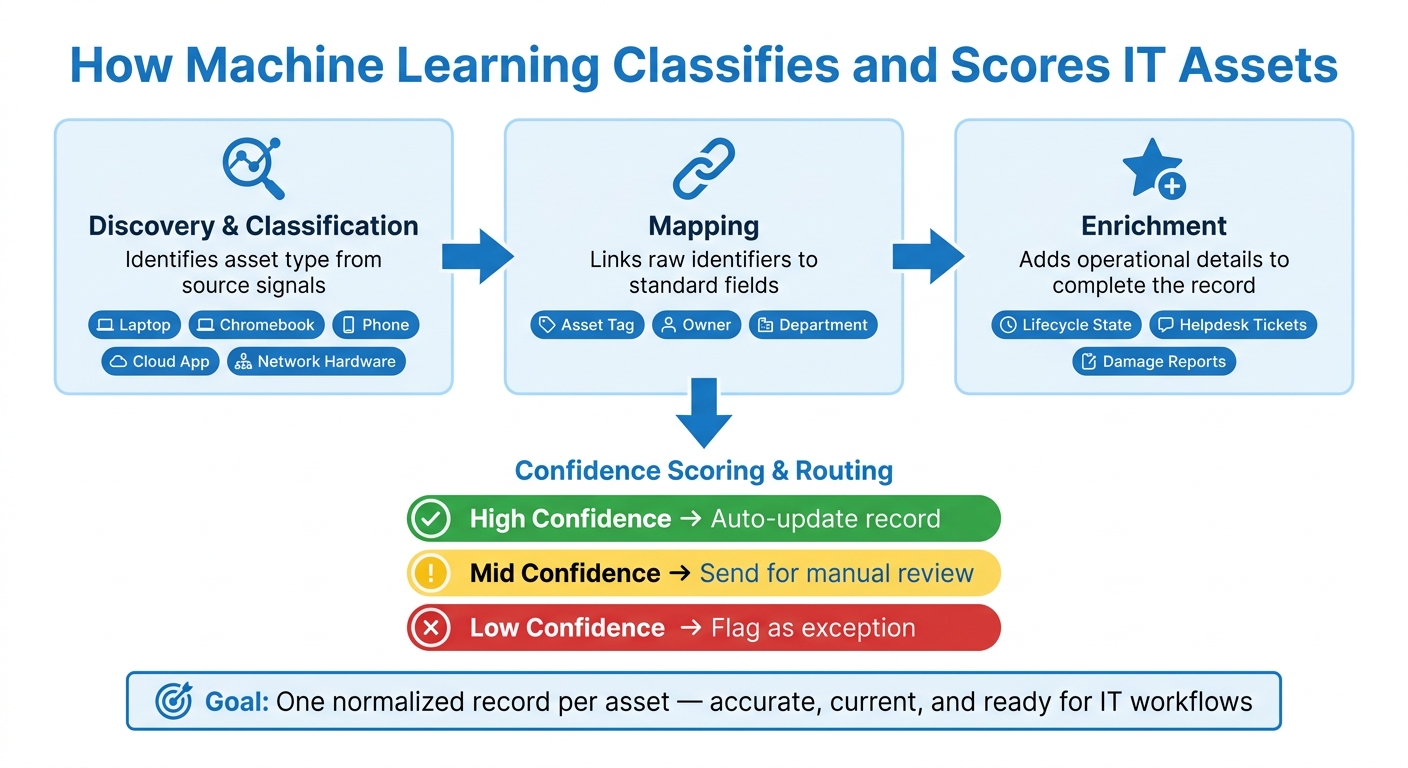
Once the model has the source signals, it turns them into records people can actually use. Raw inputs move through a pipeline that classifies, maps, and enriches each asset.
First, the pipeline figures out what the asset is. Then it maps raw identifiers to standard fields. After that, it adds operational details that make the record useful in day-to-day work. Cloud apps are classified from identity, tenant, and usage signals. The same setup works across device and app types, but the strongest signals change based on the asset.
As each stage does its job, the record picks up more tags. By the end, it can include fields such as asset category, device type, vendor, model, operating system, firmware, user, location, lifecycle state, and associated helpdesk tickets. That’s how a raw scan turns into an inventory-ready record.
| Pipeline Stage | What It Determines | Example Output Tags |
|---|---|---|
| Discovery and classification | What kind of asset it is | Laptop, Chromebook management, phone, cloud app, network hardware |
| Mapping | How raw identifiers connect to standard fields | Asset tag, owner, department |
| Enrichment | Operational details | Lifecycle state, helpdesk tickets, damage reports |
Structured tags help normalize records and cut down on duplicates.
Confidence Scoring and Review Thresholds
After the tags are in place, the model scores how reliable each match looks. This matters a lot. If a model updates every record without checking for conflicts, it can slip errors into the system, and those errors can be tough to spot later.
When sources conflict or the data looks stale, send the record to review. A simple way to handle this is:
- High confidence: auto-update the record
- Mid confidence: send it for review
- Low confidence: treat it as an exception
Exceptions help protect clean inventory records.
Those scores decide which records update on their own and which ones need a person to take a closer look.
How IT Teams Use Machine Learning Results in Asset Inventory Workflows
Inventory Creation, Normalization, and Ownership Mapping
After confidence scoring determines what to trust, IT teams turn those results into inventory records. High-confidence records can update the inventory right away, while directory data fills in owners and departments for each asset record automatically. The aim is simple: one normalized record per asset, with ownership and lifecycle details kept up to date.
Exception Handling, Audits, and Operational Follow-Up
Mid- and low-confidence records usually move into a review queue for manual validation. That gives staff a clean way to check edge cases instead of fixing everything by hand.
Linked status history and tickets also make audits easier. Damage reports, open tickets, and status changes can all tie back to specific asset records through webhooks, so service desk staff can see what changed, when it changed, and what still needs attention.
Where AdminRemix Fits in Day-to-Day Asset Operations
Once those records are ready, they move into the tools admins already use every day. AdminRemix's AssetRemix acts as the hub where machine-learning outputs turn into usable records. It brings updates, scanning, help desk links, and audit trails into one place, while also letting IT admins update asset status and location from a mobile device in the field.
For teams managing large Chromebook fleets, Chromebook Getter handles bulk metadata work directly inside Google Sheets, saving admins an estimated 30–40 minutes per data upload compared to manual methods. User Getter applies the same model to Google Workspace user metadata, which makes it much easier to keep user and device records aligned at scale.
Together, these tools tie machine-learning outputs to day-to-day inventory work, so IT teams can keep records current without a lot of manual cleanup.
Conclusion: Turning Machine Learning Outputs into a Usable Asset Inventory
After classification and scoring, the final move is turning model output into an inventory IT can actually maintain.
Machine learning can improve IT asset identification. But the payoff comes from converting those classifications into records people can use day to day. Pulling in data from more than one source helps improve accuracy, and confidence thresholds keep automation under control.
Use confidence thresholds to auto-update high-certainty matches and send the rest for review. Immutable identifiers such as Serial Numbers and Device IDs cut down duplicate records and keep tags stable.
IT teams can also connect digital and physical records with barcode tags and handheld scanners. That makes checkouts faster and helps verify asset identity at the point of use. From there, real-time enrichment and normalization help keep records current as devices change. The result is a cleaner inventory that stays in sync with physical assets.
FAQs
How does machine learning reduce duplicate asset records?
Machine learning cuts down duplicate asset records by cleaning up messy data from different discovery tools.
It smooths out naming differences, settles conflicting details based on predefined rules, and matches assets using identifiers like serial numbers or device IDs. The result is a single, accurate record instead of several duplicate entries, with far less manual cleanup.
Which data sources matter most for accurate asset identification?
Accurate asset identification comes from bringing a few data sources together, not relying on just one.
That usually means pulling from core records like procurement, finance, ticketing, and even the spreadsheets teams still keep around. Then you layer in automated discovery from cloud provider APIs, webhooks, and logs.
It also helps to use endpoint telemetry and agentless network scans through SNMP, SSH, and WMI. In Google Workspace setups, linking ITAM asset tags to Serial Numbers or Device IDs makes it much easier to keep a precise, centralized inventory.
What happens when an asset match has a low confidence score?
A low confidence score means the system isn't certain enough to automatically connect discovered data to an existing asset record.
That’s why IT teams should manually review flagged assets before making a match. A quick check helps confirm identity and keeps the inventory accurate. AdminRemix brings these gaps to the surface so administrators can sort out possible duplicates or orphaned entries by checking identifiers like serial numbers or device IDs.