
IT Asset Utilization Checklist for Cost Savings
Want to save money on your IT assets? Start here. Inefficient use of hardware, software, and cloud resources costs businesses millions annually. Here's how you can fix it:
- Unused Software: Up to 50% of installed tools go untouched, wasting funds.
- Unreturned Devices: Departing employees cost companies $1,963 each for missing hardware.
- Underutilized Assets: Utilization below 50% signals waste; aim for 80%+ efficiency.
- Lifecycle Tracking: Poor IT asset management leads to ghost assets and inflated costs.
A structured checklist can help you identify waste, reduce costs, and improve efficiency. Learn how to:
- Inventory Everything: Document all hardware, software, and cloud subscriptions in a central database.
- Automate Tracking: Use tools to monitor usage, set alerts, and reduce manual errors.
- Analyze Usage: Identify underused or duplicate assets and reallocate or retire them.
- Cut Software Costs: Review licenses, reclaim unused ones, and negotiate better contracts.
- Optimize Hardware & Cloud: Balance usage to avoid idle or overworked resources.
- Manage Full Lifecycle: Track assets from purchase to disposal to control costs at every stage.
- Integrate Data: Link asset info to IT operations for faster decisions and better planning.
Key Fact: Businesses can cut SaaS spending by 25% and save thousands of hours with centralized asset management. Follow this guide to turn IT inefficiencies into savings.
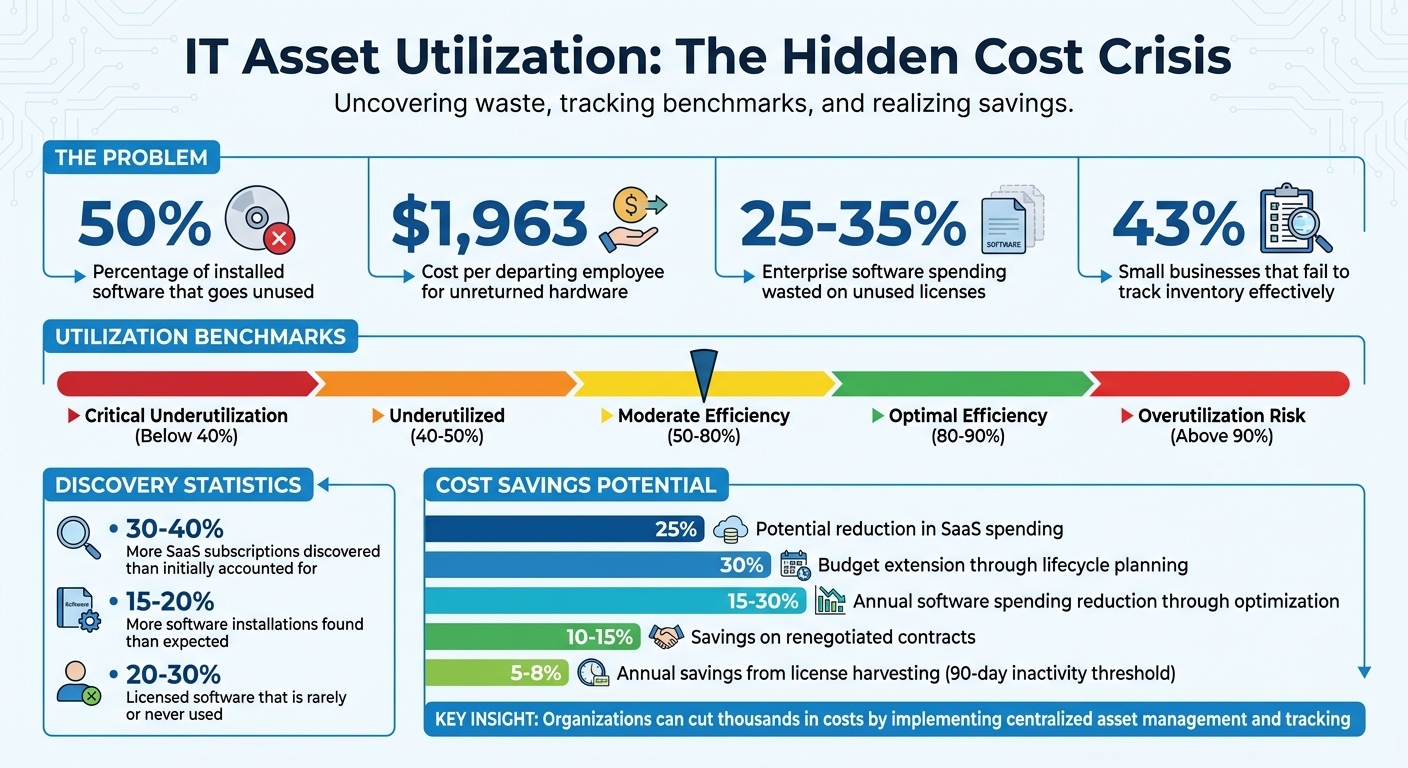
IT Asset Utilization: Key Statistics and Cost-Saving Opportunities
IT Asset Lifecycle Management (ITALM) Course
sbb-itb-c68f633
Step 1: Build a Complete IT Asset Inventory
Before diving into optimization, it's essential to document every IT asset. This inventory should cover hardware, software, and cloud subscriptions - think laptops, servers, mobile devices, and licensed applications.
For each asset, record critical details like serial numbers, purchase dates, costs, locations, assigned users, warranty expiration dates, and Auto Update Expiration dates. It's also a good idea to categorize software based on its importance:
- High-priority: Expensive or mission-critical licenses.
- Low-priority: Free or less impactful tools.
- Blacklisted: Applications that are prohibited.
Set Up a Central Asset Database
Organizing everything into a centralized database makes managing assets easier and speeds up audits. Platforms like AssetRemix are already helping manage over 500,000 IT assets daily and are trusted by more than 350 IT teams to safeguard their data.
"Assets are organized in one place, your teams on top of things, inventory is clear, and a sense of calm sets in for your team." – AssetRemix
Centralized systems have been shown to cut down audit times and improve fleet management. To get started, configure custom fields (like funding sources or warranties) and assign unique tags to each asset as soon as it arrives. It's also smart to establish a retirement policy, such as decommissioning laptops after five years, and ensure secure data-wiping procedures are ready to go.
Once this database is up and running, you're set to move toward automating asset tracking.
Use Tools for Automated Asset Tracking
Centralizing your assets is just the beginning - automated tools can take this a step further by simplifying tracking and maintenance. Automation reduces manual errors and enables faster decisions about maintenance, ultimately saving costs.
Features like directory sync and single sign-on (SSO) automatically populate user and device data, while barcode scanning makes physical audits a breeze. You can also set up custom fields to capture organization-specific details and receive automated alerts for maintenance or license renewals.
For example, AssetRemix offers a flexible pricing model starting at $99/month or $999/year, covering unlimited assets, help desk agents, and directory sync. Arrington Douglas at Malakoff ISD demonstrated how centralized asset management can streamline device rollouts by ensuring all device data and assignments are easily accessible. Additionally, linking asset data to help desk tickets allows you to track repair histories and spot recurring problems with specific models - insights that can guide smarter purchasing decisions in the future.
Step 2: Track and Analyze Asset Usage
Once you’ve cataloged your assets, it’s time to dig deeper. Understanding how each asset is used can help you figure out which ones are pulling their weight and which ones are just draining resources.
Monitor Key Usage Metrics
For hardware, look at the difference between actual usage hours and the total available hours. With software, compare how many users are actively engaging with the tool against the number of licenses you’ve purchased. For cloud services, keep an eye on metrics like CPU, RAM, and storage usage. If you’re dealing with shared resources, check how much of their available time is actually being utilized.
Utilization ratios can tell you a lot. A ratio above 80% usually means you’re using the asset efficiently. But if it creeps past 90%, you might be running the risk of overuse, which could lead to breakdowns or higher maintenance costs. On the flip side, if the ratio is below 50% - or even worse, 40% - you’re likely overinvesting in something that’s not being used enough. Another helpful tip: link help desk tickets to specific assets. This can help you identify recurring problems with certain items, giving you more insight for ongoing analysis.
By tracking these metrics, you’ll be able to identify which assets are overperforming or underperforming based on efficiency benchmarks.
Find Underused or Duplicate Assets
The next step is to identify assets that are underused or duplicated, as these are prime targets for reducing costs. To calculate utilization, use this formula: (actual usage ÷ total capacity) × 100. For instance, if you’ve paid for 100 software licenses but only 45 employees are actively using the tool, your utilization rate is just 45%. That’s a clear sign you’re spending more than necessary.
Don’t forget to address shadow IT - unauthorized tools or software that can skew your usage data and add hidden costs. Once you’ve identified underused assets, you’ve got a few options: reassign them to teams that need them more, repurpose them for secondary functions (like training or backups), or eliminate them entirely if they no longer serve a purpose. With the rise of remote work, many office-based resources are sitting idle, which could open the door to even more savings.
Step 3: Calculate and Reduce Total Cost of Ownership
The sticker price is just the beginning. When it comes to Total Cost of Ownership (TCO), you’re looking at the full lifecycle of an asset - purchase, deployment, maintenance, energy usage, and eventual disposal. Many IT teams focus solely on the upfront cost, missing hidden expenses that can lead to budget overruns and missed opportunities to save.
Break Down TCO Components
TCO includes several key categories:
- Acquisition costs: This covers the purchase price, taxes, and shipping fees.
- Operating costs: Includes ongoing expenses like software subscriptions, licenses, insurance, and energy consumption. For instance, data centers alone can increase electricity demand by 30% to 40%.
- Maintenance costs: Think repairs, spare parts, and support contracts.
- Depreciation: Tracks how much value an asset loses over time for accounting and tax purposes.
- Disposal costs: Includes decommissioning, data sanitization, and responsible recycling.
Pay attention to "ghost assets" - items that are lost, stolen, or no longer usable but still appear on your books. These can inflate costs unnecessarily, as organizations may continue paying taxes and insurance on these phantom items. A good way to stay on top of this is by linking help desk repair tickets to specific asset IDs. This not only tracks cumulative maintenance costs but also flags hardware that’s becoming too expensive to maintain. If repair costs approach or exceed the value of the asset, replacement is often the smarter move.
By combining cost data with asset usage insights, you can make informed decisions about reallocating or retiring equipment. A clear understanding of current TCO is also essential for predicting future expenses.
Plan for Future Costs and Depreciation
Once you’ve identified current costs, the next step is forecasting future expenses and depreciation. Historical depreciation data, combined with current usage trends, can help you predict when replacements will be needed and budget accordingly. For devices like Chromebooks with Auto Update Expiration (AUE) dates, you can even pinpoint exact replacement timelines.
Automating depreciation calculations ensures compliance with tax regulations like ADS under the Tax Cuts and Jobs Act. Manual tracking can be error-prone, while automation provides real-time visibility into asset value and contract renewals. Regular physical audits - conducted at least once a year - can help remove unusable assets from your inventory, cutting unnecessary costs. Organizations that adopt lifecycle planning strategies often stretch their annual asset budgets up to 30% further than those that take a reactive approach.
Step 4: Review Software Licenses and Subscriptions
Once you've tackled hardware and total cost of ownership (TCO), it's time to turn your attention to software licenses. This is a prime area to uncover savings that often go unnoticed.
Studies reveal that 25–35% of enterprise software spending is wasted on unused licenses, unnecessary subscriptions, or unfavorable contract terms. Overspending often happens when organizations renew or purchase software they no longer need. By focusing on software, you can complete a well-rounded strategy for better asset utilization.
Interestingly, most organizations discover 30–40% more SaaS subscriptions than they initially accounted for. These hidden subscriptions often result from departmental purchases, free trials, or acquisitions. This creates blind spots in budgets and contributes to unnecessary spending. Another issue is "shelfware" - software that’s purchased but never used. Usage data shows that 20–30% of licensed software is rarely or never utilized.
Maintain License Compliance
License compliance isn’t just about avoiding penalties; it’s also about having a clear picture of what software you own and use. A full software inventory often reveals 15–20% more installations than expected. This discrepancy between assumed and actual software deployments can become a problem during vendor audits.
To stay on top of this, categorize your software by priority - such as mission-critical tools versus productivity applications. High-priority tools with costly licenses and significant business impact should be closely monitored. Under-licensing, where the number of licenses falls short of active users, can lead to fines. On the flip side, over-licensing is an opportunity to cut costs. A structured license optimization program can reduce annual software spending by 15–30%.
Recover and Redistribute Unused Licenses
Beyond compliance, reclaiming unused licenses offers a direct way to lower expenses.
License harvesting, which involves reclaiming licenses from inactive users, is a practical cost-saving tactic. For instance, setting a 90-day inactivity threshold can result in savings of 5–8% annually on harvested licenses.
You can also save by aligning subscription tiers with actual usage. This adjustment can cut costs by 10–20% for affected subscriptions. Additionally, reviewing contracts 90–120 days before renewal, armed with current usage data, allows you to negotiate better terms, saving 10–15% on renegotiated contracts. Linking your IT asset management system with HR systems can further streamline the process. For example, when an employee leaves, their license can be automatically reclaimed or canceled, ensuring you’re not paying for unused seats.
Step 5: Improve Hardware and Cloud Efficiency
Once software licenses are optimized, it's time to focus on hardware and cloud performance. This step is all about trimming unnecessary costs and ensuring your assets are working efficiently without any hidden drains on resources.
Check Hardware Performance Data
To gauge hardware efficiency, use these formulas:
- For general hardware: (usage hours ÷ total available hours) x 100
- For servers or cloud resources: (actual usage ÷ capacity) x 100
Ideally, hardware utilization should hover above 80% for efficiency. However, if it consistently exceeds 90%, you risk increased hardware failure and higher maintenance costs. On the flip side, utilization below 50% often means resources are sitting idle, with levels under 40% signaling a major inefficiency.
"Underutilization wastes money. Overutilization costs money. The real win comes from finding the balance: using assets enough to get value, but not so much that they break down or burn out." - AssetLoom
For underused hardware, consider reallocation to high-demand areas, repurposing for tasks like training or backups, or even selling or recycling if the equipment is outdated. For overworked assets exceeding 90% capacity, prioritize preventive maintenance to reduce downtime and extend their lifespan. Striking the right balance ensures you’re getting maximum value from your hardware without overloading it.
Review Cloud Resource Usage
When it comes to cloud resources, categorize usage into these ranges:
- Waste: 0–20%
- Underused: 20–40%
- Optimal: 40–60%
- High: 60–80%
- Critical: 80–100%
This breakdown helps turn raw data into actionable strategies for saving costs.
"The fastest way to reduce cloud costs is not to negotiate discounts or switch providers - it is to stop paying for resources you are not using." - nawazdhandala, Author, OneUptime
Start by eliminating "zombie" resources - things like unattached storage volumes or idle load balancers. Compute resources with average CPU usage below 1–2% over a 14–30 day period can also be considered idle. To avoid overprovisioning, right-size resources using the 95th percentile of usage data.
For unutilized resources, place them in a "Pending Deletion" state for 7–14 days, notifying the owner before final removal. Set expiration dates for development or test environments, and conduct weekly billing reviews to ensure every charge is tied to a specific configuration item. By aligning cloud resource management with hardware efficiency, you can achieve a more comprehensive and effective approach to IT cost control.
Step 6: Manage Assets Through Their Full Lifecycle
Taking insights from earlier steps on usage and costs, managing your asset lifecycle effectively is another key to saving money. By tracking assets from purchase to disposal, you can control expenses at every stage. Pairing lifecycle tracking with Total Cost of Ownership (TCO) analysis ensures no hidden costs go unnoticed.
Track Each Lifecycle Stage
IT assets typically pass through five main stages: procurement, deployment, maintenance, retirement, and disposal. Monitoring each of these stages helps you keep costs in check.
During procurement, it’s important to log purchase details like the date, warranty, and funding source. This makes budgeting more accurate. In the deployment phase, assigning assets to specific users or locations prevents over-purchasing and simplifies recovery when employees leave.
The maintenance phase benefits greatly from automation. Automated alerts for warranty expirations and renewals help avoid unnecessary repair costs. Arrington Douglas from Malakoff ISD shared that using an automated asset management system improved response times and deployment efficiency.
For retirement, set clear criteria for replacing outdated equipment, such as replacing laptops every five years or when maintenance costs exceed their value. This reduces unnecessary expenses like taxes, insurance, and licensing fees. Finally, during disposal, ensure secure data deletion and environmentally friendly recycling to avoid data breaches and comply with regulations.
"Proper disposal ensures asset data security and compliance with environmental regulations, mitigating risks associated with outdated equipment."
- Signifi Team
| Lifecycle Stage | Key Tracking Activity | Cost Optimization Benefit |
|---|---|---|
| Procurement | Track funding sources and purchase price | Provides accurate depreciation and budget baseline |
| Deployment | Link assets to specific users/locations | Prevents over-purchasing and asset loss |
| Maintenance | Monitor warranties and repair tickets | Avoids paying for covered repairs; flags poor assets |
| Retirement | Identify and deactivate "ghost assets" | Cuts taxes, insurance, and licensing fees |
| Disposal | Securely erase data and recycle responsibly | Avoids data breaches and regulatory fines |
Automating these processes ensures consistency and further reduces costs.
Automate Maintenance and Disposal Tasks
As the number of assets grows, automation becomes essential. Automate tasks like scheduling warranty alerts, monitoring performance for preventive updates, and identifying underused or redundant software.
For example, AdminRemix's AssetRemix platform manages over 500,000 IT assets daily, automating lifecycle tasks for $99/month or $999/year. At Kipp Indy Public Schools, Pauline McGinnis used Chromebook integration to track device locations and metadata, drastically cutting down the time spent on manual inventory audits.
Automation also reduces costs in other ways. It helps avoid overpaying taxes on retired assets by ensuring depreciation is accurately reported. It eliminates insurance and maintenance fees for lost items by identifying "ghost" assets. Plus, it stops you from paying for software licenses on decommissioned equipment. Jim Beasley at Llano ISD noted that AssetRemix allowed his team to address minor technical issues more efficiently while keeping overall management costs low.
Step 7: Connect Asset Data to IT Operations
After implementing thorough tracking and lifecycle management, the next step is integrating asset data into IT operations. This connection helps finalize your cost-saving strategy. By feeding asset information into daily operations, your team can make quicker decisions and improve efficiency. When tools like help desk systems and reporting platforms have access to real-time asset data, resolving issues becomes faster, and budget planning becomes smarter. This integration ties asset management directly to IT support, reinforcing your overall approach to cost optimization.
Link Asset Information to Help Desk Tickets
Integrating asset data with your help desk system can completely change how issues are resolved. For example, when a support ticket is created, technicians can instantly access critical details like the asset's warranty status, maintenance history, and assigned user. Platforms like AdminRemix's AssetRemix make this process seamless, offering real-time updates and smooth check-in/check-out workflows. Impressively, AssetRemix handles over 500,000 IT assets daily and boasts a perfect 5/5 customer rating.
"Overall AssetRemix has made my life a lot easier, it has turned our slothful device rollouts into a quick and seamless process." – Arrington Douglas, Malakoff ISD
Create Usage Reports for Planning
While real-time help desk integration speeds up repairs, detailed reporting tools enable smarter long-term planning. By generating usage reports from asset data, you can better manage budgets and plan for the future. Effective reporting includes automated discovery of assets, removal of duplicate entries, and intelligent data analysis. Tracking metrics like CPU and memory usage for hardware or login activity for software can help flag underused resources. Additionally, grouping assets by manufacturer can reveal procurement savings opportunities. Detailed end-of-life reports also ensure you replace hardware before it becomes a liability in terms of security or performance.
"IT asset management provides an accurate account of technology asset lifecycle costs and risks to maximize the business value of technology strategy, architecture, funding, contractual and sourcing decisions." – Gartner
Conclusion
This checklist reshapes IT asset management by focusing on key areas: building a comprehensive inventory, monitoring usage, calculating total cost of ownership (TCO), reviewing licenses, streamlining resources, managing lifecycles, and linking data to operations. Regular upkeep and lifecycle evaluations not only extend the life of assets but also cut down on replacement expenses.
However, putting these strategies into action is often easier said than done. Shockingly, 43% of small businesses fail to effectively track their inventory and assets. This oversight can lead to overspending on unnecessary purchases and missed opportunities to better allocate existing resources.
AdminRemix steps in to bridge this gap by consolidating asset and help desk data into a single, cloud-based system. It eliminates the need for spreadsheets and provides full visibility into assets, helping to identify and address "ghost" and "zombie" assets that silently drain budgets. Currently, over 350 IT teams rely on AssetRemix to protect their data and efficiently manage assets.
"The system is responsive and efficient, but above all, it is cost-effective." – Jim Beasley, Llano ISD
FAQs
What’s the fastest way to find unused IT assets?
The quickest way to find unused IT assets is by leveraging real-time monitoring and automated discovery tools. These tools work by constantly tracking and updating asset information, which eliminates the need for manual checks and minimizes errors. By swapping out outdated spreadsheets for these solutions, you gain accurate, up-to-date visibility, making it much simpler to pinpoint unused resources efficiently.
How do I choose the right utilization targets for hardware, software, and cloud?
To make the most of your resources, it's important to set utilization targets that strike the right balance. Aim for optimal efficiency - avoiding both underutilization, which wastes potential, and overuse, which can lead to higher costs or wear and tear. The key is to align resource output with the expected lifespan of your assets.
Use data-driven insights to guide your decisions. Regularly monitor key metrics and adjust targets as needed to ensure they stay in step with your organization's broader goals. This method works well for managing hardware, software, and cloud resources, helping you boost performance while keeping waste to a minimum.
What data should I track to calculate IT asset total cost of ownership (TCO)?
To figure out the total cost of ownership (TCO) for IT assets, you’ll need to consider several key components:
- Acquisition and disposal costs: This includes the upfront purchase price and any fees related to getting rid of the asset at the end of its lifecycle.
- Maintenance and support expenses: Ongoing costs for repairs, updates, and support services.
- Energy consumption: The electricity or other energy costs required to operate the asset.
- Downtime costs: Any losses resulting from the asset being unavailable or out of service.
- Disposal fees: Costs tied to properly recycling or disposing of the asset.
By evaluating these factors, you can get a full picture of an asset's lifecycle costs and pinpoint where you might save money.