
IT Asset Management FAQs: Answers for Beginners
Managing IT assets can save money, improve security, and simplify operations. IT Asset Management (ITAM) is the process of tracking and managing hardware, software, and cloud services throughout their lifecycle. This ensures better visibility, reduces costs, and improves decision-making. Key benefits include:
- Cost savings: Avoid unnecessary purchases and identify underused resources.
- Security: Track devices and software to reduce risks, especially with remote work.
- Efficiency: Automate processes with cloud-based tools for real-time updates.
- Compliance: Maintain software licenses and meet regulatory requirements.
For small teams, ITAM can cut software costs by up to 30% in the first year. Tools like AdminRemix simplify tracking and integrate with platforms like Google Workspace, making ITAM accessible even for smaller organizations.
First steps: Start by identifying your assets, setting up a centralized inventory, and using automated tools to reduce manual work. Proper ITAM practices not only save money but also improve security and operational efficiency.
How Asset Management Works: A Beginner’s Guide for IT Asset Management
Basic Concepts in IT Asset Management
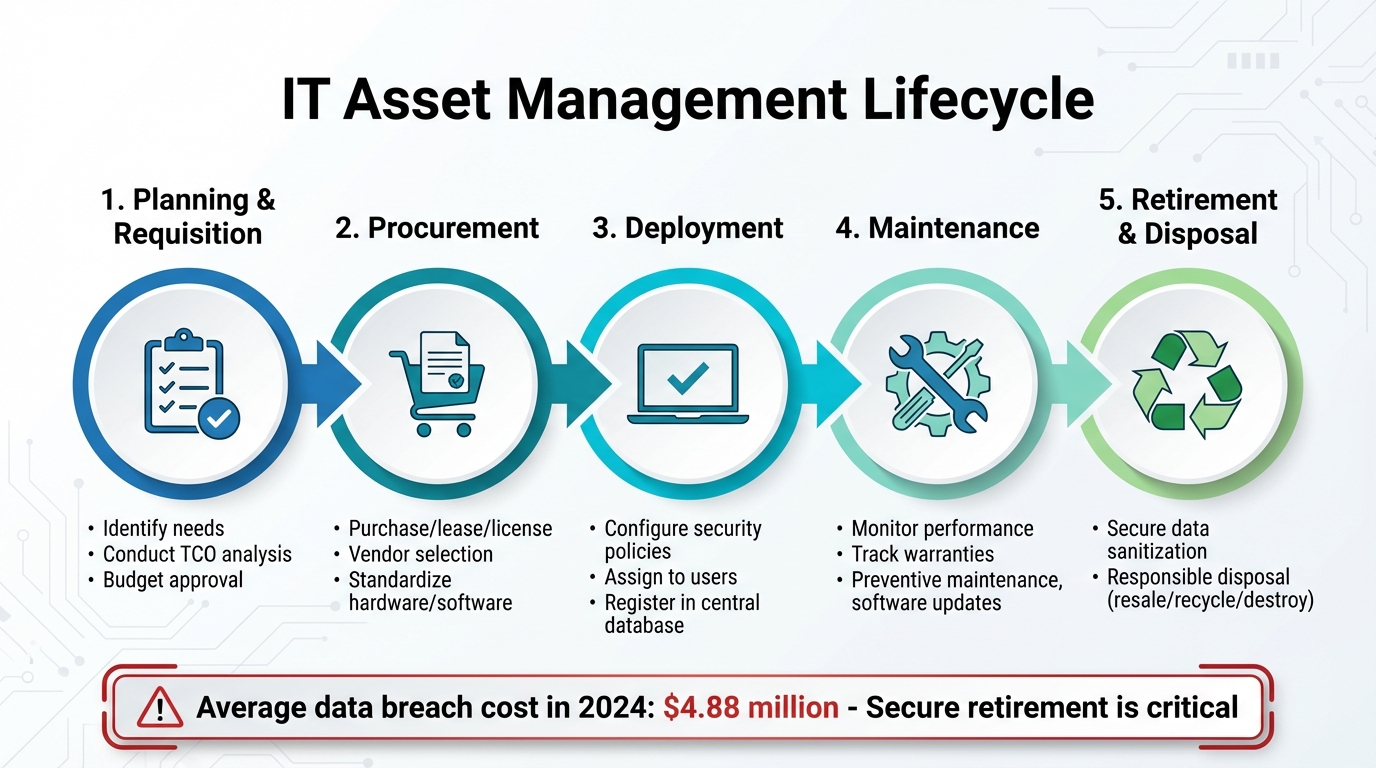
IT Asset Management Lifecycle: 5 Essential Stages from Planning to Disposal
What Counts as an IT Asset?
An IT asset includes any technology - hardware, software, data, or digital resource - that an organization owns or uses.
Hardware assets cover devices like laptops, desktops, servers, and mobile devices, as well as peripherals such as keyboards, monitors, and printers. Networking equipment, including routers, switches, firewalls, and VoIP systems, also falls into this category.
Software assets span applications, operating systems, and productivity tools, along with their licenses and updates. Cloud-based resources, like subscription SaaS platforms, virtual machines, and hosting services (e.g., AWS, Google Cloud Platform), form another key area.
Digital and data assets include proprietary databases, intellectual property, customer analytics tools, and internal documentation. Identifying all these components is the first step toward managing their lifecycle and maximizing their value.
Key ITAM Components
IT asset management (ITAM) organizes data into three main categories to give organizations a clear view of their assets:
- Physical data: Tracks details like asset location, type, assigned user, and current status.
- Financial data: Documents purchase dates, costs, vendor details, depreciation, and total cost of ownership.
- Contractual data: Covers software licenses, service-level agreements (SLAs), warranties, and renewal schedules.
"IT Asset Management (ITAM) is a set of business practices that incorporates IT assets across the business units within the organization. It joins the financial, inventory, contractual and risk management responsibilities to manage the overall life cycle of these assets."
The IT asset lifecycle includes several stages: planning and requisition, procurement, deployment, maintenance, and eventual retirement or disposal. A Configuration Management Database (CMDB) acts as the central hub for storing this information, along with the relationships between assets.
Two common challenges in ITAM are shadow IT and ghost assets. Shadow IT refers to hardware or software acquired without IT department approval, while ghost assets are items that organizations continue to pay for even though they are missing or no longer in use.
ITAM for Security and Compliance
Effective IT asset management plays a critical role in enhancing security and ensuring compliance. By keeping a real-time inventory, security teams can spot unauthorized or shadow IT devices, reducing vulnerabilities and potential attack points.
Automated tools make software license compliance easier, helping organizations adhere to vendor terms and avoid costly penalties during audits. These tools also track software versions and manage patch deployments, ensuring systems stay updated and protected against known threats.
"An effective IT asset management (ITAM) solution can tie together physical and virtual assets and provide management with a complete picture of what, where, and how assets are being used. ITAM enhances visibility for security analysts, which leads to better asset utilization and security."
During the retirement phase, ITAM ensures that sensitive data is securely erased and that devices are decommissioned following privacy and environmental guidelines. Centralized records simplify regulatory audits by providing the necessary documentation to demonstrate compliance with both internal policies and industry regulations. In the U.S., NIST offers specific ITAM guidance through its Cybersecurity Practice Guides, such as NIST SP 1800-5, which focuses on the financial services sector.
Getting Started with IT Asset Management
First Steps to Start ITAM
To kick off your IT Asset Management (ITAM) journey, start by identifying the key IT assets in your organization. These include hardware like computers, servers, and mobile devices, as well as software licenses, cloud subscriptions, and critical data. This initial discovery helps you understand the full scope of your technology landscape.
Focus on the assets that truly matter. Items like cables or mice are less critical compared to high-value hardware or software. Matt Beran, Product Specialist at InvGate, emphasizes this point:
"Not all assets carry the same weight, and the ones you choose to track should directly align with your organization's priorities".
Allen Dixon, an IT Service Management Leader, also advises taking small, incremental steps:
"Having something is better than nothing because you can't manage what you don't know you have... Get a little bit put in place, get some feedback, you know, tweak it, build it some more."
Set up naming conventions early on to keep your records organized and easy to search as your inventory grows. Physical asset tags, such as barcodes or RFID labels, are incredibly useful for tracking during audits or when devices change locations. While spreadsheets might work for very small teams, they can quickly become a headache. Transition to automated discovery tools as soon as possible to avoid errors and outdated information.
How to Structure a Basic Asset Inventory
A well-organized inventory captures three main types of data: physical details (e.g., location, assigned user, status), financial information (e.g., cost, vendor, depreciation), and contractual terms (e.g., warranties, service agreements, renewal dates). This approach ensures you track each asset's operational, financial, and contractual aspects.
Here are the core fields your inventory should include:
| Core Inventory Field | Description |
|---|---|
| Asset ID | A unique identifier, like a barcode or serial number. |
| Owner/User | The individual or department responsible for the asset. |
| Location | Physical site, office, or "Remote" status. |
| Purchase Date | Acquisition date for financial and warranty tracking. |
| Warranty Expiration | Date when manufacturer support ends. |
| Status | Current state (e.g., In Use, In Repair, In Storage, Retired). |
| Cost | Original purchase price for depreciation and total cost of ownership (TCO). |
Centralize all asset data in one system to maintain a single source of truth. This ensures consistency and avoids the confusion of conflicting records across departments. Regularly update the inventory whenever assets are moved, reassigned, or retired. An inventory is only as good as its accuracy and timeliness.
The next step is tackling the challenges of managing assets in ever-changing work environments.
Common Beginner Challenges
One of the biggest hurdles for new ITAM programs is managing remote devices. With the rise of remote work, assets are often scattered across states and home offices, where they connect to unsecured networks. In 2020–2021, 57% of ransomware attacks in August and September targeted schools, highlighting the risks of remote setups.
Another issue is Shadow IT, where employees independently purchase apps or subscriptions without informing IT. This not only introduces security risks but also leads to redundant costs. For instance, a company generating $2 million in revenue and relying on spreadsheets for tracking could spend up to $50,000 annually on "ghost assets" - items that exist on paper but are physically missing.
Manual methods like spreadsheets are prone to failure. They require constant updates and are vulnerable to human error. In January 2023, AdminRemix demonstrated how real-time asset tracking could eliminate these problems. By integrating discovery data, they allowed school IT teams to automatically track details like device damage reports, helpdesk tickets, and outstanding fees for district-issued Chromebooks.
"Prior to using Lansweeper, AdminMixer customers would leverage bulk CSV imports or manual data entry... this process was time consuming, requiring full-time employees normalize and deduplicate data."
- Lundin Matthews, Founder, AdminRemix
To streamline your ITAM processes, integrate your tools with HR systems for seamless asset retrieval during employee offboarding. Also, connect ITAM tools with service desks to provide technicians with access to asset histories. These integrations ensure consistency and improve the reliability of your data across teams.
sbb-itb-c68f633
Cloud-Based ITAM and Google Workspace Integration
Benefits of Cloud-Based ITAM
Cloud-based ITAM tools bring automation to asset updates and offer real-time tracking, solving many of the issues associated with traditional spreadsheets. Spreadsheets often lead to ghost asset errors, lack a centralized dashboard for team-wide visibility, and create version control headaches when data conflicts across departments.
With a cloud-based system, scaling becomes seamless as your organization grows. Remote teams can access the latest asset data from any internet-connected device. This approach not only simplifies asset management but also sets the stage for smooth integrations with platforms like Google Workspace.
AdminRemix and Google Workspace Integration
AdminRemix tools take cloud-based efficiency to the next level. Solutions like Chromebook Getter and User Getter simplify IT management within Google Workspace by using Google Sheets as the interface. This keeps administrators in a familiar environment, eliminating the need to master complex new software. Currently, over 350 premium G-Suite administrators rely on AdminRemix solutions to optimize their workflows.
These tools allow administrators to map Google Active Directory fields - like Device ID or Serial Number - to AdminRemix Asset Tags, enabling real-time synchronization with Google Directory. As Philip Helmers from SWBOCES LHRIC shares:
"I signed up for Chromebook Getter because it's faster than getting what I need with GAM command lines."
AdminRemix also unlocks powerful bulk management features that are challenging or impossible to achieve using the standard Google Admin Console. With these tools, administrators can perform bulk deprovisioning, power washing, rebooting, and even move devices between organizational units - all directly from a spreadsheet interface. Additionally, enhanced reporting provides access to critical details like Auto Update Expiration (AUE) dates, OS versions, and complete activity histories, which are not easily accessible in the native Google console.
How Integration Improves IT Operations
By combining the real-time capabilities of cloud-based ITAM with Google Workspace, this integration streamlines operations and minimizes manual work. Instead of juggling multiple systems or manually updating records, administrators can upload data directly from Google Sheets into the Admin Console, ensuring consistency and reducing administrative effort.
Real-time synchronization ensures that inventory updates automatically reflect any changes in Google Workspace. Whether an employee joins, leaves, or transitions to a new role, the asset data updates instantly - no manual input required. As Sarah S., a Chromebook Getter user, puts it:
"AdminRemix have filled a huge hole with Chromebook Getter that is better than the original."
Best Practices for Maintaining IT Asset Management
Lifecycle Management Practices
Managing IT assets effectively starts with careful planning and budgeting. Begin by identifying stakeholder needs and conducting a total cost of ownership (TCO) analysis. This includes factoring in purchase prices, maintenance, support, and disposal costs. Doing so helps avoid over-procurement and ensures spending aligns with your business strategy.
Establish clear processes for purchasing, leasing, or licensing assets. Standardizing hardware and software selections not only simplifies future maintenance but also takes advantage of economies of scale. When deploying new assets, configure them according to your security policies - such as applying base-level images - and ensure each asset is assigned to a specific user or service in your central register.
The maintenance phase focuses on keeping assets in top condition. This includes monitoring performance, tracking warranty expirations, and conducting preventive maintenance to extend asset life and minimize downtime. When assets reach the end of their lifecycle, decommission them securely. This involves sanitizing all data to prevent breaches and disposing of hardware responsibly - whether through resale, recycling, or destruction. It's worth noting that the global average cost of a data breach reached $4.88 million in 2024, underscoring the importance of secure asset retirement.
Financial Tracking for IT Assets
Financial tracking connects inventory data with purchase costs, maintenance expenses, and disposal fees, offering a clear view of each asset's TCO. This level of transparency supports better budget planning. For example, tracking software usage can help identify unused licenses, often called "shelfware." Optimizing these licenses can reduce software expenditures by up to 30%.
Keeping an eye on depreciation trends and maintenance logs allows organizations to determine the optimal time to refresh assets. This helps avoid situations where maintenance costs exceed the asset's value. Automated alerts for contract expirations and license renewals also help prevent unnecessary auto-renewals of underutilized services.
Using ITAM Data for Decision-Making
IT asset management (ITAM) data plays a vital role in both day-to-day operations and long-term planning. For instance, linking ITAM data with help desk systems gives support agents quick access to warranty details, repair history, and configuration specifics. This reduces resolution times and enhances service quality.
On a broader scale, asset data helps identify aging or underperforming equipment during regular audits. Replacing these assets proactively can prevent costly business disruptions. As the IBM Cloud Education Team explains:
"IT asset management (ITAM) is the end-to-end tracking and management of IT assets to ensure that every asset is properly used, maintained, upgraded and disposed of at the end of its lifecycle."
ITAM insights also help optimize cloud resources. By regularly reviewing usage data, you can reallocate existing resources instead of purchasing new ones, ensuring you're not paying for unnecessary capacity. In this way, your ITAM system transforms into a strategic tool, enabling smarter IT investments and resource management. These insights set the stage for a deeper exploration of ITAM fundamentals in the next section.
Key Takeaways for IT Asset Management
ITAM Fundamentals Recap
IT asset management (ITAM) isn’t something you do once and forget about - it’s a continuous process that evolves alongside your assets, goals, and tools. As Atlassian puts it:
"IT asset management is not a project. You don't do it once and expect it to be finished. ITAM is a process that teams execute on a regular basis or as assets, goals, and tools change".
A well-implemented ITAM strategy, covering everything from planning and procurement to deployment, maintenance, and secure retirement, can save up to 30% on software expenses by optimizing license usage. The National Institute of Standards and Technology highlights its value:
"An effective IT asset management (ITAM) solution can tie together physical and virtual assets and provide management with a complete picture of what, where, and how assets are being used".
These core principles set the stage for building a strong ITAM foundation.
Next Steps for Beginners
If you’re just starting out, there are practical steps you can take right away. Start by moving away from manual spreadsheets and adopting ITAM software that automates asset discovery. For example, tools that integrate with Google Workspace can automatically sync device details like serial numbers, storage capacity, RAM, and battery status into your inventory. AdminRemix offers such integration at $99/month or $999/year, covering unlimited assets and help desk agents - a great option for small to midsize teams.
Create a centralized asset database and gradually incorporate lifecycle tracking. Use automated renewal alerts to minimize manual errors and focus more on strategic planning. When retiring assets, ensure data is securely wiped and equipment is disposed of in line with privacy and environmental regulations. AdminRemix also provides free consultations to help businesses adopt ITAM practices effectively.
FAQs
What are the first steps to successfully start IT Asset Management?
To get started with IT Asset Management (ITAM), the first step is to decide which assets you want to track. This could include hardware, software, cloud services, or other IT resources. Once you've identified the scope, set clear objectives - whether it's cutting costs, enhancing security, or staying compliant with regulations. These goals will help ensure your ITAM strategy aligns with your business priorities.
The next step is creating a comprehensive inventory of all your IT assets. Each asset should have a unique identifier, along with key details like its location, assigned owner, purchase date, warranty status, and licensing information. While automated tools can make this process much easier, even a well-organized spreadsheet can do the job - just make sure it's regularly updated and accurate.
Finally, select an ITAM tool that works seamlessly with your existing systems (such as Google Workspace) and offers features like automated tracking and centralized reporting. Assign responsibility to a dedicated team or manager, and put clear policies in place for acquiring, maintaining, and retiring assets. By starting with a well-structured plan, you'll set the foundation for a scalable and efficient ITAM process.
How does IT Asset Management improve security and ensure compliance for my organization?
IT Asset Management (ITAM) gives you a clear, up-to-date view of all your hardware, software, and cloud services. This visibility is key to keeping your security tight and ensuring compliance. By monitoring how and where your assets are used, ITAM helps spot unauthorized or vulnerable devices, enforce necessary patch updates, and maintain consistent security policies - cutting down the chances of potential threats.
ITAM also streamlines compliance efforts by connecting asset data to regulatory standards like PCI-DSS, HIPAA, or NIST. This simplifies report generation, makes it easier to prove you’re meeting requirements, and allows for quick responses during audits. When ITAM is integrated with your security tools, you get more accurate records, quicker incident responses, and a safer, audit-ready setup.
What are the challenges of managing IT assets in remote work environments?
Managing IT assets in a remote work environment comes with its fair share of hurdles. One major issue is the physical dispersion of equipment - laptops, smartphones, and home-office setups are spread across various locations. This makes it tough to keep an accurate inventory, which can result in missed software updates, security vulnerabilities, or even unexpected costs popping up.
Security risks also rise when devices operate outside the safety net of the corporate network. IT teams often face difficulties enforcing security policies, tracking unauthorized software installations, and ensuring all devices comply with company standards. On top of that, managing IT assets typically involves juggling multiple tools for tracking lifecycles, licenses, and endpoints. This fragmented approach can lead to inefficiencies and siloed data.
One way to tackle these issues is by leveraging cloud-based tools. These tools can automate the process of discovering assets and provide real-time visibility, no matter where the devices are located.