IT Asset Inventory Reporting: Guide for Teams
I start every IT asset report with one decision - not every field. Whether you’re approving replacements or checking device security, show only the data needed to act. Give each issue an owner, priority, and due date.
My approach is simple:
- Match the report to its readers: IT needs service details, Finance needs costs, Security needs control status, and managers need assignments and budget choices.
- Check the data: Set a source for each field, reconcile records, and keep device check-in separate from custody.
- Define the numbers: For example, 90 managed devices out of 100 in scope means 90% management coverage - not proof that every device is secure.
- Control release: Review totals, disclose missing data, limit access, record approval, and archive the report.
I keep the reporting cutoff, source timestamps, and report creation time separate. A new report can still contain old data. The same checks apply to AdminRemix and exported files.
<u>The goal: one shared IT asset management inventory, reports built for each audience, and clear next steps.</u>
Plan Report Requirements and Sources
Before building the report, use a one-page checklist to confirm its audience, decision, owner, scope, reporting period, sources, recipients, and reconciliation rules. Name the preparer, validator, and approver. Specify the action the report supports: assignment, replacement, disposal, cost review, support coverage, or security response.
Keep cutoff, source refresh, and generation times separate. A newly generated report doesn’t necessarily contain new data. Use the checklist to define each stakeholder’s view, then map the fields and sources.
Match Stakeholders to Decisions
For each decision, identify the minimum fields someone needs to act. Keep three status types separate: assignment status (assigned, shared, returned), lifecycle status (in stock, deployed, repair, disposed), and check-in status (current, stale, never checked in). Set check-in windows by asset type and risk, and retain the underlying timestamp.
| Stakeholder | Decision | Required information | Action owner |
|---|---|---|---|
| IT operations | Maintain, enroll, replace, or recover devices | Asset ID, model, OS, lifecycle, location, check-in, support end date | IT operations manager |
| Help desk | Resolve incidents and recover loaners | Serial number, custodian, tickets, support entitlement, return status | Help desk lead |
| Security | Investigate unmanaged or exposed assets | Device identity, enrollment, patch level, approved connection, last seen | Security operations |
| Finance and procurement | Approve spending, renewals, or disposal | Purchase cost, book value, cost center, contract dates, disposal status | Finance or procurement owner |
| Department managers | Confirm assignments and plan replacements | Custodian, department, return status, replacement date | Department manager |
| Leadership | Approve budgets and address material risk | Asset totals, coverage, replacement forecast, renewals, unresolved exceptions | IT leadership |
Once the decision is clear, remove fields that don’t support it.
Choose Core and Report-Specific Fields
Use one core schema, but show only the fields each audience needs. Keep responsibilities clear: custodians hold assets, record owners maintain inventory records, and data owners govern specific fields.
Add fields based on the report’s purpose:
- Replacement: Age, repair count, and priority.
- Disposal: Approval, wipe evidence, and custody transfer.
- Cost: Purchase price and book value.
- Contracts: Renewal and notice deadlines.
- Support: Entitlement and open incidents.
- Security: Encryption, patches, and exceptions.
- Custody: Acknowledgment and return dates.
- SaaS: Seats, activity, business owner, and renewal date or contract value.
Share employee, financial, and security details only with authorized recipients.
| Core field | Definition or reporting rule |
|---|---|
| Stable asset ID | Persistent organizational key that doesn’t change on reassignment |
| Serial number | Manufacturer identifier used to match device and purchase records |
| Type and model | Controlled asset category, manufacturer, and model |
| Custodian and record owner | Separate custody responsibility from record maintenance |
| Department and cost center | Organizational assignment and financial allocation |
| Location | Verified site, storage area, or approved remote designation |
| Lifecycle status | Controlled stage in the asset’s use; document financial status separately if needed |
| Purchase or lease date | Acquisition date from the approved financial source |
| Support end date | Warranty or contracted coverage expiration |
| Operating system and version | Technical state; mark not applicable where appropriate |
| Last check-in | Latest device communication - not the inventory edit time |
| Record update and source timestamps | When the record changed and when each source reported its value |
Assign each field to an authoritative source and define how to resolve conflicts.
Set Source Ownership and Reconcile Records
Assign authority by field, not by system. Approve a source matrix before combining records. Treat the update frequencies below as defaults, and confirm actual refresh schedules with each data owner. Include source and extract timestamps, fallback sources, access classification, and the escalation path in the matrix.
| Field group | Authoritative source | Data owner | Update frequency | Conflict rule |
|---|---|---|---|---|
| Purchase date, cost, book value | Finance records | Finance | Purchase, adjustment, monthly close | Finance prevails; investigate unmatched assets |
| Asset ID, lifecycle | IT asset register | IT asset manager | Each lifecycle event | Approved workflow prevails |
| Serial, model, OS, check-in | Device-management records | Endpoint team | Daily or near real time | Use the most recent trusted evidence; flag identity conflicts |
| Custodian, assignment, return | Approved assignment records | Help desk or asset manager | Each custody event | Approved transaction prevails; never infer custody from presence |
| Employee status, department, manager | HR or directory records | HR or identity team | Daily or on change | Approved identity source prevails |
| Location | Assignment, shipping, or physical verification | IT operations | Move, shipment, verification | Latest verified location prevails |
| Support and contract dates | Procurement or contract records | Procurement | Contract change and review | Contract terms prevail |
| Security state | Security or endpoint records | Security operations | Daily or more frequently | Retain technical evidence and its timestamp |
| SaaS seats and activity | Administration records | Application owner | Weekly or monthly | Reconcile reported seats against contracts |
Before matching records, standardize spacing, capitalization, department codes, statuses, and timestamps. Match on stable asset ID first. Then confirm the match with the serial number and manufacturer or managed device IDs. Send ambiguous matches for manual review, and preserve original values.
Check for duplicate IDs, conflicting assignments, missing custodians, unmatched purchase records, and assets assigned to inactive employees. Log each exception with its evidence, reviewer, due date, and resolution.
Check-in shows communication, not custody. Only an approved assignment, checkout, or return record establishes responsibility.
sbb-itb-c68f633
Build Reports for Each Stakeholder
Use one report layout: purpose, audience, owner, period, last updated, scope, filters, summary, exceptions, asset details, definitions, and data-quality notes. Put investigation fields in the asset-detail section. For each exception, include the business impact, priority, named action owner, due date, status, and supporting evidence.
Tailor what each audience sees without changing the underlying record.
Create IT, Finance, Security, and Management Views
Where possible, keep one governed asset record and build audience-specific views - not separate copies. Put the information needed for each audience’s decision first. Every detail view should show the asset ID and source timestamp, and each view should answer one decision using that same governed record.
| Report template | Lead with the decision | Detail fields and filters | Metrics and owner |
|---|---|---|---|
| IT and help desk | Which assets need service, assignment, recovery, or repair? | Asset ID, serial number, device type, hostname, assigned user, department, location, status, last check-in, ticket link, warranty date; filter by open tickets, unassigned assets, stale check-ins, active devices | Open incidents by asset, unassigned-device count, stale-check-in count, average update age, warranty coverage; service desk manager or asset manager |
| Lifecycle planning | Which assets should be repaired or replaced? | Asset ID, acquisition or deployment date, condition, planned replacement date, support expiration date; filter by planning horizon | Replacement candidates, forecast cost, upcoming support deadlines; lifecycle owner |
| Finance and procurement | Which records reconcile to purchases, leases, depreciation, and renewals? | Asset ID, purchase order, vendor, acquisition date, acquisition cost, currency, cost center, depreciation status, lease end date, warranty date, contract or invoice reference; filter by period, cost center, vendor, exception status | Reconciliation rate, total acquisition cost, assets without purchase references, upcoming renewals, difference between finance records and the asset register; IT finance partner or controller |
| Security | Which assets are unmanaged, unsupported, vulnerable, or out of scope? | Asset ID, operating system, version, management status, encryption status, last check-in, vulnerability status, network approval, criticality, owner, data classification; filter by unmanaged, unsupported, high-risk, inactive records | Management coverage, unsupported-device count, overdue check-ins, critical assets without owners, remediation aging; security operations or security asset owner |
| Department equipment | What equipment does each department have, need, or need to return? | Asset ID, equipment type, user, manager, department, location, employment status, lifecycle status, replacement eligibility, return status; filter by department, location, leavers, planned hires | Assets per employee, unassigned stock, overdue returns, replacement candidates, equipment gaps; department manager with IT or HR support |
| Management and leadership | What cost, operational, and risk trends need attention? | Reporting period, asset population, business unit, total cost, lifecycle stage, risk tier, replacement forecast, material exceptions; filter by organization, geography, asset class, risk level | Total inventory value, replacement forecast, risk trend, coverage trend, exception aging, cost per asset or employee; IT leadership with finance and security partners |
Once the view is set, define which metrics trigger review, escalation, or renewal.
Define Metrics and Escalation Rules
For every metric, specify its calculation, population, exclusions, source, period, threshold, and owner. Get thresholds approved locally. Compare trends only when reporting periods and populations match, and use each metric to assign an owner, trigger, or deadline.
| Metric | Calculation, population, and period | Source, action trigger, and owner |
|---|---|---|
| Asset status | Unique assets by lifecycle status at cutoff; exclude test records and known duplicates | Inventory; investigate unexpected changes or unknown statuses; asset manager |
| Management coverage | Managed in-scope assets ÷ total in-scope assets × 100; snapshot; disclose approved exemptions | Endpoint records and inventory; below approved coverage target; security owner |
| Check-in compliance | Assets with a check-in within the approved interval ÷ assets expected to check in × 100; exclude documented offline, stored, retired, and repair assets | Device-management records; repeated or high-risk stale check-ins; endpoint owner |
| Duplicate rate | Suspected duplicate records ÷ total in-scope records × 100; snapshot; publish matching rules | Inventory and procurement; unresolved identity conflicts; data steward |
| Missing data | Records missing each required field ÷ records requiring that field × 100; snapshot; exclude not-applicable fields | Relevant field source; above agreed tolerance, with ownership gaps prioritized; field owner |
| Warranty coverage | Assets under warranty ÷ eligible active assets × 100; snapshot; disclose unknown dates separately | Procurement and vendor records; repair or replacement planning trigger; procurement owner |
| End-of-life exposure | Assets past the organization’s defined hardware or software life standard ÷ eligible assets × 100; snapshot by asset class | Inventory and lifecycle records; prioritize by condition and criticality; lifecycle owner |
| Support expiration | Assets whose vendor support or security updates have ended or will end by a stated date ÷ eligible assets × 100; show current and future expirations separately | Contract or vendor lifecycle records; unsupported critical assets or approaching deadlines; platform owner |
| Reconciliation rate | Records matching across inventory, finance, procurement, or discovery ÷ records selected for comparison × 100; accounting period; define matching keys and one-to-many treatment | ITAM, finance, procurement, and discovery systems; material or unresolved variance; reconciliation owner |
| Record age | Current date minus the source record’s last verified or updated timestamp; report median and oldest age when useful; distinguish update age from asset age | Source history; beyond the approved standard for how current records must be; data steward |
| Action items | Open exceptions by severity and owner at cutoff; separate overdue from newly opened items | Ticket or decision log; overdue deadline or critical finding; assigned action owner |
End of life and support expiration are different milestones. State whether end of life means an internal replacement standard or a manufacturer lifecycle date.
A stale check-in calls for investigation; it doesn’t prove an asset is lost. Route critical exposure to security or IT for documented action, and give high-priority exceptions a locally approved deadline.
For example, set a deadline of five business days.
Send routine field corrections to their data owners during the next review cycle. Then format the report so readers can spot the action at a glance.
Make Reports Clear for Each Audience
Start with the decision, followed by the action, metric, and supporting details. Explain terms such as management coverage in plain language. Keep status labels consistent, and pair color with Critical, Warning, or Informational labels.
Format dates as October 9, 2026, times as 2:00 PM ET, and currency as $1,250.00 USD when needed.
Show source refresh times and state clearly which missing or outdated data limits the totals.
Before sharing, confirm:
- [ ] The report supports one decision and names the decision owner.
- [ ] Scope, filters, units, and definitions are visible.
- [ ] Every action has a named owner, due date, priority, and status.
- [ ] Metrics show denominators, exclusions, sources, and approved thresholds.
- [ ] Data-quality limits are prominent.
Validate and Maintain Reports
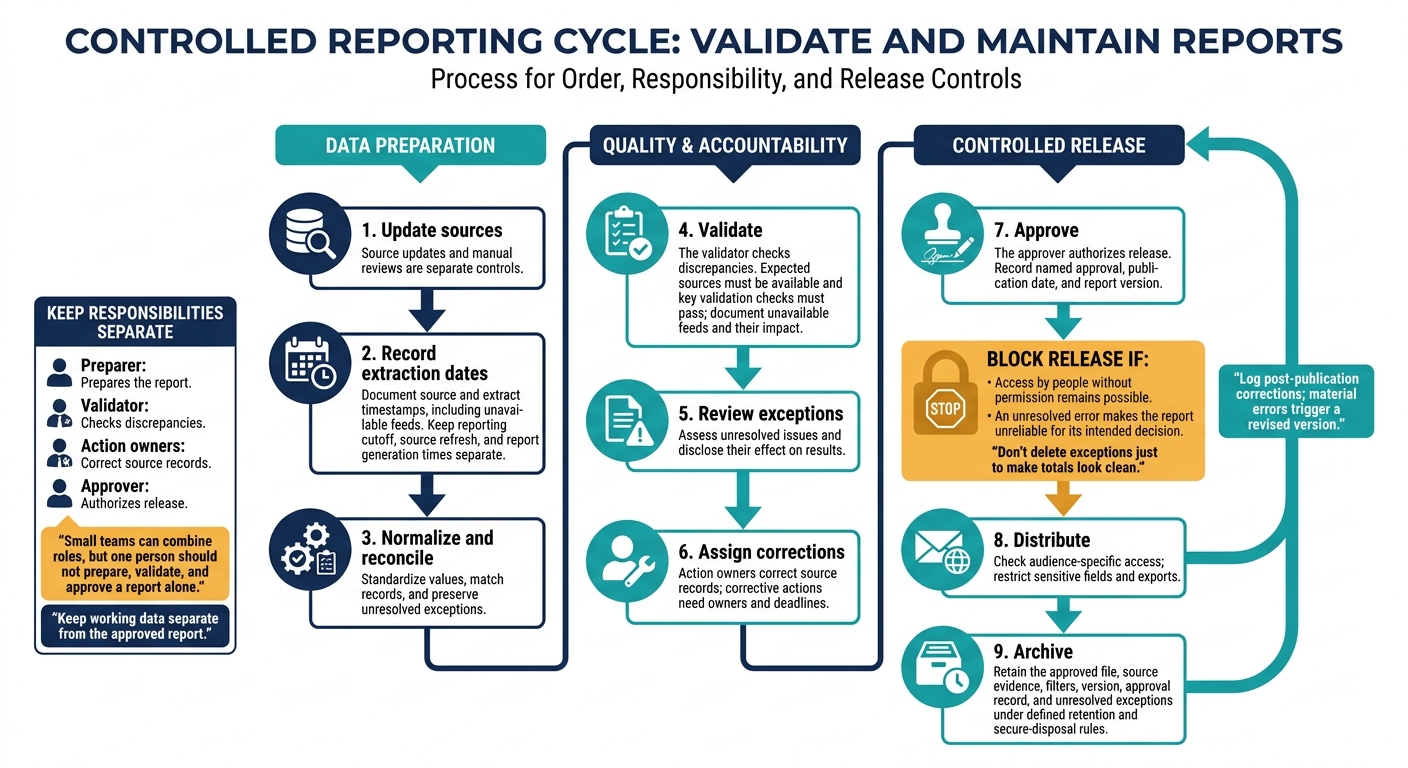
IT Asset Reporting: From Source Updates to Release
Once you’ve defined the report views, put controls in place to keep them accurate and ready for release.
Set Review Schedules and Responsibilities
Source updates and manual reviews are separate controls. Use the schedule below as a starting point for stakeholder views. Adjust it based on criticality, staffing, audit needs, and source reliability. Small teams can combine roles, but one person should not prepare, validate, and approve a report alone.
| Report type | Source-update schedule | Manual review schedule | Preparer | Validator | Approver | Action owner |
|---|---|---|---|---|---|---|
| Endpoint and network inventory | Daily or continuous where supported | Weekly | IT asset analyst | Endpoint or network administrator | IT manager | Device or system owner |
| SaaS licenses and subscription costs | Daily or weekly from connected systems | Monthly | ITAM or procurement analyst | Finance or procurement analyst | IT or finance manager | Application owner |
| Lifecycle, warranty, and ownership | On purchase, transfer, return, or retirement | Quarterly | ITAM coordinator | Department representative | IT operations manager | Custodian or department owner |
| Security exposure and unmanaged assets | Daily or weekly, based on tool capability | Weekly or more often for high-risk assets | Security or IT analyst | Security administrator | Security manager | System owner or remediation lead |
| Reporting controls and retention | When policies change | Annually or after a major change | IT governance owner | Internal control or compliance reviewer | Executive or designated control owner | Policy owner |
Follow this sequence each cycle: update sources, record extraction dates, normalize and reconcile, validate, review exceptions, assign corrections, approve, distribute, and archive.
Keep working data separate from the approved report. The validator checks discrepancies, action owners correct source records, and the approver authorizes release. Fixing a record should not automatically make someone the sole approver of the resulting report.
Archive the approved file along with its source evidence, filters, version, approval record, and unresolved exceptions.
Manage Data Quality, Access, and Changes
Maintain a data dictionary that identifies field owners, allowed values, and which source takes precedence. Before moving imports into production, test them in staging. Check mappings, date and currency formats, and how the import handles nulls, duplicates, and overwrites.
Keep a correction history with the affected asset, old and new values, reason, evidence, editor, and timestamp. Require approval for changes to formulas, filters, or reconciliation rules so report comparisons don’t change without anyone knowing.
Before using coverage metrics, check the limits of each discovery method. Agent-based discovery covers enrolled devices that are communicating. Agentless discovery depends on reachability and scan settings. Directory data may be stale, while manual checks happen periodically and don’t prove custody.
Document these limits. A missing observation does not necessarily mean an asset is missing. Reports can support compliance evidence, but they do not establish compliance on their own.
Publication checklist
- [ ] Expected sources are available and key validation checks pass; extraction times and unavailable feeds are documented.
- [ ] Unresolved exceptions have corrective actions, owners, and deadlines; their effect on results is disclosed.
- [ ] Named approval, publication date, and report version are recorded.
- [ ] Audience-specific access is checked; sensitive fields and exports are restricted.
- [ ] The approved report and evidence are archived under defined retention and secure-disposal rules.
- [ ] Post-publication corrections are logged; material errors trigger a revised version.
Block release if access by people without permission remains possible or an unresolved error makes the report unreliable for its intended decision. Don’t delete exceptions just to make totals look clean. Retain controlled copies, restrict editing, and preserve immutable evidence when audit or legal requirements apply.
Apply these same controls to optional source systems and exported files.
Use AdminRemix as a Reporting Data Source
If AdminRemix is one of your source systems, treat it like any other governed input: validate it before use.
Map AssetRemix, Chromebook Getter, and User Getter fields to your data dictionary. Record extraction dates and reconcile exports before building stakeholder views. Verify current fields, formats, permissions, and sync behavior. Protect sensitive device, user, and support data in both source files and Google Sheets exports.
Conclusion: Keep Reports Focused on Decisions
Every stakeholder report follows the same rule: Start with the decision, then define the audience, fields, and template. Keep asset IDs and source rules consistent across all views. Use risk-based reviews and controlled access.
One governed inventory can serve IT, Finance, Security, and management without exposing fields they don’t need. Give Finance the costs needed to plan asset renewal and replacement. Give Security the details needed for remediation. Remove fields and charts that no longer help recipients act. Tie each view to one decision.
Before distributing a report, confirm:
- [ ] Named owner: One person owns the report and its follow-up.
- [ ] Clear scope: State the asset types, departments, and exclusions.
- [ ] Time context: Show the reporting period and last-update timestamp separately, and include the time zone.
- [ ] Defined metrics: Define formulas, units, thresholds, and comparison periods.
- [ ] Visible exceptions: Show unresolved issues, their severity, and their effect on the decision.
- [ ] Accountable action: Assign each exception an owner, due date, and next step.
FAQs
How do I prioritize conflicting stakeholder reporting needs?
Bring your data into a single source of truth. Set reconciliation rules in advance so your team knows which source takes precedence for each field when records conflict.
Tie reporting goals to your organization’s priorities, whether that means compliance, budget management, or reducing downtime. Use role-based permissions so stakeholders see only the data relevant to them.
Start with high-priority assets, then tackle competing demands in phases to keep your team from getting overwhelmed.
How can a small IT team separate reporting duties?
Use role-based access controls and standard workflows to keep data access tied to each person’s job. In AssetRemix, set permissions so team members see only the data they need. Site coordinators, for example, should see only their location’s data.
For spreadsheets, limit the master inventory to administrators. Give help desk staff separate sheets with the device details they need. Use shared templates to keep reports consistent, keep documentation in one place, and make reviews easier.
When should missing data delay a report?
Delay a report when missing data exposes major inventory gaps, such as inaccurate asset counts, duplicate entries, or blind spots that could put audit compliance at risk.
Fix gaps found during routine accuracy checks before finalizing reports. This gives stakeholders accurate information they can act on. Use standardized templates to prevent incomplete submissions that could hold up audits or weaken decision-making.