
How to Set Up a Help Desk for Small IT Teams
Setting up a help desk for a small IT team can transform how you handle support requests. Instead of being overwhelmed by scattered inquiries, a structured help desk ensures you can prioritize and resolve issues efficiently. Here's the process in four steps:
- Assess Your Needs: Identify the number of users, devices, and applications your team supports. Define what your help desk will handle and set realistic service targets.
- Choose Tools: Pick a simple, cost-effective help desk software like AssetRemix, which integrates with Google Workspace for seamless operations.
- Create Workflows: Define ticket workflows with clear stages and assign roles (e.g., requesters, agents, admins) to streamline responsibilities.
- Document and Track: Write step-by-step guides for common tasks, build a knowledge base, and monitor metrics like ticket volume and resolution time to improve efficiency.
How to Build a Service Desk in Just 5 Minutes (Beginners Tutorial)
Step 1: Review Your Needs and Set Support Boundaries
Before diving into tools or workflows, it’s crucial to understand your current setup and define what you want to achieve. Start by taking stock of your resources and deciding exactly what your help desk will handle. Setting clear boundaries ensures your team stays effective without getting overwhelmed.
Review Your Current Setup
Begin by assessing the basics - how many users will need support? Take note of all devices in use, such as laptops, desktops, mobile phones, printers, and any specialized equipment. Also, consider where your users are located to determine whether you’ll need onsite, remote, or a mix of both types of support.
Next, list the applications your team will support, like email systems, productivity software, or internal tools. This will help you identify recurring issues and decide where self-service options could reduce repetitive tasks.
Don’t forget to factor in your team’s working hours. If your team supports users during standard hours (e.g., 9:00 AM to 5:00 PM), plan accordingly. But if your organization operates during evenings or weekends, make sure to account for potential gaps in coverage. A small team can’t sustain 24/7 support without risking burnout, so be realistic about your limits.
To get a better sense of your team’s workload, track requests for a week. Look for patterns - how many tickets come in daily? Are there recurring issues like password resets or software installations? This data will give you the insights you need to structure your help desk effectively.
Set Support Boundaries and Service Targets
Once you’ve analyzed your setup, it’s time to define what your help desk will and won’t handle. This step is critical to avoid scope creep and ensure users know where to go for specific issues.
Decide which technical problems your team will address, such as network issues, software installations, hardware repairs, or account management. Make it clear that non-IT issues, like HR or facilities requests, fall outside your scope. Then, set service targets by categorizing issues into priority levels - Critical, High, Medium, and Low - and assign response times for each (e.g., acknowledge critical issues within 2 hours and resolve them within 4 hours).
Identify Request Channels
Streamline how users submit requests by centralizing them through email, web forms, chat, phone, or in-person interactions. Make sure every request converts into a ticket with a unique identifier and timestamp. This system ensures no issue gets overlooked and gives you full visibility into your team’s workload.
With your environment assessed, support boundaries set, and request channels organized, you’re ready to move on to selecting and configuring the right help desk tools.
Step 2: Choose and Configure Help Desk Tools
After defining your needs and setting boundaries, it’s time to pick the right help desk software. This tool will be the core of your operations, so it must align with your team’s size, budget, and technical setup. For smaller teams, the software should strike a balance between being powerful and easy to manage.
What to Look for in Help Desk Software
Once you’ve outlined your support requirements, focus on software features that simplify your team’s workload without adding unnecessary complications. Here are some key aspects to consider:
- Cloud-based access: Your team should be able to handle tickets from anywhere, whether working remotely or moving between locations.
- User-friendly interface: Look for a system that’s intuitive enough for new team members to start managing tickets within hours. Dashboards should clearly display open tickets, priority levels, and assignments at a glance, reducing onboarding time.
- Automation: Features like automatic ticket routing, acknowledgment emails, overdue ticket escalation, and workflow updates can save your team hours of manual work.
- Google Workspace integration: If your team uses Google Workspace, seamless syncing is a must. The software should support single sign-on, pull user details from your directory, and work effortlessly with Gmail and Google Calendar to avoid maintaining separate systems.
- Cost structure: Many tools charge per agent or per ticket, which can quickly add up. Flat-rate pricing, such as $99/month, offers more predictable costs without surprise fees for essentials like reporting or notifications.
Connect IT Asset Management with Help Desk Work
A well-functioning help desk doesn’t operate in isolation - it works hand-in-hand with IT asset management. For example, when a user reports an issue with a laptop or printer, your team should instantly see the device’s history: purchase date, warranty status, past repairs, assigned user, and current configuration. This context not only speeds up troubleshooting but also reveals patterns, such as recurring failures with a specific device model.
Integrating asset management with help desk tools provides real-time device data, making resolutions faster and more accurate. This connection also supports proactive incident management - if you notice a trend of failing components in older devices, you can address the issue before it disrupts users. Additionally, this integration helps with asset allocation by identifying devices that generate more support tickets, guiding decisions on replacements or future purchases.
For instance, AssetRemix combines IT asset management and help desk functionality in one platform, designed with small teams in mind. With AssetRemix, your team can link tickets directly to devices, viewing specifications, warranty details, and repair history all in one place. This eliminates the need to switch between systems, streamlining the support process and ensuring no detail is overlooked.
Configure AssetRemix and Google Workspace Connections
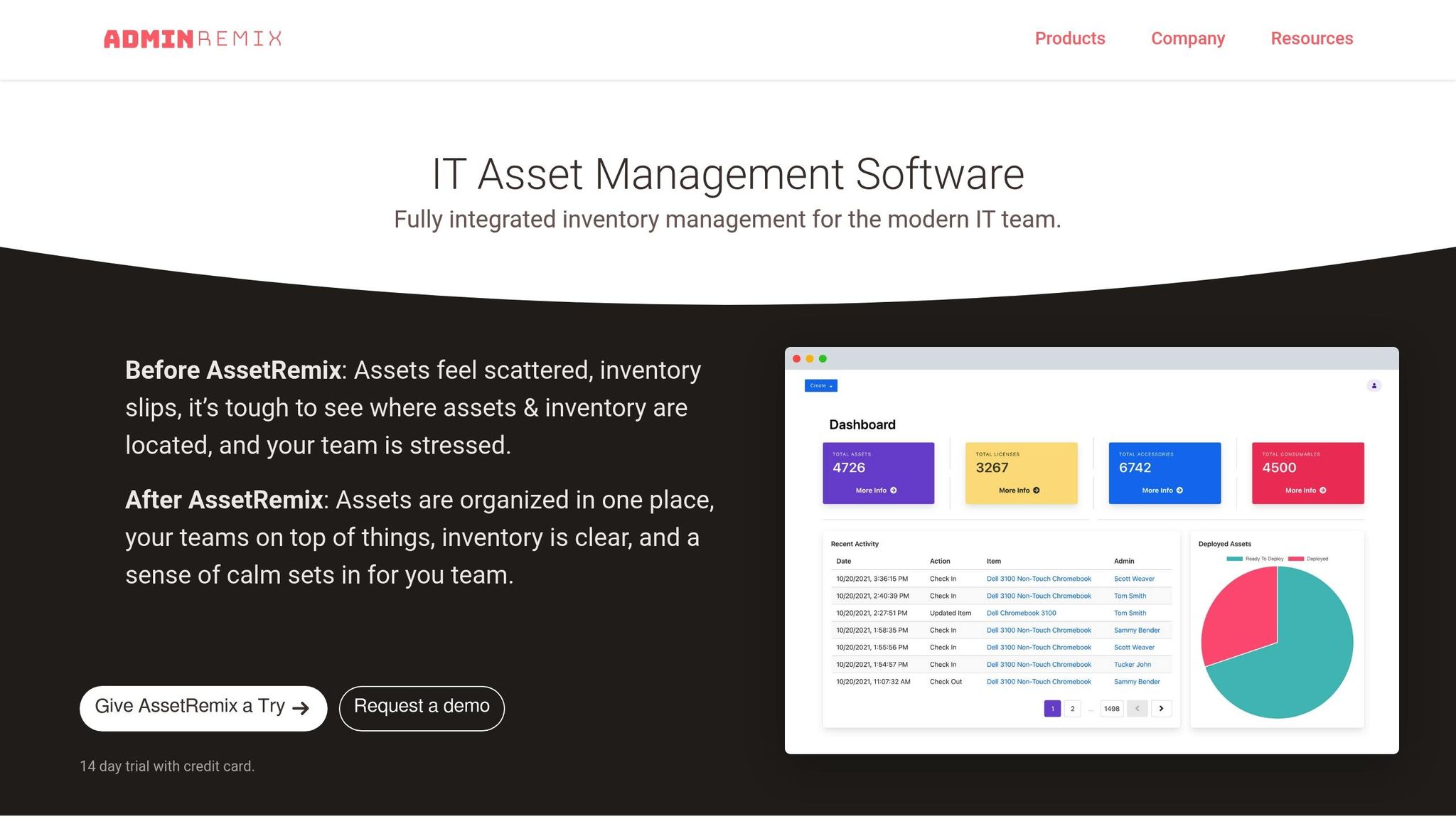
To set up AssetRemix, start by importing your existing device inventory. The platform supports bulk imports via CSV files, so you can quickly migrate data from spreadsheets. Include key details like device type, serial number, purchase date, assigned user, and location. Each asset will then have its own dedicated page to track its entire lifecycle, from deployment to retirement.
Next, enable single sign-on (SSO) with Google Workspace. This feature allows both your team and end users to log in using their Google accounts, removing the need to manage separate credentials. The setup is straightforward: authorize AssetRemix to access your Google Workspace directory, map user roles to the appropriate access levels, and test the connection. Once synced, new employees added to Google Workspace will automatically appear in AssetRemix.
By combining AssetRemix’s unified platform with Google Workspace integration, you gain a complete view of your IT environment. When a ticket comes in, your team can instantly check the device’s status, assigned user, and support history - all without leaving the help desk interface. This streamlined approach replaces fragmented workflows with a single, efficient system.
With your software selected and configured, the next step is to establish workflows and assign roles to guide your team’s day-to-day operations.
sbb-itb-c68f633
Step 3: Set Up Workflows and Assign Roles
Once your software is up and running, the next step is to establish clear ticket workflows and assign roles. This prevents delays, keeps responsibilities clear, and ensures tasks move smoothly - even when team members juggle multiple duties.
Build Ticket Workflows That Work
Ticket workflows map out how a ticket moves from the moment it’s submitted to its resolution. A basic workflow typically includes three stages: new, in progress, and closed. Depending on your needs, you can add extra stages like waiting on user, escalated, or pending approval. The key is to define triggers for each status change. For example, assigning a ticket might move it to in progress, while a user’s follow-up could shift it back to waiting on user.
With AssetRemix, you can automate these status updates directly in the settings. For instance, set it to automatically mark a ticket as in progress when an agent adds their first comment or move it to closed after 48 hours of inactivity following resolution. This automation reduces manual work and keeps everything flowing without constant monitoring.
Define Roles and Access Levels
To keep things organized, assign clear roles with specific permissions. Start with three key roles:
- Requesters: These are your users who submit tickets and track their progress.
- Agents: Team members who handle and resolve tickets.
- Admins: Those responsible for setting up workflows, managing targets, and generating reports.
AssetRemix makes it easy to integrate with Google Workspace, automatically assigning these roles. If needed, you can create custom roles, such as read-only viewers or agents with limited permissions, to suit your team’s structure.
By setting up workflows and assigning roles, you’re laying the groundwork for effective performance tracking and service management.
Establish Realistic Service Targets and Alerts
Set practical response and resolution goals to keep your team on track. For example, aim to respond to tickets within four business hours (8:00 AM–6:00 PM, Monday–Friday) and resolve 80% of tickets within two business days. Adjust these goals based on priority - high-priority tickets might need a one-hour response and same-day resolution.
AssetRemix can help you stay on top of these targets by sending alerts when 75% of a ticket’s allotted time has passed. You can also set escalation rules for tickets that remain unassigned for more than six hours.
Use the AssetRemix dashboard to monitor how well your team is meeting these targets. Review metrics weekly to see how often you’re hitting your goals. If you’re consistently exceeding targets (e.g., 95% or higher), consider tightening them slightly. On the other hand, if you’re falling short (e.g., meeting only 60% of targets), adjust them to something more achievable.
Service targets should guide your team’s efforts, not overwhelm them. They should reflect what’s realistically possible while maintaining high-quality support. As your team grows or processes improve, revisit these targets quarterly and refine them based on actual data.
Step 4: Document Processes and Track Results
Organizing your processes and keeping a close eye on performance metrics are key to running a more efficient help desk.
Write Standard Operating Procedures
Standard Operating Procedures (SOPs) are step-by-step guides that help your team tackle common help desk tasks consistently. They’re especially helpful when someone is out sick or when onboarding new team members.
Start by focusing on the tasks your team handles most often. For example, if password resets account for 30% of your tickets, create a guide that covers everything from verifying the user’s identity to resetting their password in Google Workspace and confirming they can log in. Keep the instructions clear and concise, and include any essential security protocols.
Expand your SOPs to cover routine tasks, escalations, and device management. Store these documents in a location your team can easily access, like a shared Google Drive folder, a wiki, or directly in AssetRemix's knowledge base. Make it a habit to review and update these procedures quarterly or whenever a process changes. Include a "Last Updated" date on each document to ensure everyone knows they’re using the latest version.
Once your SOPs are in place, shift your attention to tracking performance and identifying areas for improvement.
Monitor Key Metrics and Review Reports
With clear processes documented, you can start measuring how well your help desk is performing. Focus on metrics that directly affect your team's efficiency and the satisfaction of your users. Avoid collecting data you won’t use.
Here are the key metrics to monitor:
- Ticket volume: Shows how many requests your team handles daily, weekly, and monthly.
- Response time: Measures how quickly your team acknowledges new tickets.
- Resolution time: Tracks how long it takes to close tickets, broken down by priority level and type.
- First-contact resolution rate: Indicates how often issues are resolved without needing follow-ups, which saves time and gets users back to work faster.
- Backlog size: Counts open tickets waiting for attention. A growing backlog could mean your team is understaffed, spending too much time on low-priority issues, or needs to adjust workflows.
AssetRemix can automatically track these metrics, including response and resolution times. Dedicate 30 minutes every Friday to review the week’s data with your team. Look for patterns rather than focusing on individual tickets. For instance, if response times suddenly jump from two hours to six, investigate whether the cause was a surge in ticket volume, staff shortages, or unusually complex issues.
Export monthly reports from AssetRemix to identify long-term trends. Compare the current month’s performance to the last three months. For example, if resolution times have climbed from 24 to 48 hours, it’s time to dig into the root cause before the problem worsens.
Create a Knowledge Base for Common Problems
Use your documented solutions and AssetRemix integration to build a self-service knowledge base. This is a searchable collection of answers to common problems your team has already solved. It saves time by allowing users to find solutions themselves while giving your team quick references for recurring issues.
Start by identifying your top ten most common ticket types. Use AssetRemix reports to spot patterns, such as frequent issues with Google Workspace logins, printer connectivity, VPN setup, software installations, or email configurations on mobile devices.
Turn these common problems into knowledge base articles. Write in plain, easy-to-follow language. For example, an article titled "Can't Access Google Drive Files" could guide users to check their internet connection, verify they’re logged into the correct account, clear their browser cache, and try a different browser. Include screenshots to show users exactly what to expect at each step.
AssetRemix makes this process easier by letting you convert ticket resolutions into knowledge base articles. This preserves the troubleshooting steps your team already took, saving time and effort.
Organize articles by category for easy navigation. Create sections for topics like Google Workspace, hardware issues, network problems, and software applications. Use relevant tags to make articles searchable - an article about Gmail syncing issues on iPhones might include tags like "Gmail", "iPhone", "sync", and "mobile."
Make the knowledge base accessible to users before they submit tickets. Add a prominent link in your help desk portal and encourage users to search for solutions first. AssetRemix can even suggest relevant articles automatically when users describe their issues in new tickets.
Keep your knowledge base up to date. If you switch to new printer models or update your VPN software, revise related articles within 48 hours. Outdated information frustrates users and creates unnecessary tickets when instructions no longer work.
Track article views and user ratings to refine content. If an article has many views but low ratings, it might need clearer instructions or better visuals. If an article on a common issue has low views, improve its title and tags to make it easier to find.
Encourage your team to contribute. When someone solves an unusual problem, ask them to document it. Aim to add at least two new articles each month to build a resource that reduces ticket volume and empowers users to handle simple problems on their own.
Conclusion
Setting up a help desk for your small IT team doesn’t have to be overwhelming or costly. By following the four steps outlined here - assessing your needs and limitations, selecting and configuring the right tools, defining workflows and roles, and documenting your processes - you can create a system that manages support requests efficiently without overextending your resources.
The trick is to start with a realistic understanding of your team’s capacity and build workflows that align with what’s manageable. Tools like AssetRemix, with its integration into Google Workspace, help streamline operations by reducing time spent switching between platforms while offering unified access to device details and ticket histories.
A well-structured help desk does more than just speed up ticket resolution. It eases the load on your team by providing clear protocols for recurring issues, sets user expectations with defined service targets, and builds a knowledge base that empowers users to solve simple problems on their own. Over time, this reduces repetitive questions, freeing up your team to tackle projects that drive your organization forward. These changes not only make ticket handling smoother but also give your team the bandwidth to focus on more strategic goals.
Start small by targeting one or two common ticket types, documenting the solutions, and adding them to your knowledge base. Regularly review your metrics to identify trends and refine your workflows as needed. With AssetRemix’s straightforward flat-rate pricing, you can scale your system as your team grows without worrying about unexpected expenses.
A little effort today can save significant time tomorrow. Small, consistent improvements each month will help you build a scalable help desk that keeps users happy and your team energized.
FAQs
What key features should small IT teams prioritize when selecting help desk software?
When selecting help desk software for a small IT team, prioritize tools that improve workflow and teamwork. Key features to look for include ticket management for organized issue tracking and resolution, automation to handle repetitive tasks efficiently, and shared inboxes to keep team communication smooth and centralized.
Additional features worth considering are knowledge bases to empower users with self-service options, live chat for instant support, and reporting tools to track performance metrics and highlight areas needing attention. Make sure the software integrates well with your current tools and offers an intuitive interface to simplify adoption and everyday use.
How does combining IT asset management with help desk tools help small IT teams work more efficiently?
Integrating IT asset management with help desk tools can make a world of difference for small IT teams. By linking these systems, team members gain instant access to detailed information about hardware, software, and other IT assets - all within the help desk platform. This means less time chasing down asset details and more time resolving issues quickly and accurately.
On top of that, this integration helps teams spot recurring problems tied to specific assets. With this insight, they can address issues proactively and plan resources more effectively. For small teams working with tight budgets and limited manpower, this streamlined approach translates into saved time and a noticeable boost in productivity.
How can small IT teams set realistic and achievable help desk goals?
When setting goals for a small IT help desk team, begin by establishing clear Service Level Agreements (SLAs). These agreements should outline response and resolution times for tickets based on their priority levels, creating expectations that are both measurable and realistic.
Keep the team’s size and workload in mind while defining these targets. It’s important to regularly analyze performance metrics to spot areas that could use improvement and make adjustments to the goals accordingly. Maintaining open communication with your team is also key - it ensures everyone understands the objectives and feels capable of meeting them.