Google Sheets vs ITAM for Chromebook Audits
If you’re auditing more than a small Chromebook fleet, Google Sheets usually stops being enough. For a one-person process, Sheets can work for filters, notes, and one-off edits. But when audits involve 1:1 device-to-user matching, change history, shared access, and repair follow-up, an ITAM tool for Chromebooks gives you tighter control.
Here’s the short version:
- I’d use Google Sheets for small audits, short-term cleanup, and fast exports
- I’d use ITAM when I need record history, lower error risk, and clear follow-up
- The biggest difference is simple: Sheets tracks rows; ITAM tracks assets
- For schools with hundreds or thousands of Chromebooks, that gap gets hard to ignore
- A mixed setup can work too: Sheets for fast metadata edits, ITAM for the source of record
A Chromebook audit usually checks:
- Serial number
- Asset tag
- Assigned user
- OU
- Location
- Condition
- Last known IP
- OS version
- AUE date
- Warranty and purchase records
That matters because one wrong row, one bad paste, or one shared edit can throw off audit data fast.
Quick Comparison
| Area | Google Sheets | ITAM |
|---|---|---|
| Record control | Manual and loose | Built-in history by asset |
| Bulk edits | Fast, but easy to overwrite data | More controlled imports and syncs |
| Reporting | Manual setup with filters or pivots | Built-in reports |
| Error risk | Higher from row mistakes and typing | Lower with scanning and syncs |
| Team access | Broad edit access | Role-based permissions |
| Follow-up work | Tracked in cells or separate notes | Linked to tickets or repair tasks |
The bottom line: if your audit is simple, Sheets can still work. If your audit needs proof, control, and clean follow-through, ITAM is the better fit. The article breaks that down across the six areas that matter most.
sbb-itb-c68f633
Google Sheets for Chromebook Audits
How the Workflow Works in Practice
A Sheets-based audit usually starts with an export from Google Admin Console or Chromebook Getter. That export pulls serial numbers, users, locations, and notes into a single spreadsheet. From there, admins group rows by OU, school, or cart, then filter devices for physical checks.
After the check, they update columns like Audit Date, Condition, or Notes. If any device details need to change, they make those updates in Google Admin Console too. It’s a simple setup, and for smaller audits, it can do the job. But every step still leans on manual work.
Where Sheets Works Well
Sheets is handy for quick cleanup. Admins can filter by OU or enrollment date, then use fill-down or find-and-replace for batch updates. Teams can also add temporary columns for audit-only details, like device condition or storage location, without changing source records.
It also helps with fast reporting. You can pull a quick view of OS versions, AUE dates, and recent users to spot devices that may need maintenance or replacement. That speed is useful during an audit. The catch is that the same shortcuts that save time can also make record control a lot looser.
Where Sheets Creates Audit Problems
Sheets doesn’t have built-in change history for device ownership and assignment. So when records shift, it’s hard to show who changed what, when they changed it, or why.
There’s also the plain human side of the problem: manual entry creates room for mistakes. Serial numbers, asset tags, and locations can be typed wrong or pasted into the wrong row. When you’re dealing with a small batch of devices, that may be annoying but fixable. At scale, it turns into the main reason many teams move to IT Asset Management (ITAM).
ITAM for Chromebook Audits
ITAM keeps one structured record for each Chromebook, with controlled updates and a full history. Every device record includes the serial number, asset ID, OU assignment, enrollment details, user links, and current status in one place.
That matters when an audit comes down to exact device-to-user matching, location checks, and status validation. Instead of hunting across tabs and files, teams can work from one source of truth.
Single Asset Records With History
Each device record logs every change with a timestamp. That makes it much easier to show who changed what and when, without comparing different spreadsheet versions and hoping nothing got missed.
"An audit trail provides enhanced accountability for all users."
For audit work, that kind of history is a big deal. If a Chromebook moved sites, changed hands, or had its status updated, the record shows it.
Controlled Bulk Updates and Reporting
ITAM handles bulk tasks through barcode scanning and bulk Google Admin sync. During physical audits, that helps teams update records in a consistent way and cuts down on manual entry errors.
Reporting is just as straightforward. Teams can build real-time reports on:
- Device condition
- Site location
- Purchase details
- AUE dates
- Other inventory data
That means no dependence on spreadsheet formulas or patchwork manual reports.
Built-In Follow-Up Work
The biggest difference often shows up after the physical audit. When an audit finds an exception, ITAM can connect that issue to a ticket or repair workflow, so the follow-up stays tied to the asset record.
Role-based access also limits who can change sensitive records. That creates a closed loop, which is what sets audit cleanup apart from a one-off spreadsheet update.
Those differences become clearest across the six audit areas below.
Google Sheets vs. ITAM Across 6 Key Audit Areas
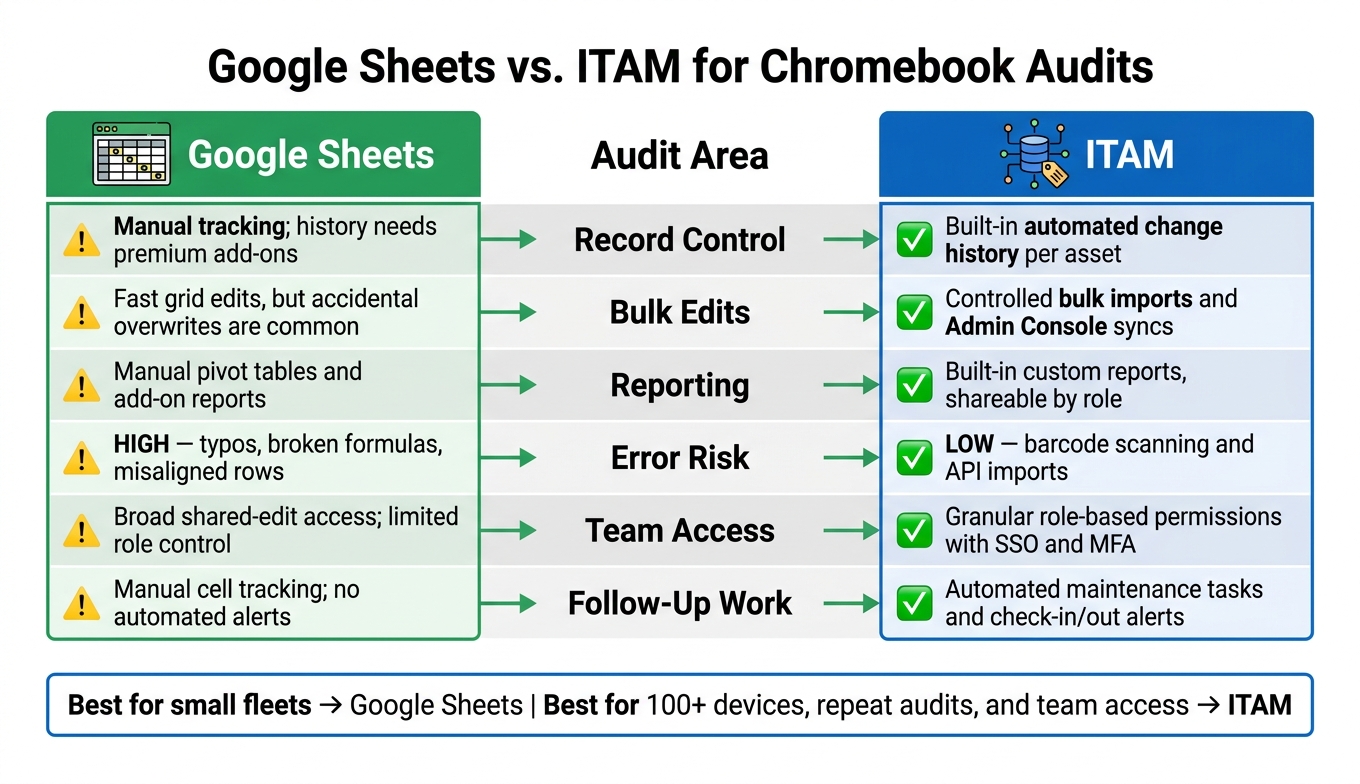
Google Sheets vs ITAM for Chromebook Audits: 6-Area Comparison
The gap between Google Sheets and ITAM shows up fast when you're dealing with audit accuracy, reporting speed, and who can change what. Here's how each one stacks up across the six audit areas that tend to matter most.
| Audit Area | Google Sheets | ITAM |
|---|---|---|
| Record Control | Manual change tracking; history often requires premium add-ons | Built-in, automated change history for every asset |
| Bulk Edits | Easy grid-based updates, but accidental overwrites are easy to make | Controlled bulk imports and syncs from Admin Console |
| Reporting | Pivot tables and add-on reports usually need manual setup | Built-in custom reports shareable by role |
| Error Risk | High; prone to typos and broken formulas or misaligned rows | Low; barcode scanning and API imports reduce manual entry |
| Team Access | Shared-edit access; limited role-based control | Granular permissions with SSO and MFA |
| Follow-Up Work | Manual tracking in cells; no automated alerts | Automated maintenance tasks and check-in/out alerts |
Record control and bulk edits shape the quality of your audit data. Team access and follow-up work shape what people can do with that data once the audit starts moving.
Record Control, Bulk Edits, and Reporting
For a lot of teams, record control is the first place where the difference becomes hard to ignore. In ITAM, every update is logged automatically. You get an audit trail out of the box, with no extra setup and no digging through version history.
Sheets can handle bulk changes fast, and that's part of the appeal. But there's a catch. One bad filter, one pasted value in the wrong place, or one accidental overwrite can throw off hundreds of rows in seconds. ITAM takes a more controlled route with bulk imports and Admin Console syncs, which helps keep records steady even when several staff members are working at once.
Reporting follows the same pattern. In Sheets, yearly summaries often mean building pivot tables or leaning on add-ons. In ITAM, reports are already there and can be limited by role, so site coordinators only see data for their own site. That cuts down on cleanup work and keeps reports easier to share.
Error Risk, Team Access, and Follow-Up Work
Shared spreadsheets tend to break in familiar ways: typos, duplicate records, broken formulas, and rows that stop lining up. And of course, those problems usually show up mid-audit, when nobody has time for cleanup. ITAM lowers that risk with barcode scanning and structured imports, which means less manual typing and fewer chances for small mistakes to snowball.
Access control is another sharp dividing line. In Sheets, edit access usually means broad edit access. If someone can edit, they can change almost anything. ITAM gives teams role-based permissions, so a technician doing a physical scan can't also overwrite a sensitive record or move a device into the wrong OU by mistake. When audit findings need to hold up under review, that separation matters.
Follow-up work is where spreadsheets often start to feel clunky. If an audit turns up a missing device, a damaged Chromebook, or an unreturned loaner, Sheets usually leaves that next step sitting in a cell for someone to notice later. ITAM can turn that issue into a linked maintenance task or alert, so the work stays visible and easier to track.
Those differences lead straight into the next issue: when Sheets is still enough, and when it's time for ITAM.
Which Approach Fits Your Environment
The right pick comes down to fleet size, how often you run audits, and how many people touch the records. So this is less about convenience and more about control.
When Google Sheets Is Enough
If one admin is managing a small fleet, Google Sheets can still do the job well, especially when you're working on one OU at a time. It gives you a fast, low-cost way to update assigned users, locations, and notes.
That starts to change when more people begin editing the same file. Once shared editing gets messy, row-level mistakes can pile up fast.
When ITAM Is the Better Long-Term Choice
When manual updates stop holding up, ITAM becomes the cleaner option. It makes more sense for growing fleets and repeat audits, especially if you need change history, role-based access, and a clear record for exceptions.
The tipping point is usually pretty obvious. A device goes missing. Ownership isn't clear. Or one of the six audit areas starts to slip: record control, bulk edits, reporting, error risk, team access, or follow-up work. That's where AssetRemix fits better.
AdminRemix says it this way:
"Spreadsheets are good for a few things, but keeping detail record and accounting of a large ever changing fleet of devices and people is not one of them." - AdminRemix
AssetRemix keeps exceptions tied to the asset record, so follow-up work doesn't disappear into a spreadsheet. AssetRemix's All-In plan is $99/month or $999/year for unlimited assets and help desk agents.
A lot of teams split the job. They use Chromebook Getter for fast bulk metadata updates in Google Sheets, like moving devices between OUs, updating locations, or handling deprovisioning actions in Admin Console, while keeping AssetRemix as the system of record for history, ownership, and reporting.
Use Sheets for quick metadata changes. Use AssetRemix for history, ownership, and reporting. That way, Sheets stays fast without becoming the source of truth.
FAQs
When does Google Sheets stop being enough for Chromebook audits?
Google Sheets works fine for a while. But once your Chromebook fleet gets big enough, manual record-keeping, tracking, and maintenance can start to slow you down and lead to mistakes.
As the number of devices grows, Sheets often turns into a mess: scattered documentation, duplicate files, edit conflicts, and no clear single source of truth. And if barcode tracking, budget tracking, or audit prep is getting harder to handle, it may be time to move to a dedicated ITAM tool like AssetRemix.
What makes ITAM better for tracking Chromebook audit changes?
ITAM tools like AssetRemix and Chromebook Getter make Chromebook audit tracking much easier because they keep everything in a single source of truth instead of scattering records across manual spreadsheets.
That one shift matters a lot. When teams rely on spreadsheets, updates can slip through the cracks. A device gets moved, reassigned, or retired, and suddenly the record is off. With ITAM tools, data is kept in one place, so audit changes are easier to track and check.
These tools also support real-time updates to device status, ownership, and location. On top of that, they can report on OS versions and AUE dates, which helps teams stay on top of device planning and compliance work without digging through multiple files.
Audit trails and activity logs add another layer of control. They make accountability clearer and give teams a simple way to verify when device changes happened, what changed, and who made the update.
Can I use Google Sheets and ITAM together for audits?
Yes. Pairing Google Sheets with ITAM tools can make your audit workflow a lot smoother.
Take AdminRemix’s Chromebook Getter, for example. It pulls live device metadata into Sheets, which makes bulk edits, reporting, and inventory tracking much easier. Once you’ve reconciled the data, you can push updates back so records stay accurate and in sync - without manual entry.