
Complete IT Asset Management Checklist for Schools
Managing IT assets in schools can feel overwhelming, but it’s critical for ensuring technology supports education effectively. Without proper tracking, schools risk losing devices, overspending, and delaying repairs. This guide breaks down a step-by-step approach to streamline IT asset management, helping schools save money, improve accountability, and plan for the future.
Key Steps to Effective IT Asset Management:
- Set audit goals: Identify priorities like budgeting, compliance, or reallocating resources.
- Build a complete inventory: Track hardware, software, and network equipment using tools instead of spreadsheets.
- Evaluate asset condition: Check for wear and plan replacements based on lifecycle data.
- Assign accountability: Link devices to users and update records regularly.
- Leverage cloud tools: Use centralized platforms and Google Workspace for real-time tracking.
- Maintain compliance: Protect sensitive data, track software licenses, and follow depreciation rules.
- Analyze and act: Use audit data to prioritize improvements and plan long-term strategies.
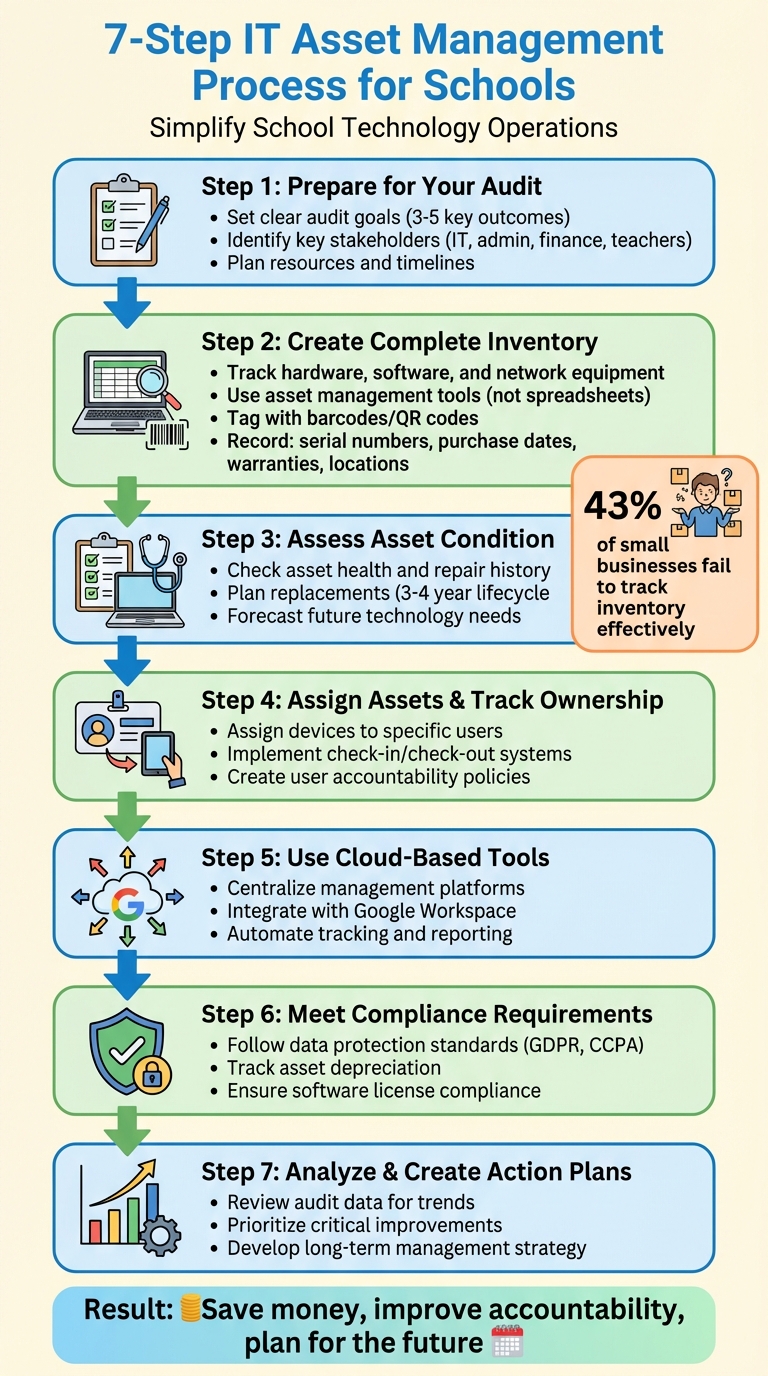
7-Step IT Asset Management Process for Schools
Transforming Asset Management at Aspire Public Schools

1. Preparing for Your Asset Audit
Before diving into spreadsheets or scanning barcodes, take time to build a solid foundation for your asset audit. Skipping this critical step can leave you with piles of data that don’t translate into actionable insights. By carefully planning ahead, you can turn your audit into a strategic tool rather than just another administrative chore. This groundwork is essential for creating a detailed inventory and streamlining asset tracking as you move forward.
1.1 Set Clear Audit Goals
Start by defining specific objectives that align with your district’s priorities. According to Incident IQ, "A smart technology audit starts with a checklist that helps you align with your district's unique goals". Are you aiming to prepare for a budget review that requires accurate depreciation numbers? Or maybe you’re looking to reallocate underused equipment or ensure compliance with regulations?
"Define Clear Goals: Align your audit with broader district initiatives, like digital equity, instructional improvement, or operational efficiency. A focused audit delivers focused results." – Incident IQ
Identify three to five key outcomes. For instance, you might focus on verifying financial records, pinpointing devices with frequent repair needs, or ensuring compliance with software licenses. Without clear goals, your audit risks becoming an overwhelming data collection exercise that offers little value for decision-making.
1.2 Identify Key Stakeholders
An effective asset audit requires teamwork. Go beyond the IT department and involve multiple groups during the planning phase. This ensures everyone understands their role and that the audit addresses the organization’s broader needs. Your core team should include IT asset managers, school administrators, and finance staff who handle depreciation and procurement.
Don’t forget to include teachers and staff who use the equipment daily - they can provide valuable feedback on how assets perform and are often the first to notice when something goes missing. Service desk teams are also key players, as they can verify asset details during repairs or installations. Clearly defining responsibilities early on ensures every participant contributes meaningfully to the process.
1.3 Plan Resources and Timelines
Decide on the “who, when, where, and how” before launching the audit. Factor in your IT team’s workload when determining the scope. For smaller schools, a full physical inventory might be manageable, but larger districts may benefit from a cycle counting approach, reviewing different asset categories over time.
Create a realistic timeline that accounts for competing priorities. Avoid scheduling audits during high-demand periods, like the start of the school year, when IT teams are focused on deploying devices. If resources are tight, consider a staggered plan - start with high-value assets and gradually work through lower-priority items over the following months. This phased approach can help you stay organized without overwhelming your team.
2. Creating a Complete Asset Inventory
Once your audit framework is in place, the next step is to document every piece of technology in your school. This includes all hardware (like desktops, laptops, tablets, printers, storage devices, and peripherals), software (such as operating systems, applications, databases, and antivirus programs), and network equipment (routers, switches, firewalls, modems). By compiling this information, you create a centralized resource that your team can access and update in real time. Here's how to approach it effectively, from choosing tools to tagging and recording assets.
2.1 Use Asset Management Tools
Relying on spreadsheets for tracking quickly becomes inefficient as your inventory grows. Dedicated asset management software solves this problem by streamlining data organization and eliminating version control issues. For example, AdminRemix's AssetRemix offers a platform tailored for schools, featuring unlimited asset tracking, help desk integration, and easy data imports and exports. Pricing starts at $99/month or $999/year, with no hidden fees.
Centralizing inventory data in a single database ensures that information remains current and accessible. This approach not only improves reporting and decision-making but also reduces the risk of outdated records. Regular updates are essential, and automated inventory tools can handle much of this process, freeing up IT staff for more strategic projects.
2.2 Tag and Categorize Assets
Physical labels are a must for keeping track of equipment. Attach barcodes or QR codes to every device - whether it's a laptop, projector, or network switch. These labels make it easier to locate and identify assets quickly.
Organize your inventory by clear categories, such as hardware, software, peripherals, mobile devices, AV equipment, and lab supplies. As new items arrive, tag and categorize them immediately to keep your inventory accurate from day one. Many asset management systems work with smartphone scanning apps, allowing staff to update records in real time during check-in or check-out.
2.3 Record Asset Details
For each asset, document key details like its serial number, model, manufacturer, purchase date, warranty, location, assigned user, and current status. Using a standard template ensures consistency across all records. Include fields for the asset name, description, location (site and room number), and status (e.g., active, redeployed, pending disposal, or retired).
Maintaining a service history for each device is also crucial. Track maintenance activities and support incidents to identify recurring issues and make better decisions about repairs or replacements. Incident IQ emphasizes the importance of this process, noting that it involves tracking essential details such as serial numbers, acquisition dates, expiration dates, maintenance needs, and more.
Store all this information in your centralized system, where authorized staff can access and update it as necessary. This ensures your inventory remains accurate and actionable.
3. Assessing Asset Condition and Lifecycle
Once you've cataloged your assets, the next step is to evaluate their condition and plan for replacements. This helps you avoid unexpected failures, manage budgets more effectively, and ensure your technology continues to meet educational needs. By understanding where each device is in its lifecycle, you can make smarter decisions about maintenance, upgrades, and replacements. This step builds on the inventory process discussed in Section 2, turning your data into actionable insights.
3.1 Check Asset Health
Start by reviewing each device's records, including purchase dates, warranties, repair histories, and software licenses. These details can highlight patterns that indicate the current state of an asset. For example, a laptop with frequent repair issues might be nearing the end of its functional life.
In addition to records, monitor performance metrics and conduct physical inspections. Look for signs of wear and tear - cracked screens, damaged ports, sluggish performance, or overheating. Document these observations in your asset management system, along with the device's service history, to create a comprehensive view of its condition. This ensures you know which devices are still reliable and which ones need attention.
3.2 Plan for Replacement or Upgrades
A good rule of thumb is to use a 3–4 year lifecycle for laptops to maintain efficiency and minimize breakdowns. Use the data you've gathered - such as purchase dates, warranty expirations, and performance metrics - to pinpoint devices nearing the end of their lifecycle.
Rather than waiting for equipment to fail, create a proactive replacement schedule. Plan for proper disposal or upgrades for outdated devices to avoid cluttering your inventory with obsolete technology. This approach not only keeps your tech up to date but also spreads costs across budget cycles, making financial planning easier.
3.3 Forecast Future Technology Needs
Your asset data can also help you anticipate future IT investments. Rapid advancements in areas like IoT, AI, and cloud computing may require infrastructure updates to prepare students for an increasingly digital world. Regularly gather feedback from educators, students, and IT staff to assess how well current technology meets their needs and identify gaps.
Align these forecasts with your school's educational goals. Tracking asset depreciation over time can guide budget planning and reveal opportunities to save money through better asset utilization. Don’t forget to factor in compliance, security, and ongoing maintenance needs. This ensures your technology roadmap not only supports current operations but also positions your school for future growth.
4. Assigning Assets and Tracking Ownership
Once you've evaluated your assets' condition and lifecycle, the next step is to establish clear ownership. Assigning devices to specific individuals not only improves accountability but also helps reduce losses. Building on your inventory and assessment efforts, this process connects each asset to a responsible user, creating a transparent system that safeguards your investment and simplifies operations.
4.1 Assign Devices to Users
Assigning devices to specific students, teachers, or staff members is a straightforward way to promote accountability. When individuals know they’re responsible for the equipment, they’re more likely to handle it with care and report issues promptly.
Using asset management software that integrates with your Student Information System (SIS) can streamline this process. Such tools can automatically pull user, course, and roster data, reducing manual data entry and keeping assignments up to date as students switch classes or staff roles change. For devices that frequently change hands - like laptops students take home or tablets shared between classrooms - a check-in/check-out system is essential. Incorporating barcode or QR code scanning can make tracking quick and accurate, ensuring you always know who has what and where it's located.
4.2 Keep Ownership Records Updated
Keeping ownership records current is key to preventing loss and theft. These records should always reflect the latest device assignments, making it clear who is responsible for each asset at any time. This is especially important during transitions, such as when students graduate, staff members leave, or devices are moved to new locations.
Whenever there’s a change - whether it’s a new assignment, a device being relocated, or equipment returned to storage - update your records immediately. Accurate and timely updates ensure accountability, making it easier to manage your assets effectively and reduce the risk of misplacement.
4.3 Create User Accountability Policies
Establish clear policies that outline user responsibilities and consequences. For example, student equipment agreements can set expectations for acceptable use, proper care, and procedures for handling damage, loss, or late returns. These agreements, signed by users, provide a written acknowledgment of their obligations.
To encourage compliance, combine consequences for late returns or damages with rewards for excellent care. Communicate these guidelines clearly through classroom demonstrations or online resources. You can also empower users by providing self-service tools, such as platforms or apps where they can view available equipment and make reservations. When expectations are clear and users understand their roles, they are more likely to follow procedures and take better care of their assigned devices.
sbb-itb-c68f633
5. Using Cloud-Based Tools and Google Workspace
Once you've established clear ownership and accountability for your assets, the next step is to take advantage of cloud-based tools. These platforms simplify management by eliminating the need for complicated on-premise servers and offering real-time access to your asset data - no matter where you are. This is especially useful for schools that operate across multiple buildings or districts.
5.1 Use Centralized Management Platforms
Centralized cloud platforms allow you to manage all your IT assets - like Chromebooks, tablets, projectors, chargers, and other accessories - through a single system. Instead of juggling spreadsheets or using disconnected tools, you get one dashboard that’s accessible from anywhere, even on mobile devices. This means technicians can update records or check out devices directly from their phones while moving between classrooms. Plus, these platforms automatically back up your data, reducing the risk of errors or delays caused by manual entry. By keeping your inventory accurate and up to date, this approach integrates seamlessly with your Google tools as well.
5.2 Connect with Google Workspace
Integrating your asset management system with Google Workspace takes efficiency to the next level. User data syncs automatically, so when a new teacher is hired or a student enrolls, their information flows directly into the system - no manual entry required. This integration also ensures automatic enrollment and policy enforcement for devices, storage, and tools like Google Meet. The Google Admin Console provides centralized control, allowing you to manage user access, device settings, and asset usage all in one place. This gives you a clear view of both physical devices and digital resources.
5.3 Automate Tracking and Reporting
Automation can turn tedious manual processes into quick, precise updates. For example, barcode or QR scanning through mobile apps makes checking devices in and out as simple as scanning a code, eliminating the need to manually enter serial numbers or asset tags. You can also set up automated notifications to alert you about overdue devices, expiring warranties, or required maintenance. Real-time reporting provides insights into which devices are in use and which are available. With custom reports on asset status, location, and condition, you’ll save time while ensuring accurate data for budgeting and planning decisions.
6. Meeting Compliance and Financial Requirements
After conducting thorough inventory checks and lifecycle evaluations, it’s crucial to address compliance and financial accuracy. These steps protect your asset management strategy by ensuring legal obligations are met, sensitive data is safeguarded, and financial planning - like budgeting and asset replacement - is on solid ground.
6.1 Follow Compliance Standards
Schools handle a wealth of sensitive data, from student records and grades to staff credentials. This makes them prime targets for cyberattacks. To mitigate risks, schools must comply with data protection laws such as GDPR and CCPA, which govern how data is collected, stored, and shared. Poor asset management can leave gaps in security, creating opportunities for hackers to exploit.
Compliance doesn’t stop at data protection. Schools also need to ensure that all software licenses are up-to-date and legally compliant. Running outdated or unlicensed software can lead to legal troubles and increase the risk of security breaches. Regular audits are essential - they confirm that asset records are accurate and that devices meet safety standards throughout their lifecycle. Additionally, proper disposal of outdated equipment is not only required by environmental regulations but also helps maintain data security.
By adhering to these compliance standards, schools can maintain secure, accurate, and legally sound asset records.
6.2 Track Asset Depreciation
To manage finances effectively, it’s important to track how IT assets lose value over time. The most common method is straight-line depreciation. Here’s how it works: subtract the salvage value (the amount you could resell the asset for) from the original cost, then divide by the asset’s useful life. For example, a $300 Chromebook with a $50 salvage value and a four-year lifespan would depreciate by ($300 - $50) ÷ 4 = $62.50 annually.
Determining an asset’s useful life can involve looking at past usage patterns, consulting manufacturer guidelines, or referring to the IRS’s property classifications in Appendix B of Publication 946. Asset management software simplifies this process by automating calculations, providing real-time depreciation values, and generating audit-ready reports. This reduces manual errors and ensures transparency for budget planning, funding compliance, and tax reporting. These tools can also track purchase details, such as PO numbers and vendors, and link assets to specific funding sources.
Accurate depreciation tracking is a cornerstone of effective lifecycle management.
6.3 Ensure Robust Data Protection Throughout Asset Management
Data protection is a critical part of managing assets across their lifecycle. IT systems offer real-time insights into connected devices, identify vulnerabilities, and monitor software licenses to prevent compliance violations. Integrated platforms are particularly useful for tracking regulatory compliance, reducing the risk of data breaches.
Legacy systems and siloed data can increase cybersecurity vulnerabilities. By centralizing asset data on a secure platform, schools can minimize knowledge gaps and maintain a complete, unified view of their IT environment. This is especially vital for protecting sensitive information, such as research data, from leaks. With tight budgets and rising security concerns, schools benefit from IT asset management systems that not only enhance compliance but also drive cost efficiency and improve IT investments.
7. Analyzing Results and Creating Action Plans
Turn your audit findings into practical steps. By examining the data, you can uncover trends, spot gaps, and shape both your immediate actions and long-term strategies.
7.1 Review Audit Data
Start by comparing your current inventory to past records. This helps you identify trends and any significant changes over time. Pay close attention to discrepancies between what's documented and what's physically present - these inconsistencies often reveal issues in your tracking system.
Security is another area that demands attention. Look for weaknesses like missing Mobile Device Management (MDM) data, outdated security patches, or devices that could leave your network vulnerable to unauthorized access. Don’t overlook underutilized assets either. Equipment gathering dust or outdated tech in storage represents wasted resources and missed opportunities. Asset management software can simplify this process by generating detailed reports that highlight problem areas and suggest actionable fixes.
Use these insights to zero in on the most pressing issues.
7.2 Prioritize Improvements
Address critical concerns first, such as devices nearing the end of their lifecycle, equipment with frequent repair needs, or recurring performance problems. Evaluate your maintenance practices: Are preventive tasks being done on time? Are the same issues cropping up repeatedly? If your team is always reacting to breakdowns instead of preventing them, that’s a sign something needs to change.
Tackle gaps methodically:
- Process gaps: Missing preventive maintenance tasks or inefficient workflows.
- Data gaps: Outdated asset records or "ghost assets" that exist on paper but not in reality.
- Training gaps: Technicians improvising fixes instead of following standard procedures.
- Inventory gaps: Poor tracking of spare parts or replacement components.
Use the audit findings to back up requests for replacements or upgrades. Concrete metrics and user feedback can make a strong case for better funding.
7.3 Create a Long-Term Management Strategy
Use your audit results as a foundation for a forward-thinking strategy that aligns with your IT asset management goals. This approach builds on earlier efforts in inventory management, lifecycle assessments, and compliance.
Set specific audit goals that align with your organization’s priorities - whether that’s cutting downtime, improving compliance, or stretching your budget further. Clearly outline the scope of each audit, specifying which assets, locations, or processes will be reviewed.
Plan for regular audits and device refresh cycles, especially for equipment nearing the end of its useful life. For example, laptops typically need replacing every 3–4 years to maintain staff productivity and reduce breakdown risks. Break audit recommendations into actionable steps with clear deadlines, assigned responsibilities, and measurable outcomes. Use dashboards or management tools to track progress and ensure accountability.
Finally, invest in training programs for both IT and non-IT staff. Equip them with the knowledge to follow best practices, keep accurate records, and support your long-term asset management goals.
Conclusion
Managing IT assets effectively isn't just about keeping track of devices - it's about making every technology dollar count. As Shawn Hudgins, Director of Technology at Jacksonville City Schools, explains:
"It really lays a foundation for fiscal responsibility and accountability… Using these systems to track that and show that we are being fiscally responsible and accountable with those dollars and that our students and teachers and staff are getting the best bang for the buck is really important".
The numbers don’t lie: 43% of small businesses fail to track their inventory effectively. Schools can’t afford to fall into the same trap. By implementing a structured IT asset management system, you gain a clear picture of what you own, where it is, and who’s using it. This eliminates unnecessary spending and prevents the waste that can drain budgets.
To make asset management work for your school, focus on a few key practices: set clear audit goals, maintain a centralized inventory, and enforce consistent processes for acquiring, deploying, and retiring assets. Regularly reviewing and updating your asset register - at least once a year - is essential. Assigning specific responsibilities to team members ensures accountability and keeps the system running smoothly.
Efficient IT asset management doesn’t just streamline operations; it also strengthens security, supports compliance, and creates a safer, more productive environment for students and staff. By staying organized and proactive, schools can free up resources to enhance education, improve day-to-day operations, and plan for future growth.
FAQs
How can schools manage their IT assets effectively while staying within budget and meeting compliance standards?
Schools can manage IT assets efficiently while keeping costs under control and meeting compliance requirements by adopting a few smart strategies. Start by setting clear IT asset management (ITAM) goals that match your school's operational priorities and financial constraints. This ensures your efforts are focused and aligned with your institution's needs.
Implement a structured procurement process to acquire new IT assets thoughtfully, documenting them properly upon arrival. This step not only keeps records accurate but also supports long-term tracking and accountability.
Regularly audit software licenses to ensure compliance and avoid paying for unused or unnecessary subscriptions. Additionally, plan for refresh cycles to replace outdated hardware. This helps maintain performance standards and reduces the risk of unexpected expenses due to sudden equipment failures.
By staying organized and forward-thinking, schools can simplify their ITAM workflows and make the most of their technology investments.
What are the advantages of using cloud-based tools to manage IT assets in schools?
Cloud-based tools make IT asset management easier for schools by providing centralized access, better security, and real-time updates. These tools allow staff to monitor and manage assets from any location, cutting down on the chances of loss or mismanagement.
Another plus? They scale effortlessly, so as your school expands, the system can grow right along with it. These solutions are also designed to be easy to use and budget-friendly, saving schools both time and money while keeping operations running smoothly.
What are the best practices for schools to track and manage their IT assets effectively?
To keep track of IT assets effectively, schools should begin with a comprehensive inventory system. This system should capture details such as serial numbers, purchase dates, warranties, and the current location of every device. Conducting regular physical audits is equally important to maintain accuracy and avoid losses or mismatches.
Leveraging asset management software can make the process easier by offering real-time updates on the status of assets throughout their lifecycle - from purchase to eventual disposal. Schools should also implement clear policies for routine maintenance and the secure disposal of outdated equipment. This approach not only ensures the equipment is used efficiently but also safeguards sensitive data. Staying organized and proactive helps schools streamline their operations and get the most value out of their IT resources.