
Cloud-Based vs On-Premise ITAM: Which to Choose
Choosing between cloud-based and on-premise IT Asset Management (ITAM) solutions comes down to your organization's specific needs, resources, and priorities. Here's a quick breakdown of the key differences:
- Cloud-Based ITAM: Lower upfront costs, subscription-based pricing, remote access, automatic updates, and easy scalability. Ideal for businesses with distributed teams or fluctuating demands.
- On-Premise ITAM: Higher initial investment, full control over infrastructure, better suited for strict compliance needs, and predictable workloads. Requires in-house IT expertise for maintenance.
Quick Comparison:
| Aspect | Cloud-Based ITAM | On-Premise ITAM |
|---|---|---|
| Cost Structure | Subscription (OpEx) | High upfront (CapEx) |
| Scalability | Instant, flexible | Slow, hardware-dependent |
| Access | Remote, internet-based | Local network, VPN required |
| Maintenance | Vendor-managed | Internal IT responsibility |
| Security | Shared responsibility | Full control |
| Compliance | Vendor certifications assist | Organization-managed |
Cloud-based solutions work best for startups, small businesses, or growing organizations, while on-premise systems cater to industries with stringent security and compliance requirements. Consider factors like budget, scalability, and IT resources to make the right choice.
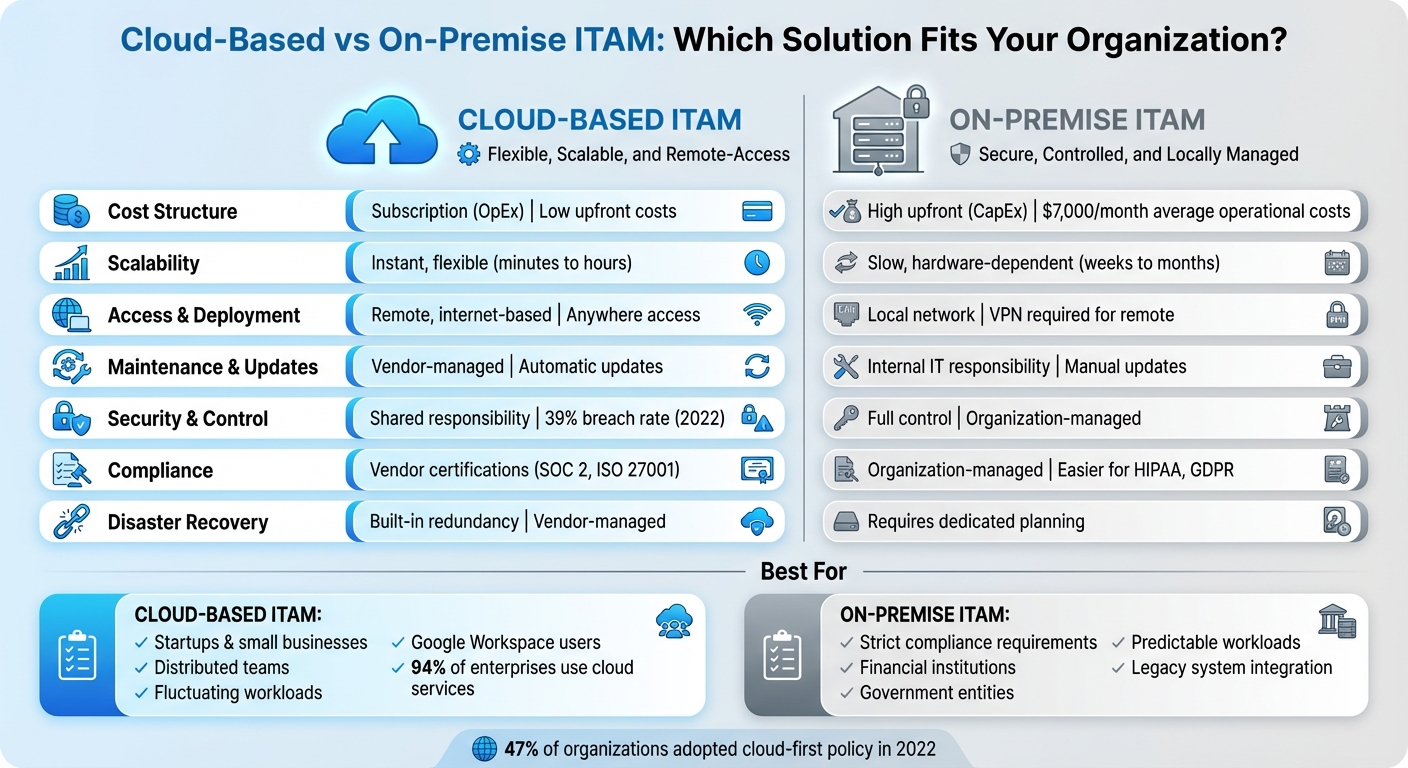
Cloud-Based vs On-Premise ITAM: Complete Comparison Guide
Cloud vs. On-Premise Software: Which is Better?
What is Cloud-Based ITAM?
Cloud-based ITAM relies on third-party infrastructure, like AWS, to store and manage asset data online, making it accessible from virtually anywhere.
This approach allows IT teams to monitor and manage assets remotely, using any device. For instance, a transport company can oversee truck usage and maintenance in real time, ensuring smoother operations. This flexibility often translates into cost savings by streamlining processes and reducing inefficiencies.
Instead of requiring large upfront investments in hardware (CAPEX), cloud-based ITAM operates on a subscription model, shifting expenses to operational costs (OPEX). Vendors handle system maintenance and updates, removing the need for in-house resources to manage these tasks.
Some standout features include centralized inventory management, lifecycle tracking, automation capabilities, and advanced security measures like multi-factor authentication and encryption. For example, healthcare providers use cloud-based ITAM to monitor medical equipment and securely access patient records from remote locations. Similarly, schools and universities manage classroom devices and software licenses for tools like Zoom. Its scalability means resources can be adjusted as needed without the hassle of purchasing or installing additional hardware.
What is On-Premise ITAM?
On-premise ITAM operates on servers located within your organization, giving you full control over hardware, software, data storage, and security protocols - all managed internally.
Unlike cloud-based solutions, this setup requires a hefty initial investment for servers, storage, networking gear, and one-time software licenses. Beyond that, there are ongoing costs for electricity, cooling, security measures, maintenance, and repairs.
This approach is often favored by organizations that need complete control over their IT environment. For example, financial institutions handling sensitive data and government entities with strict compliance requirements (like HIPAA or GDPR) commonly rely on on-premise ITAM.
Manufacturing companies also lean toward on-premise ITAM, especially when dealing with complex legacy systems. It allows them to customize configurations that integrate smoothly with existing production equipment and workflows. While this level of flexibility is a major advantage, it does come with its own set of operational challenges.
The tradeoff? Although on-premise ITAM provides greater control and customization options, it places the entire burden of implementation, maintenance, updates, and security patches squarely on your team. This means you’ll need consistent technical expertise and resources to keep things running smoothly.
Deployment and Accessibility Differences
How you deploy IT Asset Management (ITAM) systems can significantly impact how efficiently your organization operates, especially in an era where remote and hybrid work are becoming standard.
Cloud-based ITAM runs on third-party infrastructure and is accessible over the internet. This setup eliminates the need for VPNs, offering seamless remote access. It also supports real-time collaboration, allowing multiple team members to work on a centralized asset database at the same time - no data silos, no bottlenecks.
On the other hand, on-premise ITAM operates under a different set of conditions.
With on-premise ITAM, the system is installed on your organization's local servers. While this approach offers independence from internet connectivity - minimizing potential downtime - it ties access to the local network. Remote workers must use VPNs to connect, which can limit flexibility and tether operations to specific locations.
Here’s a quick comparison of the two:
| Aspect | Cloud-Based ITAM | On-Premise ITAM |
|---|---|---|
| Deployment Location | Hosted on third-party servers | Hosted on local infrastructure |
| Access Method | Internet-based, anywhere access | Local network or VPN-required |
| Remote Capabilities | Full remote access with real-time collaboration | Limited, VPN-dependent |
In 2022, nearly half (47%) of organizations adopted a cloud-first policy for deploying new applications. Cloud-based ITAM systems also give administrators the ability to manage access remotely, making it easier to support distributed teams. These features are driving more organizations to lean toward cloud-based solutions for their ITAM needs.
Cost Structure Comparison
When comparing cloud-based and on-premise IT Asset Management (ITAM), the financial differences come down to how expenses are categorized and managed.
Cloud-based ITAM operates on an operational expenditure (OpEx) model, which means lower upfront costs but ongoing subscription fees. Pricing typically depends on service tiers. For instance, entry-level plans include Atomicwork at $8 per month, JumpCloud at $9, and Freshservice at $15, while more advanced options like Lansweeper can cost around $200 per month. These recurring fees make budgeting straightforward, but as your organization grows, the cumulative costs can add up quickly.
On-premise ITAM, on the other hand, requires a significant capital expenditure (CapEx) upfront. This includes investments in physical infrastructure such as servers, storage devices, networking equipment, software licenses, and data center components like cooling systems and backup generators. Beyond the initial setup, ongoing operational costs are substantial. For example, maintaining hardware might cost $1,000 monthly, IT staff salaries could average $4,000, software updates around $4,000, and data security measures approximately $1,200 - bringing total monthly expenses to roughly $7,000. In contrast, cloud-based solutions often average closer to $1,500 per month.
The total cost of ownership (TCO) for these approaches can shift over time. Currently, 94% of enterprises use cloud services, with 70% highlighting cost efficiency as a key factor. While cloud solutions excel in scalability and flexibility - thanks to their pay-as-you-go model that avoids overprovisioning - on-premise systems might achieve a lower TCO in the long run, especially if your asset inventory remains stable.
| Cost Factor | Cloud-Based ITAM | On-Premise ITAM |
|---|---|---|
| Upfront Costs | Low or none | High (hardware, licensing) |
| Ongoing Expenses | Recurring subscription fees | Maintenance and upgrades |
| Total Cost of Ownership | Predictable | Potentially lower over time |
One challenge with cloud-based ITAM is the potential for hidden costs. Charges for data egress, API requests, or tiered storage can unexpectedly inflate expenses. By 2025, 90% of organizations are expected to adopt FinOps frameworks - up from 62% just two years ago - to better manage these complexities. Understanding these cost dynamics is essential when evaluating how scalability and flexibility influence your ITAM strategy.
sbb-itb-c68f633
Scalability and Flexibility
When business demands change quickly, the ability to scale becomes crucial. Cloud-based ITAM solutions excel in this area, offering near-instant scalability. For example, if your company plans to onboard 500 new employees next month, a cloud solution can expand computing power and storage within minutes - no need for additional hardware. These platforms also integrate effortlessly with tools like Google Workspace, ensuring team collaboration remains smooth and uninterrupted.
On the other hand, on-premise ITAM systems face limitations tied to physical hardware. Scaling up involves a lengthy process: planning cycles, budget approvals, purchasing hardware, and configuring it - all of which can take weeks or even months. If your business experiences sudden growth, significant hardware investments are typically required. While on-premise systems can be tailored to fit specific workflows, these customizations often demand substantial IT resources and come with higher costs.
These differences highlight how scalability affects the overall efficiency of ITAM systems. Cloud-based ITAM is particularly advantageous for businesses with fluctuating needs or distributed teams, offering the flexibility to adapt quickly. Meanwhile, companies with steady, predictable workloads might find the slower, more rigid nature of on-premise solutions sufficient for their needs.
Here’s a quick comparison of the two approaches:
| Aspect | Cloud-Based ITAM | On-Premise ITAM |
|---|---|---|
| Scaling Speed | Fast and automated (minutes to hours) | Dependent on hardware (weeks to months) |
| Resource Adjustment | Easily adjustable on demand | Requires manual reconfiguration and purchases |
| Integration Ease | Works seamlessly with tools like Google Workspace | May need custom development |
Security, Control, and Compliance
When it comes to security, the responsibilities for cloud-based and on-premise ITAM solutions are vastly different. With an on-premise system, your organization takes on the full burden of securing hardware, managing software updates, protecting data, implementing physical access controls, and maintaining network security. On the flip side, cloud-based ITAM operates under a shared responsibility model. In this setup, the cloud provider secures the infrastructure, while you remain responsible for managing data access, permissions, and monitoring usage effectively.
This distinction is especially important when considering compliance. On-premise ITAM gives you complete control over where your data is stored and how audits are conducted. This can simplify adhering to strict regulations like HIPAA, GDPR, or ITAR. Since the data stays within your premises, you have the flexibility to align security measures with specific regulatory needs. Cloud-based solutions, however, introduce added complexity due to offsite storage and potential cross-border regulatory issues. While cloud providers often hold certifications like SOC 2 and ISO 27001, you still need to configure your system rigorously to remain compliant. These challenges emphasize the differing levels of control between the two models.
Misconfigurations are a leading cause of cloud breaches, which can directly impact compliance. For instance, in 2022, 39% of businesses reported data breaches in their cloud environments, and 80% of organizations were using the cloud to store sensitive information. To mitigate risks in cloud-based ITAM, employing a Virtual Private Cloud (VPC) can help isolate sensitive data effectively.
Control also varies when it comes to customization. On-premise systems provide the flexibility to tailor firewalls, isolate critical systems, and enforce custom access controls. In contrast, cloud-based ITAM solutions are often designed for wide-scale use and offer limited customization. This means your security team has less direct control over the infrastructure, even though many security tasks are managed by the provider.
Here’s a quick comparison of the two approaches:
| Aspect | Cloud-Based ITAM | On-Premise ITAM |
|---|---|---|
| Data Control | Limited by vendor policies and configurations | Full control by the organization |
| Security Responsibility | Shared - provider secures infrastructure, you secure data access | Fully managed by the organization |
| Compliance Options | Vendor certifications assist compliance; requires careful setup | Organization handles compliance; easier to manage internally |
Maintenance, Updates, and Performance
Keeping systems well-maintained can free up IT teams to focus on more strategic projects. With cloud-based IT Asset Management (ITAM), much of the heavy lifting is handled by the vendor. They take care of tasks like software updates, security patches, feature rollouts, and even hardware upgrades. These updates are often deployed automatically during off-peak hours, meaning your internal team can focus on higher-priority tasks instead of spending time on manual patch management.
On the other hand, on-premise systems put the entire maintenance responsibility squarely on your IT team. From manually updating software and replacing outdated hardware to monitoring performance and troubleshooting issues, everything falls on your organization. This requires a constant investment in skilled staff and regular system upkeep. If not managed properly, it can lead to increased downtime and operational inefficiencies.
When it comes to performance, cloud solutions generally have an edge in reliability. Providers often guarantee high uptime through Service Level Agreements (SLAs) and use features like global redundancy, load balancing, and auto-healing to ensure smooth operation. However, on-premise systems may offer lower latency for local operations, but their overall performance depends entirely on how well your infrastructure is set up and maintained.
Disaster recovery is another area where cloud-based and on-premise systems differ significantly. Cloud solutions come with built-in redundancy, geographic failover, and automatic backup replication managed by the vendor. This makes recovery faster and less resource-intensive for your team. In contrast, on-premise systems require your organization to create and manage redundancy, backup infrastructure, and recovery plans, which can demand substantial resources and planning.
Here's a side-by-side look at the two approaches:
| Aspect | Cloud-Based ITAM | On-Premise ITAM |
|---|---|---|
| Update Processes | Automatic and frequent | Manual and scheduled |
| Performance Latency | Minimal when optimized | Dependent on local infrastructure |
| Disaster Recovery | Vendor-managed and integrated | Requires dedicated planning |
Integration with Google Workspace and AdminRemix
For organizations relying on Google Workspace, having an IT asset management (ITAM) system that integrates seamlessly is crucial. Cloud-based ITAM solutions are particularly well-suited for this, as they connect effortlessly with modern cloud ecosystems. This allows IT teams to track assets, manage permissions, and access real-time metadata - all from one platform. The result? Fewer data silos and reduced operational overhead. On the other hand, on-premise systems often struggle with these integrations, creating challenges that can slow things down.
Unlike cloud-based systems, on-premise ITAM platforms frequently require custom-built connectors or manual data transfers to work with cloud platforms. This adds complexity and increases the likelihood of errors, making asset management less efficient.
To tackle these challenges, modern tools like AdminRemix simplify the process. AdminRemix offers a range of solutions designed to make IT asset management easier. For example, its AssetRemix tool improves asset tracking and supports help desk operations. Meanwhile, tools like Chromebook Getter and User Getter enable bulk management of Chromebook and G-Suite metadata directly through Google Sheets. These features let IT teams use familiar tools while ensuring asset records remain accurate and up-to-date across the organization.
Another advantage of cloud-based systems is their ability to sync automatically. For instance, changes in Google Workspace - such as adding new users or handling offboarding - are updated in real-time. This automatic synchronization ensures that asset data stays current, highlighting why cloud-based ITAM solutions are a smart choice for organizations aiming to streamline and optimize their asset management processes.
Choosing the Right ITAM Approach for Your Organization
When deciding on an IT Asset Management (ITAM) approach, it’s essential to align your choice with your organization’s specific requirements. For startups and small businesses, cloud-based solutions often make the most sense. Why? They require lower upfront investments and eliminate the need for managing physical infrastructure. This means you can get up and running quickly without buying servers or hiring dedicated IT staff. For smaller companies, this low barrier to entry can be a game-changer.
On the other hand, larger organizations face more intricate challenges. With operations spread across multiple locations and complex processes to manage, these businesses often benefit from centralized, cloud-based repositories. Such systems simplify asset tracking and make it easier to manage resources across different regions. For companies planning global expansion, cloud-based ITAM solutions are particularly appealing - they let you scale operations seamlessly without the hassle of setting up physical infrastructure at every new site.
Another factor to consider is workload variability. If your organization experiences fluctuating workloads, a cloud-based ITAM system offers the flexibility to scale resources up or down as needed. However, if your workloads are more predictable or if stringent security and compliance requirements are non-negotiable, on-premise solutions might be the better fit. They give you full control over your data and infrastructure, which can be critical in highly regulated industries.
Budget also plays a significant role. Cloud solutions typically operate on a subscription model, such as AdminRemix, which costs $99 per month or $999 annually. This model spreads out expenses while including maintenance and updates. In contrast, on-premise systems involve a hefty upfront investment, plus ongoing costs for hardware upkeep, software updates, and IT staff.
For organizations using Google Workspace, cloud-based ITAM solutions offer an added advantage. These systems eliminate the need for custom connectors and automatically synchronize asset data, significantly reducing operational overhead.
FAQs
What should small businesses consider when deciding between cloud-based and on-premise ITAM solutions?
When deciding between cloud-based and on-premise ITAM solutions, small businesses need to weigh their security requirements, budget constraints, and growth plans. Cloud-based options stand out for their flexibility and remote accessibility, making them a strong choice for teams spread across different locations. In contrast, on-premise systems offer tighter data control, which can be a better fit for companies with strict compliance needs.
Key considerations include upfront setup costs, ongoing maintenance expenses, and how seamlessly the solution integrates with existing tools like Google Workspace. The right choice will depend on your company’s current infrastructure, future growth ambitions, and overall operational needs.
How do cloud-based ITAM solutions ensure compliance with regulations like GDPR and HIPAA?
Cloud-based ITAM solutions help organizations stay compliant with regulations like GDPR and HIPAA by using top-tier security measures and following strict industry guidelines. These measures typically include data encryption to protect information, role-based access controls to limit access, and routine security audits to identify and address potential vulnerabilities.
Many cloud providers also hold certifications such as SOC 2 and ISO 27001, which reflect their adherence to regulatory requirements and best practices. These features give businesses the tools they need to manage IT assets securely while maintaining compliance with relevant laws and standards.
What unexpected costs should you consider with cloud-based ITAM solutions?
Cloud-based ITAM solutions often carry hidden costs that might catch you off guard. For instance, you could face charges for data transfers, like data egress fees, or fees for API usage. As your storage needs expand, additional costs for extra storage capacity can also add up quickly.
Beyond these, there are other potential expenses to consider. You might need to grow your IT team to oversee the system, tackle hardware or network-related issues, or manage regular system upgrades. Taking the time to thoroughly analyze your provider's pricing details can help you sidestep unexpected expenses and better align your budget with your needs.