
Best Practices for IT Knowledge Base Management
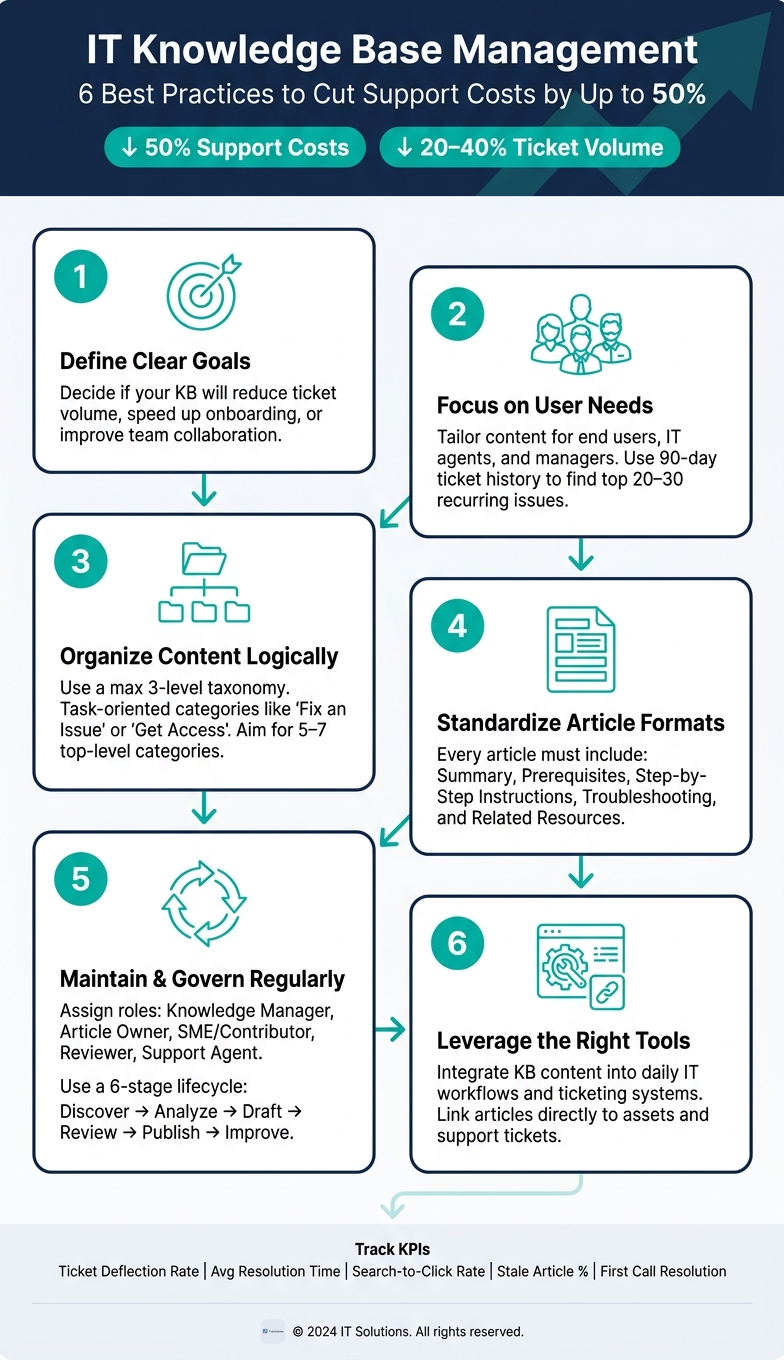
Managing an IT knowledge base effectively can cut support costs by up to 50% and reduce ticket volume by 20–40%. Here's how to do it:
- Define clear goals: Decide if your knowledge base will reduce ticket volume, speed up onboarding, or improve team collaboration. Integrating it with IT asset management processes further enhances visibility into hardware and software issues.
- Focus on user needs: Tailor content for end users, IT agents, and managers. Use ticket history to identify recurring issues.
- Organize content logically: Use a simple structure (no more than 3 levels deep) and task-oriented categories like "Fix an Issue."
- Standardize formats: Articles should include summaries, prerequisites, step-by-step instructions, and troubleshooting tips.
- Maintain and update regularly: Assign roles like Knowledge Manager and Article Owner to ensure content accuracy.
- Leverage tools: Tools like AssetRemix link knowledge base content directly to tickets and workflows, making information more accessible.
IT Knowledge Base Management: 6 Best Practices That Cut Support Costs by 50%
How to Build a Knowledge Base in Jira Service Management Using Confluence
sbb-itb-c68f633
Setting Goals and Defining Content Scope
Start by defining your knowledge base's purpose and audience. Without this clarity, you risk creating a chaotic collection of documents that no one uses. Ask yourself: Are you aiming to lower ticket volume, speed up onboarding, or improve team collaboration? The answer will guide every decision moving forward.
Identifying Primary Users and Use Cases
A successful knowledge base caters to specific audiences. For example:
- End users need simple, jargon-free instructions for tasks like resetting passwords or installing software.
- IT support agents rely on detailed technical documentation, such as runbooks, troubleshooting steps, and internal tool guides.
- Managers and HR teams require access-controlled policy documents.
To identify your key use cases, dive into your support ticket history from the past 90 days. Categorize the top 20–30 recurring issues. As DocsBot AI explains:
"The most valuable content for your new knowledge base isn't in a perfectly polished document. It's in the frequent, routine queries your team answers over and over again."
Once you’ve pinpointed your audience and their needs, set measurable goals to track your progress.
Setting Success Metrics
A knowledge base without clear goals is just a digital filing cabinet. Tie your efforts to specific KPIs to measure its effectiveness. Here are some key metrics to monitor:
| KPI | What It Measures | Target Direction |
|---|---|---|
| Ticket Deflection Rate | Percentage of issues solved via self-service without a ticket | Up |
| Average Resolution Time | How quickly technicians resolve incidents using documentation | Down |
| Search-to-Article Click Rate | How well search terms lead users to relevant content | Up |
| Stale Article Percentage | Percentage of outdated content | Down |
| First Call Resolution (FCR) | Percentage of tickets resolved in the first interaction | Up |
Track these metrics consistently - monthly at a minimum. Early wins, like fewer Level 1 support tickets, are realistic within the first few months.
Defining Content Boundaries
Resist the urge to include every document in your knowledge base. For instance, resolved solutions belong in the knowledge base, while active service requests should stay in your ticketing system. Keeping these boundaries clear prevents clutter and confusion.
Structure your content with a taxonomy no deeper than three levels. Use categories that make sense to users - like "Email & Collaboration" - instead of internal department names. Implement a tiered access model to control visibility:
- Tier 1: General policies and FAQs, accessible to all employees.
- Tier 2: Role-specific procedures.
- Tier 3: Sensitive or restricted content.
This approach keeps the knowledge base focused, organized, and easy to navigate.
Building a Scalable and Easy-to-Use Structure
Once you've set clear content boundaries, the next step is ensuring your structure allows for easy navigation. Even the most well-written content won't be useful if users can't find it. Your information architecture should make every article feel like it belongs in the larger system.
"A knowledge base without architecture becomes a dumping ground." – Knowledge Base Software
Creating a Task-Oriented Information Architecture
One common pitfall is organizing content based on internal departments - think folders labeled "Network Team" or "Desktop Support." But users don't think this way. They approach your knowledge base with specific tasks in mind. Instead, organize content around what users need to do, using labels like "Get Access", "Fix an Issue", or "Set Up a Device."
Remember the three-level taxonomy mentioned earlier. For IT environments that need to scale, a hybrid approach works best. Start with broad, user-friendly top-level categories (aim for 5–7) and support them with metadata filters (like role or system) and hub pages that link to more detailed articles. Every article should connect to at least one hub page - this ensures content is easy to find for both users and search engines.
Standardizing Article Formats
A consistent structure is key to a well-functioning knowledge base. It not only aligns with your content boundaries but also improves user engagement metrics like search-to-article click rates. When articles follow the same format, users know where to find the information they need, and new contributors can create content more easily. A solid article template should include these elements:
| Element | Purpose |
|---|---|
| Purpose/Summary | Explains what the article covers and who it’s for |
| Prerequisites | Lists required access, tools, or prior steps |
| Step-by-Step Instructions | Provides clear, numbered actions with expected results |
| Troubleshooting | Describes common errors and how to resolve them |
| Related Resources | Links to next steps or related topics |
Formatting is just as important as structure. Use short paragraphs, numbered steps, and bold text to highlight key actions. Place the solution at the very beginning, avoiding lengthy introductions or background details. Always write in the active voice - for example, "Click Export" is much clearer than "The Export button should be clicked."
Using Naming and Tagging Conventions
Titles should use plain, everyday language. For instance, "How to Request VPN Access in Okta" is much clearer than something like "Remote Connectivity Provisioning." Titles framed as questions often work well for how-to content because they align with how users typically search online.
When tagging, stick to a controlled vocabulary with three dimensions: department, system/tool, and content type. Limit each article to 3–5 tags to keep search results accurate without overwhelming users. Regularly check analytics for "zero-result" searches - these highlight gaps in your naming or tagging that need to be addressed. Consistent naming and tagging strengthen your knowledge base, making it easier to navigate and more user-focused.
Maintaining and Governing the Knowledge Base
A knowledge base only stays useful if it's actively managed. Without clear ownership, content quickly becomes outdated as systems, policies, and teams change. To combat this, assign well-defined responsibilities that ensure content remains accurate and relevant.
Defining Roles and Responsibilities
The downfall of most knowledge bases isn't a lack of content - it's a lack of accountability. The solution? Assign responsibilities to roles, not individuals. This way, ownership automatically transfers as team members change.
Here’s a breakdown of key roles to include in your governance model:
| Role | Primary Responsibility | Task |
|---|---|---|
| Knowledge Manager | Strategy and oversight | Monitoring metrics and driving adoption |
| Article Owner | Content accuracy | Reviewing content flagged for updates |
| SME/Contributor | Content creation | Documenting technical procedures and fixes |
| Reviewer | Quality control | Ensuring drafts meet established style guidelines |
| Support Agent | Gap identification | Flagging resolved tickets for documentation needs |
One role often overlooked is the Knowledge Advocate. This person works within a specific team to encourage contributions and refine rough drafts before formal review. By lowering the barrier to entry, you allow team members to submit imperfect drafts, knowing advocates or editors will polish them.
Building Content Workflows
Once roles are in place, establish workflows to keep content fresh. Every article should follow a structured lifecycle. A six-stage process - discovery, analysis, drafting, review, publishing, and improvement - helps ensure content is consistently updated.
"Knowledge needs maintenance. Without defined ownership, even the best documentation decays quickly." - Hernan Aranda, InvGate
For example, when a support agent resolves a complex issue, that resolution should immediately become a draft article. To maintain accuracy, consider tiered review schedules: fast-changing systems might need monthly reviews, while more stable ones can be reviewed quarterly.
Using Analytics and Feedback to Improve Content
Good governance means using data and feedback to continuously refine your knowledge base. Analytics can highlight issues before users even report them. One revealing metric is the "high view, high ticket" pattern - articles with heavy traffic that still result in support tickets. This typically indicates the content isn’t solving the intended problem.
Other valuable metrics to track include:
- Search success rate: The percentage of searches that lead to article views. Low rates may indicate tagging issues or missing content.
- Knowledge reuse rate: How often agents use specific articles during ticket resolution. A drop in this metric suggests the content is losing credibility.
- Feedback scores: Simple buttons like "Was this helpful?" provide direct insights. Low scores highlight articles needing immediate attention.
Additionally, audit zero-result searches every month. These searches reveal gaps in your knowledge base and help prioritize new content creation. Organizations that excel at knowledge management have reported up to a 50% reduction in support costs, while a well-maintained knowledge base can deflect 20–40% of support tickets before they even reach your team. By following these governance practices, you can ensure your knowledge base evolves alongside your IT needs.
Tools That Support Knowledge Base Management
Choosing the right tools is a game-changer when it comes to managing an IT knowledge base effectively. While good governance practices set the foundation, the tools your IT team relies on can determine how accessible and useful your knowledge base truly is.
Connecting the Knowledge Base to IT Workflows
A well-integrated knowledge base fits seamlessly into your team's daily tools and processes. Take AssetRemix, for example. This ITAM and help desk platform from AdminRemix allows teams to link troubleshooting guides and how-to articles directly to specific devices and support tickets. If a technician handles a ticket for a particular Chromebook model, the relevant documentation appears instantly, reinforcing the structured approach discussed earlier.
For teams managing large numbers of devices, Chromebook Getter offers an additional layer of functionality. This Google Sheets add-on simplifies bulk editing and reporting on Chromebook metadata, reducing the need for manual updates and ensuring records remain accurate. Pauline McGinnis from Kipp Indy Public Schools shared how this tool has transformed their operations:
"It allows us to check and update the whereabouts of our fleet. We can pull the Chromebook data, and see if any of the devices are missing or if a device needs to be replaced." - Pauline McGinnis, Kipp Indy Public Schools
Automating Content Reviews and Updates
Automation is key to keeping your knowledge base relevant. Manually tracking outdated articles is time-consuming and often leads to neglected content. A better method is to embed review triggers into your workflows. Assigning an owner to each article and scheduling quarterly reviews ensures nothing slips through the cracks.
Some tools even go further by integrating automation into help desk systems. For instance, when a resolved ticket highlights a lack of existing documentation, it can automatically trigger a content creation workflow. Tools like User Getter handle bulk actions such as password resets and organizational updates, prompting immediate reviews of related knowledge base articles to keep them up-to-date.
Embedding Knowledge into Daily IT Operations
Switching between systems can lower productivity by as much as 40%. The key to avoiding this is embedding knowledge base content directly into the tools your team uses most.
AssetRemix exemplifies this approach by combining help desk functionality with asset management, allowing IT teams to manage over 500,000 assets daily without jumping between platforms. This integration streamlines ticket resolution and asset tracking, as highlighted by Arrington Douglas of Malakoff ISD:
"Overall AssetRemix has made my life a lot easier, it has turned our slothful device rollouts into a quick and seamless process." - Arrington Douglas, Malakoff ISD
When knowledge is integrated into the tools your team uses for tickets and asset management, it becomes a natural part of their workflow, eliminating inefficiencies and boosting productivity.
Conclusion
Managing an IT knowledge base takes consistent effort, but the payoff is well worth it. As highlighted earlier, effective management can slash support ticket costs, bringing them down from $5–$15 per ticket to just pennies. This kind of cost reduction is a game-changer, especially for IT teams juggling hundreds or even thousands of devices and users.
The key lies in combining well-organized content with a clear structure, defined ownership, and regular updates. Over time, this builds trust. As noted by the Siit Editorial team:
"Stale documentation erodes trust. If an article's out of date, employees will stop relying on your KB altogether." - Siit Editorial
To maintain this trust, integrating your knowledge base into everyday workflows is essential. Tools like AssetRemix from AdminRemix make this possible by linking documentation directly to assets, tickets, and workflows. When knowledge becomes part of the tools your team already uses, it stops feeling like an extra step and becomes a seamless part of daily operations.
The focus shouldn't be on achieving perfection right away but on creating a resource that evolves and improves as your team continues to rely on it.
FAQs
Which articles should we publish first?
Begin by crafting articles that outline best practices for building and maintaining an IT knowledge base. These should focus on tackling common hurdles, such as managing outdated or messy information, and provide clear strategies for creating a structured and efficient system.
Key topics to cover include:
- Addressing outdated or disorganized content: Share tips for regular content audits and updates to keep information relevant and easy to find.
- Setting strategic standards for structure: Offer guidelines on categorizing and formatting articles to ensure consistency and usability across the knowledge base.
- Integrating the knowledge base into support workflows: Explain how to seamlessly incorporate it into day-to-day operations, making it a go-to resource for both users and support teams.
Publishing articles in this order lays a strong groundwork for a well-organized, user-friendly knowledge base that can adapt and thrive over time.
How do we keep articles from becoming outdated?
To ensure your articles remain up-to-date, set up regular review cycles aligned with events such as product updates or process changes. Make sure someone is clearly responsible for maintaining the content - this accountability helps keep things on track. Regularly auditing and updating your articles is key to preserving their accuracy and relevance, ensuring your knowledge base remains a dependable resource over time.
What’s the best way to measure knowledge base success?
The effectiveness of a knowledge base hinges on its ability to lighten internal workloads and make information easier to access. Metrics that matter include how often it’s used, content accuracy, time saved in solving problems, and user engagement, such as search activity or feedback. Keeping an eye on these metrics regularly allows you to spot weaknesses, refine the content, and ensure the knowledge base helps streamline issue resolution and daily tasks.