
Audit Trails for Google Workspace Compliance
Audit trails in Google Workspace are detailed logs capturing who performed an action, what they did, where, and when. These logs are essential for meeting compliance standards like HIPAA, SOC 2, and GDPR. They also help organizations detect security risks and manage costs by identifying issues like inactive accounts or suspicious activity. Key log types include:
- Admin Activity Logs: Track changes in the Admin console.
- Data Access Logs: Document file interactions.
- Login Logs: Record sign-in attempts.
- Access Transparency Logs: Log Google personnel access to customer data.
Google Workspace provides built-in tools for monitoring, such as the Audit and Investigation Tool (standard) and the Security Investigation Tool (premium). These tools allow for real-time alerts, advanced search capabilities, and automated responses. Organizations can also forward logs to external tools like Splunk or BigQuery for extended analysis and retention.
To ensure compliance:
- Set up real-time alerts for high-priority events.
- Restrict log access to authorized personnel.
- Configure retention policies based on regulatory requirements.
Regularly reviewing audit trails strengthens security and ensures adherence to policies. These logs are a critical resource for navigating regulatory frameworks, investigating incidents, and safeguarding sensitive data.
What Audit Trails Are and Why They Matter for Compliance
Definition of Audit Trails
In Google Workspace, audit trails are secure, time-stamped logs that detail who performed an action, what they did, where it happened, and when it occurred. These logs include specifics like email addresses, IP addresses, and actions such as password changes, file deletions, or group membership updates.
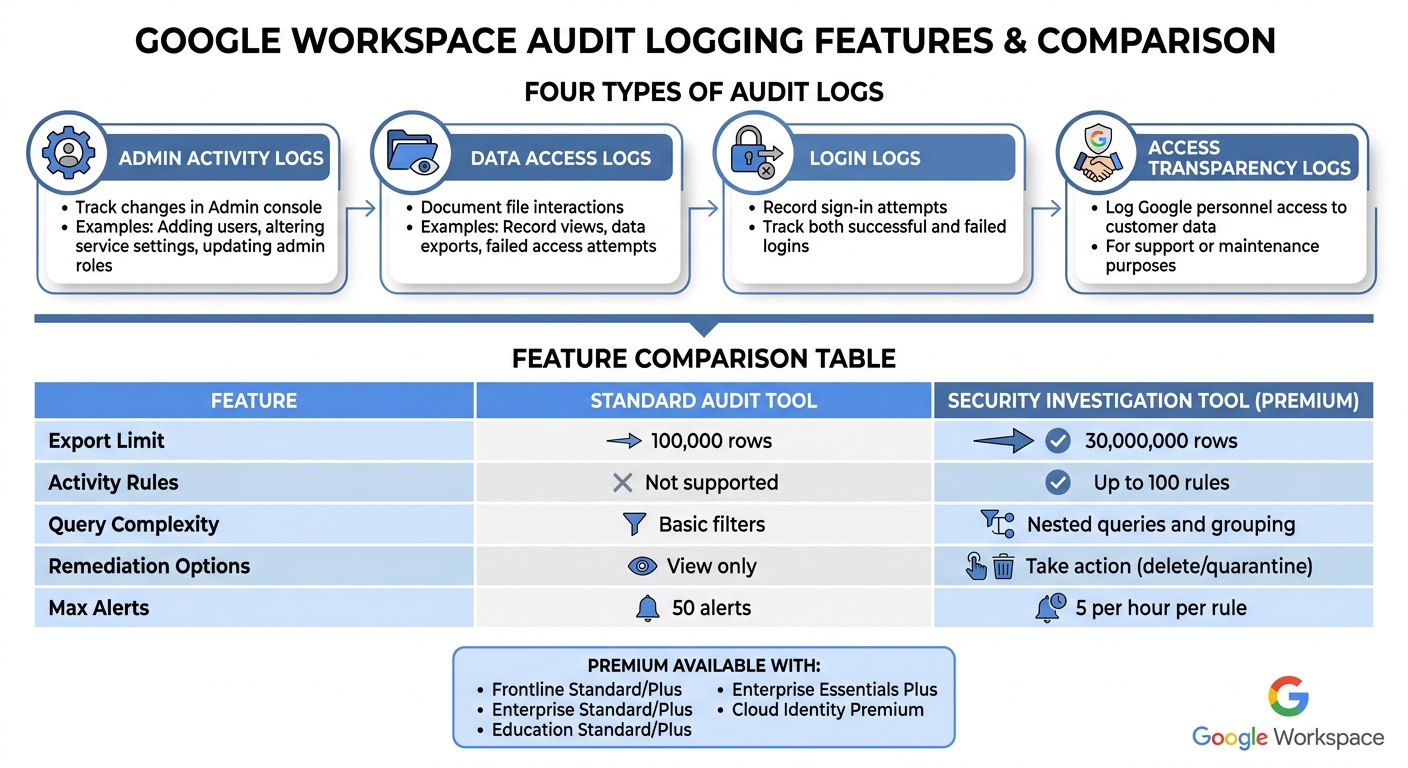
Google Workspace organizes these logs into distinct categories:
- Admin Activity logs: Track changes made in the Admin console.
- Data Access logs: Record interactions with data, whether it’s being read or modified.
- Login logs: Capture both successful and failed sign-in attempts.
- Access Transparency logs: Document instances where Google personnel access customer content.
As of October 2025, Google has improved the detail provided in Admin audit logs for Gmail, Drive, and account security. This enhancement allows for more precise data, which is especially useful for investigating cybersecurity issues.
These logs go beyond simple records of activity - they are critical for demonstrating compliance with regulatory standards.
How Audit Trails Support Compliance
Audit trails transform compliance requirements into actionable, documented evidence. For organizations navigating frameworks like SOC 2, ISO 27001, and GDPR, these logs prove responsible data management practices when regulators come knocking.
For example, healthcare organizations must meet HIPAA regulations, which require all communications involving Protected Health Information (PHI) to be auditable and securely stored for at least six years. Similarly, financial institutions must adhere to laws like SOX, GLBA, and PCI-DSS, which mandate rigorous monitoring of access to sensitive data.
"Monitoring access and changes to client data is essential... Google Workspace's audit logs provide visibility into user actions." - Security Ideals
But compliance is just one piece of the puzzle. Audit trails also play a key role in identifying security threats. They can reveal unusual activity, such as repeated failed login attempts from suspicious locations, unauthorized downloads, or the setup of unauthorized email forwarding rules - potential signs of phishing attacks.
Google’s Access Evaluation logs take this a step further by allowing administrators to monitor how security policies, like OAuth or session-binding, influence user access decisions in real time. This feature is particularly helpful in spotting risks like cookie theft.
sbb-itb-c68f633
Simplify Data Compliance With These Google Workspace Settings
Regulatory Frameworks That Require Audit Trails
Various regulations enforce strict audit trail standards, playing a vital role in ensuring data compliance for organizations using Google Workspace.
HIPAA Requirements for Protected Health Information (PHI)
HIPAA (45 CFR § 164.312(b)) requires healthcare organizations to log and review activities in systems that store electronic Protected Health Information (ePHI). These audit logs must be kept for at least 6 years, with raw logs stored uncompressed for 6–12 months. Some states may enforce even longer retention periods. For Google Workspace users managing PHI, Data Access logs are crucial - they track events such as record views, data exports, and failed access attempts. These logs capture essential details like user ID, resource type, timestamp, export format, and record count.
To meet compliance standards, organizations should use immutable log buckets with locked retention policies and limit access to authorized IT and audit personnel only. This rigorous approach ensures the integrity of PHI records and sets a precedent for audit trail requirements in other regulatory frameworks .
SOC 2 and Data Protection Requirements
SOC 2, while not a legal mandate, emphasizes rigorous audit practices to demonstrate control over security, availability, and confidentiality. Audit logs serve as critical evidence for compliance.
"Audit logs are required for compliance with many security frameworks, including HIPAA. They prove that an organization is capable of investigating any data breaches or unauthorized access."
- Emily Bonnie, Senior Content Marketing Manager, Secureframe
Google Workspace supports SOC 2 compliance through various logging tools. Admin Activity logs track configuration changes and updates to IAM permissions, while Login Audit logs monitor user sign-ins to flag unauthorized access attempts. The OAuth Token Audit logs are particularly useful for overseeing third-party app authorizations and data access.
For organizations aiming for SOC 2 certification, enabling Access Transparency logs is a must. These logs document when Google personnel access customer content for support or maintenance, offering a key layer of accountability. Without proper audit trails, organizations risk losing certifications and may struggle to detect breaches in a timely manner.
US Data Retention and Logging Requirements
In addition to HIPAA and SOC 2, numerous US regulations impose specific data retention and logging standards, tailored to different industries and data types. Google Workspace offers customizable retention policies to meet these diverse requirements. Long-term storage of audit logs can be managed through Google Cloud's Operations suite or integrated with third-party tools like Splunk for advanced compliance reporting.
For organizations juggling multiple regulations, the best practice is to identify and adhere to the strictest applicable requirement. By configuring systems to align with these standards, administrators ensure comprehensive audit trail availability. Adjusting default retention periods in Cloud Logging to meet regulatory demands safeguards compliance across various frameworks and industries.
Google Workspace's Built-In Audit Logging Features
Google Workspace Audit Log Types and Features by Edition
Google Workspace provides two native tools to help administrators track activity: the Audit and Investigation Tool (available to all customers) and the premium Security Investigation Tool. Both tools allow admins to monitor user and admin actions and perform filtered searches. The premium version goes a step further by enabling automated security responses through customizable activity rules. These tools emphasize the importance of maintaining detailed and timely audit trails, which are essential for compliance.
Admin Audit Logs
Admin Audit Logs capture every action performed in the Google Admin console, such as adding users, altering service settings, or updating administrative roles. These logs address key compliance concerns by answering the critical question: "Who did what, where, and when?". To enhance security insights, Google is updating the Admin log schema, with the changes expected to be fully implemented by August 2026. Admins should adjust event rules accordingly to avoid false positives.
Drive, Gmail, and Meet Logs
Drive Log Events provide insights into actions like file creation, sharing, and label changes. However, certain activities - such as "Print" events for Docs, Sheets, and Slides or downloads via Google Takeout - are not logged. Additionally, "Print" events in the Drive viewer may take up to 12 hours to appear in the logs.
Gmail Log Events track message delivery, Data Loss Prevention (DLP) rule violations, and admin changes to email settings. Rule Log Events play a key role in compliance by recording attempts to share sensitive data, with entries typically appearing within an hour of the action.
Meet Log Events focus on video meetings and recording activity. Beyond these, other valuable logs include OAuth events (tracking third-party app usage), Device events (monitoring mobile and desktop activity), SAML events (for single sign-on tracking), and Vault events (for eDiscovery management). Together, these logs showcase Google Workspace's dedication to providing detailed compliance tools.
Audit Log Features by Workspace Edition
The capabilities of Google Workspace's audit tools vary by edition. The standard Audit and Investigation Tool limits search result exports to 100,000 rows, while the premium Security Investigation Tool supports up to 30,000,000 rows. Premium editions also allow for up to 100 automated activity rules and offer advanced query options, such as nested searches and attribute grouping.
| Feature | Standard Audit Tool | Security Investigation Tool (Premium) |
|---|---|---|
| Export Limit | 100,000 rows | 30,000,000 rows |
| Activity Rules | Not supported | Up to 100 rules |
| Query Complexity | Basic filters | Nested queries and grouping |
| Remediation Options | View only | Take action (e.g., delete or quarantine) |
The premium Security Investigation Tool is available with Frontline Standard/Plus, Enterprise Standard/Plus, Education Standard/Plus, Enterprise Essentials Plus, and Cloud Identity Premium editions. Additionally, organizations can forward logs such as Admin, Enterprise Groups, Login, OAuth Token, and SAML logs to Google Cloud Logging for centralized management and custom retention.
How to Monitor and Manage Audit Trails
Setting Up Real-Time Monitoring and Alerts
Google Workspace provides Reporting rules for most editions, allowing admins to set up alerts for specific log events, like sharing documents outside the company or changes to administrative settings. For those using premium editions such as Enterprise Plus or Education Plus, Activity rules offer advanced features, including thresholds and automated responses. Admins can create up to 50 alerts using reporting rules.
To centralize log management, you can forward logs to Security Information and Event Management (SIEM) tools like Splunk or data warehouses such as BigQuery by configuring aggregated sinks at the organization level. When setting up alerts, focus on high-priority events like suspicious_login, 2sv_disable, password_edit, and government_backed_attack. This approach helps reduce unnecessary notifications and keeps attention on compliance-critical actions. By default, activity rules limit alerts to five per hour.
Once real-time alerts are active, managing access and retention becomes the next step to secure your audit data.
Access Controls and Retention Policies
Real-time monitoring works best when paired with strict access controls and tailored retention policies. Following the principle of least privilege ensures that only authorized individuals with auditing duties can access sensitive logs. In the Google Admin console, you can assign custom roles with specific "Audit and investigation" privileges. For instance:
- "View" access allows users to run searches.
- "View sensitive content" grants access to DLP-related data.
- "Manage" access enables actions like email deletions.
To protect sensitive details while maintaining necessary data, use log views to redact information such as email addresses. For those accessing logs in Google Cloud Logging, assign the Logging Private Logs Viewer IAM role at the organization level to avoid granting excessive permissions.
For long-term data retention, configure aggregated sinks to route logs to Cloud Storage, BigQuery, or Pub/Sub. These options allow you to set custom retention periods, ranging from 1 day to 10 years. If your organization has specific data residency requirements, you can choose geographical regions for log storage. For added security, consider using Customer-Managed Encryption Keys (CMEK) to control encryption at rest.
Establishing Regular Audit Reviews
Regularly reviewing audit trails strengthens security and ensures compliance with policies. Scheduled audits can uncover risks, detect unauthorized access, and confirm that policies are being followed. As highlighted by Google Workspace Updates:
"Granular audit logs are critical to helping organizations investigate cybersecurity incidents and understand their data usage".
Rather than waiting for an incident, set up a routine schedule to review logs. Look for unusual activities, such as repeated failed login attempts, unauthorized email forwarding, or suspicious file downloads.
Use the Audit and investigation tool or the Security investigation tool (depending on your Workspace edition) to filter logs by attributes like "Actor" (user email), "Event name" (e.g., file deletion), or "IP ASN". For added security, enable the "Require reviewer" setting for bulk actions in the investigation tool, ensuring multi-step approvals and oversight. To enhance monitoring, automate critical alerts in the Alert Center for high-risk events, and integrate with SIEM systems for extended retention and advanced analysis beyond Google Workspace's built-in limits.
Conclusion
Maintaining compliance in Google Workspace hinges on a solid framework of audit and monitoring strategies. At the heart of this framework are audit trails, which provide a clear record of "Who did what, where, and when?" across over 31 data sources. These logs cover everything from Admin Activity and Data Access to Access Transparency, ensuring organizations can meet key regulatory standards like HIPAA, SOC 2, and US data retention requirements.
Google Workspace simplifies audit data management with built-in tools that support advanced search capabilities and automated responses. To enhance compliance, organizations can connect their audit data with Google Cloud, enabling extended retention and deeper analysis through Cloud Logging. Assigning "Audit and investigation" privileges to specific admin roles ensures that only authorized personnel have access to sensitive information.
A robust compliance strategy also includes regular reviews of audit logs, real-time monitoring, and strict access controls. Forwarding logs to tools like SIEM or BigQuery allows for long-term tracking and detailed analysis. Additionally, configurable log retention and custom alerts equip organizations to meet a wide range of regulatory demands. Together, these measures create a comprehensive and reliable compliance framework.
FAQs
Which Google Workspace logs should we prioritize for HIPAA or SOC 2?
When working toward HIPAA or SOC 2 compliance, focusing on specific Google Workspace audit logs is crucial. Pay attention to logs that track admin activity, user access, login events, and data access.
The most important logs to monitor include:
- Admin log events: These capture changes made by administrators, providing a clear record of configuration changes or permissions updates.
- User login events: These track user authentication, helping identify unauthorized access attempts or unusual login patterns.
- Data access logs: These logs detail who accessed sensitive data, ensuring visibility into potential data breaches or misuse.
By keeping a close eye on these logs, you can maintain robust monitoring and retain critical evidence to meet security and compliance requirements.
How long should we retain audit logs in Google Workspace and Google Cloud?
The length of time audit logs are stored in Google Workspace varies depending on the type of log and your specific configuration. By default, the retention period follows the custom settings you've established. Logs will remain accessible until their designated retention period ends or they are manually removed. To ensure proper management, review your configuration settings regularly.
What’s the best way to alert on risky events without alert fatigue?
To cut down on alert fatigue, create reporting rules with clear conditions and actions. For example, you can set up email notifications or use alert center alerts to ensure only the most relevant events trigger responses. Make use of detailed filters in the security investigation tool to narrow down alerts to what truly matters. Additionally, periodically review and adjust your rules to stay focused on high-priority risks while keeping unnecessary notifications to a minimum.