
5 Ways To Collect IT Help Desk Feedback
Your IT help desk might handle countless support tickets, but here's the issue: nearly 47% of IT help desks don't collect user feedback, and 37% lack a formal system to do so. Without feedback, you're operating blind - missing critical insights into what works and what frustrates users.
Feedback isn't just nice to have - it's essential for identifying problems, improving processes, and boosting user satisfaction. It can highlight recurring issues like slow callbacks or unclear instructions, helping you fix them before they lead to churn. Plus, it motivates your team by showing the impact of their work.
Here are 5 practical ways to collect feedback and improve your IT help desk:
- Post-Ticket Surveys: Quick surveys sent after ticket closure provide immediate insights into user satisfaction.
- Email Follow-Ups: Personalized emails gather detailed feedback after users assess their experience.
- Live Chat Feedback Tools: Real-time feedback after chat sessions helps resolve issues faster.
- In-App Feedback Widgets: Built-in tools in your app collect user input instantly, with minimal effort.
- Help Desk Ticket Analysis: Reviewing ticket data uncovers trends and areas for improvement without asking users directly. This data is also vital for IT asset management to justify hardware and software expenditures.
Each method offers unique benefits, but the key is combining them to create a well-rounded feedback strategy. Collecting feedback is just the start - acting on it is what drives real improvement.
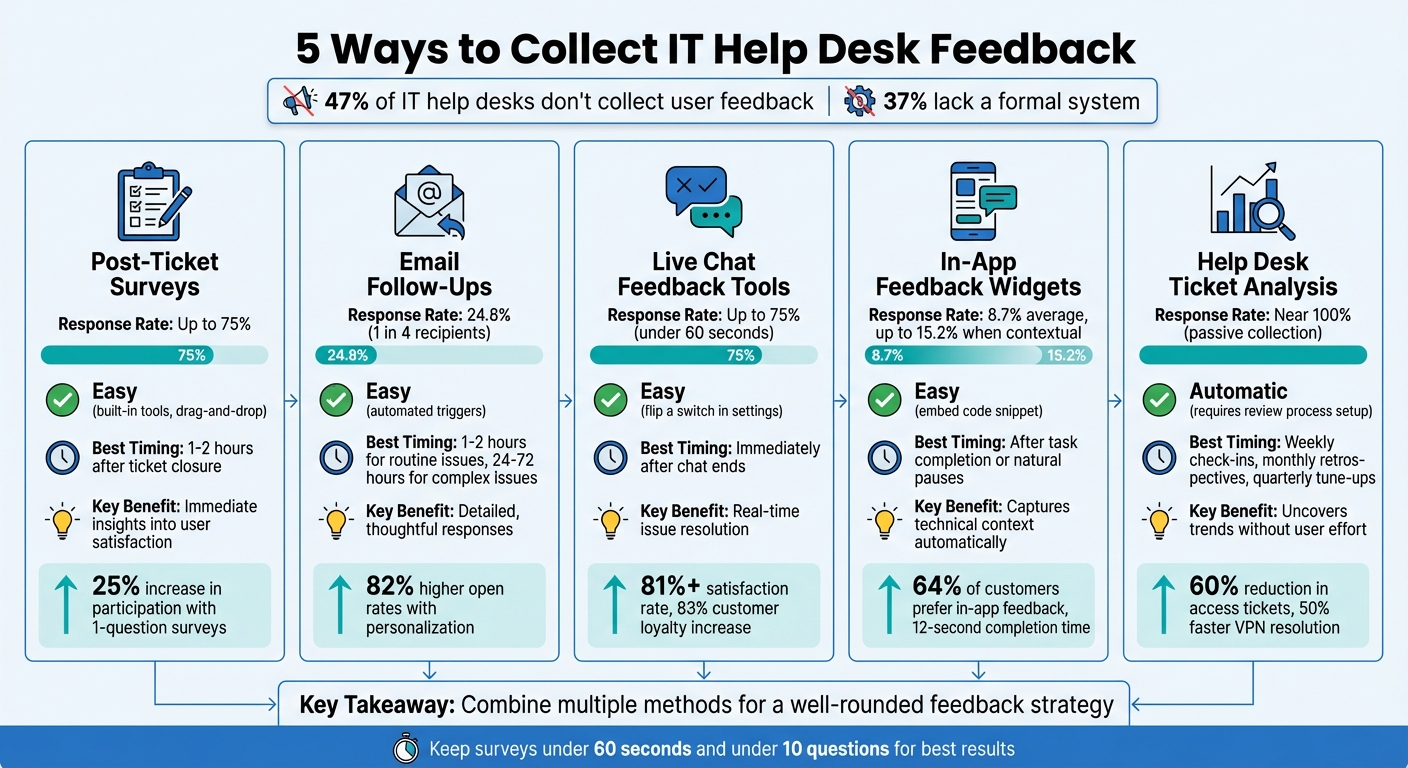
5 IT Help Desk Feedback Collection Methods Comparison
1. Post-Ticket Surveys
Post-ticket surveys are a simple and effective way to gauge user sentiment immediately after a support interaction. Many modern ITSM platforms make this process seamless by offering built-in survey tools that can be activated in the admin settings. Once enabled, these surveys are automatically sent when a ticket is marked as "Closed" or "Resolved". This approach works well alongside other feedback methods, providing quick and measurable insights.
Ease of Implementation
Setting up these surveys is straightforward. Most platforms provide drag-and-drop builders and pre-designed templates, allowing you to create questions using star ratings, emoticons, or radio buttons in just a few minutes. Surveys can be applied across your entire help desk or tailored to specific departments, such as IT or HR, with unique questions for each. Once configured, organizing the survey data becomes crucial for uncovering meaningful insights.
Effectiveness in Gathering Actionable Insights
When designed well, surveys can deliver clear insights you can act on. Assigning numerical scores to responses (e.g., 0-100%) lets you quickly group feedback into categories: negative (0-40%), neutral, or positive (60-100%). Adding branching logic makes the surveys smarter - for instance, if a user marks an issue as unresolved, follow-up questions can automatically probe deeper into the problem. You can also configure alerts to notify managers immediately when a poor rating is received, enabling quick corrective actions.
User Engagement and Response Rate
Timing plays a big role in boosting survey engagement. Surveys sent within 1-2 hours of ticket closure - while the interaction is still fresh - see much higher response rates than those sent later. For example, in 2024, Cars Commerce saw a 25% increase in survey participation by simplifying their survey to just one question: "Were we able to help you?" Tim Jordan, their Senior Manager of Customer Support, linked this streamlined survey to their CRM, triggering supervisor reviews for negative responses. This approach helped uncover training gaps that broader data had previously missed.
To maintain high response rates (up to 75%) while avoiding survey fatigue, keep surveys short - under 60 seconds or fewer than 10 questions - and limit their frequency to every 10th ticket or once per week per user. Adding your company’s logo and branding can also help make the survey feel professional and trustworthy.
sbb-itb-c68f633
2. Email Follow-Ups
Email follow-ups are a great way to gather detailed feedback after users have had time to fully assess their support experience. While immediate surveys capture first impressions, follow-ups sent via email - used by 93% of customers to communicate with companies - allow for more thoughtful responses once users confirm their issues are resolved.
Ease of Implementation
Modern help desk platforms make email follow-ups easy to implement. They use automated "Ticket Closed" templates or rules that trigger emails as soon as an issue is marked resolved. To encourage responses, keep the message brief - just 2–3 lines explaining the survey's purpose and emphasizing that it takes only 2 minutes to complete. Adding a personal touch, like addressing the user by name and referencing their specific ticket, can significantly improve engagement. In fact, personalized emails boost open rates by 82% and click-through rates by 75%. These features ensure you can gather valuable feedback with minimal manual effort.
Effectiveness in Gathering Actionable Insights
Email surveys typically achieve a response rate of 24.8%, meaning about one in four recipients takes the time to share their thoughts. A key strength of email follow-ups lies in their timing flexibility. For routine IT issues, surveys can be sent within 1–2 hours. However, for more complex problems like network outages, waiting 24–72 hours allows users to reflect on the entire resolution process. This approach captures more comprehensive feedback, such as whether a workaround held up over time or if communication during a prolonged issue was effective.
User Engagement and Response Rate
The subject line of your email is critical - 33% of recipients decide whether to open the email based on this alone. Use engaging, benefit-focused language like "Help us improve! What did you think of your recent support?" rather than generic terms like "survey" or "reminder", which are more likely to be ignored or flagged as spam. For longer surveys, offering incentives such as gift cards or discounts can encourage participation. For example, Segment sent a short, conversational follow-up to a user who had given a high score but no additional feedback. By offering a free t-shirt regardless of further input, they successfully collected richer qualitative insights. To maximize completion rates, keep the survey short - under 60 seconds - and ensure the email layout works well on mobile devices.
3. Live Chat Feedback Tools
Live chat tools offer a way to capture user sentiment immediately after support interactions. This real-time feedback helps IT teams spot and resolve issues quickly, preventing them from escalating. With satisfaction rates exceeding 81% due to the speed and convenience of live chat, adding a feedback mechanism at the end of these sessions provides valuable insights.
Ease of Implementation
Many modern help desk platforms come with built-in feedback widgets that are simple to set up - often as easy as flipping a switch in the admin settings. These systems can automatically send a quick survey as soon as a chat ends. If a user provides a low rating (e.g., below 3 stars), the tool can prompt them to share additional details. This seamless setup makes live chat an efficient, real-time addition to other feedback methods like post-ticket surveys and email follow-ups.
Effectiveness in Gathering Actionable Insights
Simplifying feedback collection can make a big difference. For example, Cars Commerce saw a 25% increase in survey engagement by using a straightforward CSAT question. This helped them identify training needs, especially around how agents explained complex inventory issues. Live chat feedback also uncovers trends in agent performance, knowledge base gaps, and technical issues. When paired with case metadata - like the agent involved, issue type, and resolution time - these insights become even more impactful. Gathering feedback in real time ensures no critical details are missed, complementing other channels discussed earlier.
User Engagement and Response Rate
Quick and engaging surveys maximize user participation. Keeping surveys short - under 10 questions and 60 seconds - can lead to completion rates as high as 75%. Adding visual elements like emojis, stars, or thumbs up/down icons enhances interaction, especially on mobile devices. Personal touches, like addressing users by name and referencing their specific issue, make the feedback process feel more meaningful. Since 83% of customers are more loyal to companies that address complaints and resolve issues, responding to negative feedback within 30 days can also encourage users to participate in future surveys.
4. In-App Feedback Widgets
In-app feedback widgets offer a built-in, real-time option for collecting feedback directly within your application. These tools integrate seamlessly into your help desk portal, capturing user reactions on the spot. Unlike email surveys that might be delayed by hours or days, these widgets gather input immediately. On average, in-app widgets boast a response rate of 8.7%.
Ease of Implementation
Setting up an in-app feedback widget is simple. Most platforms provide a code snippet that you can embed directly into your app's <body> section. The widget typically stays unobtrusive, appearing as a small icon in the bottom-right corner on desktops or as a floating action button on mobile devices. To avoid overwhelming users, keep the initial form short - just two fields for category and description. Adding extra fields can drop completion rates by 10% to 20%, so consider using progressive disclosure: collect only the essentials first, then allow users to optionally add screenshots or contact details after submitting.
Effectiveness in Gathering Actionable Insights
One of the biggest advantages of in-app widgets is their ability to automatically capture technical context. These widgets can log details like browser type, operating system, current URL, user ID, and even console errors. They also use AI to categorize submissions, speeding up issue resolution by reducing the need for back-and-forth communication. It's no surprise that 64% of customers prefer in-app feedback over other methods, finding it faster and more convenient.
User Engagement and Response Rate
Timing is everything when it comes to maximizing engagement. Triggering widgets after a task is completed or during natural pauses in the user journey can significantly boost response rates. On average, users complete these surveys in just 12 seconds, compared to the 4.3 minutes it takes for traditional surveys. Contextual widgets, when well-targeted, can achieve response rates as high as 15.2%. Keep interactions simple by using visual elements like star ratings, emojis, or thumbs up/down icons. Always follow up with a confirmation message that includes a reference number, and notify users when their feedback has led to a fix - this builds trust and encourages future participation. This approach naturally leads into the next strategy: analyzing help desk ticket data for deeper insights.
5. Help Desk Ticket Analysis
Help desk ticket analysis taps into the wealth of data embedded in every support interaction. Each ticket holds critical details - like issue type, resolution time, tags, and even the tone used by customers. This makes it a powerful passive feedback source, achieving a near-perfect response rate since every interaction is automatically logged and reviewed. When paired with active feedback methods, ticket analysis ensures a more complete understanding of user experiences.
Ease of Implementation
Most modern help desk platforms handle ticket data logging automatically. There's no need for additional surveys or forms because the system captures everything as part of normal operations. The real challenge lies in setting up a consistent review process. Start by scheduling weekly check-ins to monitor key metrics like ticket volume by type and first response time. Follow up with monthly retrospectives to identify trends, such as rising reopen rates or escalations. Finally, conduct quarterly tune-ups to refine automation rules based on long-term observations. To ensure actionable outcomes, each review should end with a couple of specific tasks assigned to clear owners.
Effectiveness in Gathering Actionable Insights
Unlike surveys or live chat feedback, ticket analysis offers ongoing insights without requiring extra effort from users. It’s especially good at spotting trends that might otherwise go unnoticed. For example, an IT team cut VPN ticket resolution times in half by updating an outdated knowledge base. Similarly, one organization discovered a surge in access-related tickets on Fridays. The root cause? New contractors were being onboarded late in the week without automated provisioning. Fixing this process upstream reduced those tickets by 60%.
"Raw data is meaningless without context. Actionable insights are the detailed points that give your organization a clear path forward." - Katie Joll, Jitbit
To get the most out of ticket analysis, focus on meaningful signals rather than surface-level metrics. For instance, backlog aging often highlights workflow stalls more effectively than just tracking ticket volume. Phrases like "still waiting" in tickets correlate with a 30% drop in CSAT scores, even if the issue is eventually resolved quickly. Breaking down reports by issue type, channel, or agent can reveal bottlenecks that overall averages might obscure. Tools like AI-driven sentiment analysis can also flag user frustration early, while reopen rates help pinpoint broken processes or unclear instructions. Keeping users informed about changes inspired by ticket analysis builds trust and reinforces its value.
User Engagement and Response Rate
Since ticket analysis works passively, it avoids the risk of user fatigue while still capturing insights from every interaction. The data is already there, waiting to be examined. By combining ticket analysis with active feedback tools, IT teams can achieve a more comprehensive view of support performance.
Conclusion
Gathering IT help desk feedback does more than just measure satisfaction - it helps identify potential problems before they escalate. Feedback serves as an early warning system, uncovering broken processes or communication issues in real time, often long before they manifest in metrics like increased ticket volumes or user churn. Yet, nearly half of IT help desks either skip feedback collection entirely or lack a structured system to do so - missing a critical opportunity to understand frontline challenges.
An effective feedback strategy relies on using multiple channels together. Post-ticket surveys, email follow-ups, live chat tools, in-app widgets, and ticket analysis each offer unique insights. For example, surveys capture immediate user satisfaction, live chat tools reveal real-time sentiment, and ticket analysis uncovers long-term trends. As Tim Jordan, Sr. Manager of Customer Support at Cars.com, puts it:
"Feedback is fuel... The difference between teams that simply collect feedback and those that use feedback well comes down to three things: asking the right questions at the right time, distinguishing signal from noise, and building systems that turn insights into action".
However, more than half of help desks that do collect feedback fail to act on it. Ignoring user input not only damages trust but also wastes opportunities to improve support operations. Acting on feedback is critical - closing the loop by informing users about changes made based on their input can strengthen credibility and demonstrate that their voices are heard.
Even simple steps, like using a one-question CSAT survey, can boost engagement by 25% compared to longer forms. Pair numerical scores with open-text fields to uncover the reasoning behind the ratings, and segment feedback by department, issue type, or support channel to pinpoint specific problem areas rather than relying on overall averages. Additionally, it’s essential to stay flexible - what worked six months ago may no longer resonate. Regularly review response rates, tweak survey timing, and refine your questions to keep the process effective.
The goal isn’t to achieve perfection - it’s to make steady progress. By adopting even a few of these practices and committing to ongoing improvement, you can transform feedback from a routine task into a strategic tool that leads to better support, happier users, and a more engaged IT team.
FAQs
Which feedback method should I start with first?
Collecting feedback right after a support interaction is a smart move. Using methods like post-ticket closure surveys ensures you capture thoughts while the experience is still fresh in the user's mind. This approach not only provides more accurate insights into their satisfaction but also highlights areas that might need improvement. By assessing customer satisfaction immediately after resolving an issue, you can pinpoint what’s working and what might need adjustment, making this an effective first step in understanding and improving the customer experience.
How do I increase feedback response rates without annoying users?
To increase feedback response rates without frustrating users, focus on keeping the process simple, timely, and relevant. For instance, send surveys immediately after a customer support interaction while the experience is still fresh in their minds. Use short, focused questions that clearly explain the survey's purpose.
Timing matters - don’t overwhelm users with too many requests. Instead, choose strategic moments, like right after resolving a support ticket, when the feedback request feels natural and worthwhile. By respecting their time, you’re more likely to gather meaningful and actionable insights.
How can I turn help desk feedback into process improvements?
To make the most of help desk feedback, focus on gathering actionable insights and responding promptly. Use post-ticket surveys to assess factors like response times, professionalism, and overall satisfaction. Look for patterns in the feedback to spot recurring issues, then prioritize and address them in an organized way. Keep users informed about the changes you make to demonstrate that their input is valued. Tools such as AI and automation can simplify the analysis process and support ongoing improvements to your help desk operations.