
5 Benefits of Hardware Standardization
Hardware standardization means using the same devices and configurations across your organization. This approach simplifies IT asset management, reduces costs, and improves productivity. By narrowing hardware options, companies can streamline operations, enhance security, and minimize downtime. Here’s a quick breakdown of the key benefits:
- Cost Savings: Lower expenses through bulk purchases, reduced training, and simplified maintenance.
- Simplified IT Management: Easier deployments, faster troubleshooting, and consistent updates.
- Improved Security: Uniform policies and synchronized updates reduce risks.
- Increased Productivity: Employees face fewer technical issues and adapt faster to standardized tools.
- Less Downtime: Faster repairs and replacements due to consistent hardware setups.
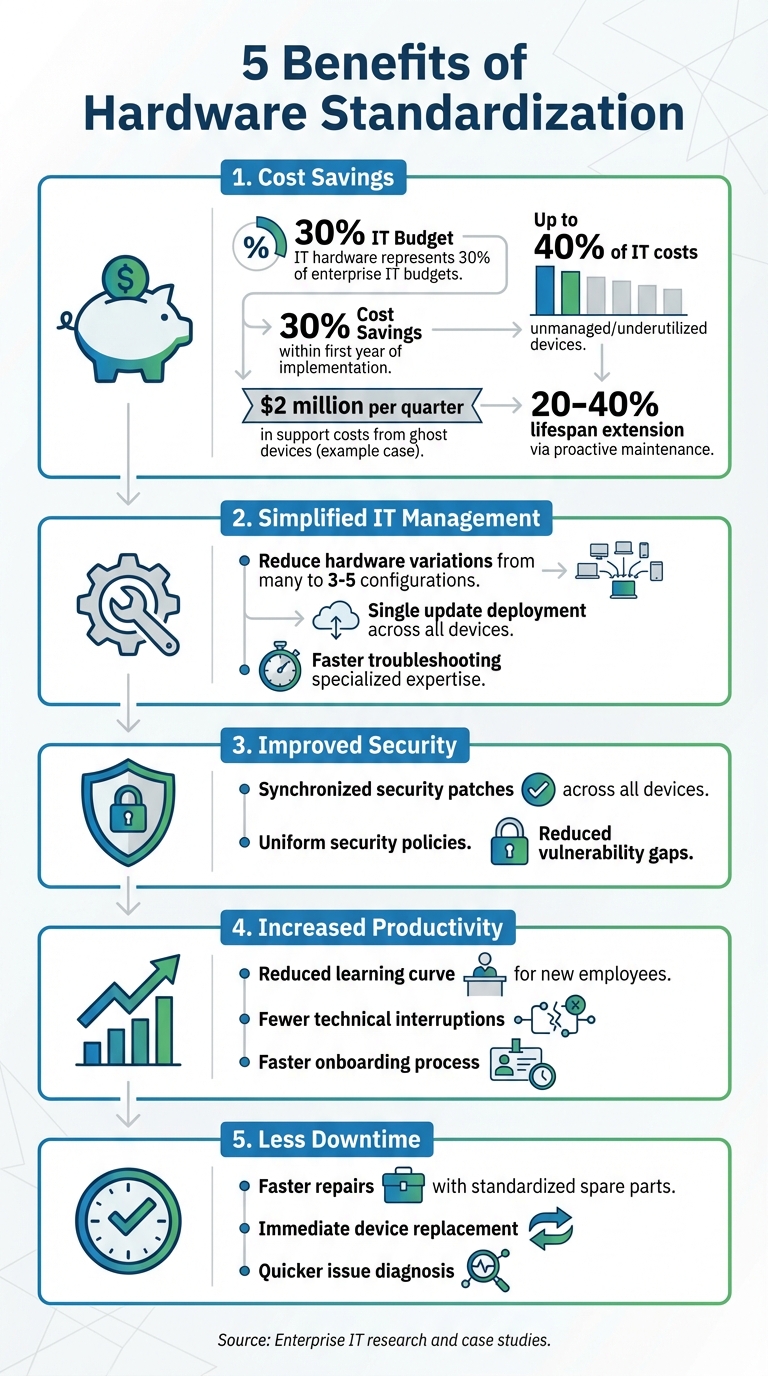
5 Key Benefits of Hardware Standardization: Cost Savings and Efficiency Statistics
Hyperscalers' George Cvetanovski talks open hardware benefits, big cost savings and plenty more
sbb-itb-c68f633
1. Cost Savings
Standardizing hardware can lead to substantial cost reductions through bulk purchasing, simplified training, and lower maintenance expenses. With IT hardware typically making up around 30% of enterprise IT budgets, even small improvements can result in noticeable financial benefits.
Buying identical devices in bulk often unlocks significant discounts. As Enlivened Tech explains:
"Standardized hardware... can also reduce IT costs by allowing you to potentially secure better pricing by buying in bulk from a single vendor".
Working with fewer vendors also strengthens your ability to negotiate perks like extended warranties, faster repairs, and improved service agreements. In fact, organizations implementing IT asset management often report 30% cost savings within the first year.
Another advantage is the reduction in training costs. When employees and IT staff only need to familiarize themselves with one type of device, training becomes much simpler and more cost-effective. GANT Systems highlights this point:
"Training one system beats training five".
This streamlined approach allows IT teams to develop specialized expertise instead of spreading their knowledge thin across multiple device models. It also means only one set of training materials is needed, cutting down on time and resources.
Maintenance becomes more efficient and cheaper too. With a standardized setup, you only need to stock a limited range of spare parts - like chargers, cables, and replacement components - instead of managing inventory for a variety of devices. IT staff can also diagnose recurring issues more quickly. For example, one organization uncovered $2 million per quarter in support costs tied to ghost devices - unused assets still generating expenses - during a hardware audit.
The hidden costs of non-standardized IT can spiral out of control. Studies show that up to 40% of IT costs stem from unmanaged or underutilized devices. Nobility Wireless sums it up well:
"Buying cheaper, non-standard devices might save a few dollars upfront - but the time IT wastes trying to make them 'work' can cost far more in the long run".
Standardization also supports proactive maintenance programs, which can extend hardware lifespan by 20% to 40%. This delays costly replacements, providing further savings and enabling smoother IT operations.
2. Simplified IT Management
When your organization standardizes its hardware, IT management becomes much easier. A unified hardware setup allows your IT team to focus on creating efficient, repeatable processes instead of dealing with a mix of drivers, compatibility issues, and troubleshooting steps for multiple device models.
Simpler deployments. Standardized hardware means your IT team can use pre-configured software images tailored to specific devices, speeding up setup. For instance, if you’re rolling out 50 new laptops, having a consistent hardware environment ensures they integrate smoothly into your existing systems. As InnoVent highlights:
"Standardization removes this friction by giving IT teams a consistent environment to work with".
With fewer hardware variations, your support team can become experts on the devices your organization uses. This makes troubleshooting faster and more predictable. Enlivened Tech underscores this point:
"Standardizing your IT hardware reduces the number of variations your team has to support, making IT management a whole lot easier".
Easier updates and patches. With standardized devices, IT teams can roll out a single update across all hardware. This eliminates the risk of security gaps caused by inconsistent patch levels. Kharmela Mindanao from Intelligent Technical Solutions explains:
"Instead of tracking multiple updates, you have one update you can push to all locations".
Many organizations adopted this approach after the initial chaos of managing diverse devices during the shift to remote work. By narrowing hardware choices to just three to five configurations, you can avoid the headaches of one-off purchases. This shift turns IT operations from reactive problem-solving into proactive management, boosting both security and operational efficiency.
3. Better Security and Compliance
Switching to standardized hardware transforms security management from a patchwork of reactive fixes to a more streamlined, proactive process. When every device operates on the same platform, patching and updating firmware becomes a synchronized effort, reducing the chances of leaving systems exposed due to inconsistent updates across devices. As Matt Le Patourel, Technical & Operations Director at Resolution IT, puts it:
"Standardizing hardware enables uniform security policies across all devices, ensuring that patches and updates can be applied simultaneously, reducing risks".
This approach not only simplifies updates but also strengthens your overall cybersecurity strategy by centralizing risk management efforts.
Compliance becomes easier to handle as well. A single platform means security protocols are easier to document, monitor, and present during audits.
4. Higher Employee Productivity
Hardware standardization doesn’t just enhance security and compliance - it also makes employees more productive. When everyone operates on the same hardware, troubleshooting is minimized, allowing employees to focus on their work. A unified setup means fewer technical hiccups and smoother workflows. As Kharmela Mindanao, Senior Content Writer at Intelligent Technical Solutions, explains:
"Standardization reduces the learning curve for new employees, as they only need to familiarize themselves with a single set of tools and processes."
This benefit isn’t limited to new hires. Consistency across devices ensures a seamless experience, whether employees are working from home, at the main office, or a satellite location. No need for extra adapters, no unfamiliar software quirks, and no unexpected performance issues. Peter Corish from ThinScale highlights this advantage:
"Standardizing IT and employee experience across devices and locations is increasingly important... all employees are engaging with a familiar UX irrespective of device or location."
For hybrid work environments, this uniformity is a game-changer. It simplifies day-to-day tasks and fosters faster team integration, making transitions between locations practically effortless.
Standardized hardware also speeds up onboarding. New hires can dive into work right away without waiting for custom configurations. Training materials apply universally, and IT teams can rely on a single, consistent setup for everyone. Collaboration becomes much easier too - uniform systems eliminate compatibility issues when sharing files or working across departments.
The payoff? Fewer support tickets and less frustration. Employees can operate at full capacity without frequent interruptions. Lenovo underscores this by noting:
"employees working with the same tools and systems face fewer learning curves, which can help them work more comfortably and reduce technical interruptions."
5. Less Downtime
By streamlining IT management and ensuring consistent security, hardware standardization plays a key role in minimizing downtime. When all devices in your organization run on the same hardware, IT teams can avoid the chaos of diagnosing unique issues for every device. Instead, they become highly skilled with specific models, enabling quicker fixes. As Kharmela Mindanao from Intelligent Technical Solutions explains:
"Standardization creates specialization – the team ends up knowing the products better than the manufacturer's engineers."
This consistency allows for faster and more efficient resolutions whenever hardware issues arise.
Another advantage? Faster replacements. Keeping spare parts or pre-configured backups for a limited range of hardware ensures immediate deployment without waiting on vendors. Curvature highlights this benefit:
"Sticking to a handful of configurations also yields a smaller spectrum of potential problems. And when they do occur, you'll be able to respond rapidly with familiar fixes."
Standardization also simplifies maintenance. Uniform schedules mean updates and security patches can roll out simultaneously across all devices, reducing vulnerabilities before they become major issues. As InnoVent points out:
"Standardisation removes this friction by giving IT teams a consistent environment to work with."
When a device fails, instead of wasting hours troubleshooting or waiting for repairs, IT teams can immediately swap it with a pre-configured replacement. To ensure maximum uptime, maintain a small inventory of standardized spare devices and consider working with a single vendor for faster response times during critical moments.
Using IT Asset Management Tools
IT asset management tools take the benefits of hardware standardization to the next level, offering IT teams better efficiency and quicker problem-solving capabilities.
When paired with the right ITAM software, hardware standardization becomes even more impactful. Take AssetRemix from AdminRemix, for example. This cloud-based platform eliminates the need for cumbersome spreadsheets and manual tracking, consolidating everything into a centralized system. Managing over 500,000 IT assets daily, AssetRemix gives IT teams real-time insights into device locations, warranty details, and usage trends across standardized hardware deployments.
The platform is designed to handle the entire lifecycle of an asset - from procurement (including funding details) to maintenance and, eventually, disposal. For organizations with standardized hardware fleets, this means quicker device rollouts and smoother inventory audits. As Arrington Douglas from Malakoff ISD puts it:
"Overall AssetRemix has made my life a lot easier, it has turned our slothful device rollouts into a quick and seamless process".
This streamlined management process perfectly complements the uniformity of standardized hardware, speeding up both deployment and maintenance tasks.
One standout feature of AssetRemix is its help desk integration, which is especially beneficial for standardized setups. Its built-in email ticketing system links asset data directly to support requests. This allows IT teams to instantly pull up hardware details during troubleshooting, significantly cutting down diagnosis time. Uniform devices make it easier for technicians to decide whether to repair or replace based on historical data. Pauline McGinnis from Kipp Indy Public Schools shares:
"It allows us to check and update the whereabouts of our fleet. We can pull the Chromebook data, and see if any of the devices are missing or if a device needs to be replaced".
The platform also offers automation features that further improve IT workflows. Automated directory synchronization and one-click Chromebook metadata imports keep inventory up-to-date without requiring manual input. Additional tools like barcode scanning simplify large-scale deployments, while custom fields let you organize standardized models by location, department, or configuration. For $99/month or $999/year, AssetRemix provides unlimited asset tracking, help desk agents, and support tickets.
Conclusion
Streamlining your IT operations through hardware standardization offers clear advantages. By narrowing the range of hardware in use, organizations can save money through bulk purchasing, simplify maintenance processes, and maintain consistent security protocols. IT teams also benefit by becoming highly skilled with specific hardware models, which makes troubleshooting and support much more efficient.
Standardization also cuts down on hidden costs - like juggling multiple vendors or spending extra time on manual device configurations. This approach not only improves cost management but also simplifies daily operations.
As Kharmela Mindanao from Intelligent Technical Solutions puts it:
"Standardization simplifies your IT environment, reducing the complexity of maintenance tasks and the need for specialized skills".
This simplicity extends to employees outside of IT, boosting productivity with familiar tools and reducing onboarding time for new hires.
To start reaping these benefits, begin with an audit of your current hardware. Identify the models that perform best, consolidate vendor relationships to secure better pricing and support, and set clear standards for hardware selection. Instead of forcing a "one-size-fits-all" solution, establish role-based hardware baselines while requiring strong business cases for any deviations.
The result? Lower costs, faster troubleshooting, stronger security, and a scalable IT environment. By prioritizing hardware standardization, organizations position themselves for long-term efficiency and consistent performance across their entire infrastructure.
FAQs
How do we pick standard hardware models for different roles?
When selecting standard hardware models, start by outlining clear guidelines tailored to the needs of different roles in your organization. For instance, roles focused on data analysis may require high-performance machines, while general office tasks might only need basic, reliable hardware. Strive for a balance between performance, durability, and cost efficiency when making your choices.
It's also important to periodically revisit and refine these standards. Technology evolves quickly, so keeping your hardware aligned with current advancements ensures better compatibility, stronger security, and smoother operations across the board.
What exceptions should be allowed to the hardware standard?
Exceptions to hardware standardization are sometimes necessary, particularly in scenarios such as handling specialized tasks that demand specific hardware, adhering to strict regulatory requirements, or when implementing new technology provides clear and measurable benefits. These exceptions ensure that unique organizational needs are met without compromising on security or performance.
How do IT asset management tools support standardization?
IT asset management (ITAM) tools help create consistency by centralizing how hardware and software assets are tracked and managed. They streamline processes like asset tagging and ensure that all assets follow the same configurations and security protocols. By automating tasks such as updates and compliance tracking, these tools minimize errors, boost efficiency, and maintain a well-organized IT environment. This standardization is key for smoother operations and more informed decision-making.