
10 Ways to Personalize IT Help Desk Support
Personalized IT help desk support transforms generic assistance into tailored solutions by leveraging user data, behavior insights, and integrated tools. This approach improves efficiency, reduces costs, and enhances user satisfaction. Here’s a quick overview of the 10 strategies:
- Build User Profiles: Collect data like roles, apps used, and skill levels for tailored support.
- Asset Visibility Tools: Use tools like AssetRemix to track devices and streamline issue resolution.
- Device-Specific Data: Tools like Chromebook Getter provide detailed device insights for quick fixes.
- Workspace User Data: Centralize user data for precise assistance.
- Context-Aware Responses: Tailor responses based on user history and technical expertise.
- Multi-Channel Support: Offer email, chat, self-service, and more to meet user preferences.
- Advance Alerts: Notify users of potential issues before they escalate.
- AI-Powered Recommendations: Use AI to predict and resolve issues faster.
- User Segmentation: Group users by needs for targeted communication and efficient routing.
- Custom Feedback Requests: Collect specific feedback to improve services.
These strategies cut downtime, lower costs, and create a better IT support experience. Tools like AdminRemix simplify implementation, offering solutions starting at $99/month.
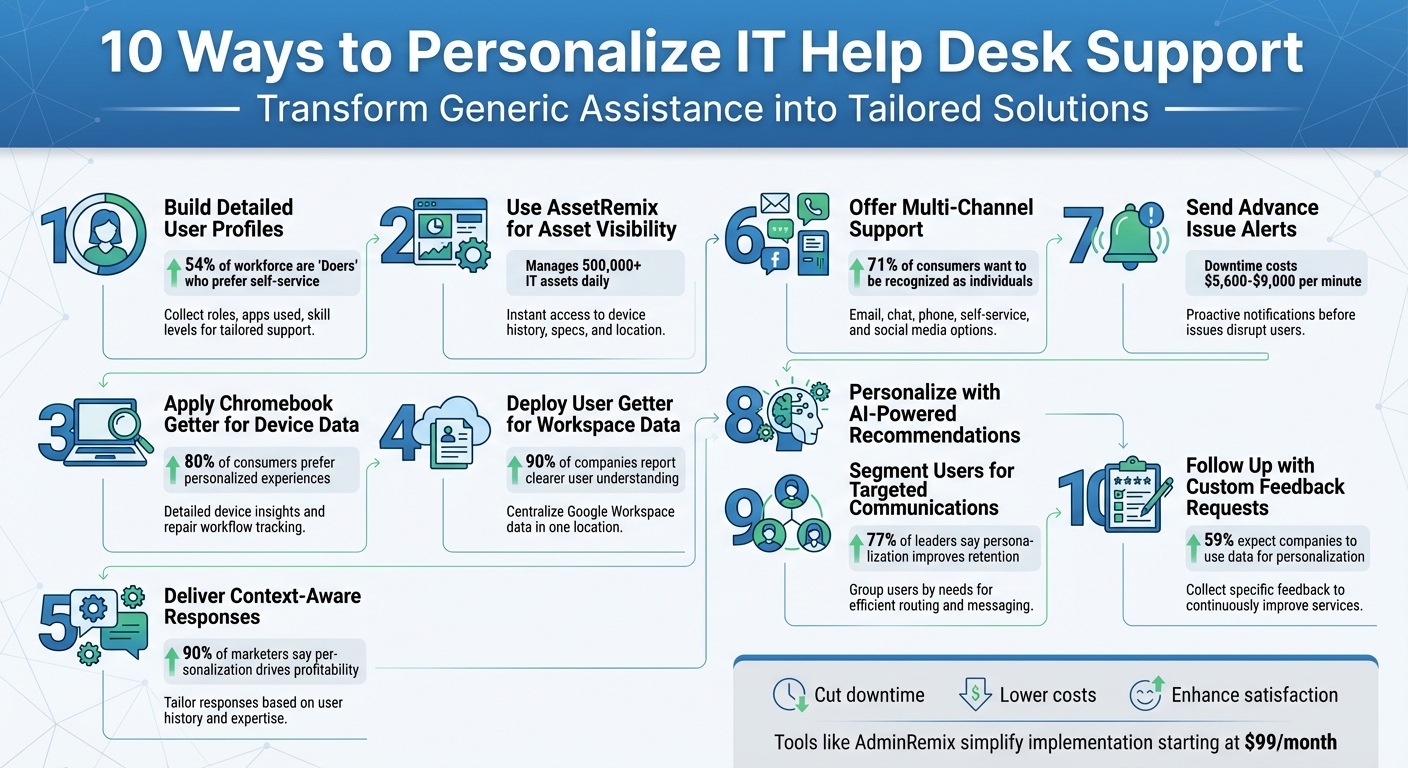
10 Strategies to Personalize IT Help Desk Support
1. Build Detailed User Profiles
User profiles aren't just about gathering basic contact information. They should include comprehensive details like job title, department, seniority level, assigned hardware, software licenses, and even how frequently specific apps are used. For instance, knowing someone is an "8.5/10 MS Word user" can help pinpoint their exact support needs.
The real strength lies in behavioral segmentation. By categorizing users based on technical skills and attitudes, IT teams can deliver support tailored to individual needs. In 2022, "Doers" - employees who are both capable of and willing to troubleshoot their own IT problems - made up 54% of the workforce. Meanwhile, "Supported" users, who prefer personal assistance, accounted for about 19%. "Doers" thrive on technical language and self-service tools, while "Supported" users need straightforward instructions and clear communication. Incorporating these detailed profiles into IT systems can significantly streamline support processes.
Integration with IT Tools and Systems
To create a unified user profile, data from multiple sources needs to be aggregated. Moveworks illustrated this concept in October 2020 with their "enterprise identity map", which combined information from systems like Active Directory, Okta, and ServiceNow. For example, when an employee named Ellen requested to add a colleague to a Slack channel, the system automatically identified the correct person and the specific "#dev-ops" channel based on her department and past interactions - eliminating the need for follow-up questions.
Efficiency in Resolving IT Issues
Detailed user profiles enable smarter workflows, such as dynamic ticket routing that connects users to the right specialists instantly. Unisys highlighted this in September 2023 with their persona-based mapping, which efficiently directed sales and healthcare users to the appropriate support teams. Additionally, these profiles can trigger proactive alerts, like notifying users about upcoming password expirations based on their timezone, helping to prevent lockouts before they occur.
"Make a quick cheat sheet for Agents, three things to do and three things to avoid with each profile" - HappySignals
2. Use AssetRemix for Asset Visibility
Relevance to User Personalization
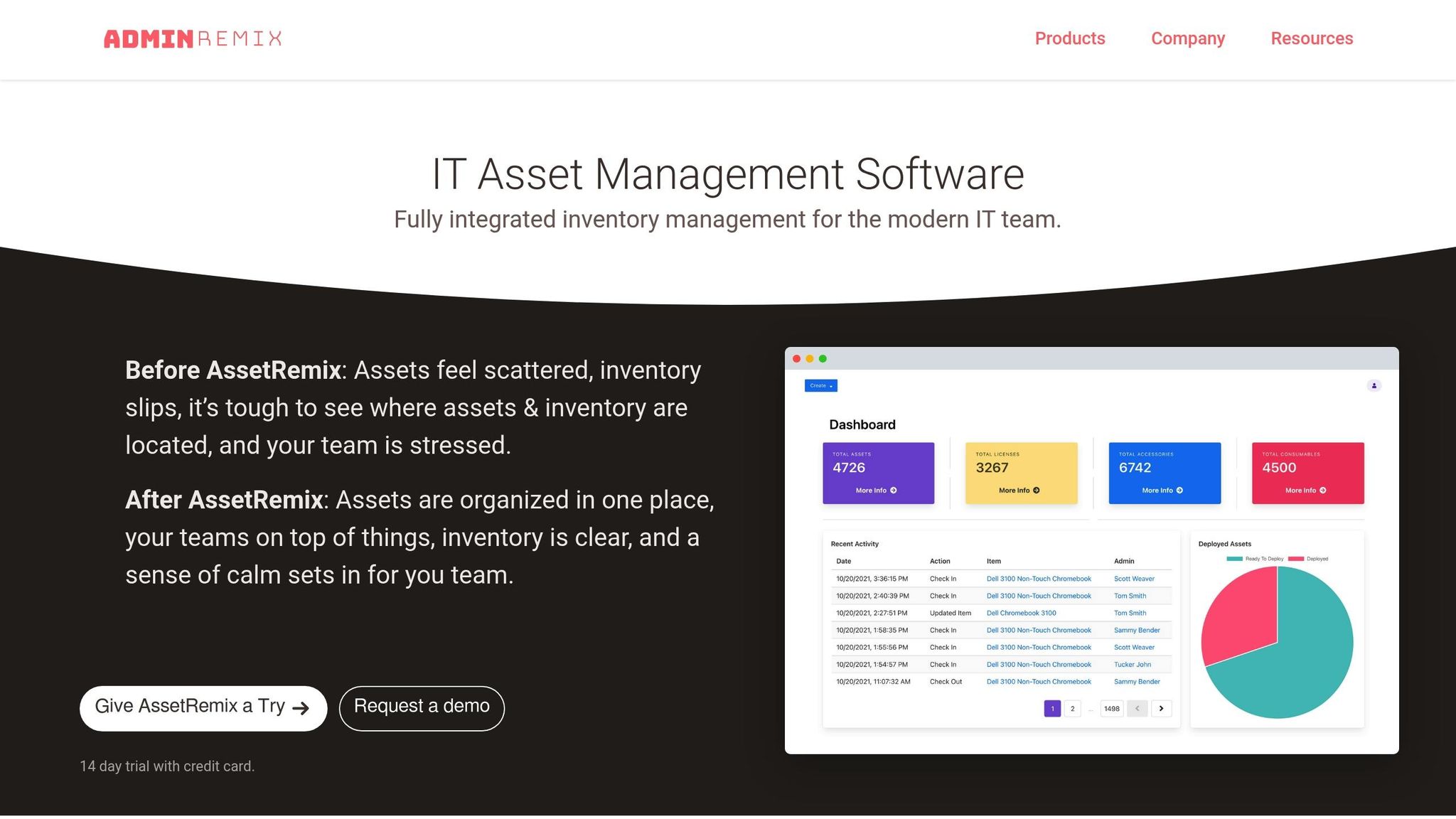
With AssetRemix, agents gain instant access to a user's complete technology profile, making personalized support a breeze. By linking asset data directly to the help desk, agents can immediately view crucial details like device history, specifications, location, and department information as soon as a ticket arrives - no need for extra back-and-forth. IT teams can also use custom fields to categorize assets by funding source, maintenance schedules, or physical location, offering agents a clear picture of the user's environment and enabling tailored responses.
Currently, the platform manages over 500,000 IT assets daily for more than 350 IT teams. A real-time directory sync ensures that user profiles and account data stay up to date. For example, Pauline McGinnis from Kipp Indy Public Schools can instantly pull Chromebook data during a support call to determine if a device needs replacing. This level of asset visibility allows for smooth system integrations and better user experiences.
Integration with IT Tools and Systems
AssetRemix works seamlessly with other IT tools, integrating with Lansweeper for real-time asset discovery and using Zapier to automate workflows. Its Chromebook integration syncs device metadata 75% faster than the standard Google Admin Console. Outbound webhooks enable real-time data exports, creating a connected IT ecosystem where asset information moves effortlessly between systems. Plus, the Chrome Extension simplifies work order submissions for students and staff, requiring just three clicks - no manual entry of asset tags needed.
Efficiency in Resolving IT Issues
Integrating asset data with ticketing systems significantly speeds up issue resolution. Arrington Douglas from Malakoff ISD shared, "AssetRemix has made my life a lot easier, it has turned our slothful device rollouts into a quick and seamless process". The platform's straightforward pricing - $99 per month or $999 per year - covers unlimited assets and help desk issues, making it an accessible solution for IT teams.
"It allows us to check and update the whereabouts of our fleet. We can pull the Chromebook data, and see if any of the devices are missing or if a device needs to be replaced. The inventory takes less time and we can retrieve data instantly."
- Pauline McGinnis, Kipp Indy Public Schools
3. Apply Chromebook Getter for Device-Specific Data
Relevance to User Personalization
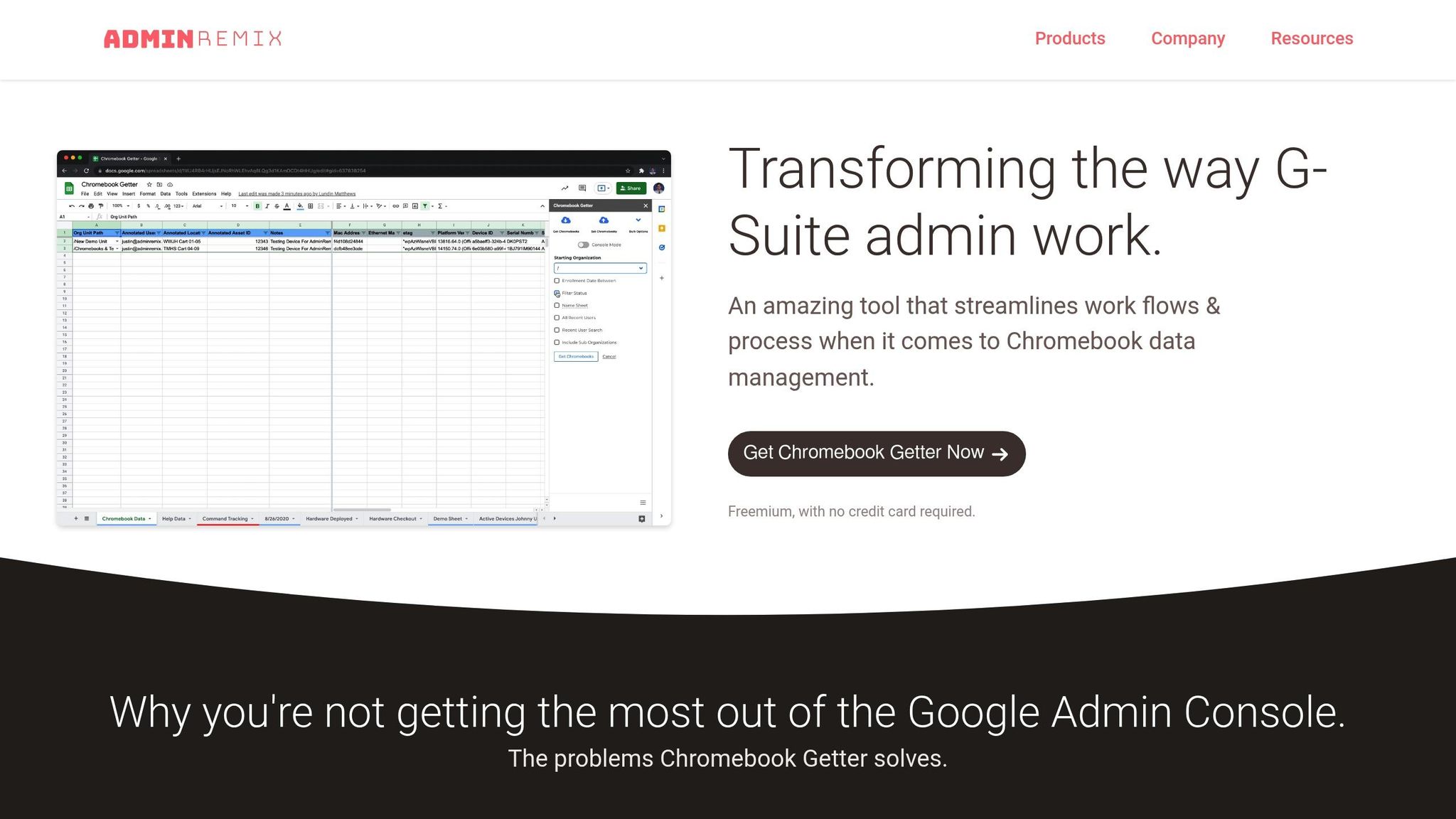
Chromebook Getter provides IT teams with detailed device insights, enabling them to offer personalized support right when it’s needed. Administrators can edit Chromebook metadata, search for G Suite users, and access critical data like recent user activity, device status, and organizational units - all without requiring additional input. This level of personalization is crucial, especially since 80% of consumers prefer brands that deliver tailored experiences. With device-specific data, IT teams can move beyond generic troubleshooting and provide solutions that feel custom-made.
The tool’s Repairs Workflow and Detailed Reporting features make it easy to track the history and current status of any device. This ensures that support teams address the exact technical condition of a user’s Chromebook. Instead of starting from scratch, IT professionals can quickly identify hardware issues, review past repairs, and analyze performance trends before tackling a support ticket. This saves time - important when 58% of IT teams spend five or more hours weekly on repetitive tasks. By offering this level of detail, Chromebook Getter simplifies workflows and integrates seamlessly with existing IT tools.
Integration with IT Tools and Systems
The Chrome Extension takes device management to the next level by embedding Chromebook data directly into the help desk. This streamlines metadata updates and device management, offering a smoother experience compared to using the standard Google Admin Console. Chromebook Getter offers two pricing tiers:
- Free Device Manager Plan: Includes unlimited Chromebook metadata updates and G Suite user search.
- District Help Desk Plan: Priced at $0.17 per device per month, this plan adds the Chrome extension, repairs workflow, and access to a knowledge base.
These features make it easier for IT teams to manage devices efficiently, regardless of the scale of their operations.
Efficiency in Resolving IT Issues
With real-time access to Chromebook data - such as OS version, last user, and system activity - support agents can skip the usual scripted troubleshooting and jump straight to accurate solutions. This shift from reactive to proactive support is game-changing, especially when 90% of IT professionals say manual tasks contribute to low morale and staff turnover. By automating metadata management and providing instant visibility into device details, Chromebook Getter not only speeds up issue resolution but also reduces the administrative workload on IT teams. It’s a win-win for efficiency and morale.
4. Deploy User Getter for Workspace User Data
Relevance to User Personalization
AdminRemix's User Getter brings Google Workspace user data into one central location, giving IT teams the tools they need for more personalized support. By combining data from systems like Active Directory, Okta, and Google Workspace into a single identity map, IT agents gain a full picture of each employee. And it matters - studies show that 90% of companies using data-driven personas report a clearer understanding of their users. With this tool, support agents can instantly access details like a user's role, department, location, and email groups, cutting down on repetitive back-and-forth questions.
One standout feature is its ability to resolve confusion when employees share similar names. The disambiguation tool uses extra details like department, role, and shared contacts to pinpoint the right person without needing additional clarifications. This unified view also makes integrations with other systems smooth and efficient.
Integration with IT Tools and Systems
User Getter works seamlessly with ITSM platforms like ServiceNow, Jira, and BMC Helix, letting agents access up-to-date user profiles directly within support tickets. Since the system syncs continuously throughout the day, any changes - whether it’s a new role, location, or email group - are immediately reflected in the help desk software.
The tool also connects with collaboration platforms like Slack and Microsoft Teams, enabling IT guidance and automated workflows right where employees communicate and work. For example, in March 2025, Jamf shared that over 70% of its employee requests were handled by an AI assistant powered by integrated user data, dramatically streamlining processes like onboarding and off-boarding.
Efficiency in Resolving IT Issues
By automating data retrieval, User Getter eliminates the need for manual searches, helping resolve issues faster. This not only speeds up ticket resolution but also saves significant costs. While the average cost of a service desk ticket ranges from $20 to $40, enabling instant self-resolution with integrated data can save companies hundreds of thousands of dollars over time. The system’s ability to use key details - like department, role, and location - ensures it can quickly and accurately distinguish between employees with similar names, boosting both speed and accuracy.
"Personalization is the missing link between employees and automation. With a contextual, 360-degree identity map, employees get their IT issues resolved immediately".
5. Deliver Context-Aware Ticket Responses
Relevance to User Personalization
Context-aware responses elevate support interactions by turning them into personalized experiences. Instead of relying on just a user’s name, agents gain access to a wealth of information - like the user’s role, department, technical skills, and recent support history - all in one view. This comprehensive understanding allows agents to tailor their responses. For example, a seasoned developer inquiring about data export might need an in-depth explanation, while a non-technical newcomer would benefit from a simpler, step-by-step guide. This level of personalization ensures that every response feels tailored to the individual.
Here’s why it matters: 90% of top marketers agree that personalization drives profitability, and 80% of customers are more likely to stay loyal to brands that make their experience feel personal. By integrating identity data, IT teams can craft responses that meet users exactly where they are. This approach not only improves user satisfaction but also lays the groundwork for advanced help desk capabilities.
Integration with IT Tools and Systems
Modern help desk platforms make personalization seamless by pulling contextual data directly into an agent’s workspace. These tools provide real-time insights, such as software versions, last login details, and recent ticket history - all displayed in the agent's sidebar. When IT Asset Management (ITAM) is integrated with IT Service Management (ITSM), agents gain instant visibility into a user’s hardware status, age, and performance. This allows them to address potential issues proactively, even before they escalate.
A Configuration Management Database (CMDB) plays a key role here, serving as a central repository for physical, financial, and contractual details of IT assets. Additionally, AI-powered tools like Freshservice’s Freddy AI analyze historical data to suggest proactive recommendations, while omnichannel integration ensures that no context is lost, whether the user reaches out via email, chat, or phone.
Efficiency in Resolving IT Issues
Context-aware responses streamline the support process by eliminating the need for users to repeat themselves. When agents have access to previous ticket histories and interaction patterns, they can resolve issues faster and with fewer follow-ups. This not only saves time but also enhances the user experience.
"When you better understand who you're trying to help, what their past experiences have been... you can shape your answer in a way that AI tools just can't match."
- Mathew Patterson, Help Scout
Having a consolidated view of ticket history also enables agents to provide quick updates once the root cause of an issue is identified. This efficiency is critical, especially considering it can take up to 20 minutes for employees to regain focus after a technical disruption. Fast, accurate resolutions minimize downtime and help users get back to work more quickly.
6. Offer Multi-Channel Support Options
Relevance to User Personalization
Using detailed user profiles and integrated asset data, multi-channel support takes the IT help desk experience to a more tailored level. It lets users pick the support channel that works best for them. For example, some employees might prefer the speed of live chat to fix a frozen application, while others appreciate the documentation trail that email provides. Remote managers could lean toward messaging apps for quick queries, while office-based developers may prefer solving issues on their own through a self-service portal. By offering options like email, phone, live chat, social media, and self-service portals, IT teams accommodate diverse technical skills and communication preferences.
Statistics back up this approach: 71% of consumers want businesses to recognize them as individuals, and 78% are more likely to stay engaged with personalized interactions. As Sam Holzman from Nexthink aptly states:
"A one-size-fits-all strategy simply cannot meet the needs of modern employees".
Multi-channel support respects individual preferences and working styles, while integrating these channels into a unified system ensures every interaction feels seamless and personalized.
Integration with IT Tools and Systems
Multi-channel support works best when all communication methods feed into a single unified platform. This setup ensures that if a user submits a ticket via email on Monday, follows up through chat on Tuesday, and calls on Wednesday, the IT agent has the entire conversation history in one view. When integrated with IT Asset Management tools, agents gain instant access to details like the user's laptop model, operating system version, and software licenses - eliminating the need for repetitive questions.
Heather Wintermantel, Senior Director of CX Strategy and Programs at Zendesk, highlights the importance of this approach:
"Customers expect a personalized experience via all channels. We should know our customer and personalize their experience, regardless of what channel they engage with us in.".
API integrations also bridge the gap between legacy systems and modern tools, syncing CRM data and enabling intelligent ticket routing based on agent skill and workload. This connected framework sets the stage for proactive and personalized service across all channels.
Improvement of User Experience
Giving users the option to reach IT support through their preferred channel reduces frustration and boosts satisfaction. For instance, 72% of customers prefer self-service options when they're easy to use. A well-organized knowledge base accessible through a central portal can make a big difference. For urgent issues, live chat delivers the instant responses users expect, while email suits more complex problems that require detailed explanations or screenshots.
The real challenge - and opportunity - lies in maintaining context across every touchpoint. If a user begins a conversation on chat and later follows up via email, they shouldn’t have to start from scratch. This seamless experience is what separates true omnichannel support from basic multi-channel setups where data remains siloed. When done right, personalized multi-channel interactions can result in a 10% to 15% revenue increase.
Efficiency in Resolving IT Issues
Multi-channel support doesn’t just make users happier - it also helps resolve issues faster. Self-service portals can handle routine tasks like password resets and account unlocks without involving an agent, freeing up IT teams to tackle more complex problems. Live chat facilitates real-time troubleshooting, cutting down the back-and-forth that email exchanges often require. Meanwhile, AI-powered chatbots can provide instant, 24/7 support by leveraging backend user data.
The benefits are clear: 86% of CX leaders believe AI agents will soon handle complex inquiries, and improving customer retention by just 5% can boost profits by 25% to 95%. By routing tickets based on priority and agent expertise rather than the channel of origin, IT teams can reduce resolution times while ensuring users receive the specialized help they need. Up next, we’ll dive into how AI-powered recommendations refine IT support even further.
sbb-itb-c68f633
7. Send Advance Issue Alerts
Relevance to User Personalization
Extending the concept of multi-channel support, advance issue alerts take IT assistance to the next level by addressing potential problems before they disrupt users. Rather than waiting for tickets to roll in about issues like network outages, IT teams can proactively notify affected users with tailored messages. For example, they can segment users - such as remote sales managers or office-based developers - and send alerts that specifically address how an outage impacts each group’s workflow.
As Zendesk puts it:
"When personalized customer service becomes proactive, it goes beyond reacting to customer needs; it anticipates them".
Using real-time data, IT teams can provide context-specific instructions - offering detailed troubleshooting steps for developers while providing simple workarounds for sales reps. This approach not only saves users time but also builds trust. In fact, 80% of consumers are more likely to purchase from brands that deliver personalized experiences.
Integration with IT Tools and Systems
For advance alerts to work effectively, IT teams need robust monitoring tools that can detect potential issues - like system failures or high-risk actions - before they escalate. When integrated with IT asset management platforms, these tools can identify which users and devices are affected. For instance, if a specific laptop model starts experiencing battery issues, IT can notify only the employees using that model instead of sending a blanket message to the entire organization.
AIOps and predictive analytics take this even further, using machine learning to predict failures based on historical data. Automated systems can then take action - like restarting a server or switching to a backup database - without waiting for manual intervention. This is critical for large enterprises, where downtime can cost anywhere from $5,600 to $9,000 per minute. Multi-channel alerts (via SMS, push notifications, or email) ensure that users are informed in a timely manner.
Improvement of User Experience
Advance alerts help reduce user frustration by addressing issues before they’re even noticed. As Sam Holzman from Nexthink explains:
"Using personas, IT can tailor their messaging and the resources they provide to each segment of their end users".
This targeted communication prevents alert fatigue, ensuring employees only receive notifications that are relevant to their role or location. Alerts can also include actionable details, like step-by-step instructions or workarounds, so users can stay productive while IT works on resolving the issue. Regular updates about resolution progress further enhance transparency and reinforce the perception of IT’s reliability.
Duplicate alerts, however, can be a major pain point - each one can reduce staff attention by 30%. That’s why de-duplication tools are essential for keeping notifications streamlined and effective.
Efficiency in Resolving IT Issues
Proactive alerts don’t just improve user satisfaction; they also speed up resolution times. By including detailed logs, charts, or checklists in alerts, technicians can skip lengthy diagnostics and jump straight into fixing the problem. Automated escalations ensure that when a service-level agreement (SLA) is at risk of being violated, the right team members are notified immediately.
As Atlassian highlights:
"Identifying issues before they get out of hand has a big impact on the business bottom line".
Smart configurations can distinguish between critical issues that demand immediate attention and minor glitches that can wait, helping to prevent technician burnout. Heartbeat monitoring tools also play a key role by continuously verifying that alerting systems are working properly, so no critical notifications are missed.
This proactive approach lays the groundwork for exploring how AI-powered recommendations can further refine IT support.
8. Personalize with AI-Powered Recommendations
Relevance to User Personalization
AI has reached a point where it can anticipate user needs and provide proactive support. By analyzing historical tickets, device configurations, and user behavior, it delivers tailored recommendations. Tools like ChatGPT and Capacity take this a step further, engaging users in natural, conversational exchanges that make them feel truly understood. These tools draw on a user’s specific support history to provide relevant solutions. By 2025, 80% of organizations are expected to have incorporated AI into their support operations, a sharp rise from 62% in 2024.
"AI agents empower service desk personnel with enhanced communication, analysis, and problem-solving skills to deliver faster resolutions, anticipate user needs, and provide a more personalized and proactive support experience." - Jose Alvarez, Managing Director of IT Services at Auxis
This growing integration of AI into IT workflows builds on earlier personalization methods, paving the way for quicker and more precise resolutions.
Integration with IT Tools and Systems
AI seamlessly connects with existing IT systems, enhancing the accuracy and speed of support. As discussed earlier, context-aware responses are a game-changer, and AI-powered recommendations take this further by streamlining ticket resolution. By integrating with IT asset management platforms, Configuration Management Databases (CMDBs), and user profile systems, AI taps into detailed data like hardware specs, software licenses, and usage patterns. Skills-Based Routing, powered by AI, ensures tickets are assigned to the most qualified technician, cutting resolution times by up to 90%. Organizations using virtual agents have reported resolving up to 65% of issues on the first attempt without human involvement. Real-time agent assistance tools also play a crucial role, offering intelligent suggestions during live interactions to ensure responses are accurate and tailored to the user's specific needs.
Improvement of User Experience
AI-powered recommendations are shifting support from being merely reactive to highly strategic. For instance, Oracle's "Smart Prompt" highlights frequently used data values for individual users, boosting their productivity. Predictive problem-solving is another standout feature, identifying potential infrastructure problems before they impact workflows, allowing IT teams to address issues proactively.
"I look at personalization as adding familiarity for end-users. As humans, we are drawn to the familiar... they want that sensation of, 'Oh, I feel like they know me, and they understand my wants and needs.'" - Jason Maloney, Customer Success Manager at Grafana Labs
Self-healing endpoints are another innovation, resolving device issues automatically before users even notice a problem. Modern AI workspaces further enhance the experience by consolidating all communications - whether via email, chat, or portals - into a single timeline. This ensures users never have to repeat themselves to different agents. By blending AI efficiency with human empathy, support systems are becoming smarter and more user-friendly.
Efficiency in Resolving IT Issues
AI doesn’t just enhance user satisfaction; it dramatically speeds up issue resolution. By analyzing historical patterns, AI can handle up to 60% of ticket requests without any manual input. Agent copilots assist technicians by suggesting contextually relevant responses and outlining "next best steps" during complex troubleshooting, significantly reducing diagnostic times. Generative AI is expected to reduce reliance on human support agents by 20%–30% by 2026.
"AI is revolutionizing IT help desk automation by shifting the workload from human agents to intelligent systems that can resolve issues quickly, accurately, and at scale." - Larissa Varela, Global Director of Growth and Digital Marketing at Pia
Training AI models with your organization’s specific IT knowledge and workflows ensures that recommendations remain aligned with internal standards.
9. Segment Users for Targeted Communications
Why Personalization Matters
Not every employee needs the same updates or alerts. Tailoring communications ensures that people get the information they actually need. For instance, the sales team might need to know about changes to the CRM platform, while remote workers in specific time zones should be informed about scheduled maintenance that affects them.
"A one-size-fits-all strategy may loosely fit the needs of some of your employees - but not all." - Alan Shen, Vice President of Solution Portfolio and Development, Unisys
Research backs this up: 90% of companies that use persona mapping report a better understanding of their users. On top of that, 77% of business leaders acknowledge that personalization improves retention rates. By segmenting employees thoughtfully, companies can cut down on message fatigue, ensuring workers only receive updates relevant to the tools and systems they rely on. With seamless data integration, it becomes easier to achieve precise segmentation for more effective communication.
Tying Segmentation to IT Tools
The first step in effective segmentation is bringing together data from systems like Active Directory, Okta, and ServiceNow. This consolidated view doesn’t just refine segmentation - it also strengthens the overall personalization strategy. For example, dynamic ticket routing can use persona data to connect users with the right IT specialists. A field sales rep might be routed to someone skilled in mobile CRM troubleshooting, while a healthcare worker could be directed to an agent familiar with HIPAA-compliant systems. If you’re just starting, aim for up to ten personas to strike the right balance between manageability and personalization.
Enhancing User Experience
Segmentation transforms generic support into customized interactions. Tailored messaging can account for users’ technical expertise. For example, creating a VIP segment for executives or mission-critical roles ensures these individuals receive top-priority support during critical moments. Think about trauma center doctors or manufacturing plant workers - they can be flagged for immediate assistance. Assigning dedicated IT agents to specific departments also helps build familiarity, so employees don’t have to repeatedly explain their needs.
Boosting IT Efficiency
Segmentation doesn’t just benefit users; it also streamlines IT operations. By routing tickets based on detailed persona data, technicians can spend less time gathering context and more time solving the issue. This approach makes proactive support possible. For instance, IT can send password expiration reminders tailored to users’ time zones or notify only affected employees about a software vulnerability. However, segmenting based purely on job titles can lead to inefficiencies. Instead, focus on grouping employees by their technical needs and the tools they use. This precision reduces ticket transfers and can save an average of 20 minutes in downtime per incident.
10. Follow Up with Custom Feedback Requests
Relevance to User Personalization
Generic surveys often fall short when it comes to capturing the unique insights of individual users. Custom feedback requests, on the other hand, gather what researchers call "attitudinal data" - the kind of opinions and preferences that go beyond basic demographics. Asking specific questions about a user's recent experience shows that IT values them as individuals, not just as ticket numbers. This matters because 59% of consumers expect companies to use their data to create personalized experiences.
"I look at personalization as adding familiarity for end-users... whenever a person is interacting with a company, they want that sensation of, 'Oh, I feel like they know me, and they understand my wants and needs.'" - Jason Maloney, Customer Success Manager, Grafana Labs
To make this work, IT systems need to integrate custom feedback tools seamlessly for real-time insights.
Integration with IT Tools and Systems
Integrating feedback tools into IT systems is crucial for turning user responses into meaningful improvements. Modern help desk platforms can automatically trigger custom questionnaires right after a ticket is closed. These responses sync into centralized databases, giving IT teams a complete view of user experiences. Embedding one-click CSAT (Customer Satisfaction) surveys in support emails is another effective way to reduce barriers and increase response rates, capturing impressions while the experience is still fresh.
Improvement of User Experience
Collecting feedback is only part of the process - following up on it is just as important. "Closing the loop", or reaching out to users who provide negative feedback, can turn bad experiences into opportunities for improvement. For example, in 2025, Stripe introduced a unique feedback initiative where individual customers were invited to attend the first 30 minutes of bi-weekly leadership meetings. These sessions, which included around 40 top managers, allowed users to share candid experiences that directly inspired new product ideas and service upgrades. This kind of personalized engagement strengthens IT's commitment to addressing specific user needs, building trust and emotional connections that generic surveys simply can't achieve.
Efficiency in Resolving IT Issues
Analyzing feedback trends helps IT teams spot recurring issues and service gaps, enabling them to prioritize fixes or update knowledge base articles to prevent similar problems in the future. Written comments are especially valuable for uncovering the root causes of user frustration. By taking a data-driven approach, technicians can follow up to ensure that resolved issues stay fixed and that the solutions provided actually fit the user's workflow.
"The best way to see where your product stands with your customers is to hear it from them. User feedback, in the form of surveys, should be leveraged to obtain specific positive insight and identify any pain points in IT services." - Shailesh Kumar Davey, Director of Engineering, ManageEngine
Conclusion
Making IT help desk support more personalized isn't just a nice-to-have - it can completely change how IT operations function. The 10 strategies we've discussed here help shift support from a reactive "break-fix" approach to a proactive, user-centered model that addresses issues before they disrupt workflows. For example, by creating detailed user profiles, using asset visibility tools, and providing context-aware responses, IT teams can significantly cut down on wasted time. And wasted time adds up - employees lose about 20% of their workday searching for the information they need. These proactive efforts lead to smoother support operations and better outcomes.
Tools like AdminRemix make this transformation both achievable and practical. With features like AssetRemix, which provides centralized asset visibility to eliminate "ghost assets" and avoid unnecessary licensing costs, and tools like Chromebook Getter and User Getter that integrate device-specific and workspace data directly into ticketing systems, IT teams can resolve issues much faster. Instead of hours, agents can often solve problems in seconds. And at just $99 per month for unlimited assets and support agents, AdminRemix offers enterprise-grade tools without the usual complexity or high costs that often deter IT teams.
But the benefits of personalization go beyond just improving efficiency. As Jeff Bezos once said:
"We see our customers as invited guests to a party, and we are the hosts. It's our job every day to make every important aspect of the customer experience a little bit better".
When IT support feels personal and proactive, it strengthens trust and helps combat the disengagement that costs businesses a staggering $1.9 trillion annually.
FAQs
How do detailed user profiles enhance IT help desk support?
Detailed user profiles empower IT help desks to offer support that's tailored to each employee's role, the tools they rely on, and the challenges they frequently face. This approach leads to quicker ticket resolutions, more precise troubleshooting, and a noticeable improvement in overall efficiency.
When help desks have insight into individual user needs, they can tackle recurring problems head-on, optimize how tickets are routed, and provide responses that feel personalized - enhancing both the user experience and satisfaction.
How does AI enhance personalized IT help desk support?
AI has become a game-changer in IT help desk support, turning what used to be a generic process into a highly personalized experience. By analyzing user data - like device details, application habits, and ticket history - AI creates detailed user profiles. This allows it to deliver instant, context-aware solutions, often before a human agent even steps in.
It doesn't stop there. AI simplifies ticket management by automatically directing issues to the right specialist or resolving them through natural language processing. This means faster responses and less manual work. Plus, real-time agent-assist tools step in to suggest tailored responses or troubleshooting steps, ensuring every interaction feels customized to the user's needs.
When paired with tools like AdminRemix’s AssetRemix and Help Desk Support suite, AI takes IT operations to the next level. It can provide proactive guidance, like sending reminders for software updates, or automate repetitive tasks, such as bulk password resets. By integrating AI, IT teams can deliver faster, smarter, and more personalized support on a larger scale.
Why is offering multi-channel support essential for improving user satisfaction?
Providing support across multiple channels is a game-changer for improving user satisfaction. It gives employees the freedom to reach out to the IT help desk in the way that works best for them - whether that’s through email, live chat, messaging apps like WhatsApp, collaboration platforms like Microsoft Teams, or even a good old-fashioned phone call. This kind of flexibility makes getting help more convenient, fitting naturally into users’ daily routines. The result? Fewer delays and a smoother, more tailored support experience.
With solutions like those from AdminRemix, IT teams can seamlessly connect various communication channels, ensuring users always have fast and easy access to assistance. This approach not only speeds up issue resolution but also builds trust and boosts satisfaction across the organization.